
Exploripo Guide
Email Platform vs Newsletter Service: Which Should You Choose?
Compare email platforms and newsletter services by publishing, audience, automation, monetization, and operational needs before choosing.
An email platform manages contacts and sends messages. A newsletter service does that too, but usually puts the recurring publication at the center of the workflow. The labels overlap, so the useful question is not what the vendor calls the product. It is whether you are primarily publishing an issue, orchestrating a customer journey, or genuinely doing both.
Choose a newsletter service when the newsletter itself is the product or the main audience relationship. Choose a broader email marketing platform when forms, segmentation, event-driven sequences, sales activity, or integrations matter more than a public edition. Choose a hybrid only when its publishing and automation workflows both pass your real test case.
Quick answer: choose the system around the primary job
A newsletter service is usually publishing-first. One piece of content can be prepared as an email and often as a web post or archive entry, then sent to an audience on a regular cadence. Subscriber growth, referrals, paid subscriptions, sponsorships, and publication analytics may sit close to that workflow.
An email marketing platform is usually contact- and journey-first. Forms, tags, groups, fields, behavioral events, triggers, conditions, delays, and actions determine who receives what and when. The email is one action inside a broader lifecycle rather than necessarily a public issue.
Use this starting rule:
| Your primary job | Better starting category | What must be proven |
|---|---|---|
| Publish a recurring editorial issue by email and on the web | Newsletter service | A fast write-preview-publish flow, archive control, audience delivery, and publication analytics |
| Nurture leads or customers according to data and behavior | Email marketing platform | Reliable capture, audience state, triggers, branches, exclusions, history, and integrations |
| Sell a newsletter, membership, or sponsorship-led publication | Newsletter service with native monetization | The exact payment, access, upgrade, cancellation, and reporting path you need |
| Connect acquisition, email, sales, courses, or other business actions | Broader email or all-in-one platform | The full cross-feature journey, not merely the availability of each feature |
| Run an editorial publication and sophisticated lifecycle marketing | A proven hybrid or two connected tools | Clear ownership of subscriber data, consent state, publishing, automation, and reporting |
Do not buy two products merely because both categories appear in a feature comparison. Begin with one primary job and one representative workflow. Add a second system only when the missing capability is important enough to justify syncing data and operating another failure point.
Why the labels overlap
Modern products borrow from both categories. A newsletter service may offer forms, segments, automations, recommendations, and digital products. An email marketing platform may include landing pages, websites, paid newsletters, RSS campaigns, or a public archive. A vendor home page can therefore make every product look like a complete substitute for every other product.
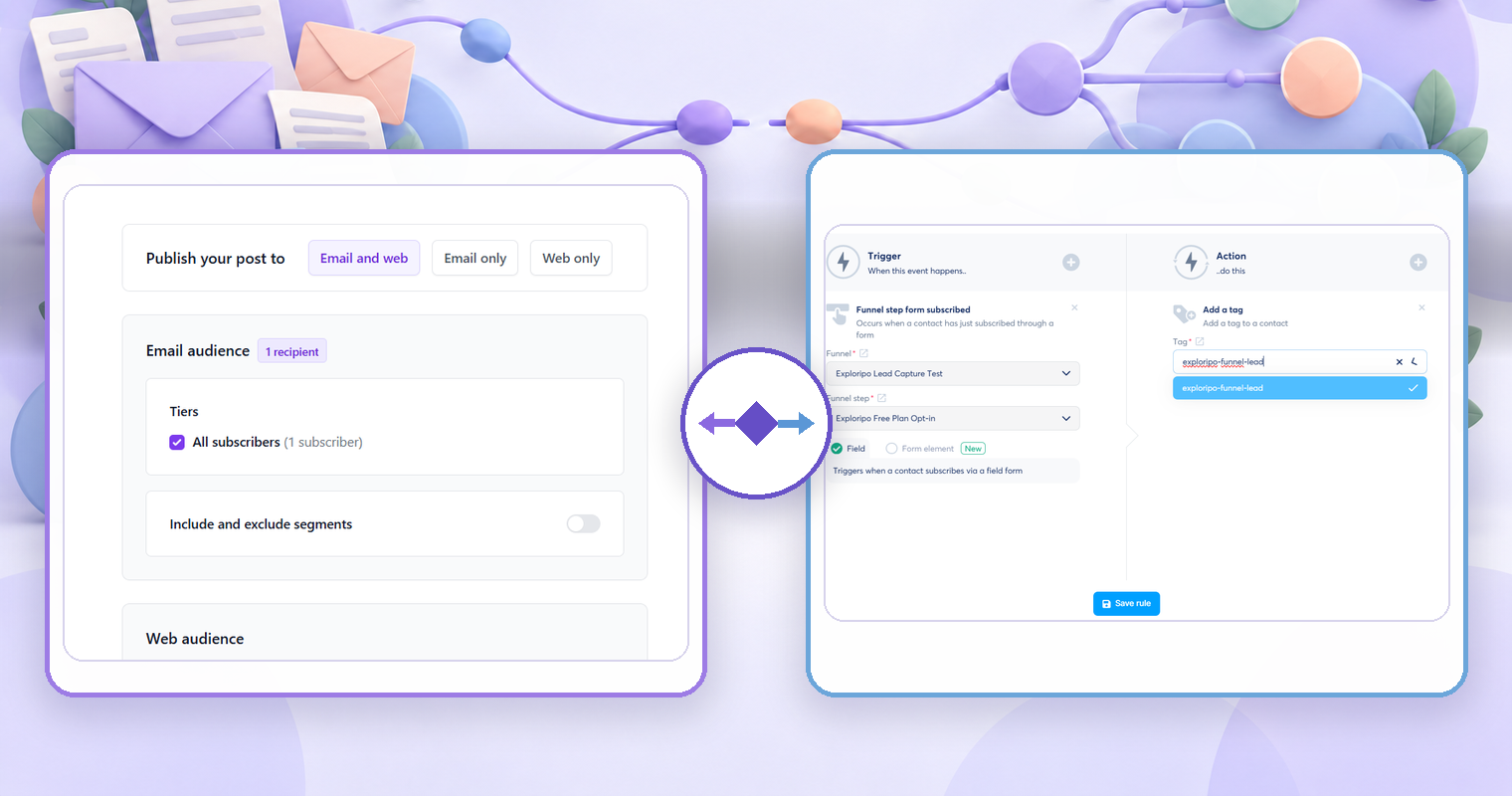
The architecture still shows through in the default workflow. In Beehiiv's current post flow, an editor moves through Compose, Audience, Email, Web, and Review, with separate email and web settings before publication. That is a publication-centered model. In AWeber and Systeme.io's current workflow documentation, the core model begins with a starter or trigger and adds messages, waits, tags, decisions, or other actions. That is a journey-centered model.
Neither model is inherently better. A publication-first interface can remove friction for a weekly issue but feel limiting for a complex customer lifecycle. A journey-first interface can model that lifecycle but create unnecessary overhead for a writer who mainly needs to draft, send, publish, and grow an edition.
Treat category names as a shortlist, not a conclusion. The winning product is the one whose default workflow matches your most frequent, highest-consequence job.
Question 1: Is the content an issue or a step in a journey?
Start with the unit you produce repeatedly.
If the unit is an issue, you probably care about an editorial draft, subject and preview text, email and web previews, a public URL, archive appearance, scheduling, audience selection, and post-publication performance. The same content may need to work in an inbox and on a publication site.
If the unit is a journey step, you probably begin with a contact state or event: joined a list, requested a resource, received a tag, completed a purchase, entered a segment, or reached a date. The message belongs inside a sequence with eligibility rules, delays, branches, exits, and state changes.
Write one sentence before comparing software:
Every Friday, we publish one analysis to subscribers and a permanent web archive.
That points toward a newsletter service.
When an eligible prospect requests a guide, we deliver it, update their state, and follow up according to their actions.
That points toward an email marketing platform. If both sentences are central, you have a hybrid requirement—but each workflow still needs to be evaluated separately.
Question 2: What is the source of truth?
Decide where the authoritative content and audience state will live.
For a publication, the newsletter service may be the source of truth for issues, public posts, subscribers, publication settings, and edition-level analytics. A separate website might link to the archive or syndicate selected content, but editors should know which version owns corrections, URLs, and access.
For lifecycle marketing, the source of truth may be a CRM, commerce platform, membership system, or the email platform itself. Contact fields, consent, purchase state, tags, and suppression must arrive accurately enough to control eligibility. Publishing a polished issue does not solve an ambiguous contact record.
A two-tool setup needs an explicit data contract. Record which system owns:
- subscriber identity and consent state;
- tags, groups, segments, and custom fields;
- paid status or customer state;
- newsletter issues and public URLs;
- automation membership and completion;
- unsubscribe and suppression changes;
- reporting and exports.
Avoid bidirectional syncing by default. If both tools can edit the same field, you need precedence, conflict handling, and a recovery method. A simpler one-way handoff is often easier to explain and test.
Question 3: How complex is the audience model?
A newsletter can begin with one publication and a small set of audience choices. Lifecycle marketing often requires more states: prospect, customer, product owner, onboarding stage, interest, region, engagement, or account status. The number of subscribers matters less than the number of decisions the system must make safely.
List the minimum audience operations your primary job requires:
- create or import a subscriber with the correct consent state;
- apply and remove durable labels;
- calculate dynamic segments from data or behavior;
- exclude suppressed, ineligible, or conflicting records;
- preview the exact recipients before a send;
- inspect why one person is or is not included;
- export the fields and status needed for recovery.
Do not assume that tags, groups, segments, lists, and publications mean the same thing across products. If audience selection is a deciding factor, use Exploripo's separate Guide to auditing subscriber tags before a targeted campaign. That Guide owns membership, inclusion, exclusion, and recipient approval. This comparison only determines how much audience complexity your platform must support.
Question 4: How much automation do you actually need?
Separate a scheduled newsletter from a triggered workflow. Scheduling an issue for Tuesday is not the same as reacting to a contact event, evaluating a condition, waiting, branching, changing data, and exiting safely.
For each required automation, write:
trigger → eligibility → action → timing → branch → exit → evidence
If you need only a welcome message or a short onboarding sequence, a newsletter-first product may be sufficient. If you need multiple entry events, data-dependent branches, sales or course actions, webhooks, internal notifications, and contact-level history, evaluate a broader platform.
Builder access is not proof. Confirm that the current plan can activate the workflow, that every required trigger and action is available, and that the history explains failures. Exploripo observed an automation canvas in Beehiiv during its August 2026 test but did not activate or execute it. By contrast, we executed one narrow Systeme.io rule that applied a tag after a funnel form submission, but did not test its broader workflow branches or delays.
Use the full email automation planning and testing Guide once a product reaches the workflow-validation stage. It owns trigger, condition, negative-path, exit, activation, and monitoring tests.
Question 5: Is monetization native to the publication or elsewhere?
Native monetization can be valuable when readers pay for publication access, recommendations, or another newsletter-centered offer. Keeping content, subscriber status, access, and publication analytics together may reduce integration work.
But “monetization” is too broad to be a requirement. Define the transaction:
- paid newsletter subscription;
- one-time digital product;
- membership or course access;
- sponsorship placement;
- affiliate promotion;
- product or service sale in another commerce system.
Then test the complete state change. A checkout screen alone does not prove upgrades, cancellations, refunds, tax handling, access removal, exports, or support workflows. If the main transaction happens elsewhere, forcing it into a newsletter service may be less reliable than passing the relevant customer state to an email platform.
Prices, fees, plan names, and allowances change. Compare current total cost at your subscriber count and required feature level, but do not let an attractive entry plan override a missing operational path.
Question 6: What proof will you need after sending?
Reporting should answer the decision you will make next. For an editorial publication, that may include issue delivery, web readership, subscriber growth, referral activity, paid conversions, and content-level trends. For a lifecycle workflow, you may need contact-level entry, current step, completed actions, failures, exits, purchase or CRM state, and an audit trail.
Open and click numbers are not enough to prove either workflow. Privacy features, automated security checks, inbox behavior, and measurement methods can affect those signals. Keep operational evidence—who was eligible, what was sent, what state changed, and whether the intended path completed—separate from engagement interpretation.
Confirm export and retention before you depend on a dashboard. Ask what can be exported, at what level, with which identifiers, and for how long detailed history remains available. A visible chart is not a recovery plan.
Email delivery is also a separate test. Once the campaign or workflow is ready, use the Guide to testing email deliverability before a campaign for authentication, controlled inbox placement, links, and reporting. A platform-category decision does not establish deliverability.
Three practical scenarios
1. An independent writer publishes a weekly industry briefing
The main job is to write once, preview the email and web versions, publish on a predictable schedule, maintain an archive, and grow a direct reader relationship. Advanced CRM branching is not a current requirement.
Start with a newsletter service. Test the complete issue workflow, mobile and desktop presentation, public archive, domain options, subscriber import and export, recommendation or referral tools you will actually use, and the exact monetization path if the publication will be paid.
Beehiiv is relevant to this shortlist because Exploripo completed a bounded email-and-web publication test in August 2026. That test proved one post draft, email and web previews, a test email, a live email and web publication to one owned subscriber, and access to reporting and an export path. It did not prove large-audience delivery, paid subscriptions, sponsorship operations, or advanced automation. Read the full Beehiiv review for the product-level verdict and limitations.
2. A service business captures leads and follows up by state
The main job begins with forms and landing pages, then depends on consent, source, interest, sales stage, and follow-up status. Messages must be triggered and excluded according to contact data. There is no need for every email to become a public post.
Start with an email marketing platform. Bring one representative lead journey to the trial: acquisition, confirmation, audience state, one positive path, one excluded path, reporting, and export. Test the landing page separately with Exploripo's pre-traffic landing-page audit before treating its submission as a reliable trigger.
Kit, MailerLite, and AWeber all deserve consideration for this category, but their tested evidence is not identical. Exploripo verified a live landing page and confirmed subscriber in Kit; a one-recipient campaign and reporting in MailerLite; and a landing page, confirmed subscriber, saved tag, and controlled broadcast in AWeber. We did not execute advanced automations in any of those three tests. Use the Kit review, MailerLite review, and AWeber review to see the separate evidence and limitations.
3. A creator sells resources, courses, or services from a funnel
The main job connects an opt-in, contact record, follow-up, offer, payment, and possibly access to a course or community. A public newsletter may support the business, but it is not the entire operating model.
Start with a broader email or all-in-one platform if reducing integrations is important. Then test the full path. Features that coexist in a menu do not prove that contact state, payment, access, email, cancellation, and reporting remain synchronized.
Systeme.io is relevant because Exploripo's August 2026 test completed a live opt-in funnel, created one contact, and executed a form-submission rule that added a tag. The account could not send the planned campaign without an authenticated sending domain, so no marketing email was sent. We did not test a sale, course access, refund, cancellation, or broad workflow. Read the Systeme.io review before treating its all-in-one scope as proof of a specific journey.
When a hybrid product is enough
A hybrid is enough when one product can execute your primary job cleanly and its secondary workflow is strong enough for the actual requirement—not just present on the feature page.
Use one product if all of these are true:
- editors can complete the frequent publishing or lifecycle workflow without workarounds;
- subscriber and consent state has one clear owner;
- required automation can be activated on the intended plan;
- web and email versions behave as needed;
- required integrations do not create unexplained duplicate state;
- contact-level and publication-level evidence can be retrieved;
- a usable export supports migration and recovery.
Use two connected products when the publication experience and lifecycle requirements are both central but no single candidate handles both safely. The added tool should solve a named limitation, such as public publishing or complex event-driven journeys. Document the direction of data movement and test unsubscribe, suppression, duplicate, delay, and failure behavior before using the connection with a real audience.
Run a migration and lock-in check before choosing
The hardest product decision is often the one made after years of publishing. Before committing, inspect how you would leave.
For subscribers, verify export of the email address, creation date, consent or status, tags or groups, custom fields, paid status, and suppression state where appropriate and permitted. For content, verify whether issues, public posts, URLs, redirects, media, and SEO fields can be exported or reproduced. For automation, assume that a visual workflow may need to be rebuilt unless the vendor proves otherwise.
Record dependencies outside the platform: sending domains, DNS records, custom domains, payment processors, analytics, webhooks, forms, embedded code, and API clients. A change of tool can affect more than the subscriber CSV.
Run one controlled export during evaluation. Check that the file opens, fields are understandable, status values are preserved, and a sample record can be reconciled with the interface. Do not wait for an emergency to discover that the only available export omits the state you need.
What Exploripo actually tested
These observations come from bounded August 2026 product reviews, not a fresh October retest or a controlled five-product benchmark. Current official documentation was checked for the capabilities used in this Guide, but interfaces and plan access can change.
| Product | Practical evidence retained by Exploripo | What the evidence does not establish |
|---|---|---|
| Beehiiv | One post prepared, previewed for email and web, test-sent, published to email and web, and checked with one owned subscriber; reporting and export surfaces observed | Large-list delivery, paid publication operations, sponsorships, advanced automation, or long-term analytics |
| Kit | Onboarding, landing-page editing, desktop and mobile preview, live publication, form submission, double opt-in, and one confirmed subscriber | Broadcasts, advanced paid automation, monetization, scale, or comparative delivery performance |
| MailerLite | One group with one owned subscriber, one controlled campaign, delivery reporting, and an export; the message was found in spam after a delay | General inbox placement, live automation execution, high-volume sending, or comparative deliverability |
| AWeber | One landing page, double opt-in, confirmed subscriber, tag and note, one controlled broadcast, CTA check, and one-recipient reporting | Workflow execution, advanced branching, broad list operations, or multi-mailbox delivery |
| Systeme.io | One live opt-in funnel, thank-you path, contact creation, and a form-submission rule that applied a tag | Marketing email delivery, broader workflows, sales, payments, courses, exports, or all-in-one reliability |
The evidence is intentionally asymmetric. It can show what happened in each specific account and where a product deserves deeper evaluation. It cannot name a universal winner or convert an untested capability into a hands-on finding.
Final decision checklist
Choose a newsletter service when most answers on the left are true. Choose an email marketing platform when most answers on the right are true.
| Newsletter-service signal | Email-platform signal |
|---|---|
| A recurring issue is the main output | A contact journey is the main output |
| Email and public web publishing should share one workflow | Messages depend on contact data, events, or business state |
| Archive, publication growth, referrals, or paid readership are central | Forms, segmentation, triggers, branches, integrations, and CRM state are central |
| Editors work issue by issue | Operators work contact by contact and workflow by workflow |
| Publication-level analytics answer the next decision | Contact-level history and state answer the next decision |
Before selecting either category, confirm:
- The primary job is written in one sentence.
- One product or system clearly owns subscriber and consent state.
- A representative workflow has been completed, not merely viewed in a feature list.
- The intended plan can activate every required feature.
- Exclusions, unsubscribe, suppression, and duplicate behavior are understood.
- Email and web output have been previewed where both matter.
- Contact-level or publication-level evidence supports the next decision.
- A controlled export preserves the fields and content needed to leave.
- Current total cost includes subscriber growth, feature tiers, transaction fees, and integration overhead.
- Any untested path is recorded as a limitation rather than assumed to work.
If you cannot complete items 1 through 4, stop comparing feature totals. The operating model is still unclear.
Frequently asked questions
Is a newsletter service the same as email marketing software?
It is a type of email marketing software, but the default workflow is often different. A newsletter service generally centers recurring editorial publishing and audience growth. A broader email platform generally centers contact data, segmentation, campaigns, and lifecycle automation. Many products combine elements of both.
Can I use an email marketing platform for a newsletter?
Yes. It can be the better choice when the newsletter is one message type inside a wider lead or customer journey. Verify the writing, preview, archive, web publishing, and subscriber-growth experience you need rather than assuming a broadcast editor is equivalent to a publication workflow.
Can a newsletter service run automations?
Often yes, but depth, plan access, triggers, actions, history, and testing controls vary. Define the exact workflow and execute its positive and negative paths before relying on it. The presence of an automation builder does not prove that your plan can activate the required journey.
Do I need both types of software?
Not necessarily. One hybrid product is preferable when it handles the primary job cleanly and the secondary job safely. Use two products only when each owns a clear responsibility and the value exceeds the cost and risk of data sync, duplicate state, and additional operations.
Which type is better for a paid newsletter?
A newsletter service with native paid-publication features is the natural starting point, but test the full payment and access lifecycle. If the paid offer is actually a course, membership, service, or product sold elsewhere, a broader platform or commerce-led system may fit better.
Which type is better for ecommerce or sales follow-up?
A broader email platform is usually the better starting category because the messages depend on customer, purchase, product, pipeline, or behavioral state. The specific choice still depends on integration quality, consent and suppression handling, automation evidence, and reporting.
Choose the operating model before the product
The practical difference between an email platform and a newsletter service is where the workflow begins. A newsletter service usually begins with an issue to publish. An email marketing platform usually begins with a contact, event, or state to act on.
Choose the category that matches the primary job, then test one real workflow from entry to evidence. Prefer a hybrid when it genuinely completes both jobs; use two systems only when their ownership and data handoff are explicit. The goal is not the longest feature list. It is a publishing and communication system your team can explain, operate, verify, and leave if necessary.
For broader product discovery, browse the Marketing & Email category. Use the linked product reviews for fit and limitations, and the specialized Exploripo Guides for landing-page, audience, automation, and deliverability validation.