No spam. Just software we’ve actually tested, plus useful reviews, comparisons and recommendations. We’ll send a confirmation email (double opt-in). You can unsubscribe anytime.
Marketing & Email
MailerLite
We tested it
By Exploripo Editorial Team
MailerLite earns 9.0/10 for a polished core workflow, unusually good feature accessibility, and a very positive hands-on editing experience. Sender authentication, link auditing, and real inbox testing still require care.
Exploripo rating9.0/10Outstanding
Starting priceFree up to 250 subscribers; Comfort from $12/month
We may earn a commission if you buy through this link, at no extra cost to you.
01
The essentials
Quick Summary
Bottom line: MailerLite is a strong choice for creators, consultants, small businesses, and lean ecommerce teams that want polished newsletters and modest automation without adopting an enterprise marketing suite. It is easiest to recommend when the team is willing to connect its sending domain, audit every link, and test real inbox placement before scaling.
Bottom line
MailerLite earns 9.0/10 for a polished core workflow, unusually good feature accessibility, and a very positive hands-on editing experience. Sender authentication, link auditing, and real inbox testing still require care.
02
At a glance
Pros & Cons
+Pros
Clear onboarding and navigation for first-time email marketers.
Strong template gallery with 126 designs visible in our trial and three distinct editing modes.
Fast inline editing with solid desktop and mobile previews.
Practical group targeting and understandable recipient controls.
Useful scheduling, recipient-level activity, link reporting, and CSV export.
A free plan that supports a small but real marketing setup.
−Cons
Test-send authentication behavior and temporary-address messaging can be confusing.
A reported delivery does not guarantee inbox placement; our controlled message arrived late and landed in spam.
Starter layouts can retain incomplete links unless every element is audited.
Several campaign and automation options are Premium-labelled.
Complex CRM, attribution, governance, and production-scale needs may require a broader platform.
03
Audience fit
Who it’s for / Who it’s not for
✓Who it’s for
Creators, consultants, and newsletter publishers who want a visual campaign builder without a steep learning curve.
Small businesses that need subscriber groups, segments, responsive templates, scheduling, and understandable reports in one service.
Lean ecommerce or service teams that want email campaigns plus modest automation, forms, landing pages, or lightweight commerce options.
Users who want to start with a small free setup and move to a paid plan only when list size or workflow complexity grows.
×Who it’s not for
Creator businesses that put recommendations, digital products, and a creator-first subscriber ecosystem at the center of their newsletter strategy; Kit may fit that workflow better
Organizations that need advanced CRM orchestration, granular permissions, cross-channel attribution, or enterprise governance.
Teams unwilling to configure sender authentication and perform inbox-placement tests before a real launch.
Buyers who need production-scale deliverability, paid billing, support, or complex automations proven in this review; those areas were outside our hands-on scope.
04
Overview
Verified fact: MailerLite combines email campaigns, subscriber management, automation, forms, landing pages, websites, and lightweight commerce tools in one service. Its interface is designed for visual work, while a custom HTML editor remains available for teams that need code-level control.
Verified fact: As checked on August 27, 2026, the Free plan was listed at $0 for up to 250 active subscribers and 2,500 monthly emails, with two seats, three automations, three forms, one website, one landing page, and limited digital-product or booking capacity. A 14-day trial was available during registration. Pricing and packaging can change, so current buyers should confirm the live plan page.
Common user feedback: The locked Capterra, G2, and Trustpilot research repeatedly praised MailerLite's ease of use, clean editor, value, and fit for creators or small organizations. Recurring criticism covered account approval or review friction, support experiences, plan limits, editor or formatting issues, and deliverability concerns. These reports are sentiment, not hands-on evidence. They align with the broad pattern of our test - approachable editing paired with operational care around sender setup and inbox placement - but Exploripo did not reproduce every complaint.
05
Features
Campaign types, templates, and editing
Our finding: The campaign selector offered a regular campaign and an A/B split campaign in our trial. RSS, auto-resend, and multivariate campaigns were visibly marked Premium, which communicated feature boundaries before setup began.
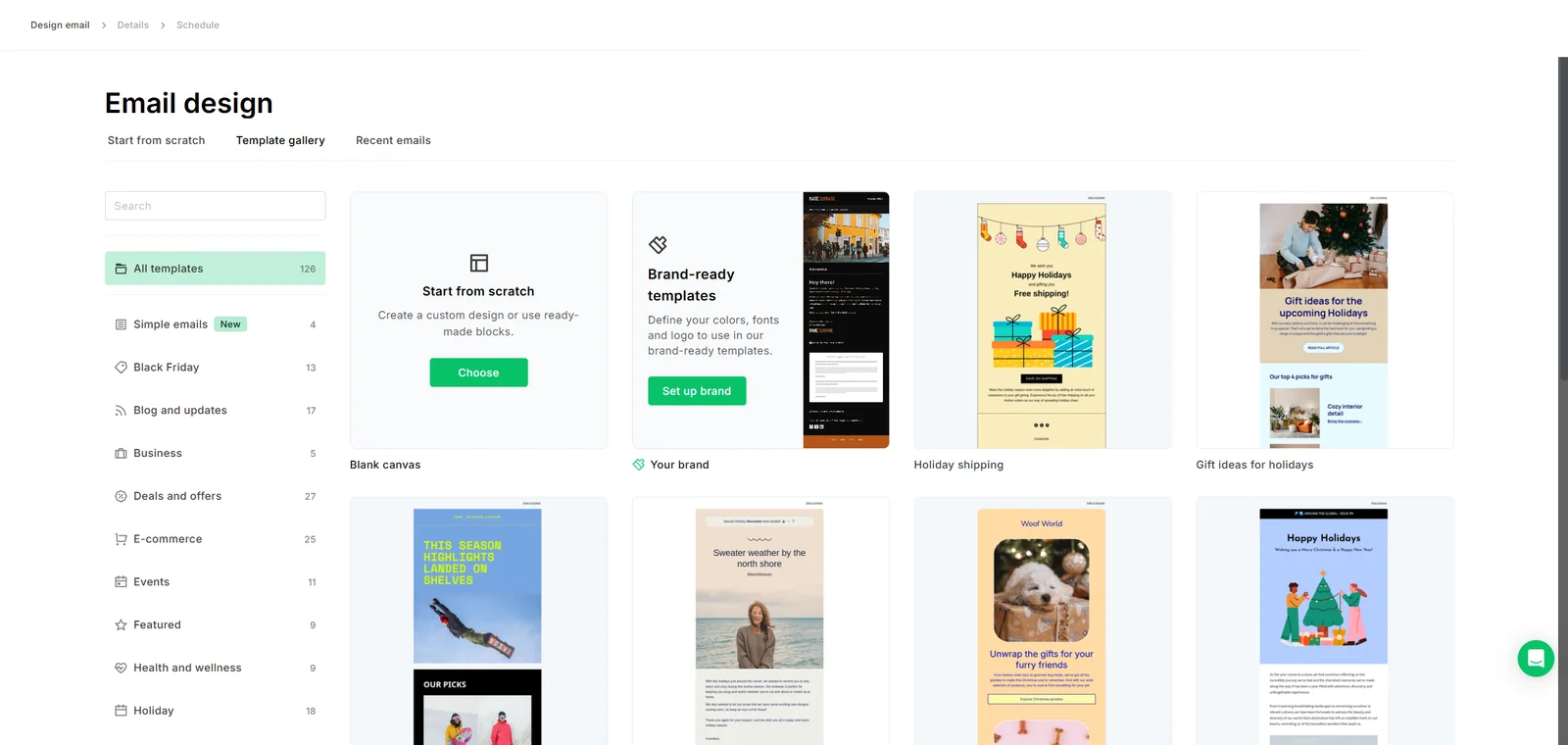
The template gallery was one of the strongest parts of the experience. We saw 126 templates organized into categories such as simple emails, blog updates, business, deals, ecommerce, events, health, and holidays. Users could also define brand-ready templates or start from scratch.
The template gallery showed 126 designs, category filters, brand-ready templates, and a blank-canvas option.
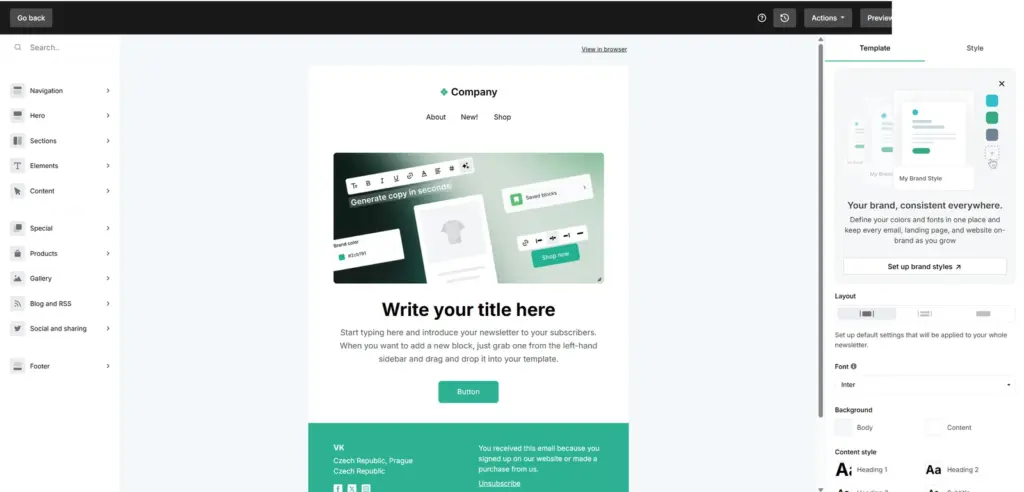
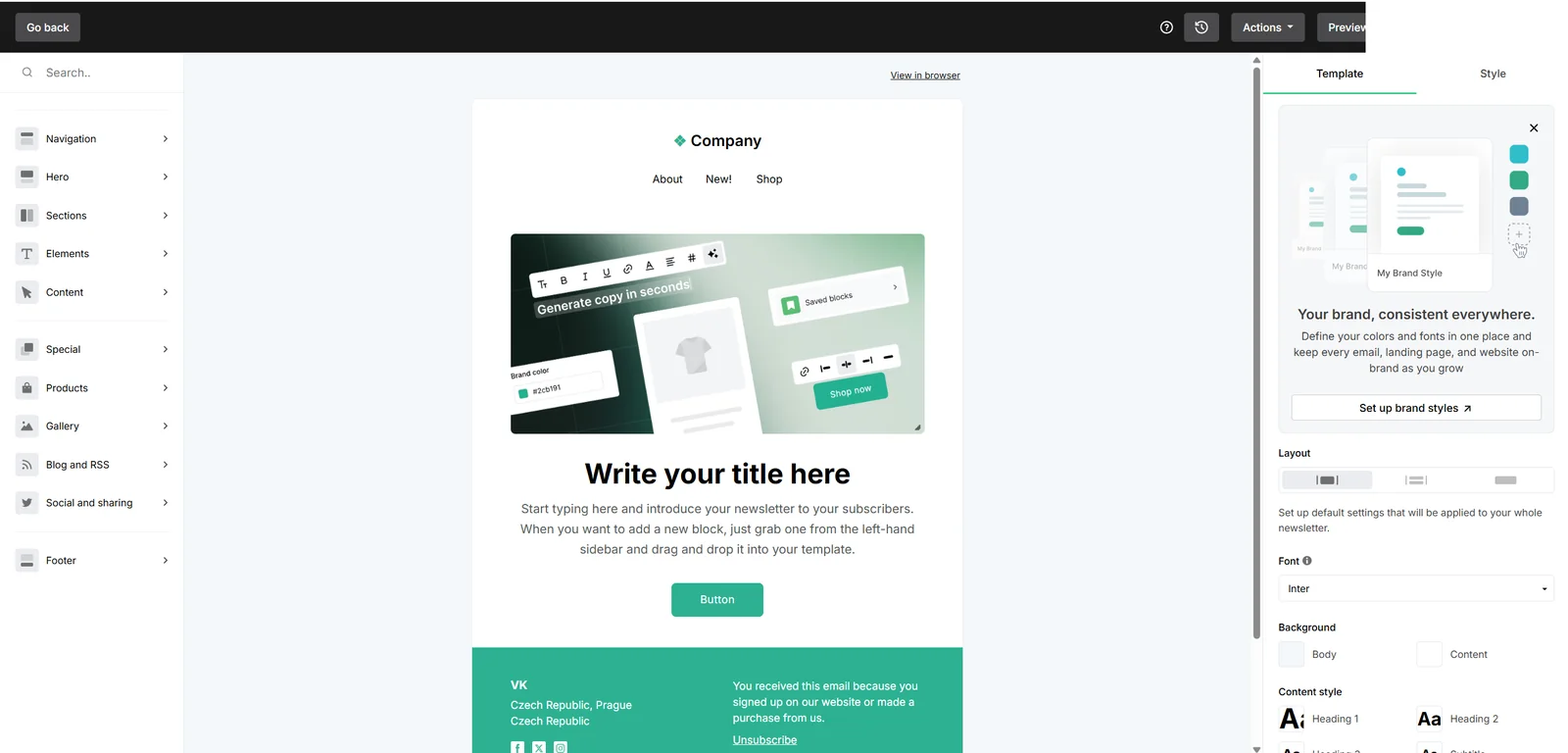
Starting from scratch opened three choices: drag-and-drop, a distraction-free simple editor, or custom HTML. We used the drag-and-drop builder. Its left rail grouped navigation, hero, sections, elements, content, products, galleries, RSS, social, and footer blocks. The right side handled template-level layout, fonts, backgrounds, and heading styles.
The drag-and-drop builder combines block categories, a central email canvas, and global style controls.
Inline editing worked well. We replaced the headline and body text directly on the canvas, renamed the button, and linked it to https://exploripo.com/. Undo and redo, saved blocks, a knowledge-base tutorial, and the preview-and-test menu were easy to find. The builder did not stop us from sending an unused generic https:// target inherited from the starter navigation, so every navigation item, image, button, webview link, and footer target still requires a preflight audit.
Responsive preview and sending controls
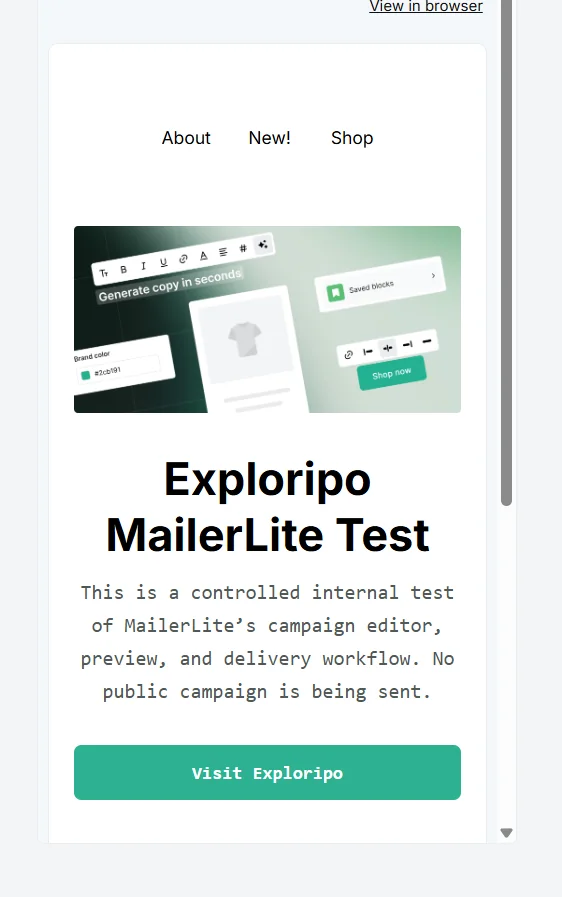
Our finding: Desktop preview removed editor controls and rendered the final message cleanly. Mobile preview stacked the image, headline, paragraph, and call to action without manual responsive work. The headline wrapped naturally and the button expanded appropriately.
Mobile preview showed a readable stacked layout with a full-width CTA.
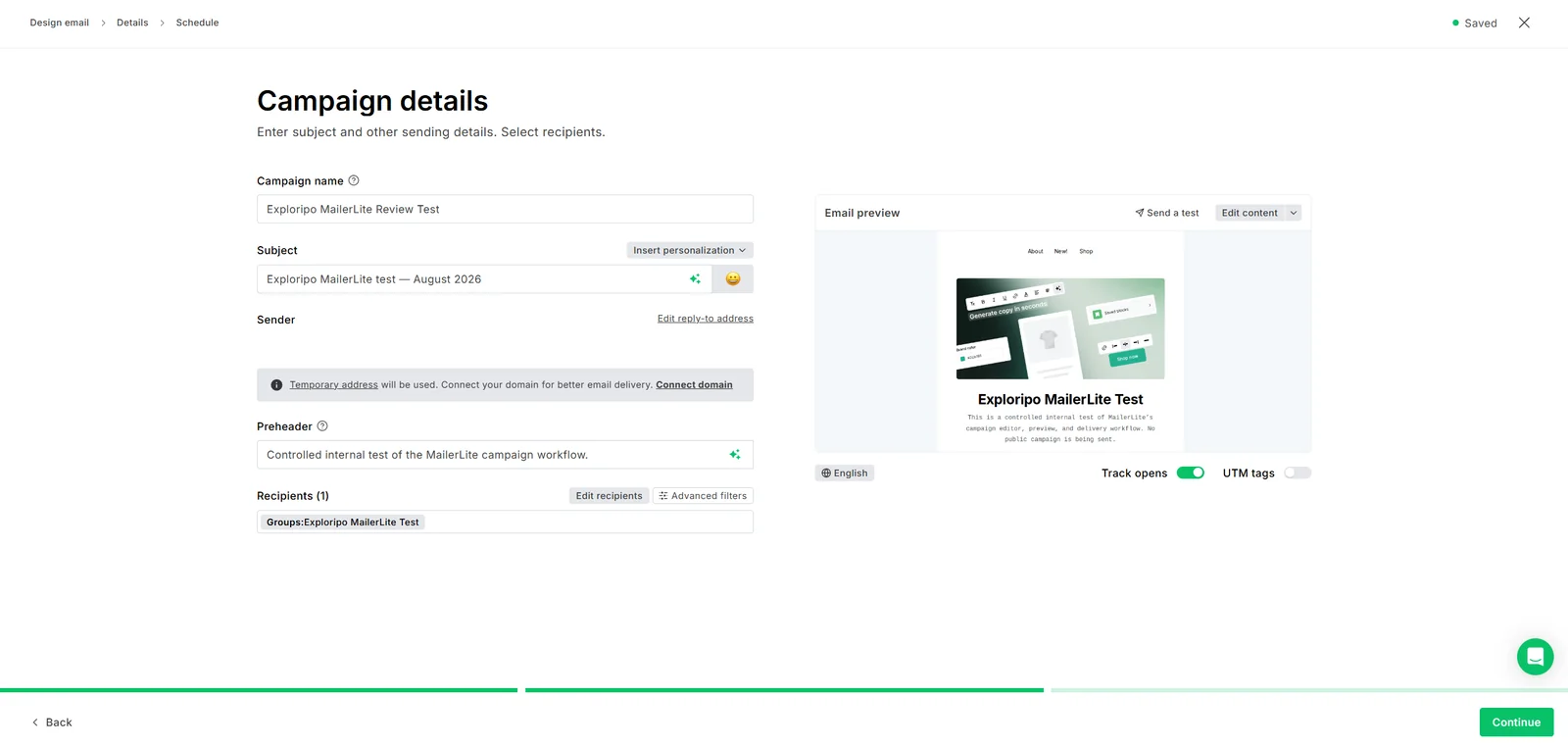
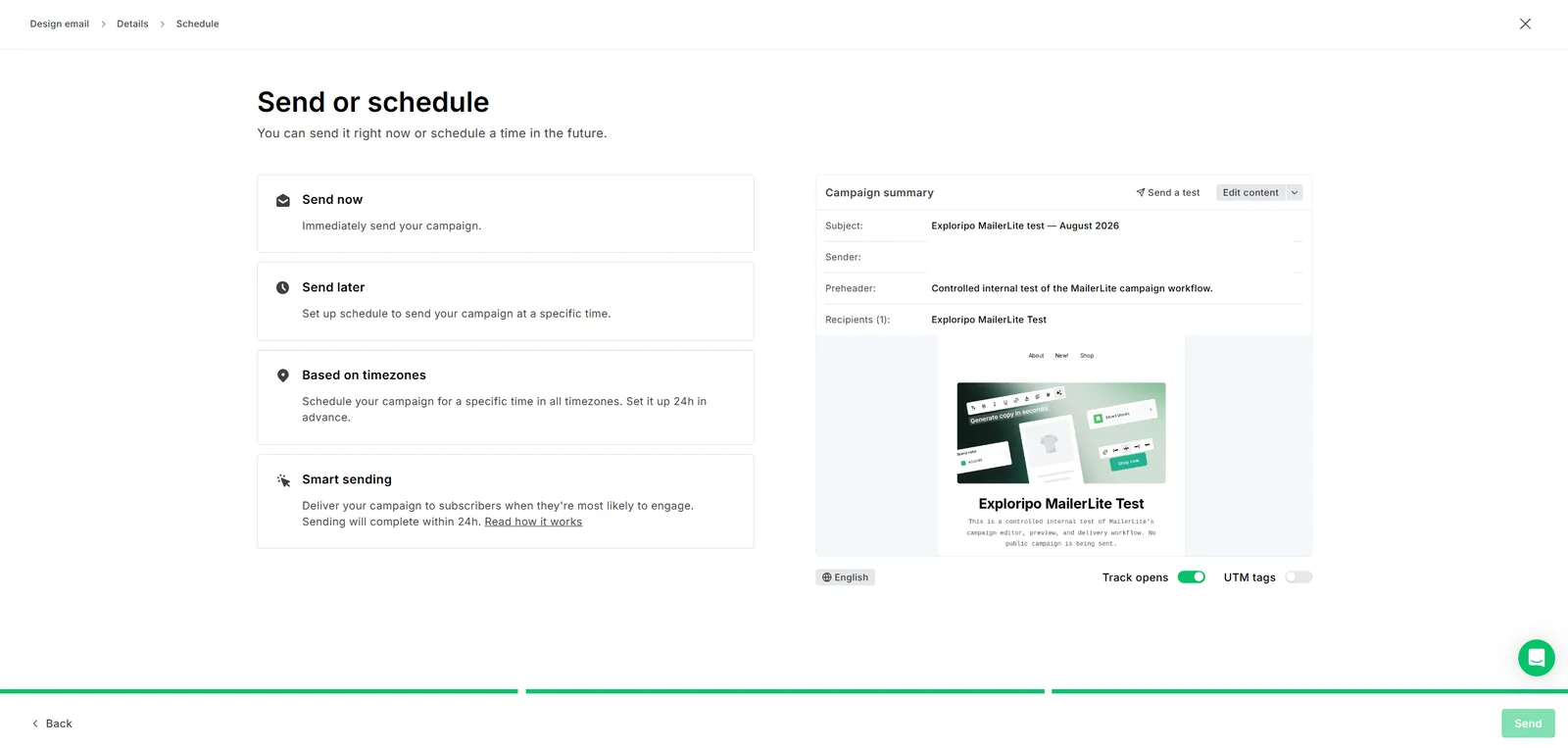
Campaign details brought together the internal name, subject, personalization, sender, reply-to address, preheader, recipients, advanced filters, language, open tracking, and UTM tags. The final screen offered immediate delivery, scheduled delivery, time-zone-based scheduling, and Smart sending.
Vendor claim: MailerLite describes Smart sending as a way to deliver when subscribers are most likely to engage, with sending completed within 24 hours. We saw the option but did not use or validate its optimization behavior.
Reporting and analytics
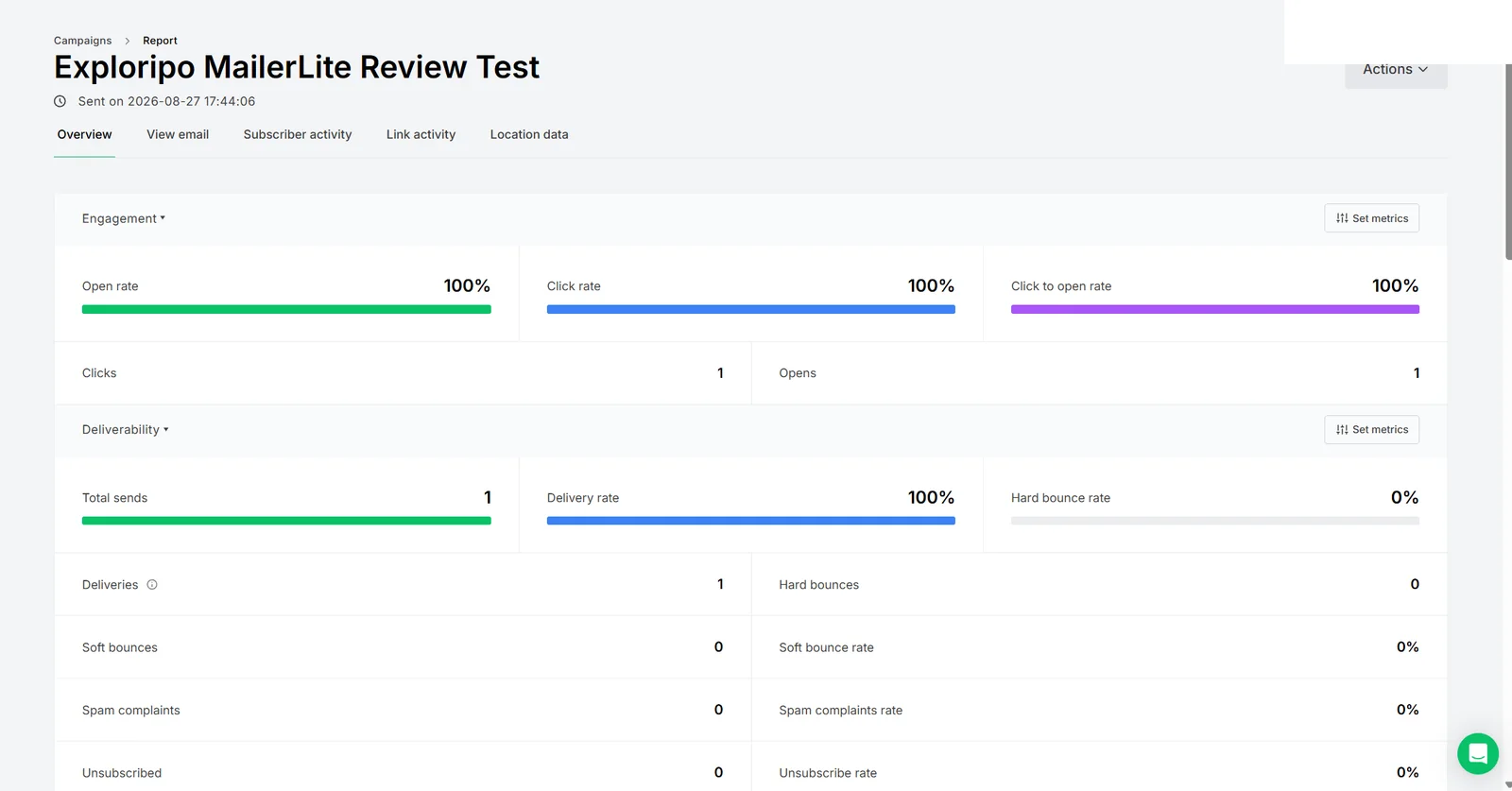
Our finding: Reporting separated engagement from deliverability and displayed open rate, click rate, click-to-open rate, total sends, deliveries, bounce rates, complaints, and unsubscribes. Separate tabs exposed the rendered email, subscriber activity, link activity, and location data.
After we opened the controlled email and clicked its CTA, MailerLite attributed one open and one click to the recipient. Link reporting assigned one unique click and one total click to https://exploripo.com/. The data could be exported as standard CSV or CSV formatted for Excel.
The final report recorded one send, one delivery, one open, and one click in the controlled test.
The resulting 100% rates verify that tracking events propagated through the reporting workflow; they are not a performance benchmark because the audience contained exactly one person.
Automation and broader platform scope
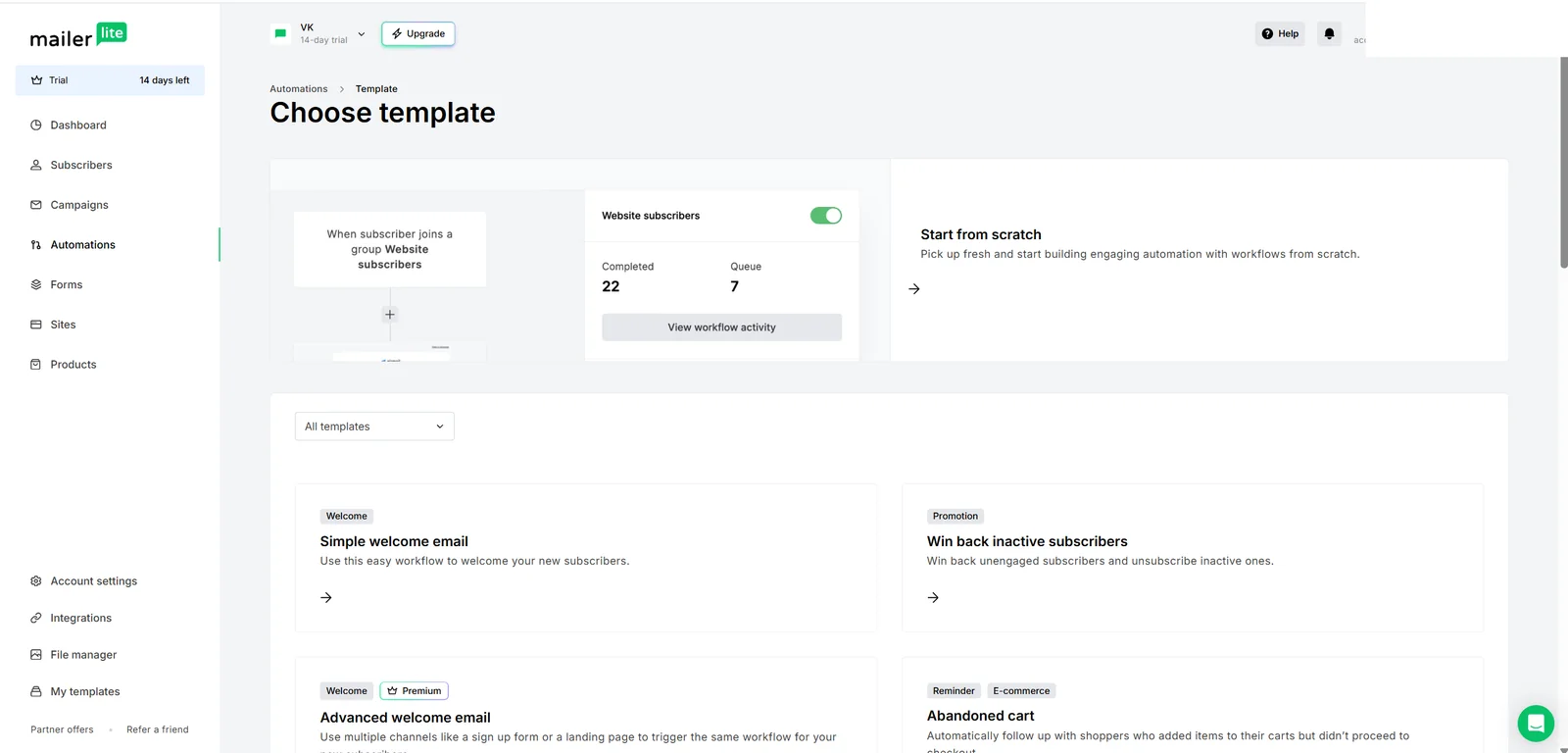
Our finding: Automation discovery showed a blank workflow, a simple welcome email, a win-back sequence, an abandoned-cart template, and more advanced welcome automation. The advanced welcome option was marked Premium. Previewing the simple template showed the expected structure: a subscriber joins one or more groups, then receives a welcome email.
Automation templates included simple welcome, re-engagement, ecommerce, and Premium-labelled advanced workflows.
Vendor claim: MailerLite also positions forms, landing pages, websites, products, integrations, and API workflows as parts of the broader platform. We did not build or run those workflows. We also stopped before activating an automation, so they are not presented as hands-on results.
06
Pricing
Free up to 250 subscribers; Comfort from $12/month
Free plan available
Free trial available
Verified fact: At the time of the locked August 27, 2026 check, MailerLite's Free plan supported up to 250 active subscribers and 2,500 monthly emails. The research packet recorded Comfort at $12 per month or $10.80 per month billed annually for up to 500 subscribers, and Power at $25 per month or $22.50 per month annually for the same starting subscriber configuration. Annual billing was listed as a 10% saving.
The locked plan details described Comfort as including 5,000 monthly emails at that starting tier, three seats, up to 50 active automations, ten forms, ten combined websites and landing pages, and five digital products or bookings. Power expanded to unlimited monthly emails, seats, automations, forms, landing pages, digital products, and bookings, with multiple automation triggers and live chat plus email support. Unlimited sending remained subject to fair use. Enterprise pricing was custom for 200,000 or more subscribers.
Pricing was based on active subscribers and send volume in the checked materials. Because list size, billing cadence, taxes, promotions, and packaging can change the actual price, use these figures as a dated comparison point and confirm the live calculator before purchase.
Our finding: The value proposition is strongest when a small team needs both polished newsletters and a modest customer journey in one approachable tool. A business that sends only occasional plain emails may find a simpler sender sufficient, while a larger organization with complex lead scoring, CRM orchestration, or governance may outgrow MailerLite faster.
Free
$0/month
No paid commitment
Key features
Up to 250 active subscribers
2,500 emails per month
Limits
MailerLite branding and Free-plan feature limits apply
Comfort
From $12/month
From $10.80/month equivalent billed annually
Key features
Paid email-marketing features
Power
From $25/month
From $22.50/month equivalent billed annually
Key features
Higher-tier collaboration and advanced features
Enterprise
Custom pricing
For 200,000+ subscribers
Key features
Sales-led package
07
Our Experience
Onboarding and subscriber organization
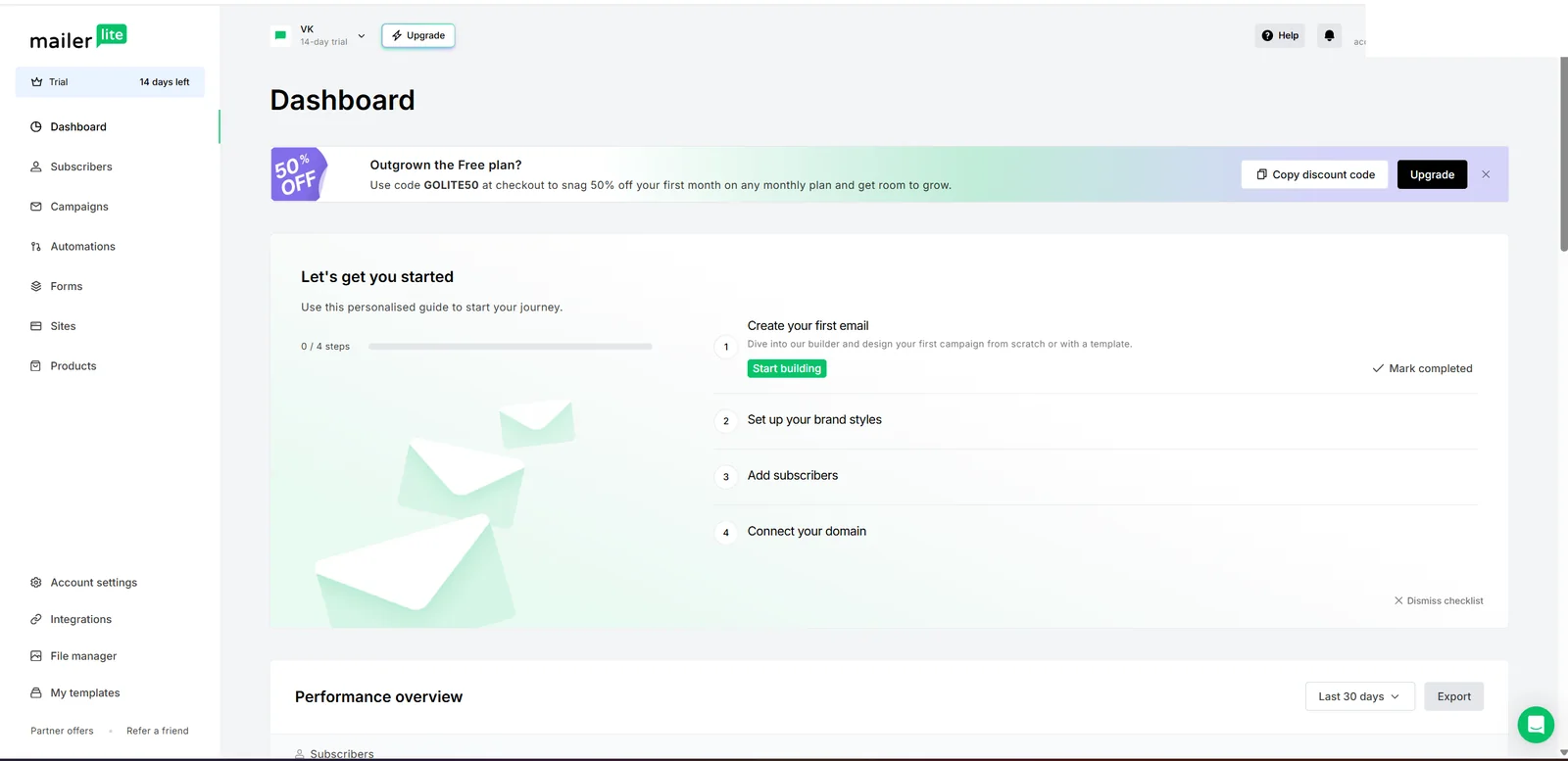
Account creation led to a short goal-based onboarding flow, including choices to send a first email, collect subscribers, or sell products and services. The dashboard then presented a four-step checklist for a first email, brand styles, subscribers, and domain connection. We tested on a visible 14-day trial.
The new-account dashboard presents a four-step onboarding checklist and a visible 14-day trial status.
We created a group called Exploripo MailerLite Test, selected the account's controlled address, and added it through the bulk Actions menu. The group-assignment modal did not make its confirmation behavior obvious while its selector remained open; our first attempt closed without applying the change. Once the selector was collapsed and the action confirmed, the group count updated correctly.
Campaign setup and send
We created a regular campaign from a blank canvas, edited its content, set the CTA, checked desktop and mobile previews, entered a subject and preheader, and targeted only the one-member controlled group. The details page stated that a temporary address would be used and recommended connecting the domain for better delivery.
The configured campaign was restricted to one controlled group and showed subject, preheader, sender, and tracking controls.
A direct test-email attempt failed with a message that the sender address needed authentication. The live campaign nevertheless proceeded using MailerLite's temporary-address handling after the account owner reviewed and accepted the service terms. The difference between test-send and live-send behavior was not intuitive.
MailerLite exposed immediate, scheduled, time-zone-based, and Smart sending options.
Delivery, inbox placement, and analytics
The controlled message moved from Outbox to Sent, and MailerLite reported one delivery with no hard or soft bounce. Human mailbox verification added an important qualification: the message arrived after a delay and landed in spam. A delivery event means the receiving server accepted a message; it does not prove placement in the primary inbox.
We opened the email, clicked the Exploripo CTA, and confirmed that MailerLite recorded the recipient activity and correct destination link. We also exported the detailed link-activity CSV and verified that it contained five link rows. The unused generic https:// link from the starter layout remained visible in the report even though it had no click.
This is a complete functional check of one controlled campaign, not proof of production-scale deliverability. The result reinforces the need for domain authentication, full link inspection, and tests across representative inbox providers before a public launch.
08
Alternatives
Kit (ConvertKit)
Kit is the strongest alternative for creator-first businesses that treat the subscriber relationship as the center of their products and newsletter strategy. Exploripo completed a separate hands-on Kit test covering landing-page creation, responsive preview, live publishing, form submission, double opt-in, and confirmed subscriber status; Kit earned 10/10 and was selected for Exploripo's newsletters. MailerLite is the more general small-business email tool, while Kit puts more emphasis on creator workflows, recommendations, products, and audience monetization.
Brevo
Brevo is the relevant comparison when send-volume pricing and broad contact storage matter more than MailerLite's subscriber-led packaging. This positioning comes from the locked comparison research, not a parallel Exploripo hands-on test. Buyers considering Brevo should verify its current plan limits and test the workflows that matter to them before deciding.
Mailchimp
Mailchimp is the relevant alternative for teams that prioritize ecosystem breadth, integrations, and mainstream familiarity. That comparison is likewise based on the locked market-positioning research rather than hands-on Mailchimp testing in this review. MailerLite's appeal is a lighter, more approachable core email workflow; Mailchimp may be more relevant when email is one part of a broader marketing stack.
Marketing & Email
Kit (ConvertKit)
Rating
10.0 / 10
Price
Free up to 10,000 subscribers
Free plan available
Best for: Creators building and monetizing an email audience in one platform
Kit is the creator-commerce alternative already tested by Exploripo.
Our finding: MailerLite's clearest strength is the balance between a friendly builder and real campaign depth. It offered more template and editor choice than we needed for the controlled test, then connected the send to clear recipient- and link-level reporting.
Compared with Kit, MailerLite feels more like a general-purpose email-marketing platform for creators and small businesses. Kit was stronger in Exploripo's separately tested creator acquisition journey - landing page, live form, double opt-in, and confirmed subscriber - and its creator ecosystem drove the higher 10/10 rating. MailerLite's 9/10 reflects an excellent campaign-building experience with only limited friction around sender authentication, placeholder links, and inbox placement in this test.
Compared with Brevo, MailerLite is the option to favor when visual campaign creation, subscriber groups, and a conventional newsletter workflow are the priority. Brevo remains the comparison to investigate for send-volume economics and broad contact storage; Exploripo did not run a like-for-like hands-on Brevo test here.
Compared with Mailchimp, MailerLite presents a less sprawling path from list to campaign to report. Mailchimp remains relevant for integration breadth and general market familiarity, but this review does not rank the two on deliverability, support, or large-scale operation because Mailchimp was not tested under the same protocol.
10
Final Verdict
MailerLite is easy to recommend for creators and small teams that want to move from a subscriber list to a polished, measurable campaign without wrestling with enterprise software. The builder, template range, responsive preview, targeting, scheduling, and reporting all performed well in the controlled workflow.
The best results will come from treating the friendly interface as the beginning of the process, not the entire process. Authenticate the sending domain, remove every placeholder, run inbox-placement checks, and validate automation behavior before scaling. With that discipline, MailerLite offers a strong balance of accessibility, capability, and value.
Final Exploripo rating: 9/10. The rating is editorially consistent with Exploripo's ten-point launch-review convention. It rewards the intuitive editor, smooth campaign construction, successful end-to-end workflow, and capable feature set. The remaining one-point deduction covers authentication friction, the late spam placement, the incomplete inherited link, and the untested production-scale areas.
Testing disclosure
Exploripo tested MailerLite on August 27, 2026 using a 14-day trial, one controlled subscriber, and one regular campaign. We created a group, edited and previewed an email, sent it, verified mailbox placement, opened and clicked it, reviewed analytics, and exported link data. Automation was inspected through template selection only. Forms, landing pages, websites, products, integrations, API use, paid checkout, paid support, complex automation execution, and production-scale deliverability were not tested.