No spam. Just software we’ve actually tested, plus useful reviews, comparisons and recommendations. We’ll send a confirmation email (double opt-in). You can unsubscribe anytime.
Marketing & Email
Kit (ConvertKit)
We tested it
By Exploripo Editorial Team
Kit handled our complete subscriber journey clearly and reliably, from page creation through double opt-in and confirmed subscriber status. We chose it for Exploripo's newsletters and rate it 10.0/10.
Kit (formerly ConvertKit) review based on hands-on testing of landing pages, forms and double opt-in, with current Free, Creator and Pro pricing.
Bottom line
Kit handled our complete subscriber journey clearly and reliably, from page creation through double opt-in and confirmed subscriber status. We chose it for Exploripo's newsletters and rate it 10.0/10.
02
At a glance
Pros & Cons
+Pros
Clean and well-guided onboarding for new users
Attractive landing-page templates with useful customization controls
Reliable publishing and double-opt-in subscriber workflow in our test
Desktop and mobile previews are built into the editor
Free plan supports up to 10,000 active unique subscribers
Combines audience growth, email, automation, recommendations, and monetization
Well suited to creators, writers, newsletter publishers, and digital-product businesses
−Cons
Paid pricing rises as the subscriber list grows
Design controls are less flexible than a dedicated page builder
Templates may include placeholder testimonials, publication logos, and Kit branding that require careful review
Email sequences, visual automations, Rules, RSS campaigns, paid apps, and earnings from Paid Recommendations require a paid plan.
We did not test advanced paid automations, large broadcasts, or deliverability at scale
03
Audience fit
Who it’s for / Who it’s not for
✓Who it’s for
Independent creators building an email list.
Newsletter publishers who want landing pages, forms, and email tools in one service.
Writers, bloggers, educators, coaches, and digital-product sellers.
Small businesses that prefer subscriber tags and automation over traditional list management.
Users who want to launch quickly without designing a signup funnel from scratch.
Creators monetizing through products, subscriptions, or recommendations.
×Who it’s not for
Businesses that need highly advanced visual page-design controls.
Organizations requiring complex enterprise reporting or extensive administrative controls.
Users whose main priority is the lowest possible cost as subscriber count increases.
Teams that need a full CRM rather than a creator-focused email platform.
Anyone expecting the Free plan to include all paid automation capabilities.
04
Overview
Kit began as ConvertKit and remains focused on helping creators develop direct relationships with their audiences. Its interface is organized around practical activities such as collecting subscribers, publishing newsletters, sending broadcasts, creating automated sequences, and selling digital products.
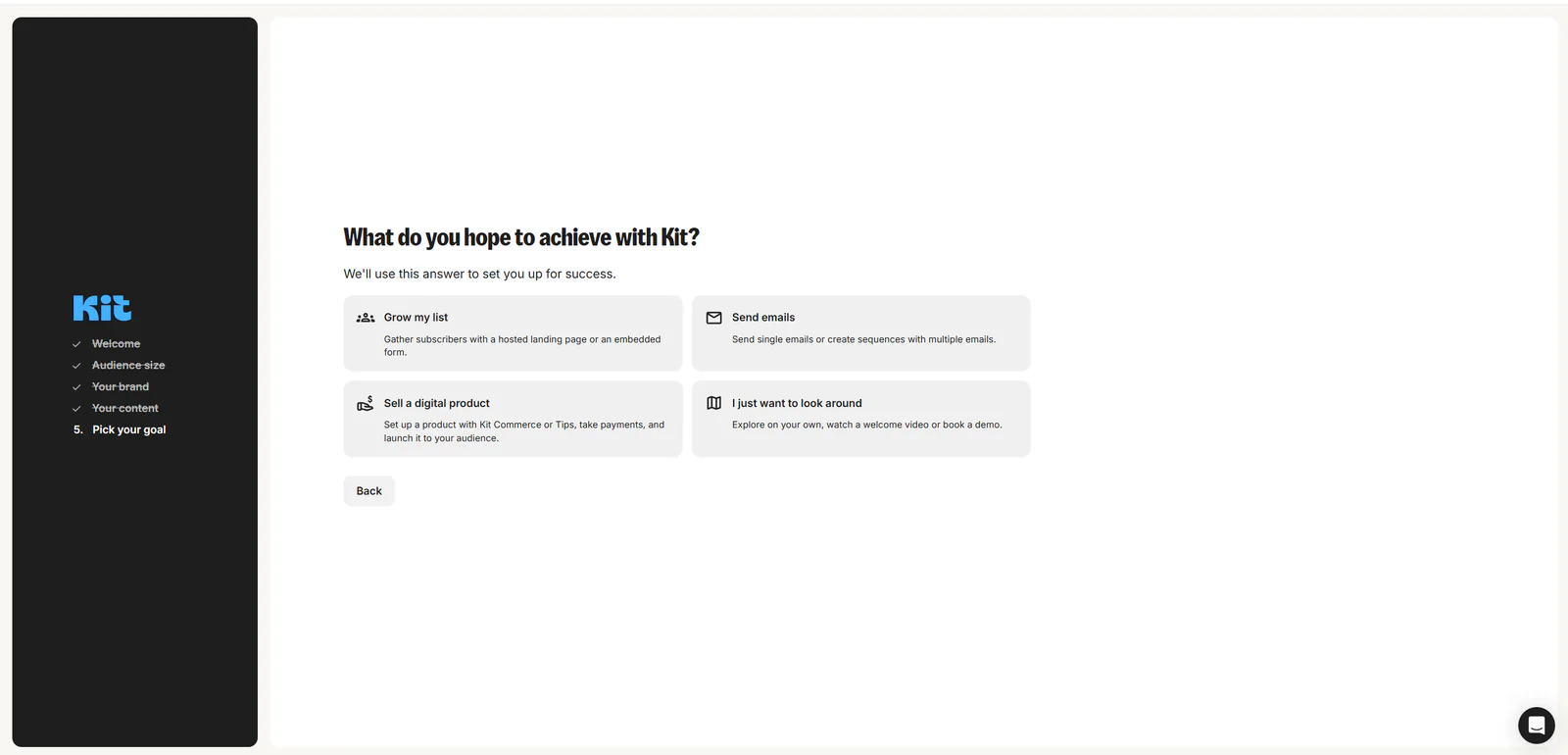
The onboarding process asks what the user wants to achieve. Available goals include growing a list, sending emails, selling a digital product, or simply exploring the platform. We selected Grow my list, which led directly to a checklist for creating and sharing a landing page, embedding a form, offering an incentive, creating a welcome sequence, and using recommendations.
This guidance makes the platform approachable without hiding its more advanced capabilities. Beginners can follow a defined path, while experienced marketers can move directly into subscribers, broadcasts, automations, audience-growth tools, apps, or monetization features.
Kit’s creator focus is visible throughout the product. Landing pages and forms are treated as integral parts of the email workflow, not as isolated add-ons. Subscriber confirmation, list management, and subsequent email activity are connected inside the same account.
05
Features
Landing Pages and Forms
Kit includes a library of professionally designed landing-page templates. We selected the College template and customized it for an Exploripo creator-tools newsletter.
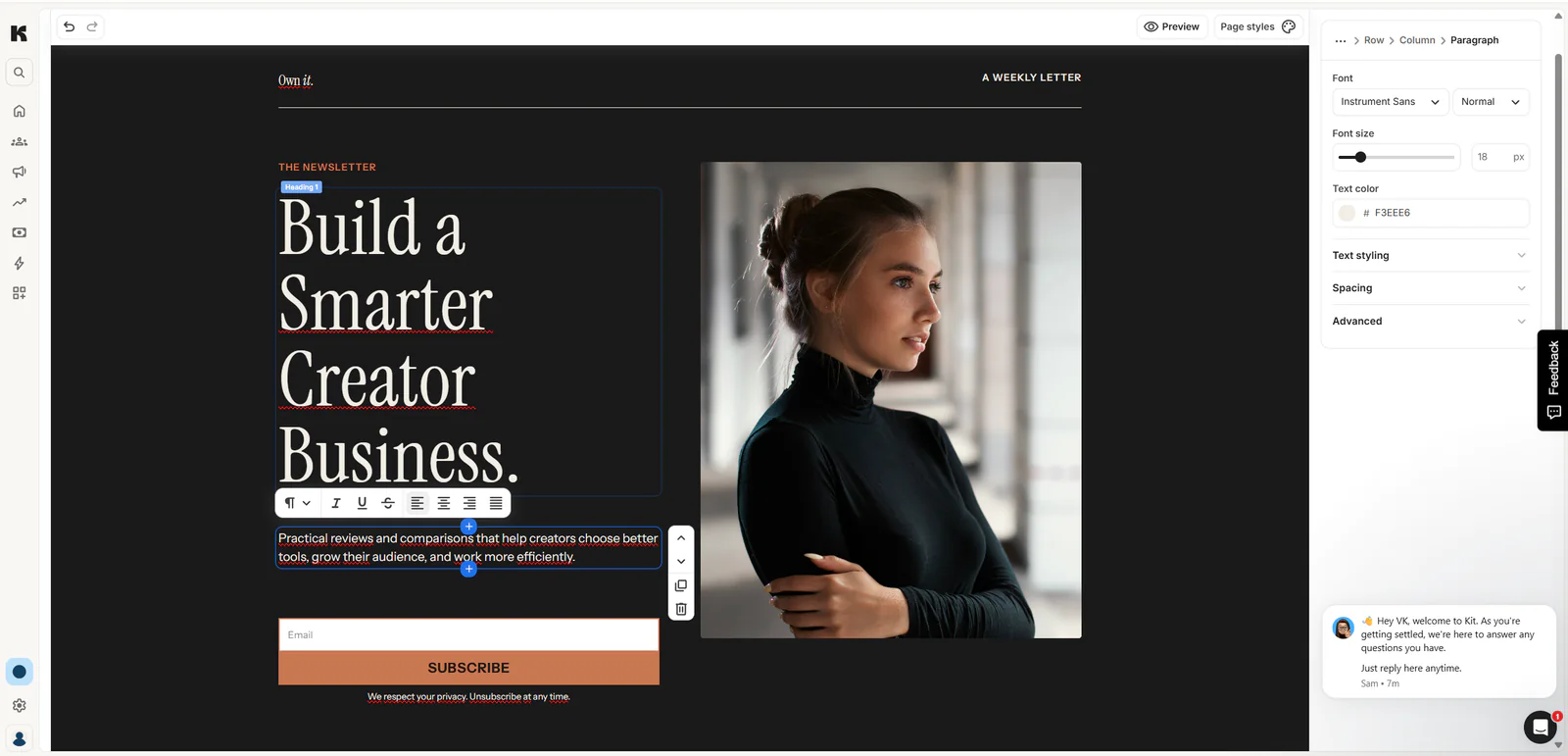
The editor allowed us to modify the headline, supporting text, call-to-action button, typography, colors, spacing, and page styles. Individual page elements could be selected and edited directly, with additional controls in the right sidebar.
The Kit editor let us replace the template copy and adjust the landing-page content.
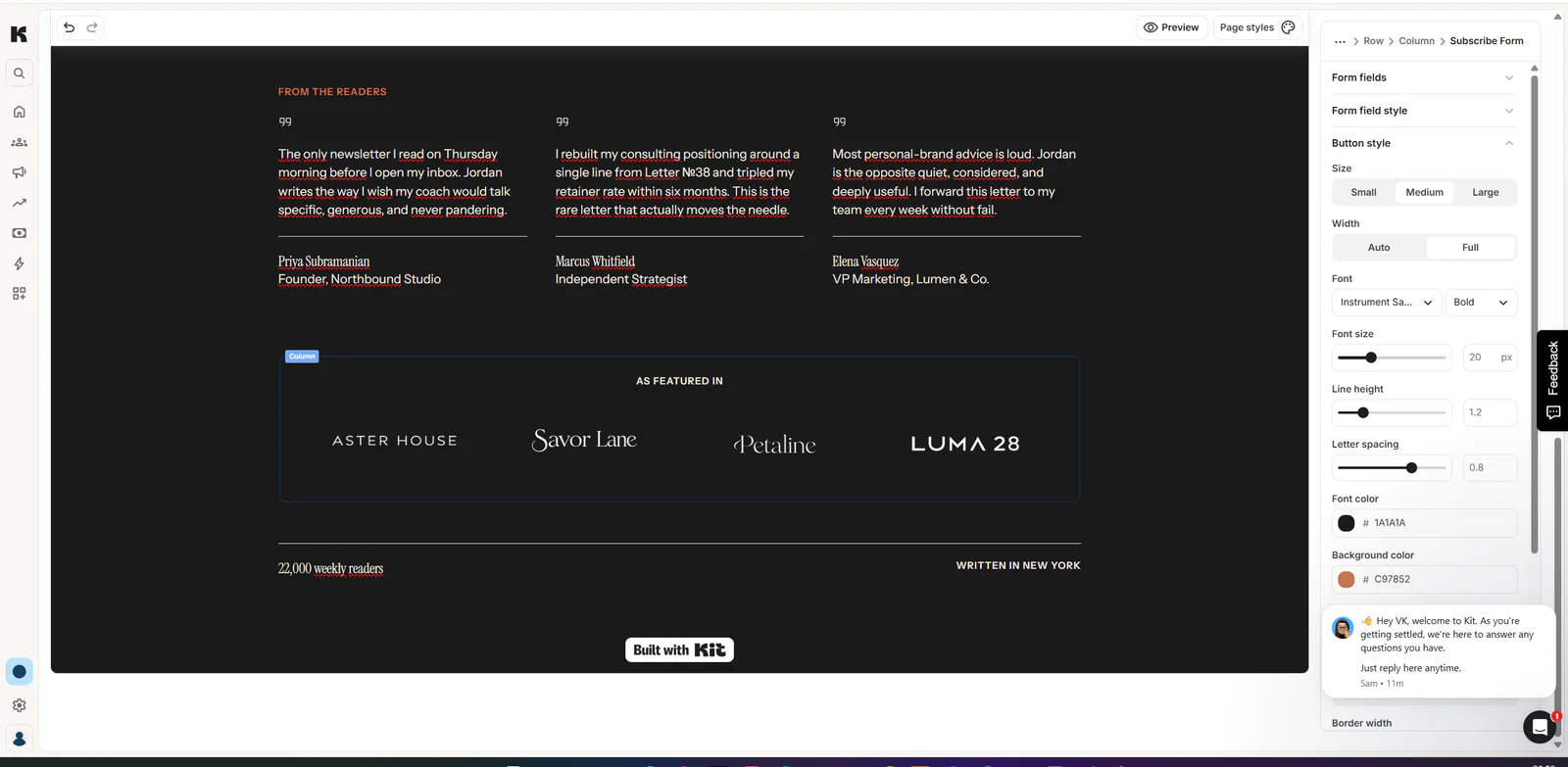
The template was visually polished, although it contained lower-page placeholder testimonials, publication logos, audience figures, and Kit branding. These elements would need to be replaced or removed before using the page for a real campaign.
The lower template sections contained placeholder content and Kit branding that required review.
Responsive Preview
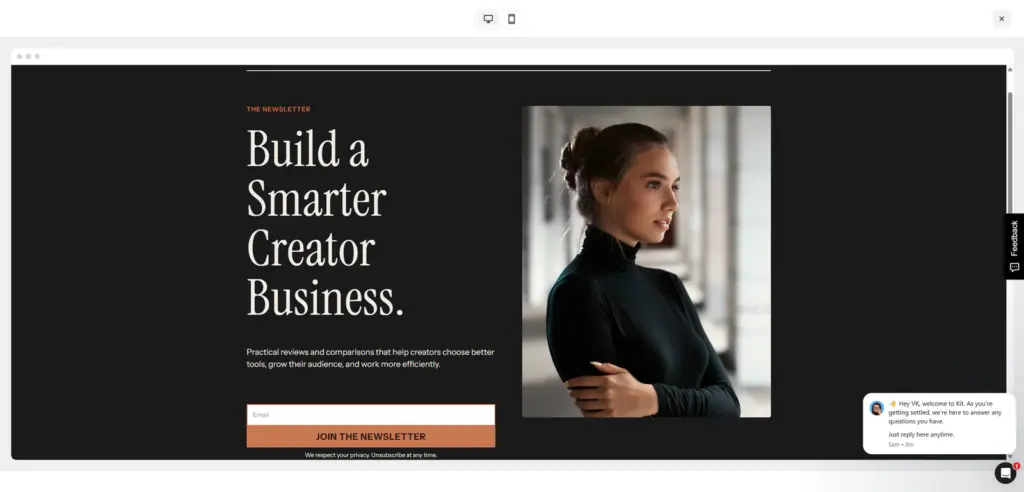
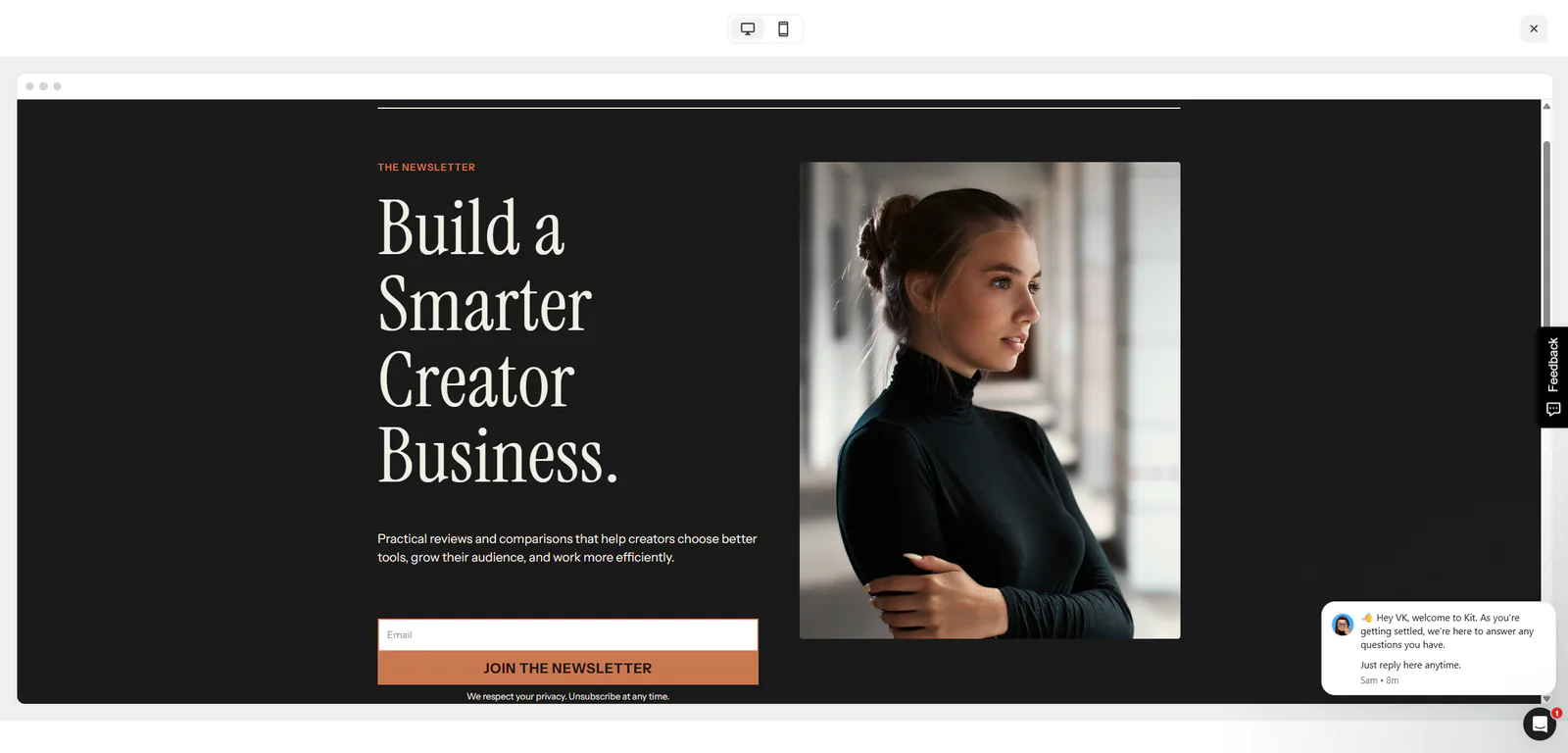
Kit provides desktop and mobile previews within the editor. The desktop layout presented the headline, copy, signup form, and image in a balanced two-column design.
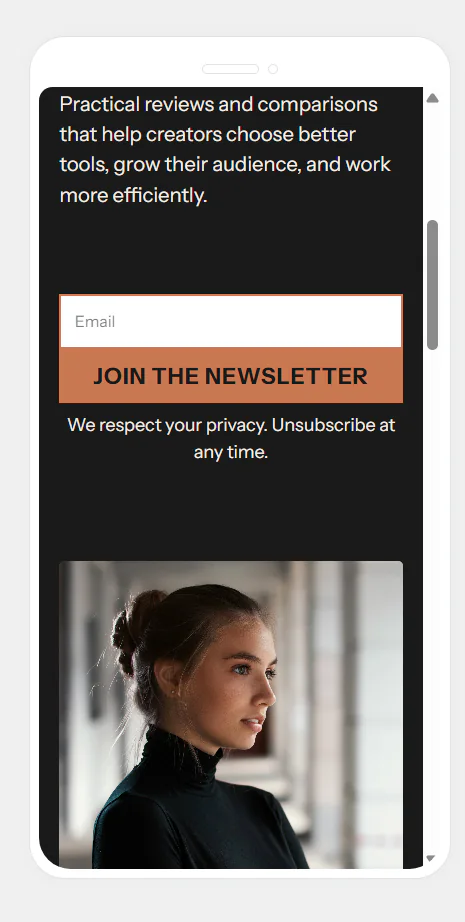
Kit's built-in mobile preview kept the form and call to action usable.The customized landing page in Kit's desktop preview.
The mobile preview correctly stacked the content, form, call-to-action button, and image. The result remained readable and usable, although the tall headline occupied considerable vertical space and would benefit from careful sizing on a production page.
Publishing and Subscriber Confirmation
Publishing produced a hosted Kit URL that could be shared directly. Kit also offered embedding and social-sharing options.
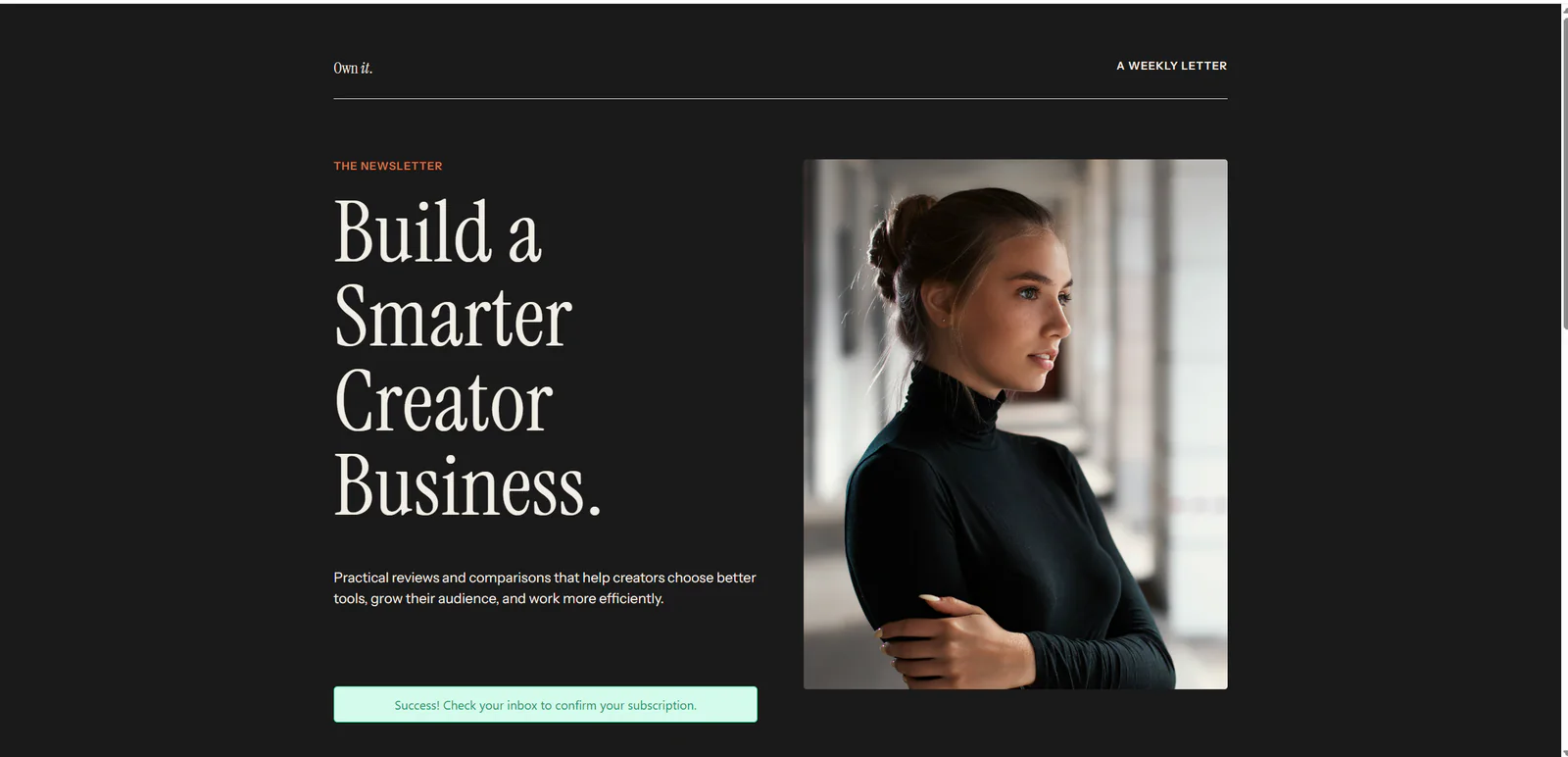
Our live form submission worked correctly. After entering an email address, the page displayed the custom success message:
The published form returned a clear success message before double-opt-in confirmation.
“Success! Check your inbox to confirm your subscription.”
Kit then sent a double-opt-in email containing a confirmation button. Following that link opened a confirmation page and changed the subscriber’s status to Confirmed inside the Kit dashboard.
Subscriber Management
The Subscribers area displays subscriber totals, recent additions, emails sent, open rates, click rates, and individual subscriber records. Filters are available for confirmation status, segments, tags, and products.
Our test subscriber appeared with the correct email address, date, and confirmed status.
Broadcasts, Automation, and Monetization
Kit also provides broadcasts, email sequences, visual automations, recommendations, apps, digital products, and paid subscriptions. These areas are central to the broader product, but we did not test their paid or large-scale operation during this review.
On the current Free account, we confirmed access to broadcasts, landing pages, and forms. Email sequences, visual automations, Rules, and RSS each displayed a Creator-plan upgrade gate. We did not buy or independently test those paid capabilities, large-scale sending, support response time, or monetization performance.
06
Pricing
Free up to 10,000 subscribers
Free plan available
Free trial available
Pricing and plan packaging were rechecked on October 7, 2026. The paid prices below apply to accounts with up to 1,000 subscribers unless stated otherwise.
Free Plan
The Free plan costs $0 per month while the account remains below 10,000 subscribers and includes:
Unlimited landing pages and forms.
Unlimited email broadcasts.
Digital products and subscriptions.
A newsletter website.
Audience tagging and segmentation.
Free and Smart Recommendations through the Creator Network.
API access.
Kit gives Free accounts five editable Smart Recommendation slots. Earning from Paid Recommendations requires a paid plan, and paid plans receive priority in Smart Recommendations.
Visual Automations, Email Sequences, Rules, RSS campaigns, AI Connectors, and paid apps require a paid plan, while some apps remain available on Free.
Once an account exceeds 10,000 subscribers, it must upgrade to continue sending. Kit says support is available to Free accounts and aims to answer requests in queue order within 24 hours; we did not independently test that response time.
Creator
For up to 1,000 subscribers, Creator starts at $39 per month or $390 billed yearly ($33 per month equivalent).
Pro
For up to 1,000 subscribers, Pro starts at $79 per month. Standard annual billing provides the equivalent of two months free ($790 per year, about $66 per month).
At our October 7, 2026 check, Kit's public pricing page displayed a limited-time Pro offer of $593 for the first year (shown as $50 per month) before renewal at the standard rate. Kit also offers a 14-day free trial without requiring a credit card.
The free plan is unusually generous in subscriber capacity, but businesses should examine how paid pricing changes as their lists grow. Cost at a higher subscriber count can become an important consideration.
Free
$0/month
Up to 10,000 subscribers; upgrade required above that limit
Key features
Unlimited landing pages, forms, and email broadcasts
Tags and segments
Free and Smart Recommendations
Limits
Paid plan required for automations, sequences, Rules, RSS, Paid Recommendations, and paid apps
Recommended
Creator
$39/month
$390/year ($33/month equivalent)
Key features
14-day no-card trial
Expanded automation and creator tools
Best value
Pro
$79/month
$593 first year ($50/month shown); then standard $790/year (about $66/month)
Key features
Advanced creator features
07
Our Experience
We registered a Kit account, confirmed the account email, and received a 14-day free trial. During onboarding, we selected Grow my list as the primary goal.
Kit onboarding asked us to choose the main goal for the account.
We then opened Audience growth and created a landing page from the College template. The page was renamed Exploripo Creator Tools Newsletter and customized with the following content:
Headline:
Build a Smarter Creator Business.
Supporting text:
Practical reviews and comparisons that help creators choose better tools, grow their audience, and work more efficiently.
Call to action:
JOIN THE NEWSLETTER
Editing the main content was straightforward. Text could be changed directly on the page, while typography, colors, spacing, and other settings appeared in the side panel.
We checked both the desktop and mobile previews. The desktop version looked polished and balanced. The mobile design remained functional and readable, with the page elements stacked vertically.
The lower part of the original template contained fabricated sample testimonials, publication logos, and an audience-size claim. This is important because a user who publishes too quickly could leave placeholder social proof on a live page. Kit gives users the tools to change these elements, but it remains the publisher’s responsibility to inspect the entire template.
We configured the success message, published the landing page, and opened the live hosted version. The form accepted the test email and displayed the correct message. The double-opt-in email arrived successfully, its confirmation link worked, and the subscriber appeared in Kit with a confirmed status.
That complete result—from template selection to a verified subscriber—was the strongest part of our test. The workflow did not feel fragmented, and we did not have to connect a separate form service, page builder, or subscriber database.
Based on this experience, we decided to use Kit for Exploripo’s newsletters instead of MailPoet.
08
Alternatives
MailerLite
MailerLite is a sensible alternative for users who prioritize straightforward email marketing, landing pages, and competitive entry-level pricing. It may appeal to small businesses that do not specifically need Kit’s creator-oriented ecosystem.
Beehiiv
Beehiiv is particularly relevant to newsletter-first publishers. Users whose main goal is building a publication with integrated growth and monetization tools may prefer its editorially focused approach.
Mailchimp
Mailchimp remains a broadly recognized option for businesses that want email marketing alongside a wide range of integrations and general marketing features. Kit is more explicitly focused on creators and audience-based businesses.
MailPoet can also be considered by WordPress users who want newsletter management inside their WordPress installation. Exploripo originally considered that approach but ultimately selected Kit after completing this test.
Marketing & Email
MailerLite
Rating
9.0 / 10
Price
Free up to 250 subscribers; Comfort from $12/month
Free plan available
Best for: Creators and small teams that want polished newsletters, targeting, analytics, and modest automation
MailerLite is the value-oriented alternative for users prioritizing low-cost email marketing and landing pages.
Kit’s clearest advantage is the way it combines creator-focused audience building with email operations.
Compared with a WordPress-based newsletter plugin such as MailPoet, Kit provides a hosted environment for landing pages, subscriber management, email workflows, and monetization. This reduces dependence on the website’s hosting and plugin stack.
Compared with MailerLite, Kit places more emphasis on creator workflows, subscriber tagging, recommendations, products, and audience monetization.
Compared with Beehiiv, Kit feels broader than a newsletter-publishing platform. It is suitable for creators who may combine newsletters with courses, products, memberships, or other audience-driven offers.
Compared with Mailchimp, Kit has a more focused identity and a less general-purpose approach. Its structure is easier to understand when the main objective is growing and communicating with a creator audience.
The best choice depends on the intended workflow. Kit is strongest when email subscribers are treated as the center of a creator business rather than as one marketing channel among many.
Comparison of the current reviewed software with selected alternatives
MailerLite
MailerLite is the value-oriented alternative for users prioritizing low-cost email marketing and landing pages.
Beehiiv
Beehiiv is the closer comparison for newsletter-native publishing and growth tooling.
Overall rating
10.0 / 10
9.0 / 10
8.8 / 10
Price
Free up to 10,000 subscribers
Free up to 250 subscribers; Comfort from $12/month
Free to 2,500 subscribers; Lite from $59/month or $49/month with yearly billing
Free plan
Yes
Yes
Yes
Free trial
Yes
Yes
Yes
Best for
Creators building and monetizing an email audience in one platform
Creators and small teams that want polished newsletters, targeting, analytics, and modest automation
Creators and newsletter-led publishers that want email, a public archive, growth tooling, and monetization in one platform
10
Final Verdict
Kit delivered the complete workflow we needed during testing. We could create an attractive landing page, customize it, preview it on different screen sizes, publish it, collect a subscription, complete double opt-in, and verify the subscriber inside the dashboard.
Its creator-first organization, strong onboarding, polished templates, and integrated subscriber workflow make it easy to understand why it is widely used by writers and online creators.
The product is not without tradeoffs. Paid pricing can rise as the audience grows, the design system is not a replacement for a completely flexible page builder, and templates must be checked carefully for placeholder content. We also did not test advanced automations, paid broadcasts at scale, long-term deliverability, or monetization.
Those limitations did not affect the success of the workflow we actually completed. Kit met our requirements so convincingly that we chose it for Exploripo’s own newsletter operation.
Final Exploripo rating: 10/10
Final verdict: Highly recommended for creators, publishers, and small online businesses that want one dependable platform for audience growth and email marketing.