No spam. Just software we’ve actually tested, plus useful reviews, comparisons and recommendations. We’ll send a confirmation email (double opt-in). You can unsubscribe anytime.
Marketing & Email
AWeber
We tested it
By Exploripo Editorial Team
AWeber is a capable small-business email workhorse with practical editors, subscriber controls, and useful reporting. It earns 8.5/10.
Exploripo rating8.5/10Excellent
Starting priceFree account path; Lite $15/month or $12.49/month billed annually
We may earn a commission if you buy through this link, at no extra cost to you.
01
The essentials
Quick Summary
Bottom line: AWeber completed the full page-to-subscriber-to-broadcast path. Authenticate the sending domain, review public-sharing defaults, and test multiple real inboxes before scaling.
Bottom line
AWeber is a capable small-business email workhorse with practical editors, subscriber controls, and useful reporting. It earns 8.5/10.
02
At a glance
Pros & Cons
+Pros
A real Free-account path was available alongside the 14-day Lite and Plus trials.
Landing-page templates, inline editing, autosave, and desktop/mobile previews worked smoothly.
Double opt-in, source attribution, tags, notes, filters, segments, and contact history were easy to locate.
Four message-building routes cover drag-and-drop, Smart Designer, plain text, and custom HTML.
The send flow includes test messages, immediate or scheduled delivery, link tracking, sharing controls, and a second confirmation step.
Reporting updated quickly and recorded the controlled CTA click.
−Cons
Newsletter Hub publication was enabled by default in the final send settings.
The delivered email's colors differed sharply from the preview in our tested mail client, and the remote avatar was blocked.
Sending-domain authentication was not complete, prompting a DKIM/DMARC warning immediately before broadcast.
The pricing ladder becomes more demanding as contacts and send volume grow, a concern echoed in independent feedback.
Automation execution, ecommerce, web push, exports, paid support, and production-scale deliverability were not validated here.
03
Audience fit
Who it’s for / Who it’s not for
✓Who it’s for
Creators, coaches, consultants, and local businesses that want one guided path from signup page to subscriber to newsletter.
Small teams that value templates, straightforward list management, and visible support options over enterprise complexity.
Operators who need a usable Free starting point but expect to upgrade for more lists, landing pages, automations, users, reporting, or branding control.
Businesses that want drag-and-drop creation but still appreciate plain-text and custom-HTML alternatives.
×Who it’s not for
Creator businesses centered on recommendations, paid newsletters, and creator-network growth; Kit may fit that operating model better.
Teams prioritizing the most polished modern campaign-builder experience and aggressive small-list value; MailerLite is the closest direct alternative to investigate.
Senders unwilling to configure domain authentication, review public-sharing defaults, and test multiple real inboxes before launch.
04
Overview
Verified fact: AWeber combines broadcasts, subscriber management, landing pages, signup forms, automation, reporting, ecommerce options, integrations, and web push in one platform. Official materials position it primarily for creators and small businesses, with 24/7 support and an optional Done For You setup service.
Our finding: The account was created through the visible `continue with Free` path rather than the 14-day paid trial. The dashboard immediately exposed one list, onboarding actions, subscriber and sales panels, AI landing-page prompts, support links, and upgrade messaging. Navigation grouped Messages, Automation, Subscribers, Pages & Forms, List Options, Reports, Integrations, Community, and Help in a persistent left rail.
Common user feedback: The locked research packet found recurring praise for support and general ease of use across G2 and Trustpilot, with pricing growth appearing as a repeated concern. TechRadar's April 2026 test likewise praised onboarding and support while questioning parts of the template/editor experience, automation depth, and value as lists expand. These are external themes, not findings reproduced automatically by Exploripo.
05
Features
Landing pages and signup flow
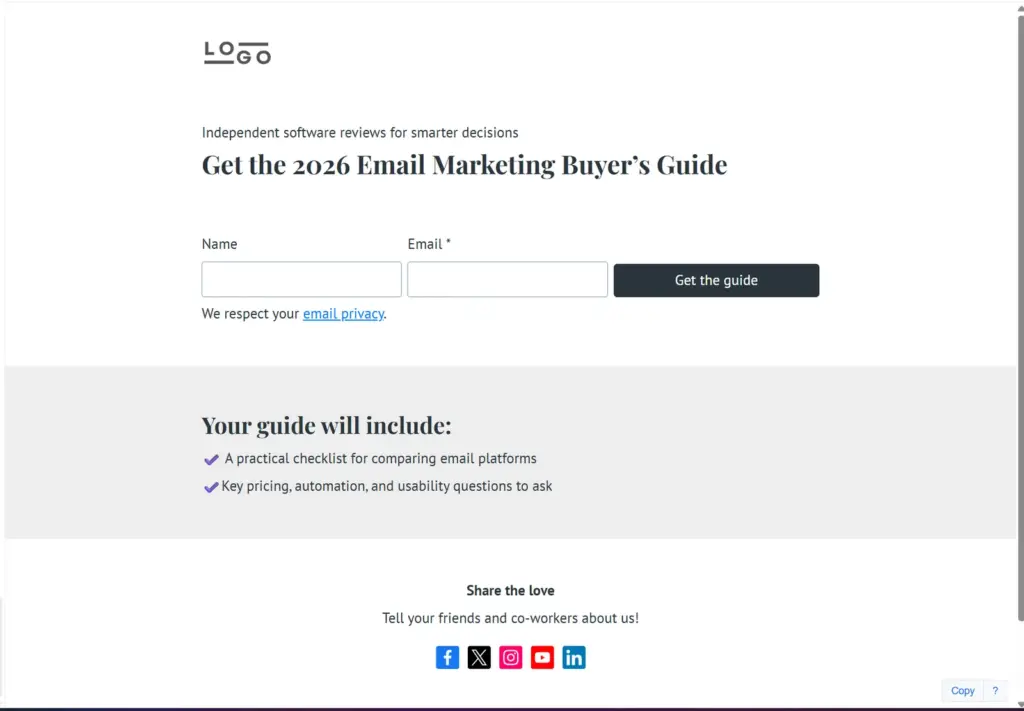
Our finding: The landing-page gallery offered a blank canvas plus purpose-built designs for lead magnets, consultations, courses, business cards, donations, crowdfunding, and social proof. We chose Lead Magnet Offer, renamed the page, rewrote the headline and benefits, changed the form CTA, and saw `All changes saved` without a manual save cycle.
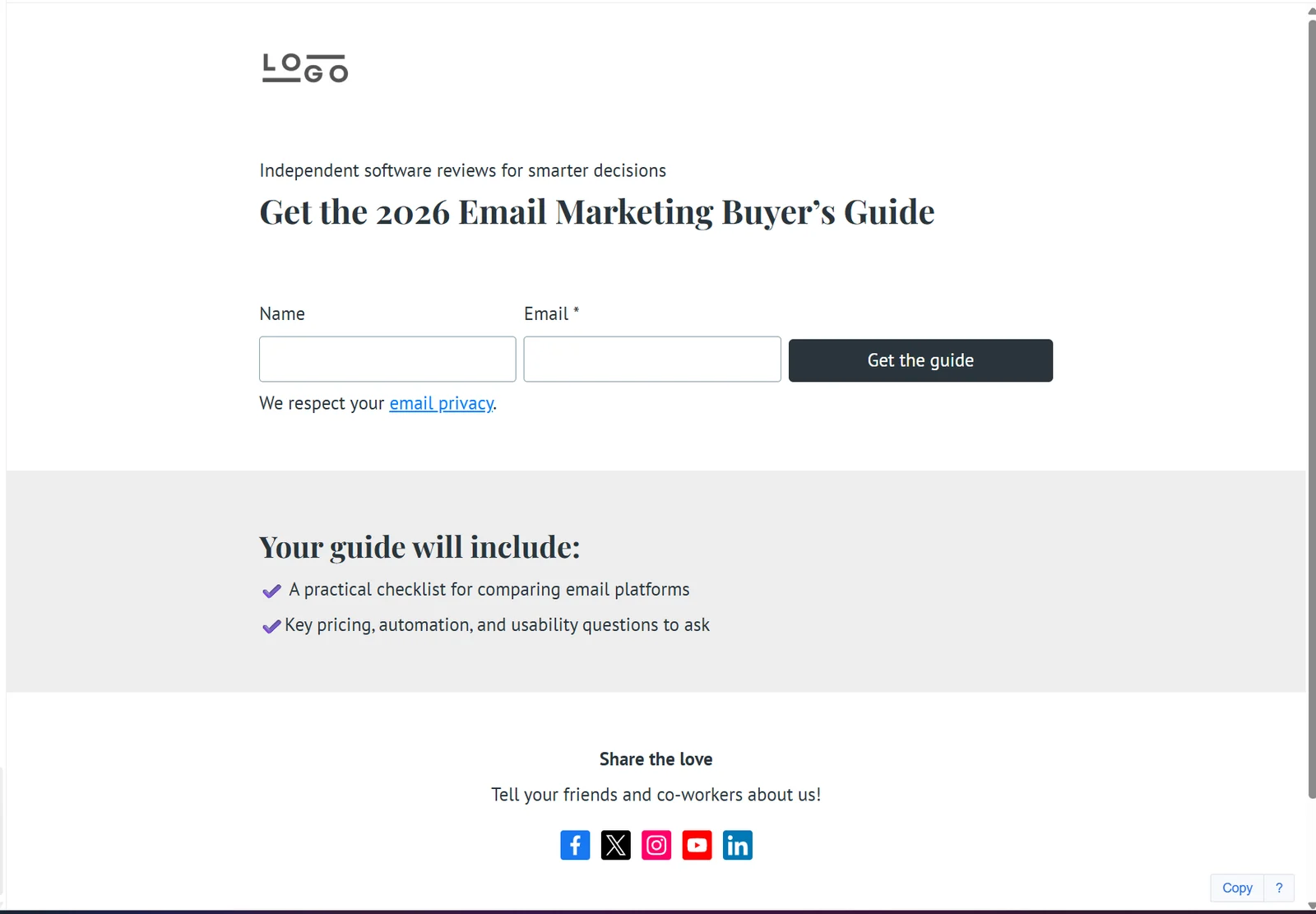
The published lead-magnet page preserved the customized headline, signup form, benefit section, and responsive one-page layout.
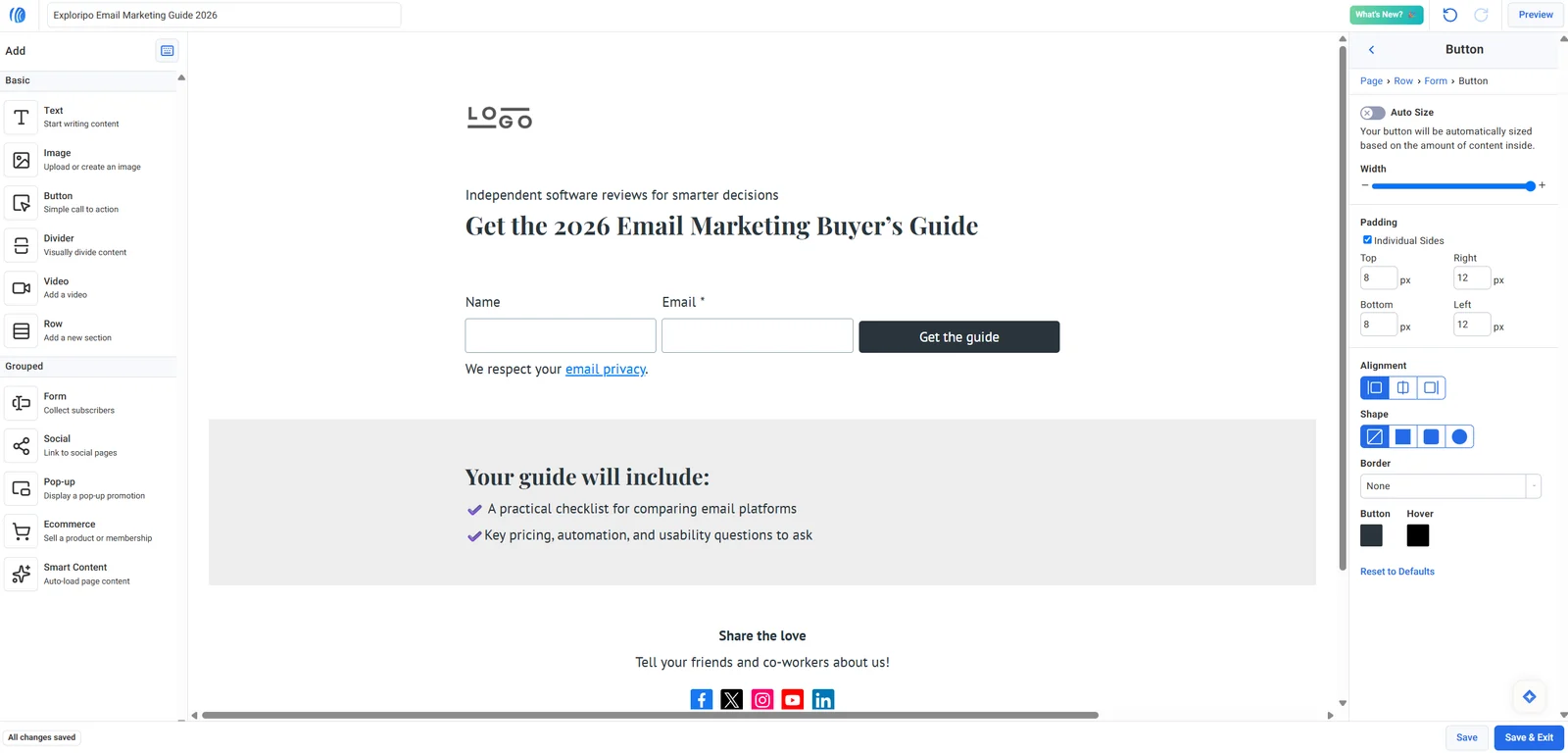
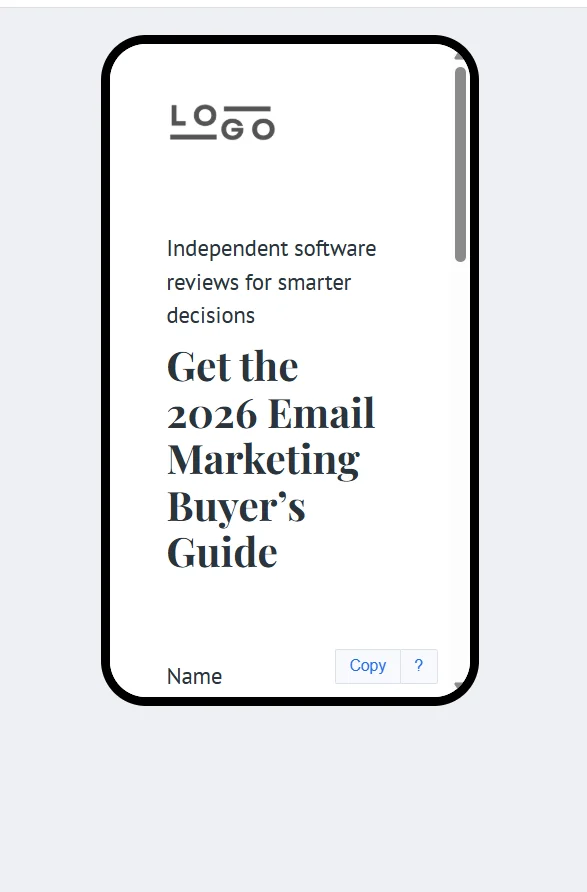
The editor exposed text, image, button, divider, video, row, form, social, pop-up, ecommerce, and Smart Content blocks. Global controls covered fonts, buttons, and backgrounds. Desktop preview matched the customized canvas, while mobile preview reflowed the page into one column; the long headline wrapped heavily and required internal scrolling, making mobile review important rather than optional.
The customized lead-magnet page shows inline editing, form controls, button settings, and confirmed autosave.Mobile preview stacked the layout correctly but wrapped the long headline across many lines.
Publishing was separate from Save & Exit. The saved draft appeared as Unpublished, and the row menu exposed Edit, Preview, Publish, Copy, and Copy to List. Publishing produced a live `aweb.page` URL plus social-sharing and share-as-template options. A real form submission triggered a confirmation email; after double opt-in, the contact appeared as Subscribed with source `Web Form`. We then saved a test tag and internal note without changing subscription status.
Message creation and sending controls
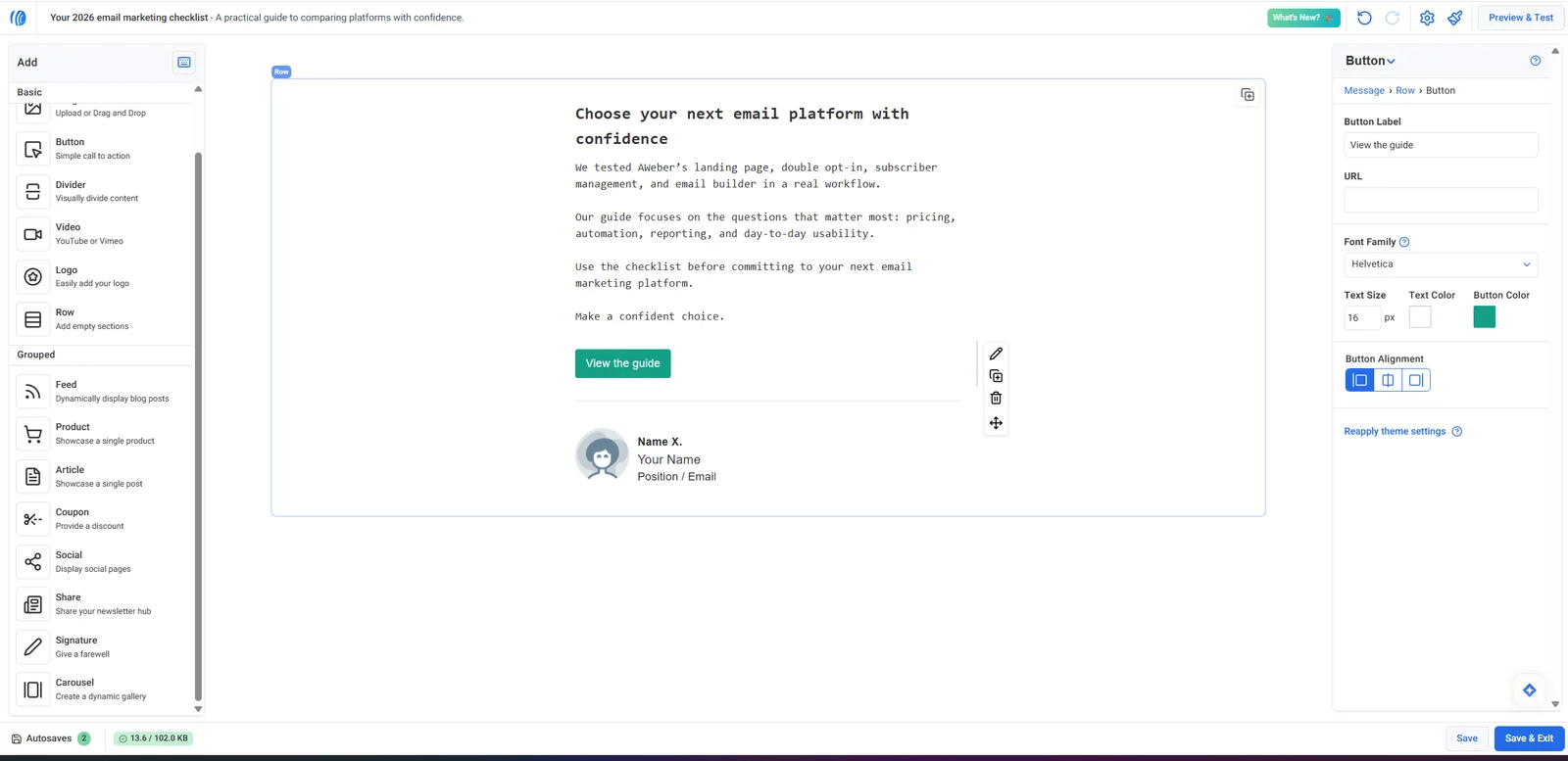
Our finding: AWeber offered four creation routes: Drag & Drop Editor, Smart Designer from a website URL, Plain Text Editor, and Custom HTML Editor. In the visual editor we set a subject and preheader, received character counts and a green best-practice check, rewrote the body, configured a tracked CTA, and customized the signature. The left rail included common content blocks plus feed, product, article, coupon, social, share, signature, and carousel elements.
The customized broadcast editor shows the final copy, CTA settings, block library, and autosave state.
Preview & Test combined desktop and mobile views with a test-address field and optional personalization tags. The final send screen supported immediate or dated delivery, an audience segment, list inclusion/exclusion, Newsletter Hub and social sharing, link tracking, and an email notification when statistics became available. A second confirmation dialog reduced accidental sends.
Reporting, automation, and platform scope
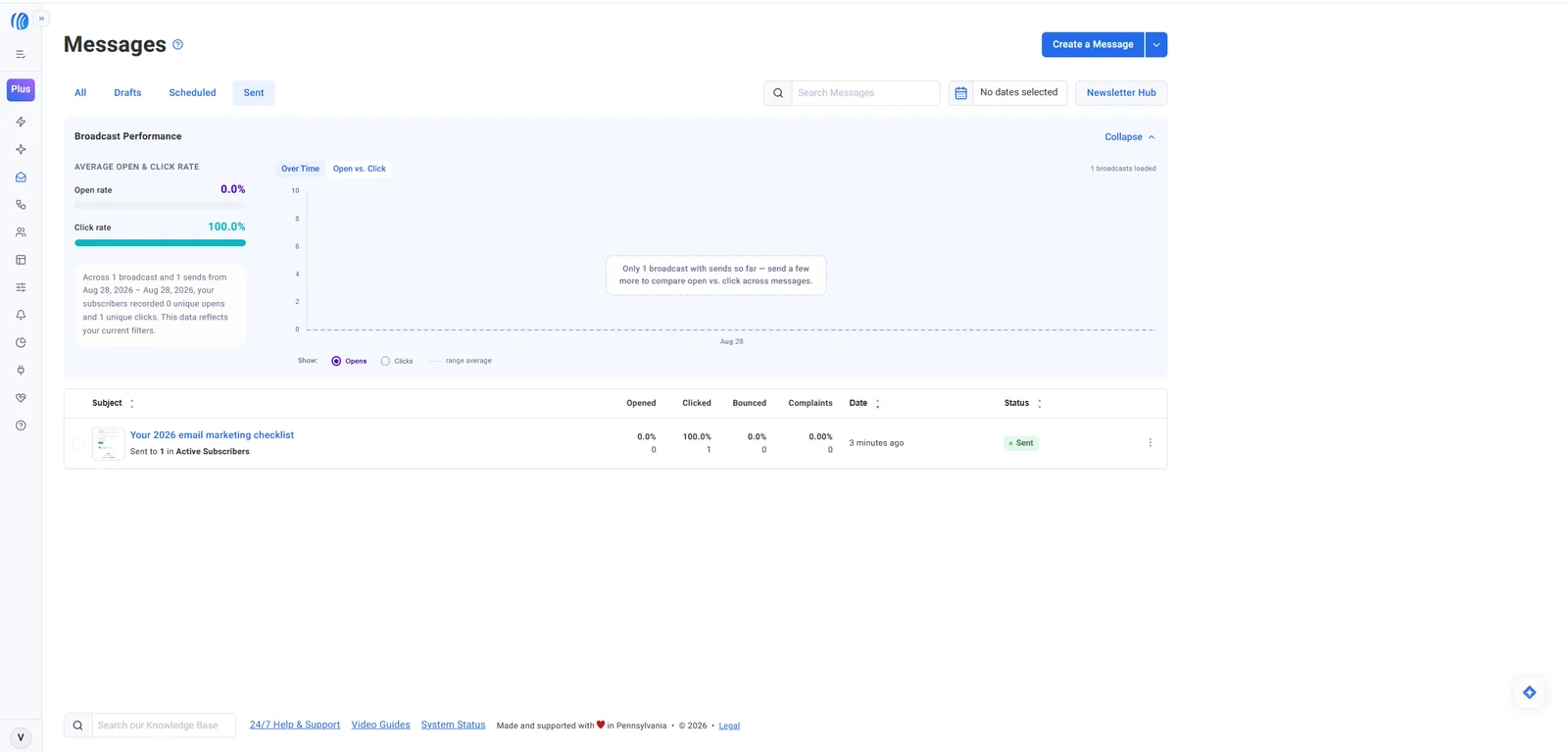
Our finding: The Sent view reported sends, opens, clicks, bounces, complaints, date, and status. After we clicked the tracked CTA, AWeber recorded one unique click and a 100% click rate for the one-person test. Open rate stayed at 0% because the mail client blocked remote resources, demonstrating why opens are less reliable than clicks under modern privacy controls. These percentages validate event flow only; they are not performance benchmarks.
Vendor claim: Official documentation describes Workflows with message, wait, tag, feed, and split-path steps, along with open- and click-triggered actions, exits, and branching. We did not build or activate a Workflow, so automation depth is not presented as a hands-on result. Ecommerce, web push, integrations, sales tracking, exports, and API use were also outside scope.
06
Pricing
Free account path; Lite $15/month or $12.49/month billed annually
Free plan available
Free trial available
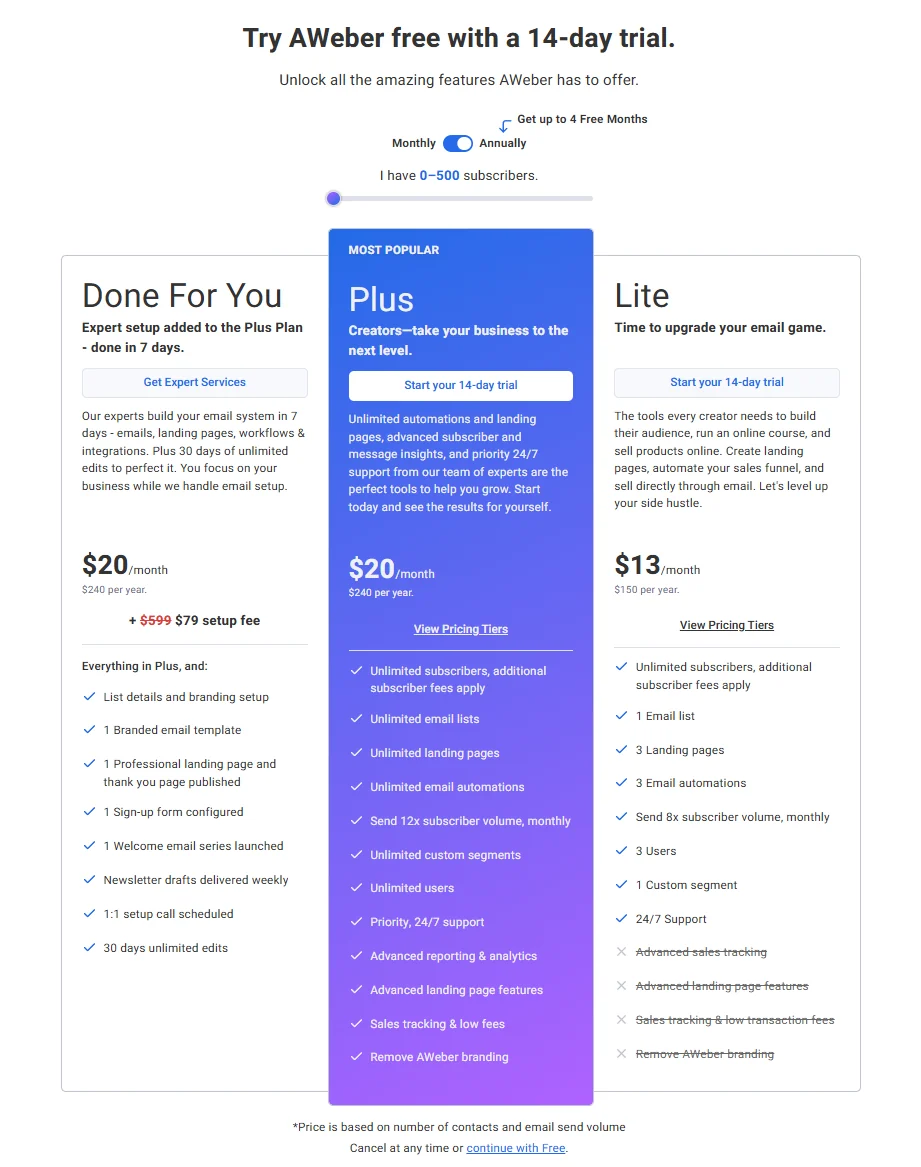
Pricing was rechecked on September 13, 2026 for 0–500 subscribers. Lite remains $15 month to month and now displays $12.49 per month when billed as $150 annually. Plus remains $30 month to month and now displays $19.99 per month when billed as $240 annually. Done For You displays $20 per month billed annually plus a promotional $79 setup fee against a stated $599 regular fee. A 14-day trial is offered for Lite and Plus, while the Free account path used in this review remains available from signup.
The annual pricing view for 0–500 subscribers showed Lite, Plus, and Done For You pricing and feature boundaries.
The current comparison lists Lite with one email list, three landing pages, three automations, three users, one custom segment, and monthly sending up to ten times subscriber volume. Plus lists unlimited lists, landing pages, automations, custom segments, and users, monthly sending up to twelve times subscriber volume, advanced reporting, sales features, priority support, and branding removal.
The 14-day trial was prominently offered for Lite and Plus, while `continue with Free` remained available and led to the account used for this review. Official help says a selected paid trial plan is charged when the trial ends unless cancelled, and exceeding applicable subscriber or send limits can start paid billing early. Unsubscribed contacts do not count toward the billing subscriber total, but reducing contacts does not automatically downgrade the billing tier.
Free
$0
Available from signup
Key features
A usable Free account path was verified hands-on
Limits
Plan limits apply
Lite
$15/month
$12.49/month equivalent; $150 billed annually
Key features
One list
Three landing pages, automations, and users
Ten sends per subscriber monthly
Plus
$30/month
$19.99/month equivalent; $240 billed annually
Key features
Unlimited lists, landing pages, automations, segments, and users
Twelve sends per subscriber monthly
Advanced reporting and branding removal
Done For You
$20/month
Billed annually, plus promotional $79 setup fee
Key features
Plus-level subscription
Managed email-system setup
07
Our Experience
Onboarding and controlled acquisition
Account creation and the Free path were straightforward. The onboarding checklist proposed publishing a pre-built signup page, activating a welcome message, and sharing the page. We instead verified the Pages & Forms area directly, created a fresh lead-magnet page, checked desktop and mobile layouts, published it, and confirmed the public URL.
The complete acquisition path worked: public form submission, double-opt-in email, confirmation page, active subscriber record, source attribution, and saved tag/note. Contact detail included engagement metrics, device/client usage, email history, activity, location, and direct-send controls. Address, email, IP, and location details were excluded from publication.
Broadcast, inbox rendering, and privacy controls
The editor was efficient once content blocks were selected, and test sending worked before the live broadcast. However, the privacy-protective recipient client rendered the message body in bright pink even though AWeber's preview showed dark text; the remote signature avatar was also blocked. We did not isolate whether the color difference came from client-specific styling, so it is recorded as an observed compatibility difference rather than a confirmed AWeber defect.
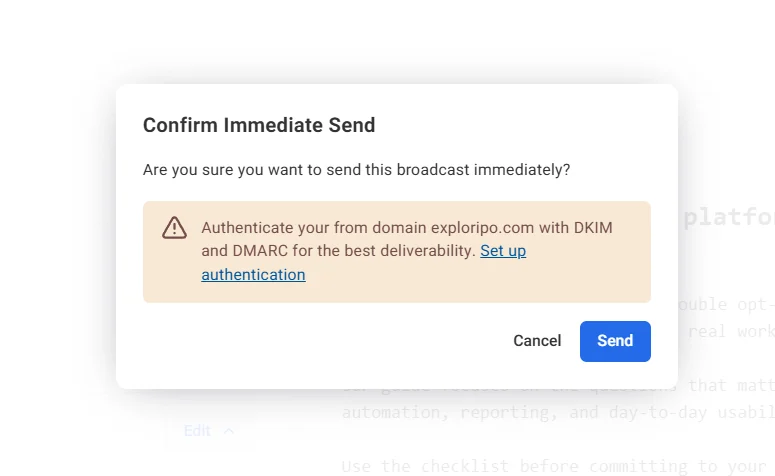
The final send review surfaced two useful guardrails. First, Newsletter Hub posting was enabled by default; we turned it off before sending the internal test broadcast. Second, the confirmation dialog warned us to authenticate `exploripo.com` with DKIM and DMARC for better deliverability. That warning was clear and appropriately timed, though teams should configure authentication before production work rather than at the last click.
AWeber added a second send confirmation and warned that the sending domain needed DKIM/DMARC authentication.
The broadcast progressed from Sending to Sent and reported one send with no bounce or complaint. Opening the message did not create an open event because remote resources were blocked, but the CTA redirected correctly and the click appeared in AWeber within minutes.
Reporting captured one unique click while open tracking remained at zero under the client’s privacy blocking.
What we did not test
This was a controlled Free-account review with one landing page, one confirmed subscriber, one test message, and one live broadcast. We did not activate Workflows, connect DKIM/DMARC, test multiple inbox providers, import a list, export data, process a sale, use web push, contact support, cancel a paid trial, or measure production-scale deliverability. Those limits narrow the verdict and prevent broader claims.
08
Alternatives
MailerLite
MailerLite is the closest alternative for creators and small teams that prioritize a polished visual campaign workflow and competitive small-list packaging. Exploripo’s separate hands-on review found excellent editing, targeting, scheduling, and reporting, though it also required authentication discipline and inbox testing. AWeber stands out more for its long-established support positioning, guided list workflow, and Done For You service.
Kit (ConvertKit)
Kit is the stronger alternative for creator-first businesses that place recommendations, digital products, and audience monetization at the center of their newsletter strategy. Exploripo’s separate test covered landing-page publishing, form submission, double opt-in, and confirmed subscriber status. AWeber feels broader and more traditional; Kit feels more intentionally designed around creator businesses.
Mailchimp or Brevo
Mailchimp remains relevant when mainstream familiarity and ecosystem breadth drive the shortlist, while Brevo is worth investigating when send-volume economics and broad contact storage matter most. Those positions come from the locked comparison research, not like-for-like Exploripo hands-on tests in this review. Buyers should verify current limits and run their own critical workflows.
Marketing & Email
MailerLite
Rating
9.0 / 10
Price
Free up to 250 subscribers; Comfort from $12/month
Free plan available
Best for: Creators and small teams that want polished newsletters, targeting, analytics, and modest automation
MailerLite is the closest tested value alternative for polished email creation and landing pages.
Our finding: AWeber’s clearest strength is that the full acquisition-to-reporting path works without requiring enterprise software. Compared with MailerLite, its editing experience felt capable but less visually refined, while its support emphasis and Done For You option may reassure less technical operators. Both require careful domain authentication and inbox testing.
Compared with Kit, AWeber offers a more conventional email-marketing toolkit: lists, forms, landing pages, broadcasts, reporting, ecommerce options, and Workflows. Kit is the more obvious fit for creator-network and monetization workflows. AWeber is easier to frame as a general small-business workhorse.
The 8.5/10 rating sits below Exploripo’s completed MailerLite and Kit scores because AWeber combined a successful core workflow with more visible operational caveats in this test: public Newsletter Hub sharing was on by default, the inbox rendering differed from preview, and automation remained unexecuted. The comparison does not rank production deliverability or support response quality because those were not tested under a common protocol.
Comparison of the current reviewed software with selected alternatives
MailerLite
MailerLite is the closest tested value alternative for polished email creation and landing pages.
Kit (ConvertKit)
Kit better matches creator businesses centered on forms, sequences, automations, and digital selling.
Overall rating
8.5 / 10
9.0 / 10
10.0 / 10
Price
Free account path; Lite $15/month or $12.49/month billed annually
Free up to 250 subscribers; Comfort from $12/month
Free up to 10,000 subscribers
Free plan
Yes
Yes
Yes
Free trial
Yes
Yes
Yes
Best for
Creators, consultants, and small businesses that want landing pages, subscribers, newsletters, and support in one service
Creators and small teams that want polished newsletters, targeting, analytics, and modest automation
Creators building and monetizing an email audience in one platform
10
Final Verdict
AWeber remains relevant in 2026. It is not merely a legacy newsletter sender: the Free account supported a live landing page, double opt-in, subscriber management, a customized broadcast, test delivery, a controlled live send, and click reporting. The workflow was coherent, and important choices such as audience, schedule, tracking, sharing, and domain authentication were visible before commitment.
Its best users will accept a little operational discipline. Authenticate the domain early, disable public sharing when a message is private, check every desktop and mobile preview, and test actual inboxes rather than trusting the editor alone. Teams that want sophisticated automation, the most modern visual design, or creator-network monetization should compare AWeber directly with MailerLite and Kit.
Final Exploripo rating: 8.5/10. The score reflects a dependable and feature-rich small-business core, strong support positioning, and a successful end-to-end test. The one-and-a-half-point deduction covers pricing pressure, the default Newsletter Hub setting, the inbox-rendering discrepancy, the unauthenticated-domain warning, and important untested areas such as automation execution and production-scale delivery.