
Exploripo Guide
How to Check AI Video Generator Download Limits Before Choosing a Plan
Learn how to separate generation, playback, sharing, and real file export, then run a short test that exposes resolution, watermark, caption, and plan restrictions before you buy.
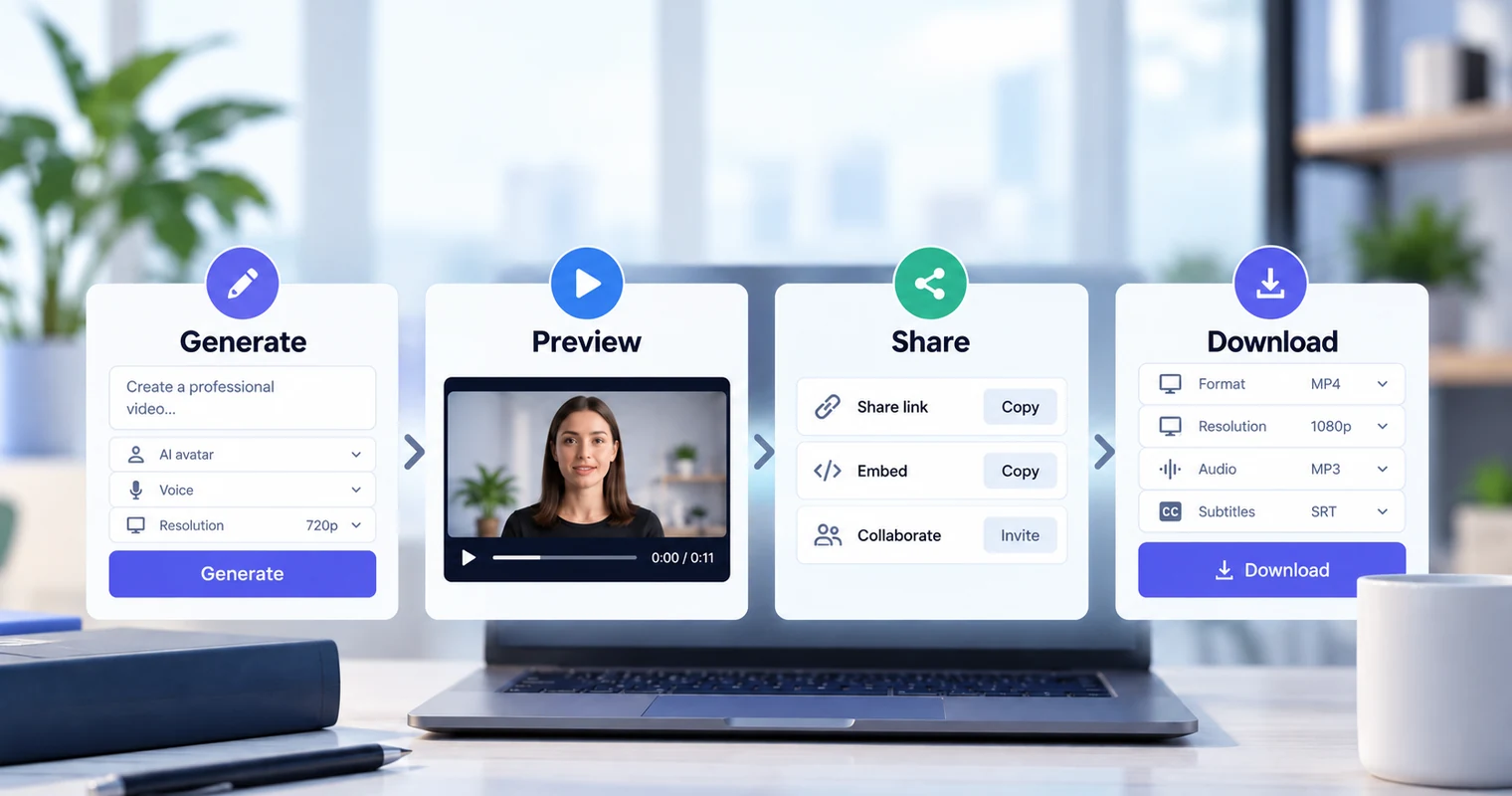
Most AI video tools can show you something before they give you a file you can actually use. A project may render successfully, play inside the vendor’s app, and even have a public share link while MP4 download remains unavailable. Checking AI video generator download limits before choosing a plan means testing the whole delivery path, not stopping when a preview looks finished.
This Guide provides a practical export-readiness test. It is not a ranking of AI video generators or a substitute for broader product reviews. Plan rules change, regional offers differ, and older accounts can retain legacy terms, so verify the current documentation and the controls inside your own authenticated account before paying.
1. Quick Answer: Generation Is Not the Same as Download
Treat a usable video file as the final gate. Generation only proves that the service accepted your project and produced an output somewhere in its system. It does not prove that your plan lets you save an MP4, remove a watermark, download captions, or play the video outside the vendor’s app.
The safest pre-purchase check is a short representative project followed by an actual download attempt. Record what happened at four distinct stages: generation, in-account preview or playback, share or embed access, and local file download or export. If your required stage is blocked, the workflow is not ready even if the video looks complete on the dashboard.
2. Define the Required Delivery File First
Write a delivery specification before opening a pricing page. “We need a video” is too vague. A useful specification names:
- the required container, usually MP4 but sometimes an audio-only or LMS package;
- minimum pixel dimensions, such as 1920×1080, rather than the word “HD” alone;
- landscape, portrait, or square aspect ratio;
- whether any vendor or stock-library watermark is acceptable;
- whether the downloaded file must contain audio, and whether separate audio is required;
- caption requirements, including burned-in captions or separate SRT/VTT files;
- whether viewers need a public link, website embed, password protection, branching, or SCORM for an LMS.
These requirements are not interchangeable. A public player can preserve buttons and branching that a flat MP4 cannot. Conversely, an embed link may be unsuitable when a client, ad platform, archive, or learning system requires possession of a local file. If avatar timing and pronunciation also matter, use the separate AI avatar lip-sync testing workflow after confirming that the delivery format is obtainable.
3. Separate the Four Gates
Use four rows in your test notes and do not merge them into one “export” result.
Generation: Did the service accept the script and assets, spend the expected allowance, and complete the render? A credit balance or generation quota can stop the process before a video exists.
Preview or playback: Can the completed result play inside the account? This proves that the output exists in the service, not that you own a transferable file. Note whether the preview is a draft, a finished render, or a lower-quality proxy.
Share or embed: Can another person view the output through a public or restricted link? Is an embed code available, and does it depend on the vendor continuing to host the project? Record access controls separately from file rights.
Download or export: Does clicking the download control deliver a real file, open an upgrade screen, or offer only another hosted link? Save the file and inspect it. A visible download icon is not proof until the transfer completes.
This distinction prevents a common purchasing error: seeing a playable result on a free plan and assuming the same plan includes a production-ready file.
4. Check the Current Plan and the Authenticated UI
Read the official plan and export documentation on the same day as your test, then compare it with the authenticated workspace. Record the plan name shown in the account, billing region, test date, remaining quota, and any legacy-plan label. Do not infer entitlements from a search-result snippet or an older review.
Plan names can change while feature gates remain, and the same service can show regional quotas or legacy subscriptions. Synthesia, for example, announced current Basic, Starter, and Pro naming on October 1, 2026 while saying existing feature unlocks were unchanged. HeyGen’s current documentation notes that its Free video quota can vary by region and that legacy unlimited subscriptions remain separate from newer credit-based plans.
The authenticated interface is the final pre-purchase checkpoint because it reveals the account state actually being offered to you. Keep screenshots of both the plan label and any download gate, but remove email addresses, personal names, and private project content.
5. Run a Short Representative Export Test
Create one 10–20 second project with non-sensitive material. That range is an Exploripo testing method, not a vendor requirement. Use the same aspect ratio, voice or audio arrangement, caption setting, and interactive features you expect in production. Include a few seconds of motion, spoken audio, visible text, and a deliberate end frame.
Before generating, capture the displayed resolution, watermark option, estimated credit use, and selected plan. Then generate once, note whether credits or quotas changed, and allow the project to finish. Play the complete result from start to end. Open the share controls without assuming they also unlock download. Finally, click the actual download or export control and record the result, including any upgrade gate.
Avoid repeated generations until you understand the allowance. A short test should answer the delivery question without consuming a production budget or uploading confidential material.
6. Inspect the Downloaded File
If a file arrives, move beyond its filename. Open it in a player that is not the vendor’s app and inspect:
- the real file extension and codec;
- pixel width and height;
- duration and aspect ratio;
- visible vendor or stock-media watermarks;
- whether speech, music, and other audio tracks are present;
- whether captions are burned in, embedded, or supplied separately;
- whether the complete video plays without relying on an internet connection or vendor login.
Compare these properties with the specification from section 2. A 720p MP4 is a valid file, but it is still a no-go when the destination requires 1080p. Likewise, a hosted interactive video may satisfy an LMS workflow through embed or SCORM while failing an MP4-only delivery requirement.
Keep the original test file, the account-state screenshot, and the documentation links together. That evidence makes later plan changes easier to diagnose and stops a preview from being mistaken for a verified export.
7. What Exploripo Observed
These examples are bounded workflow evidence, not head-to-head product verdicts.
HeyGen
In Exploripo’s August 23, 2026 Free-plan test, two short 720p presenter videos generated and played inside the account, while the file-download attempt opened a paid-plan gate. On October 6, an anonymous retest reached a Single scene editor showing 720p, but Generate required sign-in. We did not create another account or claim a new authenticated export result.
Current HeyGen documentation describes Free as providing a region-dependent video quota, videos up to one minute, a 720p sharing link, and sharing. Its export guide addresses paid-user downloads, including video, audio, and SRT, with resolution depending on plan; SCORM is listed for Business and Enterprise. HeyGen also says Free videos include its watermark. See the full Exploripo HeyGen review for broader product context.
Synthesia
On October 6, 2026, Exploripo generated one 11-second project in an authenticated Basic workspace. It completed and played in the account with visible Synthesia branding. The sharing panel showed a live public link, public video page, and embed route. Selecting the download control opened a Starter+ upgrade dialog; no MP4 file was delivered.
Synthesia’s current download documentation confirms that Basic and trial users cannot download videos. It lists 1920×1080 MP4 plus WAV, XLIFF, SRT, and VTT for eligible plans. The same source says interactive videos cannot be downloaded as MP4; use link, embed, or SCORM delivery, or duplicate the project and remove interactivity. Synthesia’s sharing guide identifies SCORM as Enterprise-only. The full Exploripo Synthesia review covers the wider workflow.
Pictory
In Exploripo’s August 25, 2026 trial, Pictory generated a project and delivered an MP4. The saved file was 1920×1080 H.264 at 30 fps, 29 seconds long, and about 4.48 MB; it carried Pictory branding. That is direct evidence from one trial export.
Pictory’s official download instructions list MP4 video, MP3 audio, SRT/TXT/VTT text, and a shareable link. Its watermark guidance says trial downloads are branded and that an existing project must be downloaded again after subscribing to obtain the paid-plan watermark treatment. Read the Exploripo Pictory review for findings outside export readiness.
InVideo AI
Exploripo’s August 25, 2026 Free-plan test did not reach a completed video: narration revisions used the remaining credits, and visual generation requested more. We therefore did not hands-on test its final export, file quality, or watermark behavior.
Current InVideo documentation says Free credits reset weekly on Monday at 00:00 UTC. Its plan and credit guide says AI work consumes credits but exporting or downloading does not. InVideo’s watermark guidance says projects exported before subscribing remain watermarked and must be re-exported after subscription. Broader findings belong in the Exploripo InVideo AI review.
8. Test Upgrade and Re-Export Assumptions
Do not assume that payment modifies a file already saved to your computer. Preserve the project, upgrade only if the documented entitlement matches your specification, and repeat the export from that project. Then inspect the new file as if it were the first.
This matters in specific documented workflows. Pictory says subscribing does not automatically remove branding from earlier trial downloads; the project must be downloaded again. InVideo likewise says a project exported before subscription remains watermarked until it is re-exported under the paid plan. These examples do not establish a universal rule for every vendor. They show why “upgrade, then verify a new file” belongs in the test plan.
Check whether regeneration consumes credits, whether the original project remains available, and whether a plan change affects captions, resolution, or interactive delivery. Treat those as questions until the vendor’s current documentation or your own account confirms them.
9. Final Go/No-Go Checklist
Choose go only when every requirement you actually need is verified:
- ☐ The authenticated account shows the expected plan and quota.
- ☐ A representative project completes generation.
- ☐ The final result plays from start to finish in the account.
- ☐ Required link, embed, privacy, or SCORM delivery works on the eligible plan.
- ☐ The download control produces a local file rather than an upgrade screen.
- ☐ The file format, dimensions, duration, aspect ratio, and audio match the brief.
- ☐ Watermark treatment is acceptable in the newly exported file.
- ☐ Required caption or subtitle files are available and accurate.
- ☐ The file plays outside the vendor app.
- ☐ Any post-upgrade project has been re-exported and rechecked.
Choose no-go when a required gate is blocked, undocumented, or only assumed. Choose conditional go when hosted sharing is acceptable but local-file delivery is not required, and record that dependency explicitly.
10. When to Read the Product Reviews Instead
This workflow answers a narrow question: can the current account deliver the asset you need? It does not compare overall output quality, editing ease, pricing value, avatar realism, audience fit, support, or the broader feature set.
For those buying questions, use the linked product reviews or browse the AI Images / Video / Voice category. Return to this Guide when you have a shortlist and need a repeatable proof that generation can become the required downloadable—or deliberately hosted—deliverable.