No spam. Just software we’ve actually tested, plus useful reviews, comparisons and recommendations. We’ll send a confirmation email (double opt-in). You can unsubscribe anytime.
AI Images / Video / Voice
Pictory
We tested it
By Exploripo Editorial Team
Pictory is a capable, efficient choice for creators who want to transform text into a structured stock-footage video with minimal setup. It earns 7.5/10.
Exploripo rating7.5/10Very Good
Starting price14-day free trial; Starter $29/month or $25/month billed annually
We may earn a commission if you buy through this link, at no extra cost to you.
01
The essentials
Quick Summary
Bottom line: Pictory is strongest as a production accelerator. It can produce a coherent first cut quickly, but it should not be treated as a one-click replacement for editorial review.
Bottom line
Pictory is a capable, efficient choice for creators who want to transform text into a structured stock-footage video with minimal setup. It earns 7.5/10.
02
At a glance
Pros & Cons
+Pros
Fast, approachable script-to-video workflow
Stock visuals and transitions matched our short script well
Readable captions and useful scene-level editing
A free-trial export was available with a watermark
−Cons
Voice quality varied noticeably between options
Two tested voices mishandled the price, and one also mishandled the date
The accurate standard voice sounded familiar and generic
Credit estimates and live accounting were not self-explanatory
03
Audience fit
Who it’s for / Who it’s not for
✓Who it’s for
Marketers, bloggers, educators, and small teams repurposing written content into social or explainer videos.
Users who value speed, stock-footage automation, captions, and a guided editor more than cinematic originality.
Creators willing to review voice pronunciation and replace weak stock matches before publishing.
Teams that need a repeatable draft-to-video workflow without learning a traditional nonlinear editor.
×Who it’s not for
Creators who need highly expressive, distinctive narration without manual voice experimentation.
Brands demanding bespoke cinematography or fully generative visual continuity across scenes.
Users expecting credit estimates, deductions, and plan quotas to be perfectly transparent at a glance.
Anyone who wants a watermark-free free-tier export; Pictory reserves branding removal for paid plans.
04
Overview
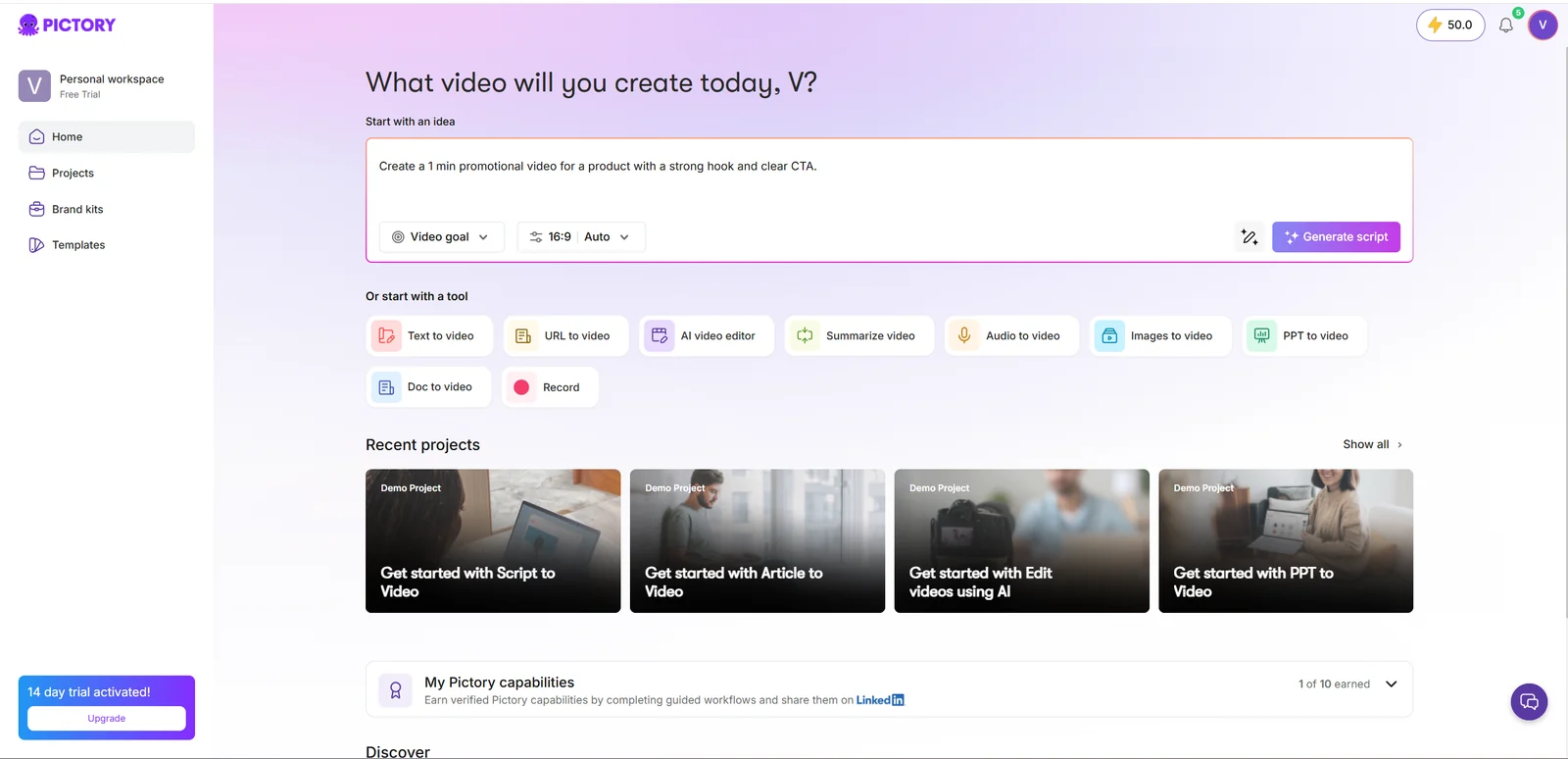
Pictory's dashboard exposes multiple conversion workflows in one place.
Pictory organizes AI video creation around familiar source formats. The home screen offers idea-to-video, text-to-video, URL-to-video, document-to-video, PowerPoint-to-video, audio-to-video, images-to-video, video summarization, recording, and AI-assisted editing. For our review, we used the direct script workflow to isolate how well the service handled scene creation, stock selection, captions, voice, numbers, and transitions.
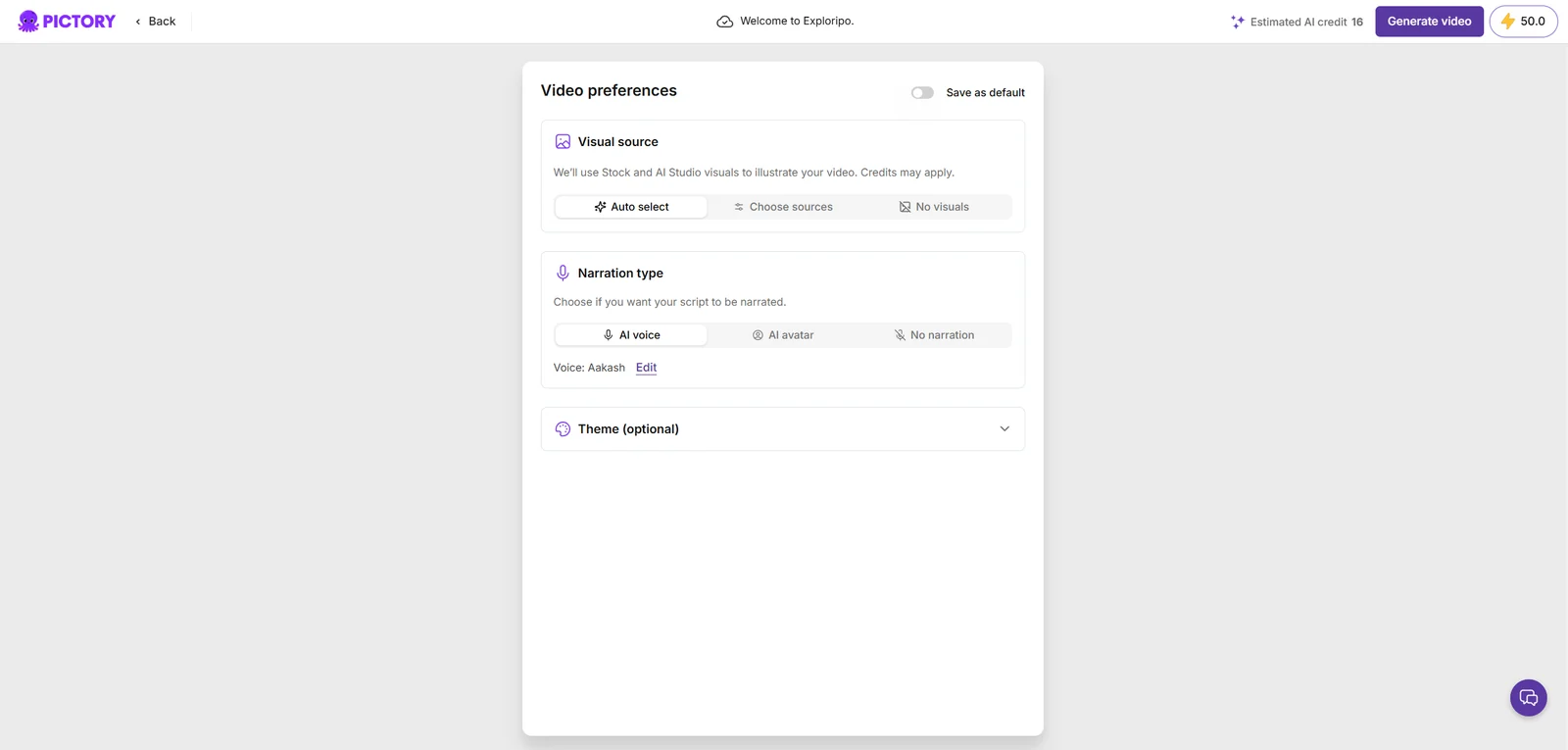
The generation path is guided: enter or generate a script, choose aspect ratio and scene-splitting behavior, confirm visual and narration preferences, then generate an editable storyboard. That structure reduces ambiguity compared with open-ended video agents. It also makes manual quality control practical because each sentence becomes a scene that can be inspected and replaced.
4.1 What other users repeatedly report
Independent reviews repeatedly praise Pictory’s ease of use, time savings, and ability to turn articles or scripts into a workable video without conventional editing experience. G2 and Capterra reviewers commonly highlight the straightforward workflow and stock-media integration. Reddit discussions similarly describe it as useful for repurposing blog or social content.
The repeated criticism also mirrors our test: voices may sound robotic, accents and pacing can feel limited, and stock footage does not always match perfectly. Users often recommend replacing some visuals and checking narration before publishing. We treat those patterns as independent user feedback, not as facts observed in every account.
Video preferences showed an estimated 16 AI credits before generation.
05
Features
5.1 Script-to-video assembly
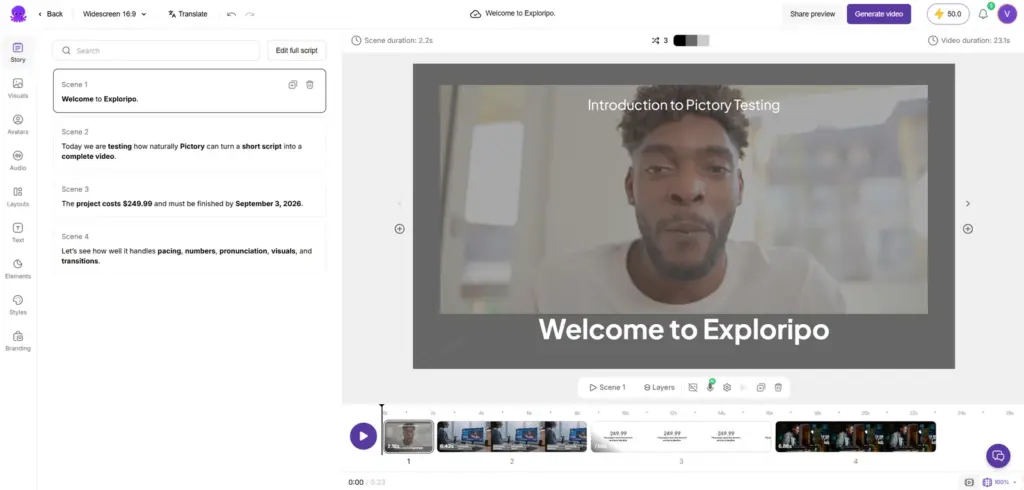
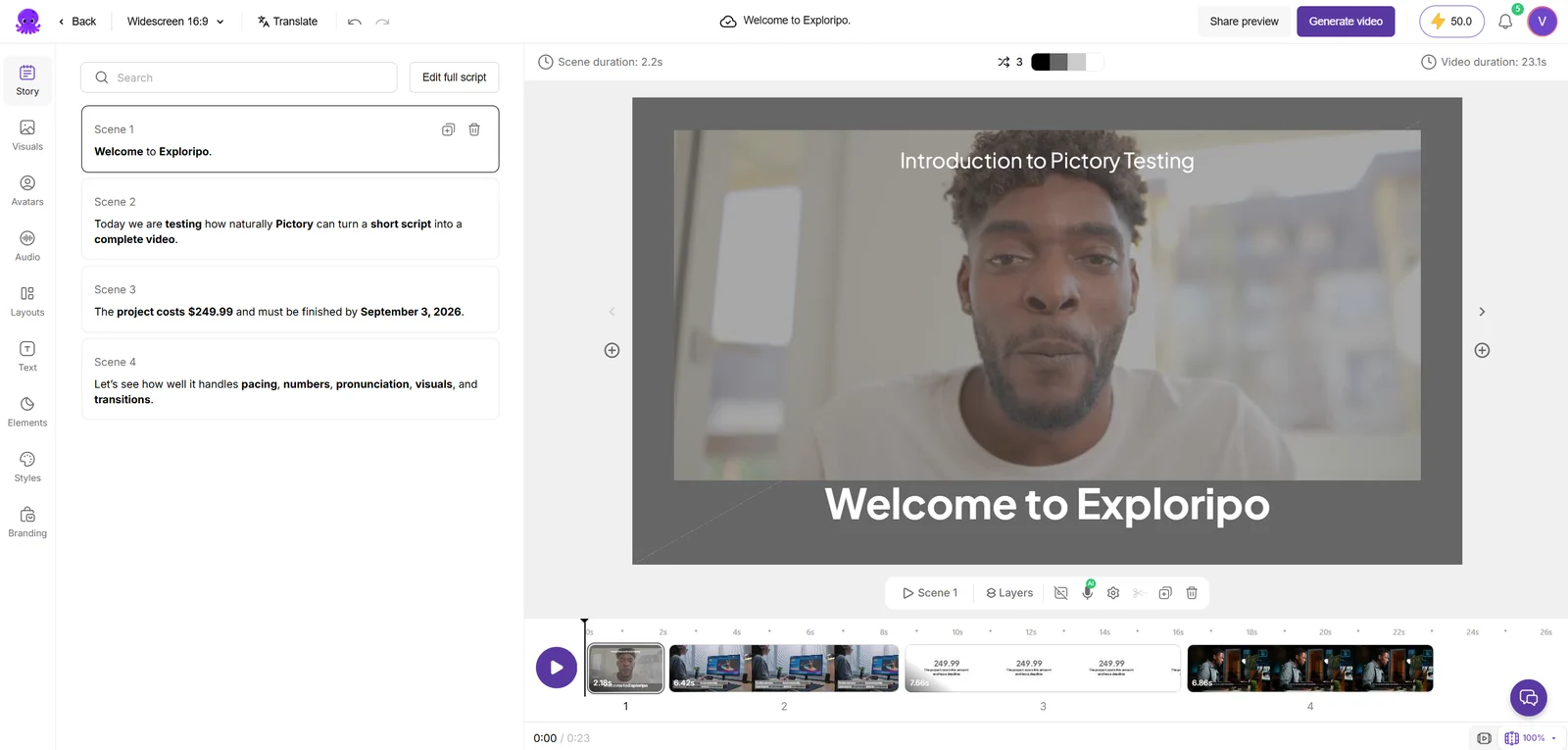
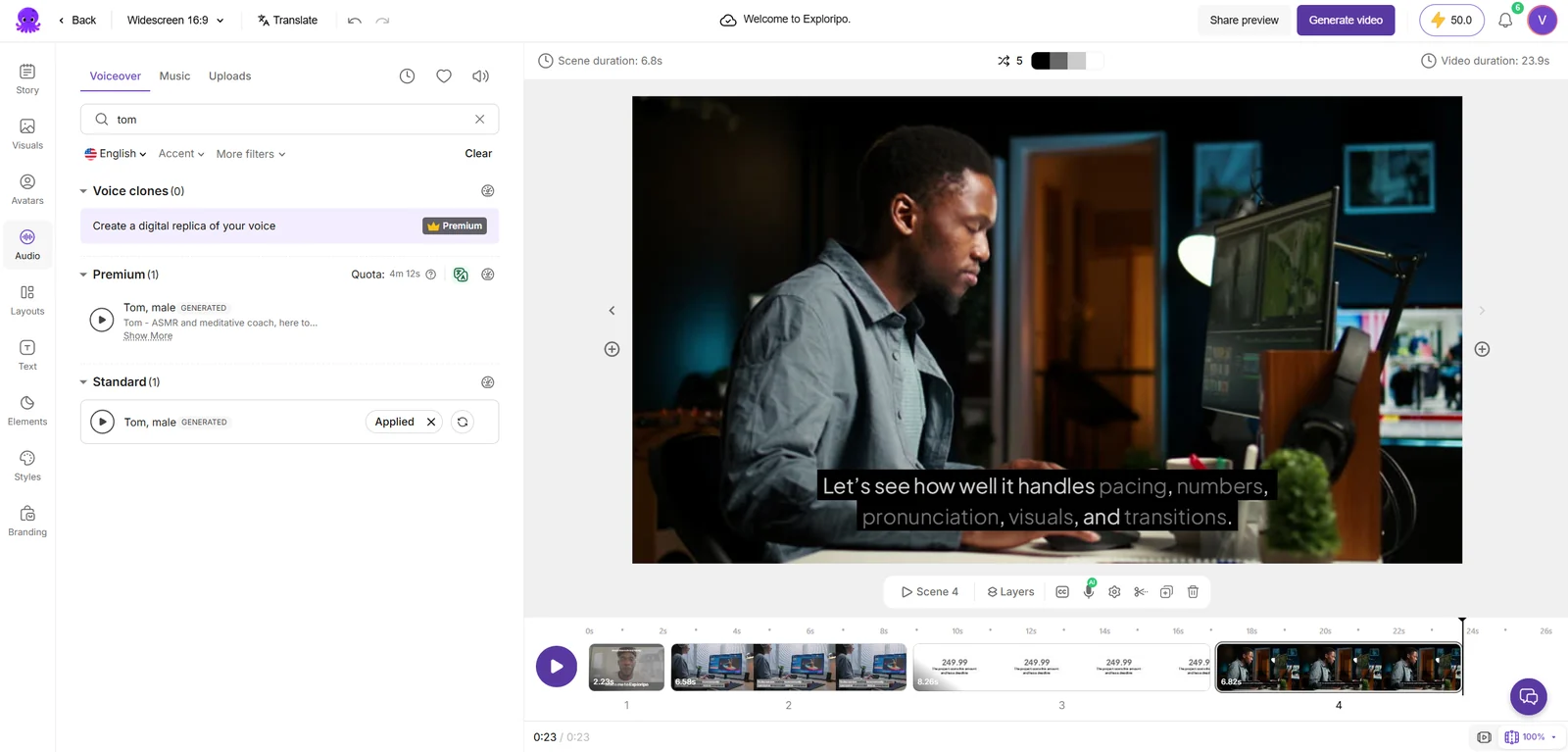
Hands-on result: Pictory divided our script into four scenes—one per sentence—and produced a roughly 24-second editable sequence. The structure was accurate, captions were readable, and the visual pacing followed the script. The stock footage was not custom-made for Exploripo, but the selections were relevant enough that we did not need to rebuild the sequence.
5.2 Visual matching, captions, and transitions
The generated visuals corresponded to the subject of each scene, and the transitions were smooth rather than distracting. The final download ran 29 seconds, slightly longer than the editor estimate, likely because the exported free-trial version included branded material. This was a coherent result, not just a collection of unrelated clips.
The generated draft contained four editable scenes with captions and stock visuals.
5.3 Voice and numeric pronunciation
We tested three narration outcomes. Aakash sounded somewhat robotic, leaned toward an Indian-English delivery, and failed the price and date test. Premium Tom improved the tone and read the date and year correctly, but still mishandled $249.99. Standard Tom correctly read Exploripo, the price, September 3, and 2026. Its weakness was character: it sounded like the generic AI narrator used in many low-quality online videos.
5.4 Voice selection and free-trial export
Standard Tom was the only tested voice that read both the price and date correctly.
The voice comparison matters because a superficially polished option was not automatically the most accurate. Pictory gave us enough control to switch voices and regenerate narration, but the workflow still required listening rather than trusting the label or preview.
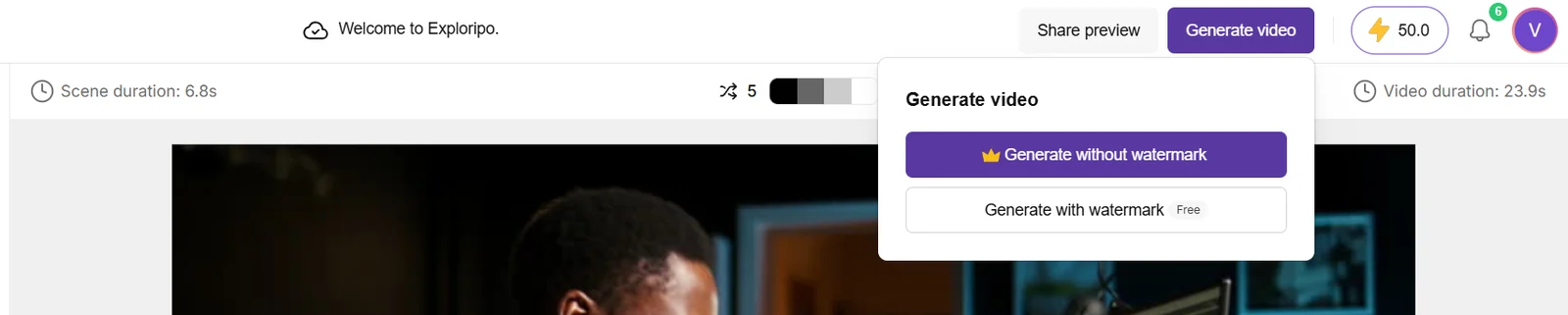
The free option generated the video with a Pictory watermark.
Official Pictory documentation confirms that free-trial downloads carry Pictory branding. Paid subscribers can remove it, and trial projects must be downloaded again after upgrading if the user wants a clean version. Our result matched that policy.
06
Pricing
14-day free trial; Starter $29/month or $25/month billed annually
Free trial available
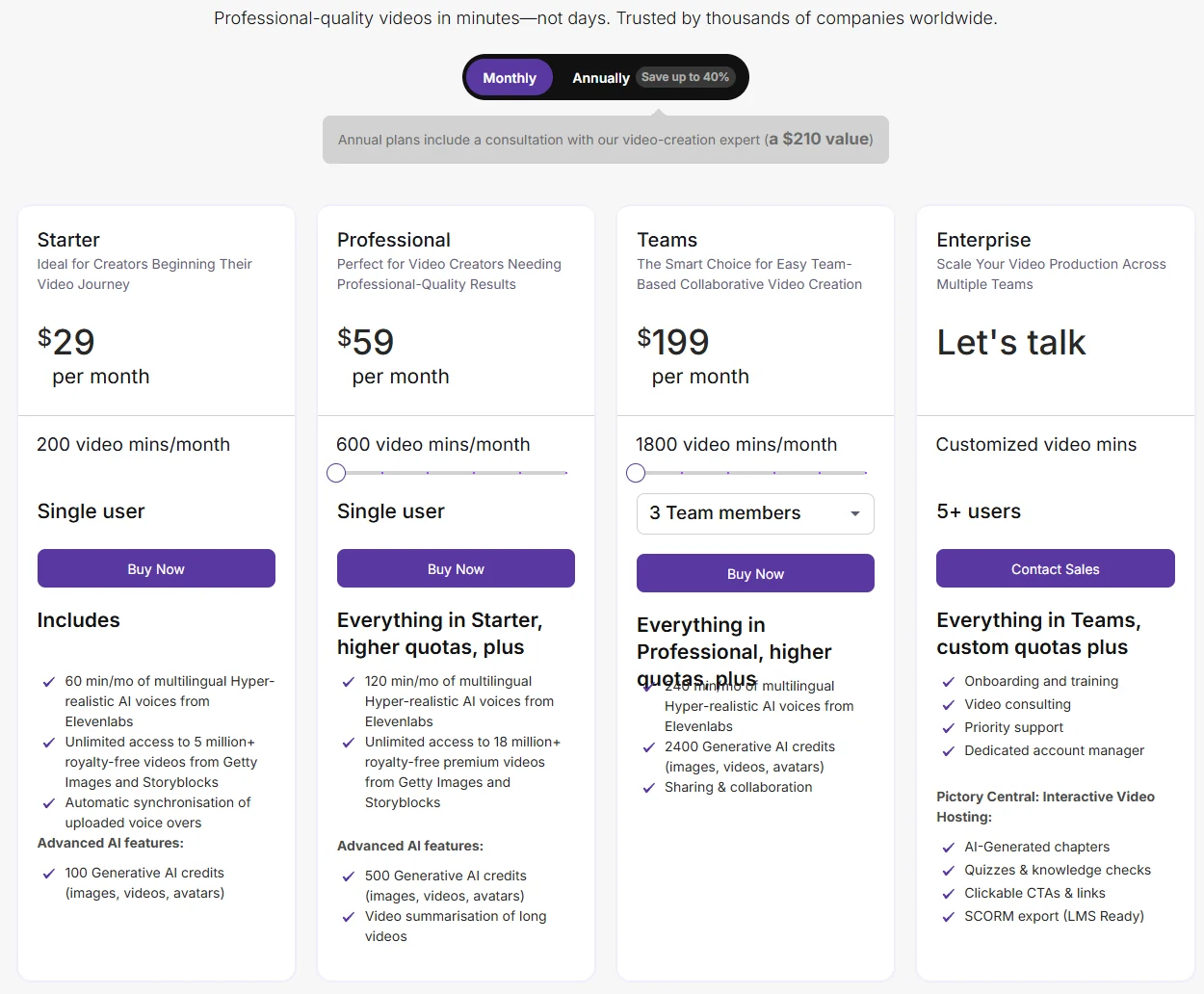
Pricing was rechecked on September 12, 2026. Pictory still displayed Starter, Professional, Team, and Enterprise plans. Monthly prices remained $29, $59, and $199 for the first three tiers; annual equivalents remained $25, $35, and $119 per month, billed annually. Enterprise pricing was custom.
Plan
Monthly
Annual equivalent
Video allowance
Selected inclusions
Starter
$29/mo
$25/mo billed annually
200 min/mo
60 min ElevenLabs; 100 AI credits monthly
Professional
$59/mo
$35/mo billed annually
600 min/mo
120 min ElevenLabs; 500 AI credits monthly
Teams
$199/mo
$119/mo billed annually
1,800 min/mo
3 members; 240 min ElevenLabs; 2,400 AI credits monthly
Enterprise
Custom
Custom
Customized
5+ users; onboarding; priority support
The current pricing page advertises a limited Pictory 2.0 annual offer and presents AI-credit values differently across the plan cards and comparison area. That continues the allowance discrepancy captured during our test, so buyers should verify the checkout screen for the exact credits attached to their plan and promotion.
Monthly pricing captured during the test.
Starter
$29/month
$25/month equivalent billed annually
Key features
200 video minutes monthly
60 minutes of ElevenLabs voices monthly
Professional
$59/month
$35/month equivalent billed annually
Key features
600 video minutes monthly
Voice cloning and advanced AI tools
Team
$199/month
$119/month equivalent billed annually
Key features
Three or more users
Team workspace and onboarding
Enterprise
Custom
Contact sales
Key features
Custom limits and enterprise controls
07
Our Experience
The workflow was quick and understandable from the first screen. Pictory did not force us through a complex agent conversation: we supplied the script, reviewed scene settings, chose a voice, generated the draft, and inspected the result. Editing remained scene-based and approachable. For this type of content repurposing, that predictability is a real advantage.
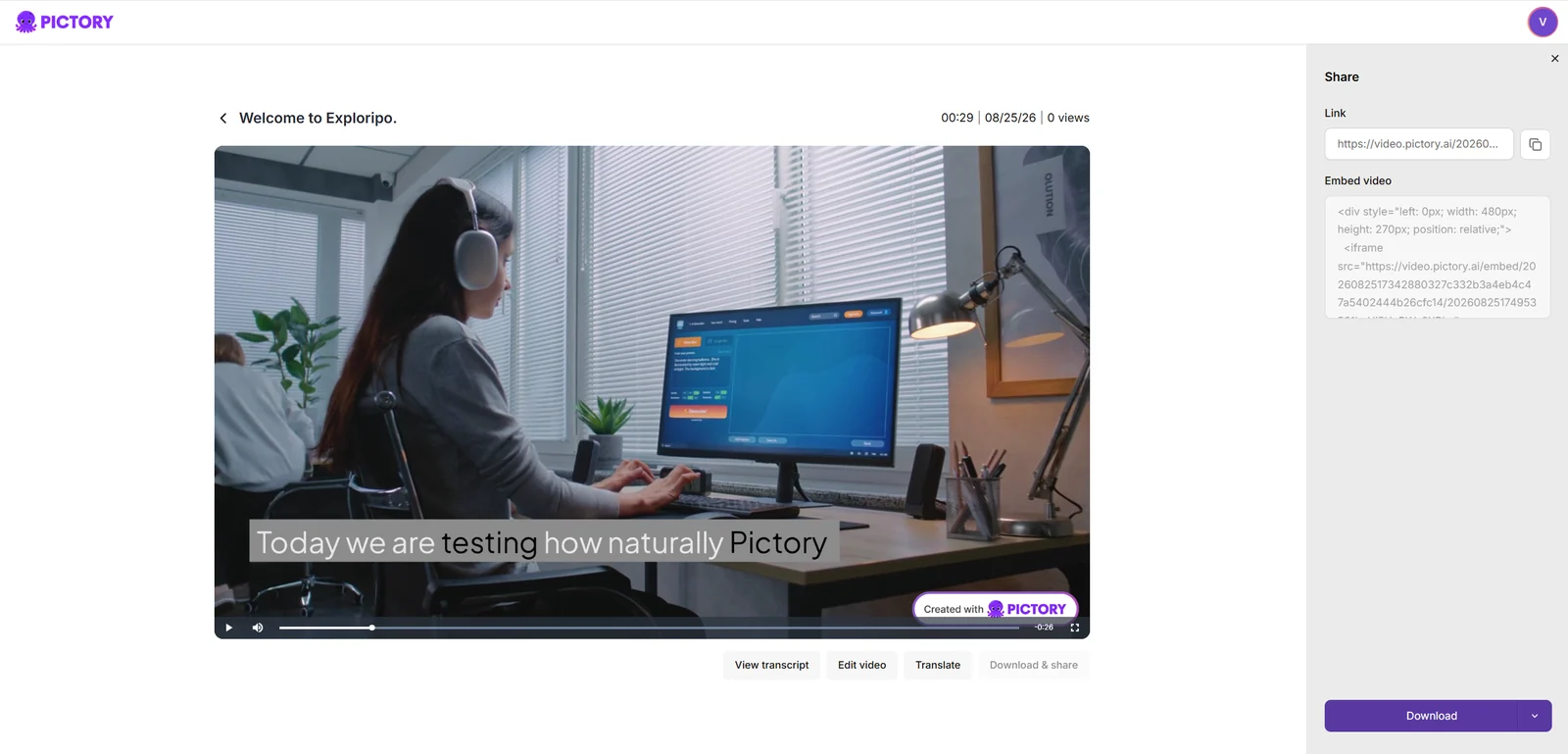
The final MP4 was 1920×1080, H.264, 30 fps, 29 seconds, and approximately 4.48 MB. Visuals and transitions matched the script, and download, share-link, and embed controls were available. The small Pictory watermark in the lower-right corner was the expected free-trial limitation.
The final hosted export matched the script and exposed share, embed, and download controls.
7.1 Credit accounting
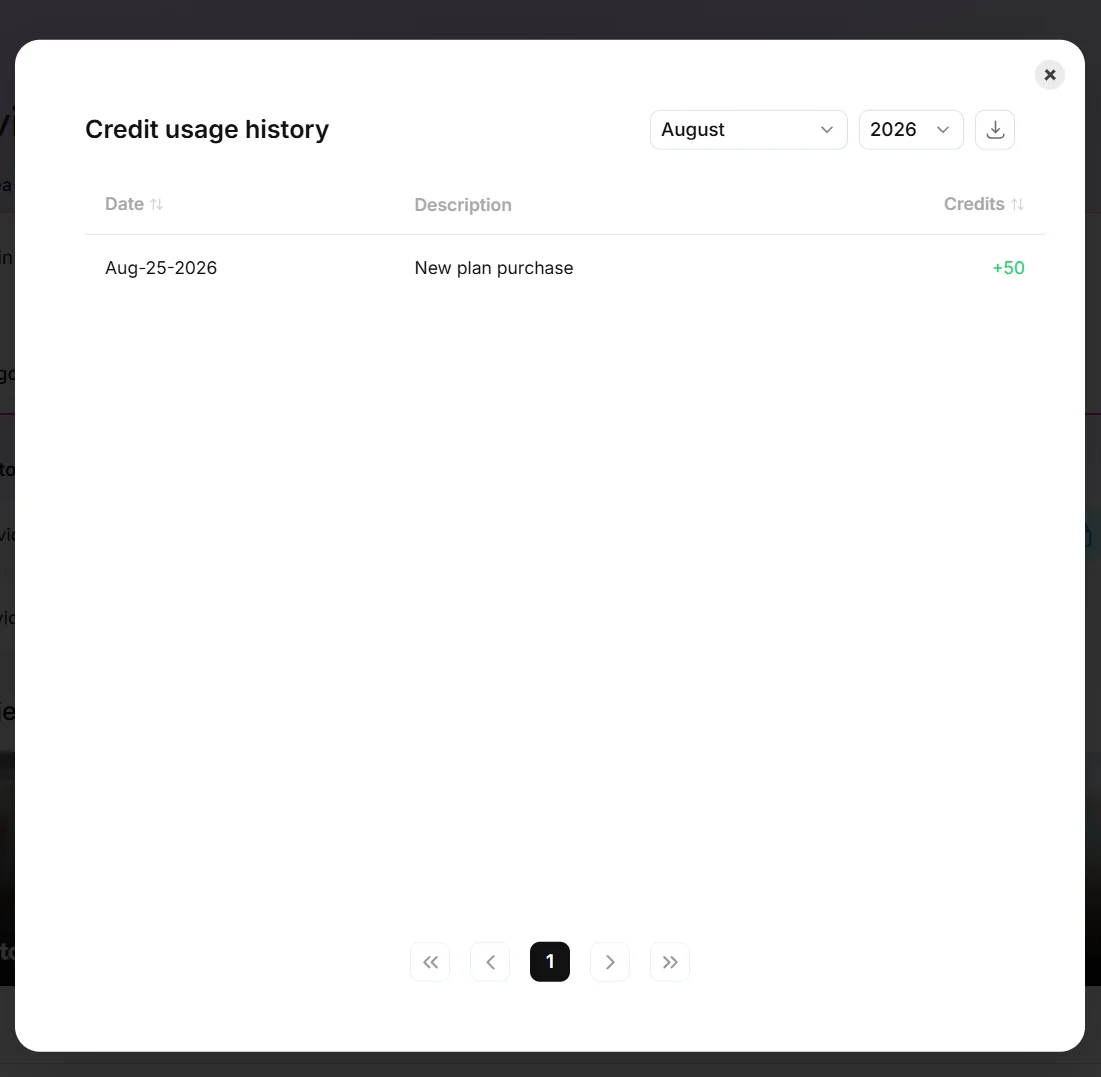
Before generation, the interface estimated 16 AI credits. After producing and downloading the video, the visible balance still showed 50. The credit history contained only “New plan purchase +50” and no deduction. We therefore cannot claim that the test cost 16 credits. The most accurate conclusion is that 16 was a pre-generation estimate and no charge appeared in the visible account history.
Credit history showed only the initial +50 allocation and no generation deduction.
What We Did Not Test
Long-form article or webinar summarization at scale
Team collaboration, approval workflows, and enterprise administration
Custom voice cloning, uploaded voice-over synchronization, or multilingual translation
API access, integrations, or automated batch production
Paid-plan watermark removal and paid support response quality
High-volume credit consumption over a full billing cycle
These exclusions prevent us from making claims about enterprise readiness, long-form consistency, or sustained cost efficiency. The rating reflects the tested short-form script-to-video workflow.
08
Alternatives
Alternative
Choose it for
Trade-off versus Pictory
Exploripo take
InVideo AI
Broader agent-led generation
Free credits can disappear quickly
Stronger concept automation; less predictable value in free use
Synthesia
Polished avatar-led business video
More presenter-centric and paid export
Better avatar realism and voice polish
HeyGen
Avatar video and localization
Free download restrictions
Good voice and lip sync, but our Czech numeric test was imperfect
Adobe Firefly
Creative image, video, and audio generation
Not a direct script-to-stock-video replacement
Much broader creative toolkit; a different workflow
AI Images / Video / Voice
InVideo AI
Rating
6.5 / 10
Price
Free plan; Starter from $20 per seat/month billed annually
Free plan available
Best for: Creators who prefer a project-aware conversational workflow and can actively manage generation credits
InVideo AI offers broader agent-led generation with less predictable Free-credit value.
InVideo AI offers broader agent-led generation, but its Free credits were less predictable in our test. Synthesia and HeyGen are stronger fits for avatar-led video, while Adobe Firefly provides a broader creative toolkit rather than a direct script-to-stock-video replacement.
Comparison of the current reviewed software with selected alternatives
InVideo AI
InVideo AI offers broader agent-led generation with less predictable Free-credit value.
Synthesia
Synthesia is the stronger tested option for polished avatar-led business video.
HeyGen
HeyGen is an avatar and localization alternative with tested presenter output.
Overall rating
7.5 / 10
6.5 / 10
8.0 / 10
7.0 / 10
Price
14-day free trial; Starter $29/month or $25/month billed annually
Free plan; Starter from $20 per seat/month billed annually
Free Basic plan; Starter $29/month
Free plan; Creator $29/month
Free plan
No
Yes
Yes
Yes
Free trial
Yes
No
No
No
Best for
Marketers, educators, bloggers, and small teams prioritizing fast, repeatable script-to-video production
Creators who prefer a project-aware conversational workflow and can actively manage generation credits
Polished multilingual AI-presenter videos without filming a person
Fast short-form AI-presenter drafts with approachable avatar and voice controls
10
Final Verdict
Pictory is a capable, efficient choice for creators who want to transform text into a structured stock-footage video with minimal setup. It performed well on scene assembly, captions, relevant visuals, transitions, and final export. The editor was easier to navigate than several more ambitious agent-led competitors.
It falls short of top-tier voice platforms and polished avatar tools. Two narration options mishandled at least one important number, while the accurate voice sounded generic. Credit presentation also deserves clearer explanation. Those are meaningful limitations, but they do not erase the platform’s core strength: getting from script to a usable first cut quickly.
Exploripo rating: 7.5/10
Recommended for: marketers, educators, bloggers, and small teams prioritizing speed and repeatability. Less suitable for: creators who need distinctive narration, custom cinematic visuals, or a fully transparent free-credit model.