No spam. Just software we’ve actually tested, plus useful reviews, comparisons and recommendations. We’ll send a confirmation email (double opt-in). You can unsubscribe anytime.
Writing & Self-Publishing
Novlr
We tested it
By Exploripo Editorial Team
Novlr is a strong, focused writing home with unusually useful Free-plan portability. Its two-project cap, import cleanup, export-note gaps, and unverified offline behavior keep it from being an all-purpose author platform.
Exploripo rating8.6/10Excellent
Starting priceFree; Starter from $10/month; Studio from $20/month
Novlr is a browser-based workspace for drafting, manuscript organization, planning, goals, and export. Our Free-plan test covered an 803-word story, structured import, five export formats, and read-only sharing.
Bottom line
Novlr is a strong, focused writing home with unusually useful Free-plan portability. Its two-project cap, import cleanup, export-note gaps, and unverified offline behavior keep it from being an all-purpose author platform.
02
At a glance
Pros & Cons
+Pros
Free includes drafting, planning, notes, goals, sprints, analytics, comments, and sharing
Clean section tree supports parent and nested manuscript structure
DOCX, PDF, ODT, RTF, and EPUB all downloaded in our Free-account test
No built-in AI, according to Novlr, with a self-hosted grammar checker
−Cons
Free is limited to two active projects
Dragging sections can change hierarchy if the drop target is imprecise
Our DOCX import added extra front-matter and untitled sections
Planning notes and the editor comment were absent from our notes-inclusive DOCX
03
Audience fit
Who it’s for / Who it’s not for
✓Who it’s for
Novelists and long-form writers who want a browser-based manuscript workspace with clear section navigation.
Writers who want drafting, lightweight planning, notes, goals, and progress tracking in the same product.
Authors who value a useful Free plan and want DOCX, PDF, ODT, RTF, and EPUB export before committing to a subscription.
Writers who deliberately prefer a non-generative-AI environment and are comfortable working primarily online.
×Who it’s not for
Writers who need deep visual plotting, complex series timelines, or a large story bible as the center of the workflow.
Authors who want AI-assisted ideation and scene drafting inside the editor.
Teams that require proven live coediting, reviewer comments, granular permissions, or an audited collaboration workflow.
Anyone who needs a native offline desktop app, tested mobile ergonomics, or guaranteed print- and retailer-ready output.
04
Overview
Novlr organizes work into projects, sections, nested sections, notes, comments, and a planning grid. The manuscript screen keeps the section tree on the left and can show related notes or comments beside the prose. Separate areas track habits, goals, analytics, and a cross-project note library. The result is more structured than a plain online word processor but less elaborate than a dedicated plotting database.
Free supports two projects and the core writing and planning workflow. Starter raises the limit to ten and adds 30-day version history for new subscriptions. Studio advertises unlimited projects and history, an advanced proofreader, cloud backups, priority support, and Novlr Sites. We tested only Novlr Free.
Current independent review evidence is thin. A small set of recent comments liked the clean interface, chapter switching, notes, habits, and no-AI stance, while some writers wanted deeper organization or more than two Free projects. The sample is too small for a representative rating, and older reviews often describe superseded limits, so external sentiment did not affect the score.
05
Features
5.1 Drafting and section organization
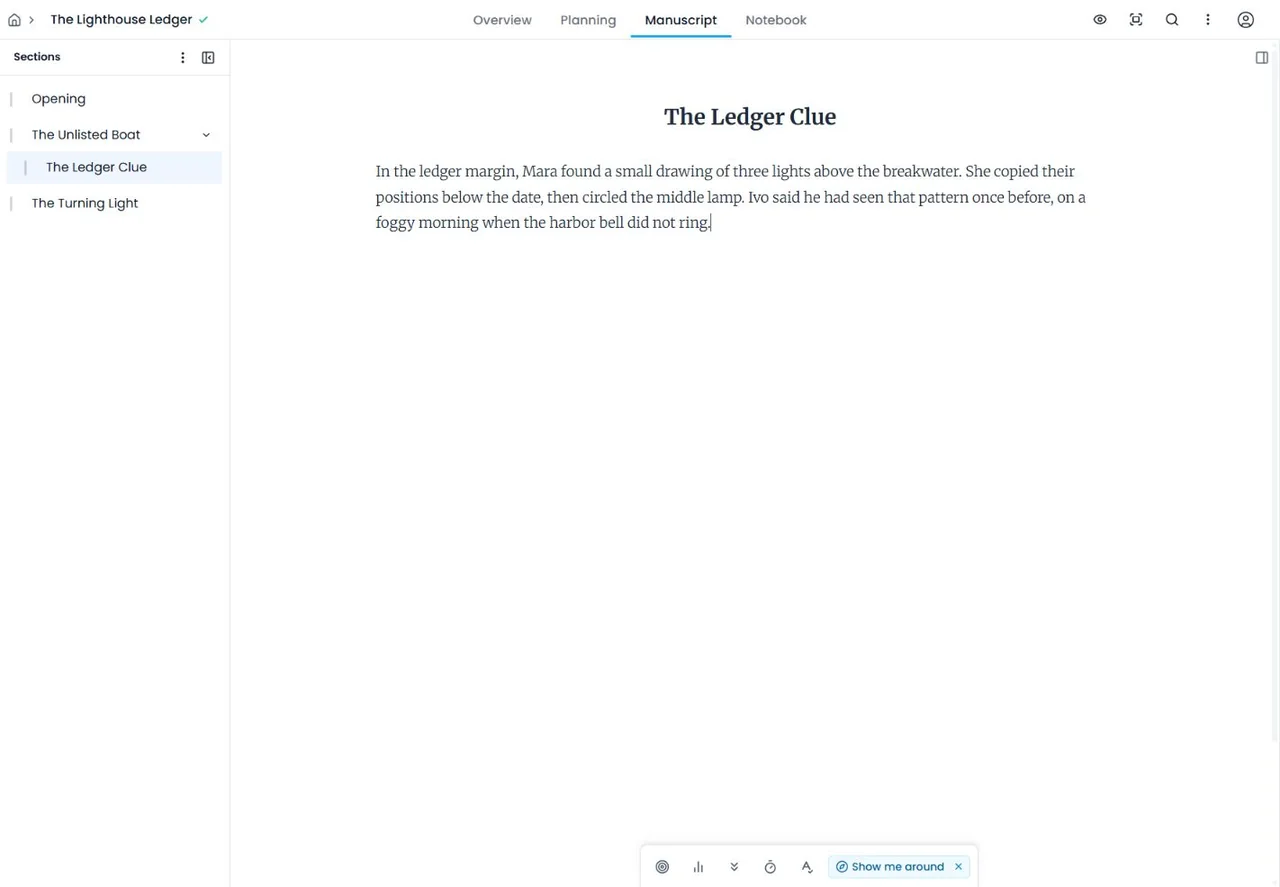
We created The Lighthouse Ledger as three main sections and added The Ledger Clue as a nested subsection. Search found an exact control phrase, comments attached to selected text, and Focus mode hid the surrounding interface while we typed. Dark mode, the dyslexia option, and Typewriter mode were all available, although one short session cannot establish comfort or accessibility for every writer.
Section movement deserves attention. One drag placed a section at the wrong hierarchy level before we repaired it. The controls worked, but the drop target can change nesting as well as order. After one controlled reopen, the prose, section structure, exact markers, and editor comment were still present. That is a successful reopen, not evidence of long-term save reliability.
Figure 1. The manuscript tree supported three parent sections and a nested subsection in Novlr Free.
5.2 Planning grid and notes
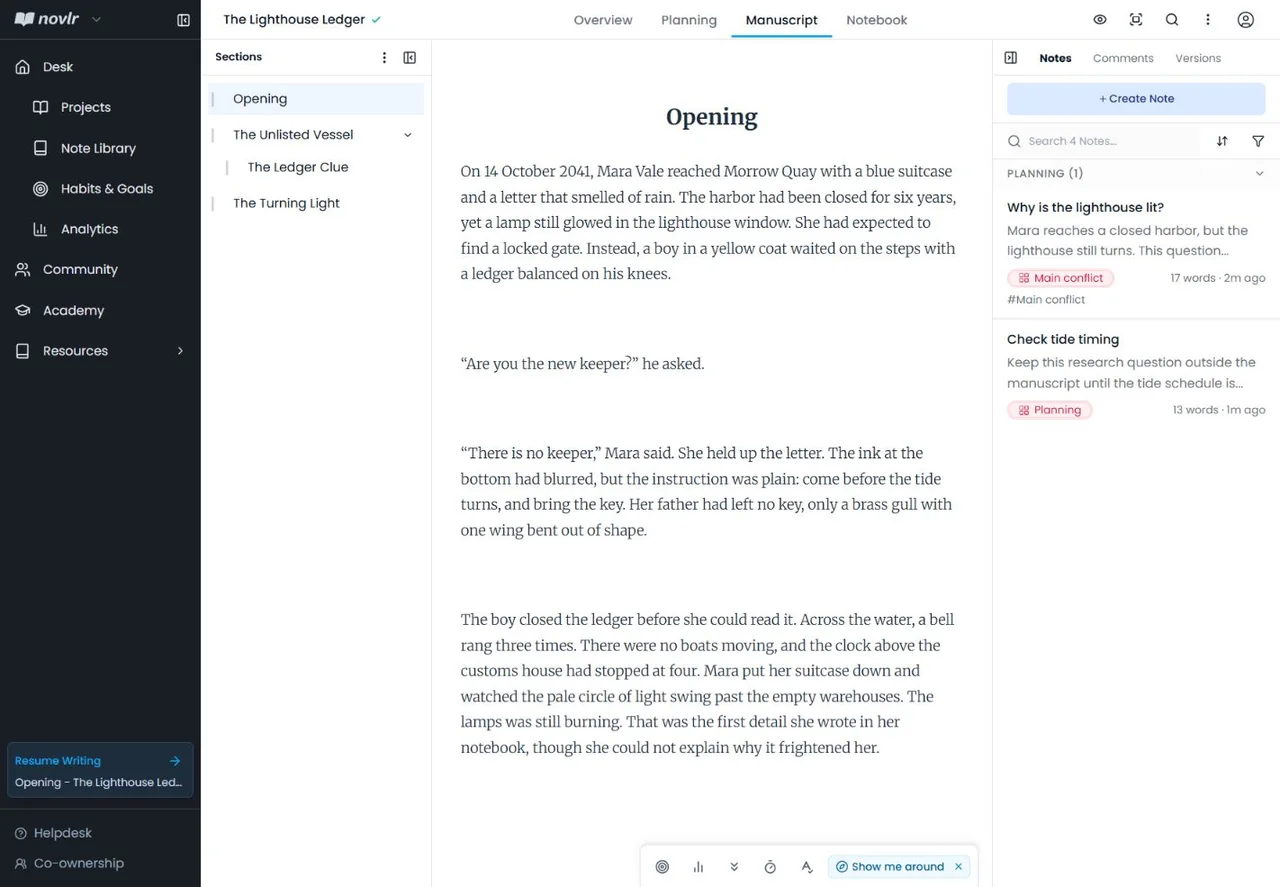
The planning grid let us create three plot threads, assign notes to sections, move a card, and leave one note unassigned. Assigned notes were visible beside the prose and stayed attached through one rename and one reorder, keeping scene-level questions near the draft.
The notebook handled broader reference material. A character note appeared in the project notebook and in the global Note Library with its project label. Only one project contained a populated notebook in our test, so we did not assess cross-project filtering at scale.
Figure 2. Planning notes appeared beside the manuscript and remained linked through one rename and reorder.
5.3 Goals, sprints, and word counts
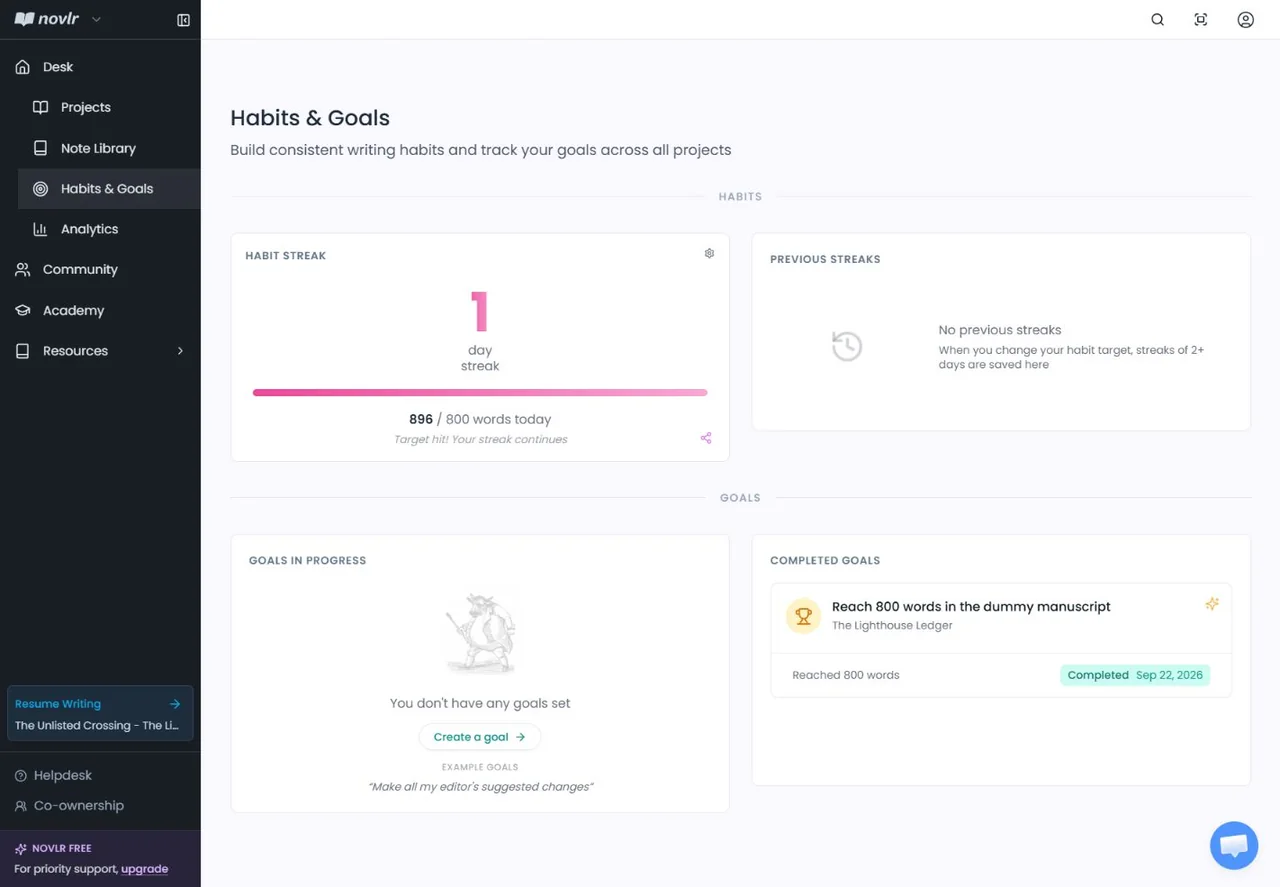
We set an 800-word goal, ran a one-minute sprint, and recorded 12 timed words. Finishing the controlled passage raised both manuscript count and words written by 51. Pasting a ten-word marker increased the manuscript from 793 to 803 while words written stayed unchanged. Typed notebook words affected words written without increasing manuscript count, matching Novlr’s documented distinction in our sample.
The goal moved to completed and the habit showed a one-day streak. That confirms the immediate counters and completion state; it does not prove multi-day streak accuracy or long-term motivational value.
Figure 3. The 800-word project goal completed while the habit recorded the session’s words-written total.
5.4 DOCX and RTF import
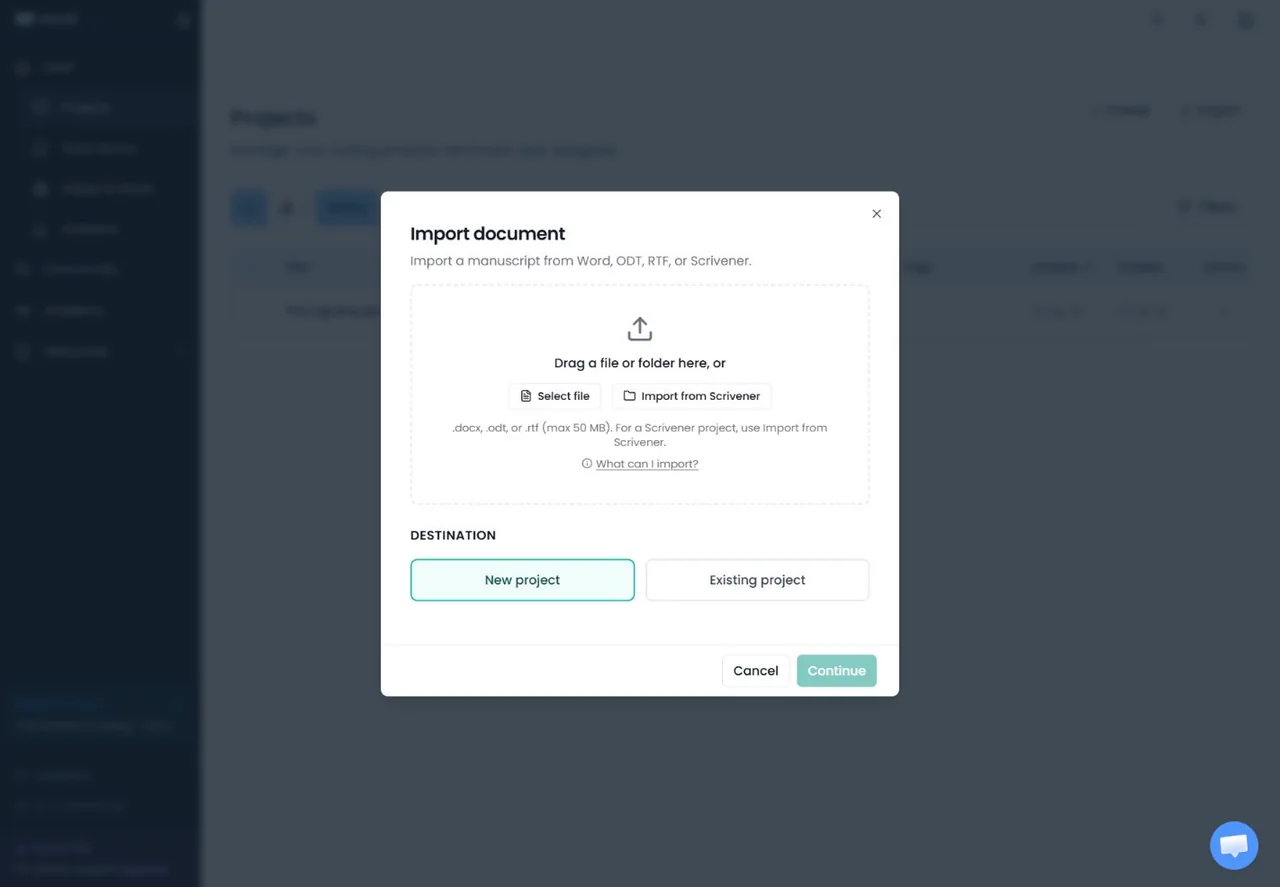
The live import dialog listed DOCX, ODT, RTF, and Scrivener. It displayed and accepted our .rtf fixture, while Novlr’s April 2026 help article spells the extension .rft. The tested interface therefore supports the standard .rtf spelling; the help text appears inconsistent with the current product.
Figure 4. The current import dialog displayed .rtf, resolving the apparent .rft documentation mismatch in the live interface.
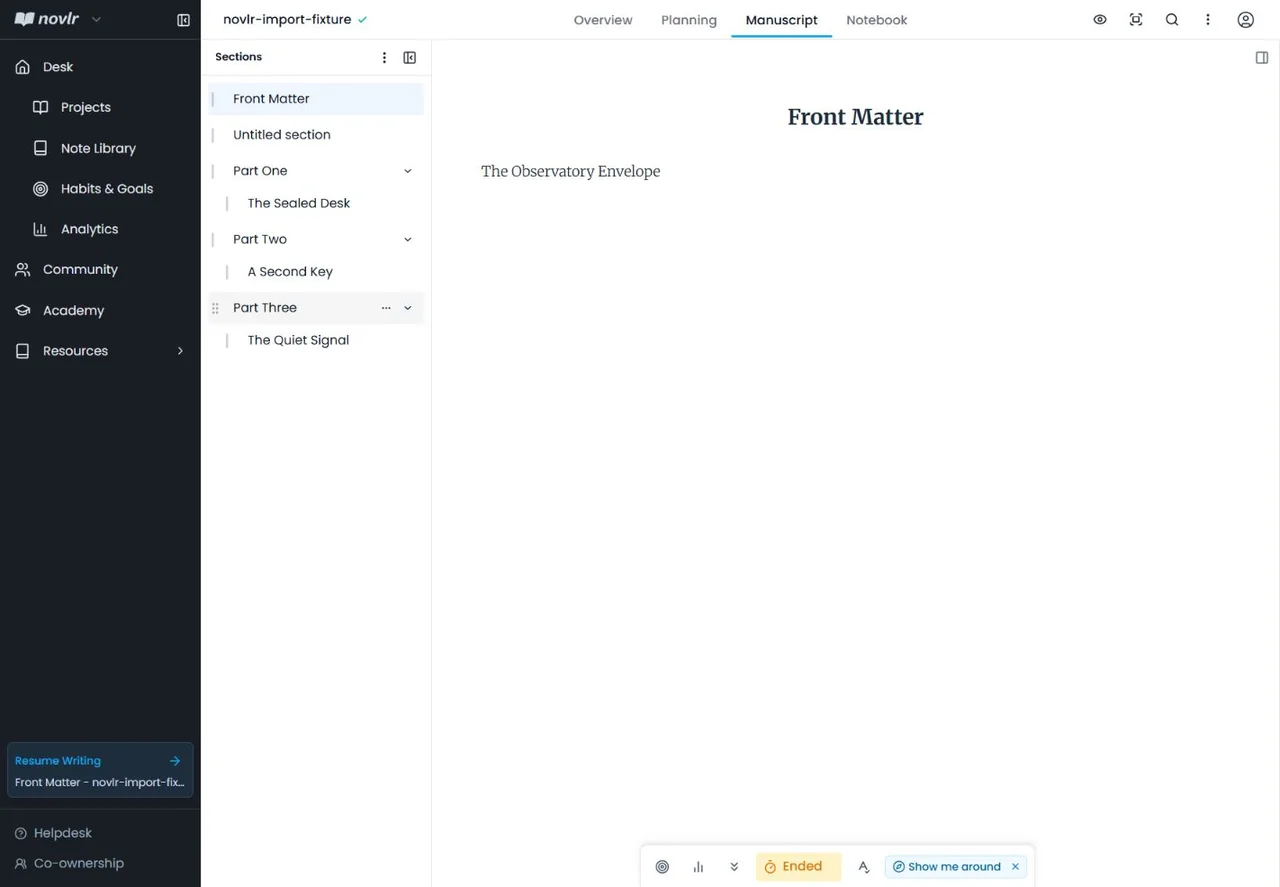
Our structured DOCX contained three Heading 1 parts, three Heading 2 scenes, dialogue, italics, a date, a place name, and a control phrase. Novlr reported eight sections and 188 words. It preserved the H1/H2 parent-child hierarchy, dialogue, tested phrases, and italic sentence, but also created Front Matter and Untitled section entries. The result was usable and recognizable, though it was not a perfect one-to-one split.
Figure 5. The DOCX hierarchy survived as three parent parts and three nested scenes, with two extra structural sections.
5.5 Free-plan export
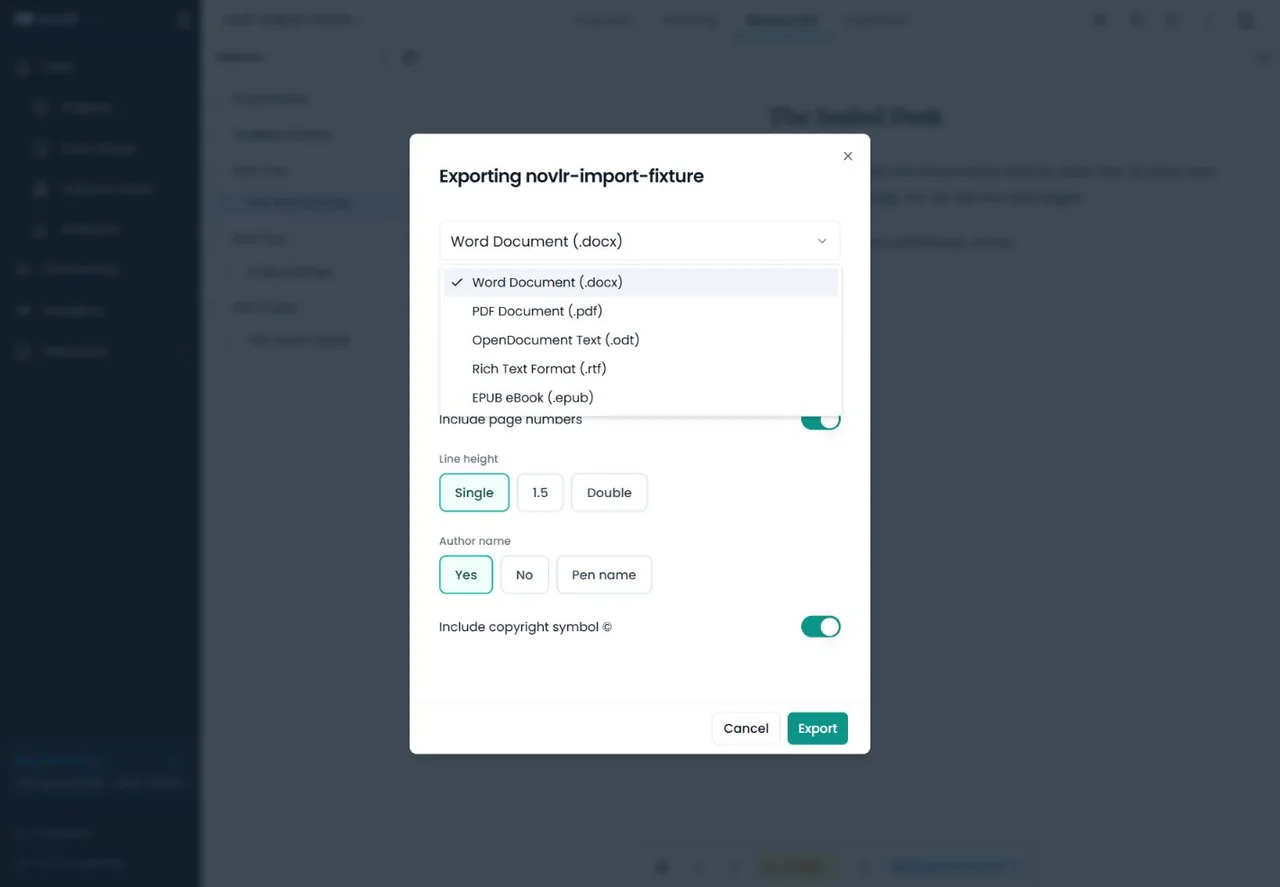
Our Free export menu offered DOCX, PDF, ODT, RTF, and EPUB. We downloaded all five from both test projects, and the controlled section names and text markers were present in all ten baseline files. The imported DOCX kept all eight headings and the italic sentence; a representative PDF page rendered cleanly with hierarchy, dialogue, italics, and page numbering.
Figure 6. Novlr Free exposed five export formats, and each one downloaded successfully in our test.
Portability still needs a final review. The small fixtures did not test images, tables, footnotes, complex typography, print trim, retailer ingestion, or long-manuscript performance. With Include notes enabled, the all-in-one DOCX added the general notebook notes but omitted the three planning-grid notes and the editor comment. Writers should inspect every exported file before editing, submission, or publication.
5.6 Read-only sharing
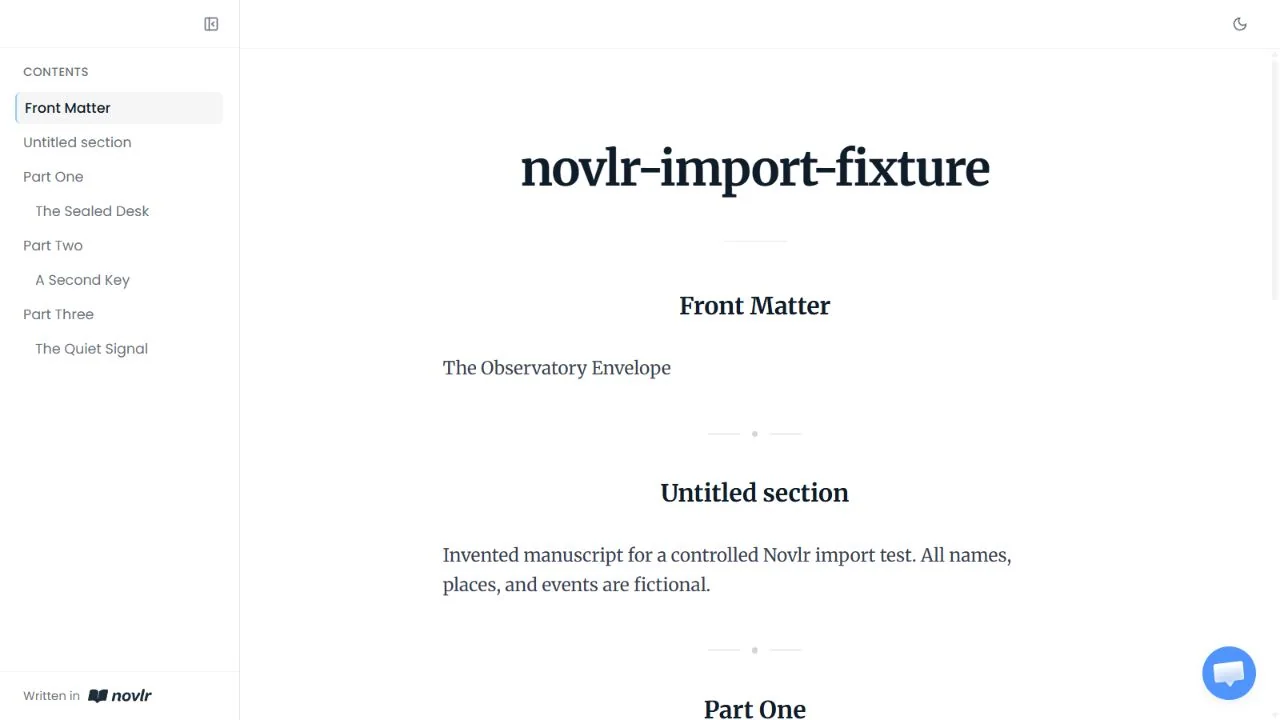
We created a temporary link for the imported dummy project after disabling its cover, synopsis, notes, author credit, and reader resharing. The reader page displayed all eight sections and the test text without visible edit controls. A separate anonymous request reached the shared project without a sign-in prompt, although the visual reader tab used the same browser profile as the account session.
Figure 7. The temporary reader page showed the shared manuscript as a clean, read-only document.
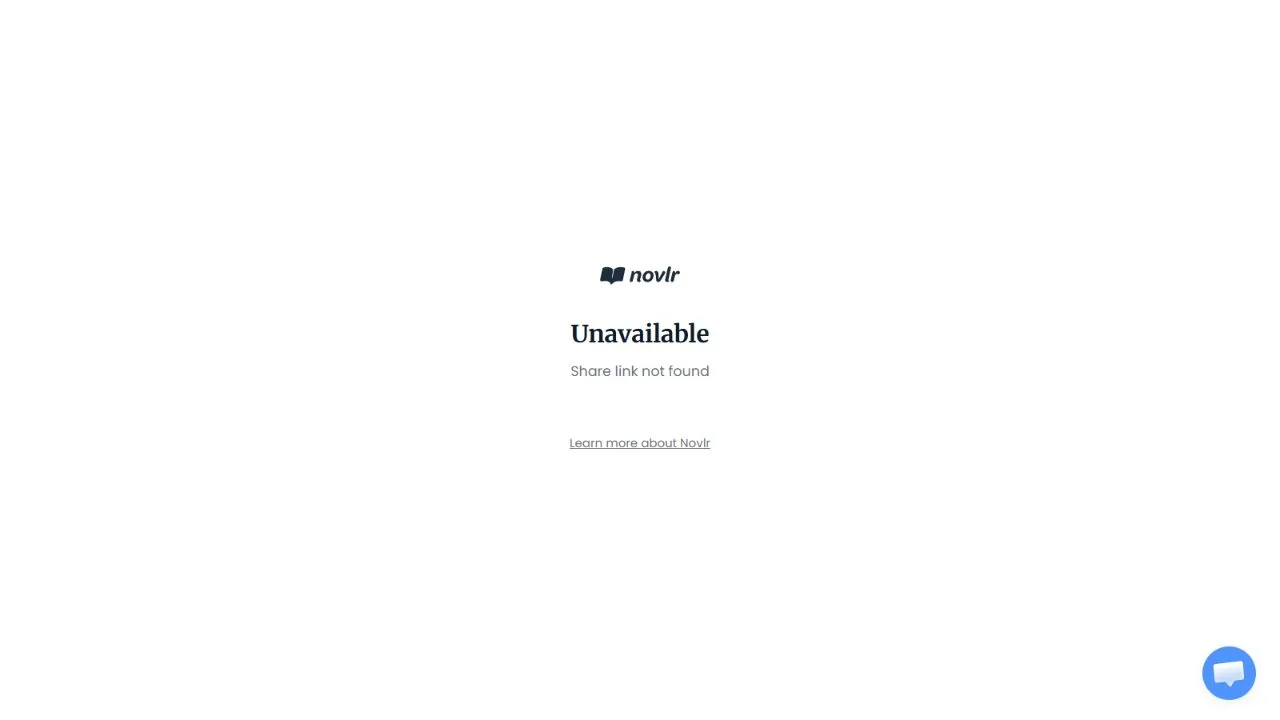
After we stopped sharing, the dialog returned to its creation state and the exact old URL displayed Share link not found. We did not test reader comments, editing, invitations, configurable document access, or live collaboration.
Figure 8. The revoked dummy link no longer opened the manuscript.
06
Pricing
Free; Starter from $10/month; Studio from $20/month
Free plan available
Novlr’s official USD pricing was rechecked on September 22, 2026 in both billing states. The annual figures below are calculated from the displayed monthly equivalents. The public pricing page showed no active paid-trial duration or eligibility terms, so the Free plan should not be described as a paid trial.
Studio access advertised as ongoing; no subscription
Free is unusually complete for one or two active projects. Starter is the practical step for more manuscripts or 30-day history. Studio’s value depends on whether unlimited projects and history, advanced proofreading, cloud backups, support, and the author-site bundle replace other paid services. We did not purchase or test either paid tier.
Novlr says subscriptions renew until cancelled before the billing period ends and are generally nonrefundable. Those are official terms, not a tested cancellation or refund experience. Buyers should confirm the checkout total and current terms before paying.
Free
$0
No subscription
Best for: Trying the core writing workflow
Key features
2 active projects
Core writing, planning, goals, analytics, sharing and export
Limits
Two active projects
Recommended
Starter
$10/month
$96/year when billed annually
Best for: Writers who need up to 10 projects
Key features
10 projects for new subscriptions
30-day version history
Studio
$20/month
$192/year when billed annually
Best for: Writers with unlimited projects
Key features
Unlimited projects and history
Advanced proofreader, backups, support and Novlr Sites
Best value
Lifetime Studio
$499 one time
One-time payment
Best for: Long-term Studio use without a subscription
Key features
Studio access advertised as ongoing
07
Our Experience
Novlr’s strongest quality was coherence. Drafting, sections, planning notes, notebook material, goals, and analytics felt like one environment. The interface left most of the screen to the manuscript, while the planning panel supplied context without requiring a second app.
Free also treated portability as a normal feature. Five working formats, including EPUB, let writers evaluate Novlr without trapping a project behind payment. Import was less exact: useful hierarchy and text survived, but extra sections needed cleanup. Notebook notes, planning notes, and comments also followed different export boundaries.
We appreciated the product’s clear non-AI position. Novlr’s current help page says it has no AI built into the platform, and its privacy policy says it does not use AI to process, analyse, or train on writing. The policy describes a self-hosted LanguageTool checker. These are vendor policy statements, not an independent security audit, but they are a meaningful distinction for writers who want software that organizes their own prose instead of generating it.
What We Did Not Test
A safe offline interruption, reconnection, conflict resolution, or prolonged offline editing
Long-term saving, version-history retention, multi-device synchronization, or a large manuscript
Starter, Studio, Lifetime Studio, any paid trial, advanced proofreading, or Drive/Dropbox backups
Mobile and tablet usability, screen-reader behavior, keyboard-only completeness, or accessibility outcomes
Shared-reader commenting or editing, invitations, live coediting, support, cancellation, refunds, or account deletion
Print production, retailer ingestion, complex manuscript formatting, or the Individual (zip) notes export
08
Alternatives
Alternative
Choose it when
Main trade-off versus Novlr
Exploripo take
Plottr
Visual timelines, plot templates, and linked story-bible records are the priority
Drafting and everyday manuscript work are less central
Better specialist planner; Novlr is the more complete writing home
Sudowrite
AI-assisted fiction ideation, continuation, rewriting, and scene generation are the priority
Generated prose, credit use, and AI review become part of the workflow
Choose it for an AI co-writer; choose Novlr for a non-generative workspace
Grammarly
Proofreading, rewriting, and language feedback are the primary need
It is not a manuscript planner or long-form project home
Use it as an editing layer; Novlr handles the manuscript and project structure
Writing & Self-Publishing
Plottr
Rating
8.0 / 10
Price
Standard $60/year; lifetime $150
Best for: Visual novel planning with structured timelines and a connected story bible
Better specialist visual planner; Novlr is the more complete writing home.
Novlr occupies the middle ground between a word processor and a specialist author platform. Plottr goes deeper on visual structure and template-driven plotting. Sudowrite makes AI generation the core creative partner. Grammarly concentrates on proofreading and rewriting across many writing contexts. Novlr’s advantage is that ordinary long-form work—drafting, section navigation, notes, a lightweight planning grid, progress tracking, sharing, and broad export—lives in one quieter browser workspace.
That breadth does not make Novlr universally better. Writers with complex timelines may outgrow its grid, AI-first authors will miss generative assistance, and intensive editing still benefits from a dedicated language tool or human editor. Novlr is most persuasive when the manuscript itself should remain the center of the system.
Comparison of the current reviewed software with selected alternatives
Visual novel planning with structured timelines and a connected story bible
Fiction writers who want guided ideation, scene-level help, and structured story context
A quick second proofreading pass for everyday English writing
10
Final Verdict
Novlr earns 8.6/10. It gave us a focused place to draft and organize a small manuscript, kept planning notes close to the prose, made goals and writing activity understandable, imported a structured DOCX with manageable cleanup, and exported both projects in five formats on Free. The read-only link also revoked cleanly in our controlled test. Those results make the Free plan useful in its own right rather than a thin preview.
The score stops short of the top tier because the two-project cap arrives quickly, import structure needed cleanup, notes and comments followed different export boundaries, and several important areas remain untested: offline recovery, long-term saving and history, collaboration, mobile use, large manuscripts, and paid features. Novlr is easy to recommend to individual writers who want a calm, non-generative long-form workspace with a strong exit path. Writers who need deep plotting, AI drafting, intensive proofreading, or proven team collaboration should choose a more specialized tool.
Exploripo rating: 8.6/10
Recommended for: individual novelists and long-form writers who want drafting, organization, planning, goals, and broad Free-plan export in one browser workspace. Less suitable for: teams needing proven collaboration, writers who require a native offline app, or authors whose main need is visual plotting, AI generation, or advanced proofreading.
Frequently Asked Questions
Is Novlr free?
Yes. Free costs $0 and supports two projects. In our test it also included planning, notes, goals, sprints, analytics, comments, sharing, and five export formats.
Which export formats are available on Novlr Free?
Our tested Free account successfully downloaded DOCX, PDF, ODT, RTF, and EPUB from both dummy projects. Availability should still be rechecked if Novlr changes its plans.
Can Novlr import DOCX and RTF files?
Yes in our test. A structured DOCX kept its H1/H2 hierarchy, text, dialogue, and italics, plus two extra sections. The live picker displayed and accepted .rtf.
Does Novlr use AI on writers’ work?
Novlr says it has no built-in AI and does not use AI to process, analyse, or train on writing. Its privacy policy describes a self-hosted LanguageTool grammar checker. This is the vendor’s policy statement.
Does Novlr work offline?
Novlr advertises protection for unstable internet and documents browser storage with later syncing. We did not run a safe offline interruption, so we cannot verify recovery, conflict handling, or prolonged offline use.
Can readers edit or comment through a Novlr share link?
Our tested project link displayed the manuscript read-only and became unavailable after revocation. We did not test reader editing, commenting, invitations, or live collaboration.