Writing & Self-Publishing

Grammarly

We tested it By Exploripo Editorial Team

Use Grammarly as a fast second-pass assistant, not an autopilot. Free fundamentals were strong, but the 'Daniel and Daniel' correction, rephrase limits, and paid AI Detector justify 7.5/10.

Exploripo rating 7.5 Very Good
Starting price Free plan; Pro from $30/month
Last updated
Pricing checked
Grammarly document after Free corrections with a score of 90

The essentials

Quick Summary

Grammarly remains one of the easiest ways to add a second proofreading pass to everyday English writing. Its Free web editor improved our controlled sample from 43 to 90, while preserving the tested price and date.

Bottom line

Use Grammarly as a fast second-pass assistant, not an autopilot. Free fundamentals were strong, but the 'Daniel and Daniel' correction, rephrase limits, and paid AI Detector justify 7.5/10.

At a glance

Pros & Cons

Pros

  1. Useful basic spelling, grammar, and agreement checks in Free
  2. Preserved the benchmark price and full date accurately
  3. Clear web editor with immediate score and category feedback
  4. Word and PDF export both completed without payment

Cons

  1. A correction introduced the serious phrase 'Daniel and Daniel'
  2. Advanced rephrase samples ran out during the session
  3. AI Detector and several advanced tools were locked behind Pro
  4. Privacy-conscious users should review the training setting

Audience fit

Who it’s for / Who it’s not for

Who it’s for

  • Students, professionals, marketers, and non-native English writers who want fast feedback on everyday prose.
  • Writers who need a convenient web editor and optional support across many applications and websites.
  • Free users who mainly need spelling, grammar, agreement, and basic tone awareness rather than deep rewriting.
  • Teams and individuals willing to review context and preserve their own voice instead of accepting every suggestion automatically.

Who it’s not for

  • Authors who want manuscript-scale structural reports and detailed long-form style analysis.
  • Users who need AI detection, plagiarism checks, unlimited advanced rewriting, or higher prompt allowances at no cost.
  • Privacy-sensitive organizations requiring custom data controls, regional hosting commitments, or enterprise agreements.
  • Anyone expecting automated proofreading to understand names, domain terminology, intent, and nuance as reliably as a human editor.

Overview

Grammarly combines spelling and grammar correction with clarity, delivery, tone, rewriting, generative AI, plagiarism checking, and AI detection. Its main advantage is reach: Grammarly Docs works in a browser, while separate desktop and browser integrations can surface suggestions in many writing environments. The Free plan can be used indefinitely and includes core correctness feedback, tone visibility, and 100 AI prompts per month.

The current limits matter for heavier users. Grammarly says an account can be used on up to five devices. It lists rolling limits of 300 documents or 150,000 words in 30 days and 100 documents or 50,000 words in 24 hours. A Grammarly Docs document can contain up to 100,000 characters, and uploads are capped at 4 MB. DOC, DOCX, ODT, TXT, and RTF uploads are supported, while PDF, LaTeX, and Markdown uploads are not.

4.1 What other users repeatedly report

Independent reviews strongly support Grammarly's ease-of-use advantage, but they also repeat the context problem seen in our test. At our August 25, 2026 check, G2 displayed about 4.7/5 from 13,568 reviews and Software Advice displayed 4.7/5 from 7,218 reviews. Users commonly praise real-time corrections, clear explanations, broad integrations, writing improvement, and time savings. Software Advice also displayed 4.8 for ease of use, with functionality at 4.6 and value and support at 4.5.

G2's negative-theme counts were substantial: incorrect corrections appeared in 618 mentions, inaccuracy in 549, poor suggestions in 427, incorrect suggestions in 420, and irrelevant suggestions in 388. Trustpilot showed a lower 3.2/5 from roughly 10,000 reviews, with recurring complaints about cancellation, refunds, support, subscription expectations, and product behavior. Reddit discussions repeat frustration with locked advanced suggestions, contextually wrong recommendations, and unstable scores or suggestion counts. These platforms serve different populations, so we do not average their ratings. Billing and support were not part of our test.


Features

5.1 Baseline analysis and basic corrections

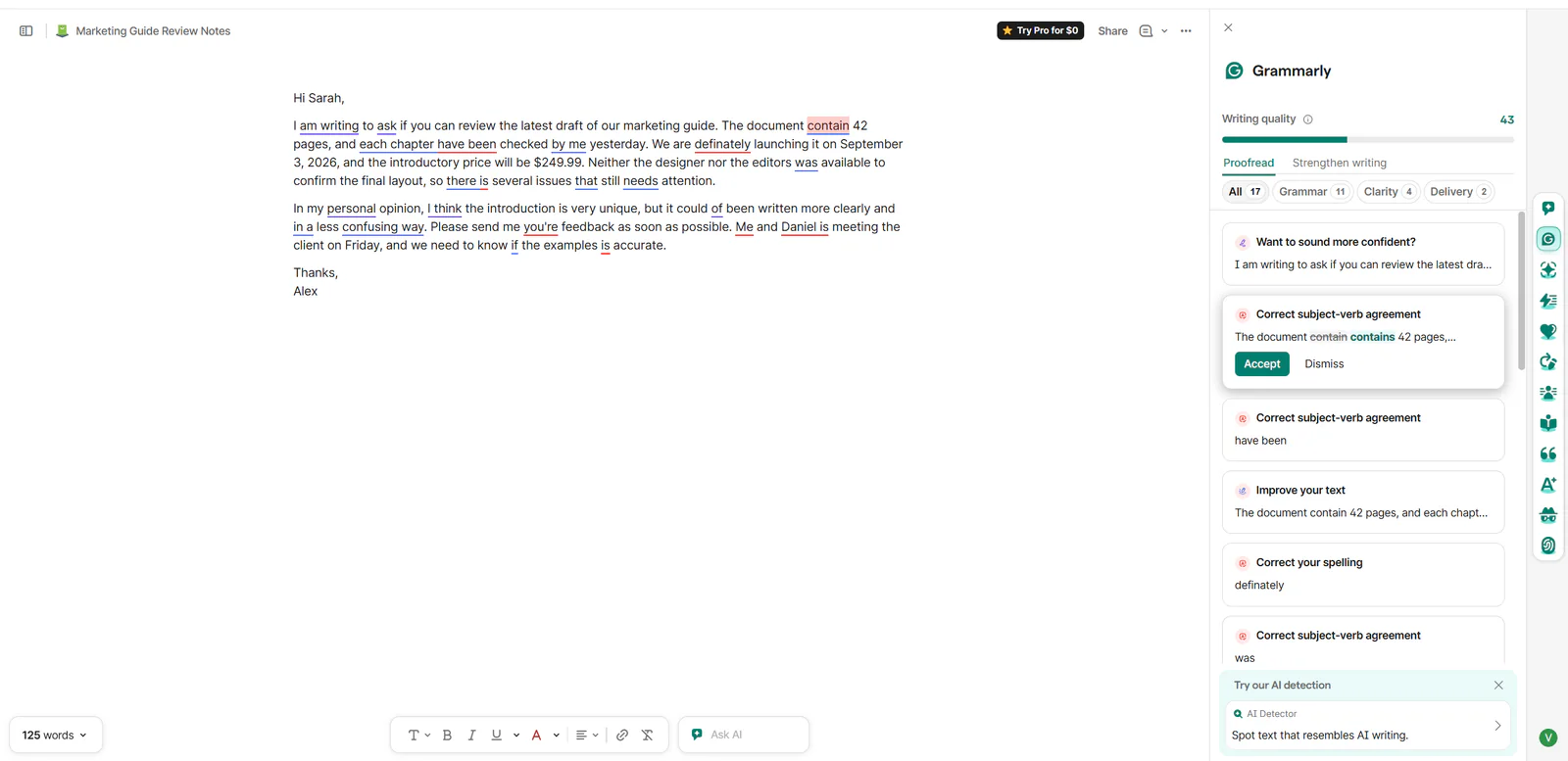
Our controlled text included 'contain' instead of 'contains,' 'definately,' agreement problems, an incorrect possessive, awkward phrases, and a sentence beginning 'Me and Daniel is meeting.' Grammarly identified 17 issues and grouped them clearly. Accepting several Free corrections lifted the score from 43 to 72, then to 90. The price and date remained accurate throughout, which is useful for business copy where punctuation around numbers can be fragile.

Grammarly baseline analysis showing a writing-quality score of 43
Figure 1. The controlled sample opened at writing quality 43 with 17 suggestions.

5.2 Free samples and Pro boundaries

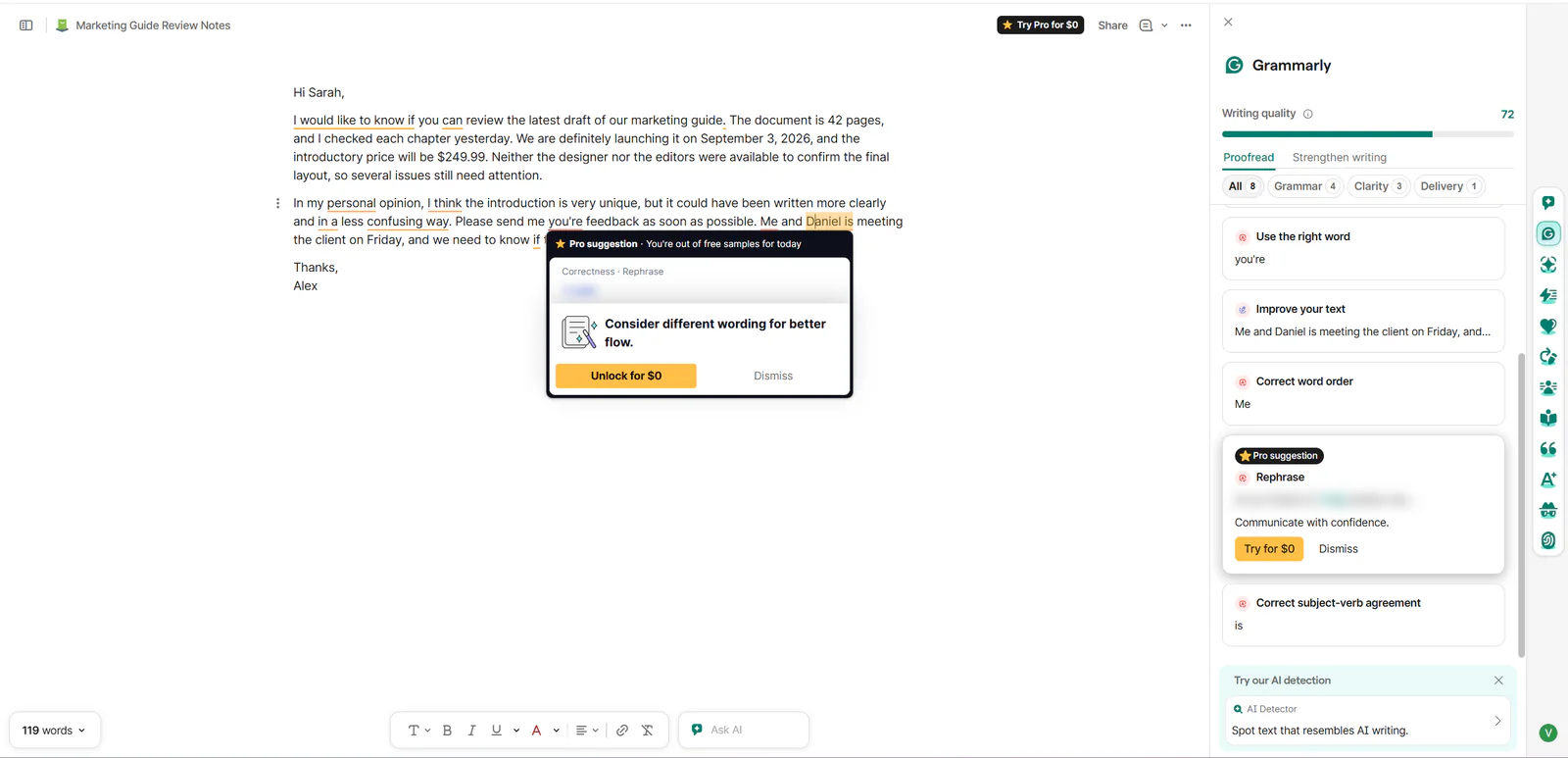
Grammarly distinguished basic corrections from advanced help less cleanly than we would like. When we selected an advanced rephrase, a popover said we were out of Free samples for the day and offered a $0 Pro trial. Basic grammar corrections still worked afterward, so this was not a daily lockout of the Free proofreader. Official documentation similarly says Free users receive a limited number of Paraphraser suggestions per day. The distinction should be more explicit because the message can look like a broad usage cap.

Grammarly popover showing that Free Pro-rephrase samples were exhausted
Figure 2. The daily sample message applied to an advanced Pro rephrase, not all basic corrections.

5.3 Context accuracy failure

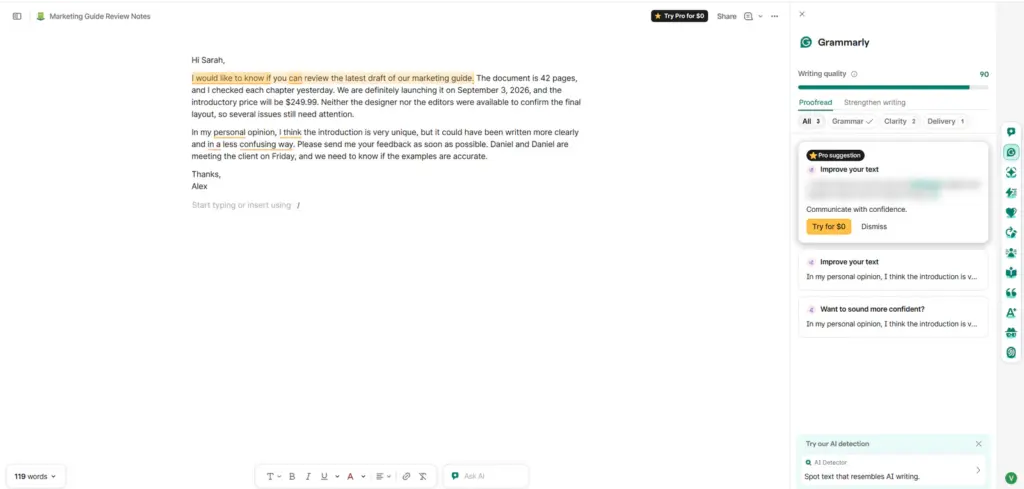
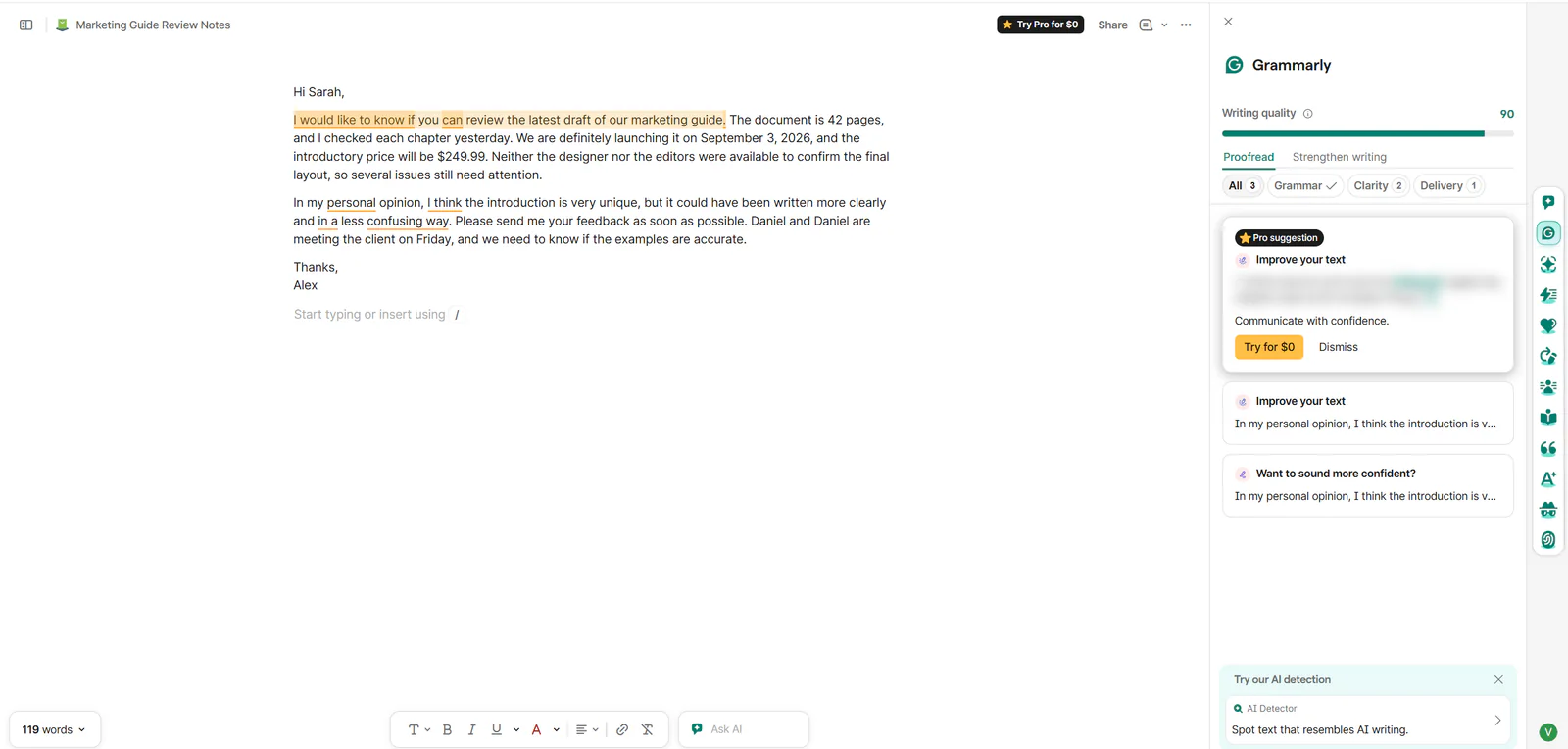
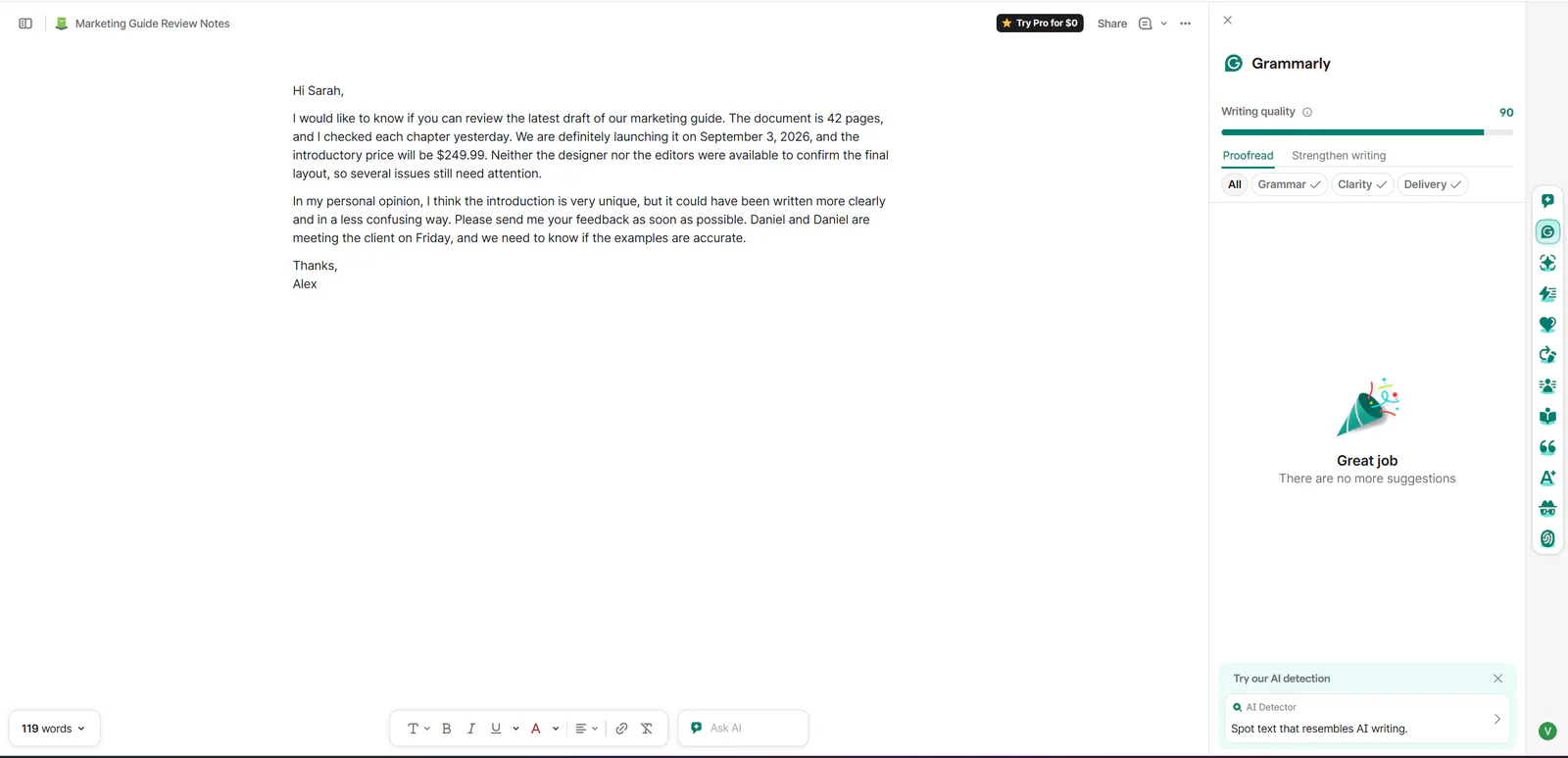
The largest problem was not a missed comma. Grammarly transformed a deliberately incorrect sentence into 'Daniel and Daniel are meeting the client on Friday.' The correction fixed agreement but duplicated the person's name and removed the speaker. After the remaining style suggestions were dismissed, Grammarly displayed 'Great job' and no more suggestions while the error remained. We manually restored 'Daniel and I are meeting.' This shows why a high score is not a factual or semantic guarantee.

Grammarly document after Free corrections with a score of 90
Figure 3. A score of 90 still contained the duplicated-name correction.
Grammarly showing no suggestions while a duplicated name remains in the text
Figure 4. Grammarly reported no remaining suggestions while the duplicated name was still present.

5.4 AI Detector

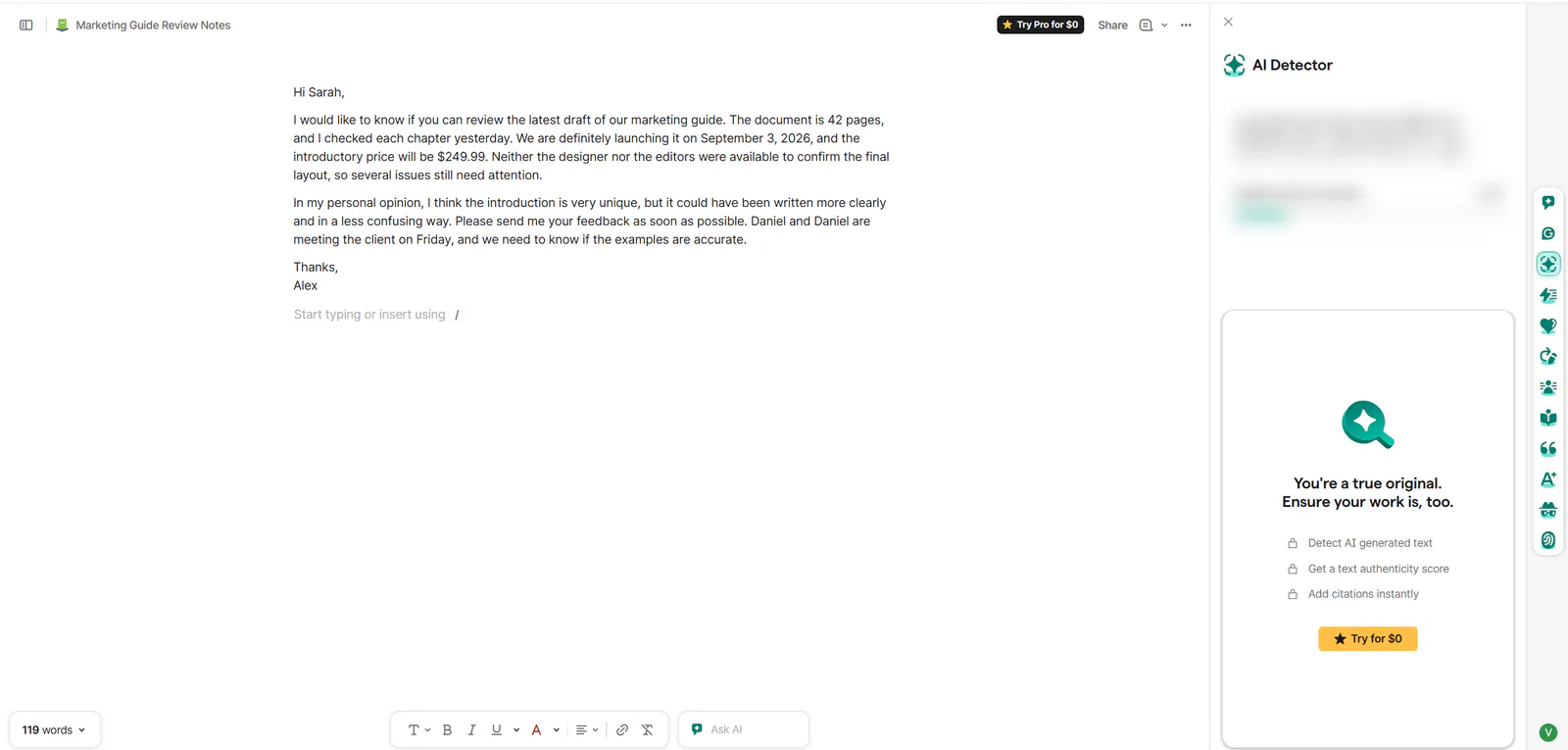
AI Detector appeared in the side toolbar but was unavailable in the tested Free account. The panel locked AI-generated-text detection, authenticity scoring, and citation tools behind the Pro trial. Grammarly's official guide confirms that AI Detector is a paid feature. It also says the result is an estimate rather than objective truth and that shorter passages are harder to classify. We therefore did not score detection accuracy.

Grammarly AI Detector locked behind a Pro trial
Figure 5. AI Detector was visible but locked behind the Pro trial in Free.

5.5 Word and PDF export

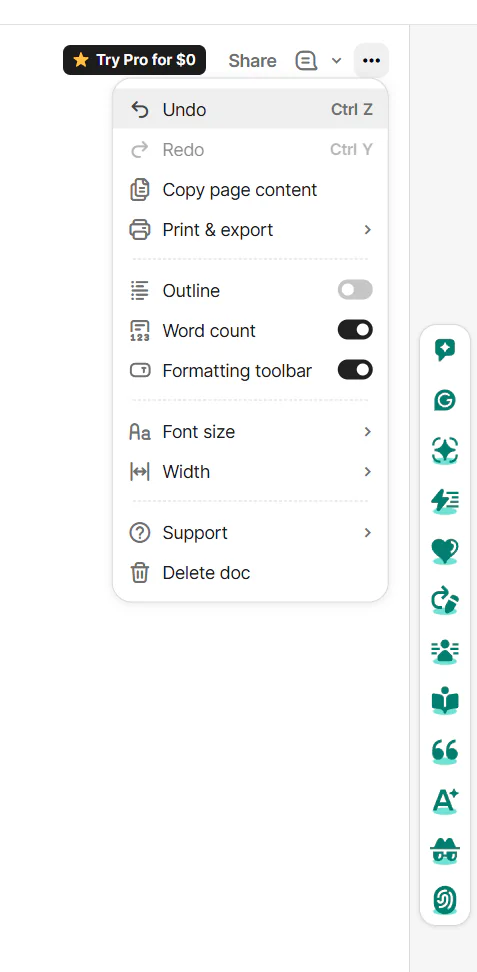
The three-dot menu offered Print, Export to PDF, and Export to Word (.docx). Both files downloaded successfully. Their normalized body text matched and contained $249.99, September 3, 2026, and the manually corrected 'Daniel and I are meeting.' The PDF added a title page; the DOCX contained five paragraphs. A gray code-like style around the manually pasted correction came from rich formatting in the clipboard, so it is not recorded as a Grammarly export bug.

Grammarly export menu with Word and PDF options
Figure 6. The Free web editor offered PDF and Word export.

Official documentation warns that export may not preserve images, footnotes, charts, indentation, spacing, justification, citations, some highlights, callouts, formulas, bookmarks, comments, or columns. Our simple text sample did not test those elements. For complex source documents, export should be treated as a convenience copy and checked visually before delivery.

Pricing

Free plan; Pro from $30/month

  • Free plan available
  • Free trial available

Pricing recheck on September 12, 2026: Grammarly's official support page still listed Pro at $30 monthly, $60 every three months, or $144 annually ($12 per month equivalent). The plans page still advertised a seven-day Pro trial. No material pricing correction was required.

Pricing was checked on August 25, 2026 from Grammarly's official USD pages. Pro can be billed monthly, quarterly, or annually. The advertised $12 per month is an annualized rate, not a month-to-month price. The public plans page showed a seven-day Pro trial with $0 charged immediately and an email reminder two days before the trial ends.

Plan / termCurrent USD priceEffective monthlySelected inclusions
Free$0$0Basic corrections, tone visibility, 100 AI prompts/month
Pro monthly$30/member/month$30Advanced rewrites, tone, AI detection, plagiarism, 2,000 prompts/month
Pro quarterly$60/member/3 months$20Same Pro feature set; billed every three months
Pro annual$144/member/year$12Lowest published effective monthly rate; annual commitment
EnterpriseContact salesCustomOrganization controls, security, service, and deployment options

Pro is expensive when purchased month to month, but the annual rate is easier to justify for people who use advanced rewrites, plagiarism checking, AI detection, and generative prompts every day. A trial must be cancelled before renewal to avoid the charge. Grammarly says cancellation ends the trial immediately, refunds are generally available only where required by law, and it does not sell lifetime or one-time subscriptions.

Value judgment: Free is enough for routine proofreading if the writer accepts the feature locks and reviews context carefully. Pro makes more sense for frequent professional or academic workflows that genuinely use the advanced tools. Buying Pro only to chase a perfect writing-quality score would be poor value because the score cannot verify meaning, truth, or voice.

Free

$0

No fixed term

Key features

  • Basic writing suggestions
  • 100 AI prompts

Pro monthly

$30/month

Monthly

Key features

  • Advanced suggestions and rewriting
  • 2,000 AI prompts

Pro quarterly

$60/3 months

$20/month effective

Key features

  • Pro feature set
  • Best value

Pro annual

$144/year

$12/month effective

Key features

  • Pro feature set

Enterprise

Custom pricing

Contact Grammarly

Key features

  • Enterprise controls and agreements

Pricing note: Pro remains $30 monthly, $60 quarterly, or $144 annually ($12/month equivalent); a seven-day Pro trial was still advertised on 2026-09-12.

Pricing checked:

Try it

Our Experience

The web editor was clean, responsive, and easy to understand. It did not force a desktop download, and the score/category structure made progress visible. Grammarly's strongest moment was ordinary mechanical cleanup: it found numerous deliberate problems quickly, explained the categories, and preserved the benchmark number and date. Export completed in both advertised document formats.

The test also captured Grammarly's central risk. A confident-looking suggestion can be grammatically smoother but semantically wrong. The duplicate-name result was easy to notice in a short sample, yet the same failure could survive inside a long email, report, or manuscript. The later 'no suggestions' state reinforced that the interface measures its own remaining rules, not whether the document is actually correct.

Privacy deserves a deliberate choice. Grammarly says it does not sell user content, encrypts data, and stores editor documents until they are deleted. For individual Free, Premium, and single-user Pro accounts, Product Improvement and Training is enabled by default and can be turned off. Organizations should evaluate the applicable plan and controls before processing confidential or regulated text.

What We Did Not Test

  • A paid Pro subscription, checkout, renewal, cancellation, refunds, or customer support
  • Desktop and browser extensions across third-party applications, mobile keyboards, or five-device behavior
  • Plagiarism checking, paid AI Detector accuracy, Authorship, citations, or 2,000-prompt Pro usage
  • Long manuscripts, 100,000-character documents, upload limits, complex formatting, or collaboration
  • Languages beyond the controlled English sample, enterprise controls, or organization-wide deployment

Alternatives

AlternativeChoose it forTrade-off versus GrammarlyExploripo take
LanguageToolBroad multilingual checking and a lighter-cost optionLess polished English guidance and ecosystem depthStart here when languages or budget matter most
ProWritingAidLong-form style analysis for books and manuscriptsDenser interface and more editorial frictionBetter for authors who want deep reports
Microsoft EditorBasic checks inside Microsoft 365 and EdgeFewer advanced writing and coaching toolsGood value when Microsoft 365 is already paid for
QuillBotParaphrasing and rewriting workflowsLess focused on continuous contextual proofreadingUseful companion when transformation matters more than correction

How it compares

LanguageTool is the more relevant alternative for multilingual and budget-sensitive proofreading, while ProWritingAid is aimed more directly at long-form authors. Microsoft Editor is the economical option for Microsoft 365 users, and QuillBot focuses more on rewriting and transformation.

Final Verdict

Grammarly Free earns its place as a fast, accessible proofreading layer. It caught many obvious mistakes, presented feedback clearly, kept the benchmark price and date intact, and exported clean text to Word and PDF without payment. Those strengths explain its broad popularity and make it easy to recommend for routine drafts.

It is not an editor you should obey automatically. The duplicated-name correction was a meaningful context failure, advanced rephrasing samples ran out, AI Detector was paywalled, and privacy-conscious users need to review the default training control. Grammarly is most useful when a writer accepts only suggestions that preserve meaning and performs one final read without the score as a distraction.

Exploripo rating: 7.5/10

Recommended for: students, professionals, marketers, and everyday English writers who want a strong second pass. Less suitable for: users who need perfect contextual judgment, free AI detection, deep manuscript analysis, or enterprise-grade privacy commitments without choosing an appropriate paid plan.

Sources 8 sources