No spam. Just software we’ve actually tested, plus useful reviews, comparisons and recommendations. We’ll send a confirmation email (double opt-in). You can unsubscribe anytime.
Writing & Self-Publishing
Plottr
We tested it
By Exploripo Editorial Team
Plottr earns 8.0/10 and is easy to recommend to writers who think visually and want an outline plus a connected story bible. It is less compelling for discovery writers or authors expecting a polished manuscript editor.
Plottr is one of the most focused visual planning tools for novelists and series writers. It is not a drafting app and it does not try to generate a story for you. Instead, it turns beats, plotlines, scenes, characters, places, and notes into a connected planning workspace. In our Windows trial, that specialist approach worked.
Bottom line
Plottr earns 8.0/10 and is easy to recommend to writers who think visually and want an outline plus a connected story bible. It is less compelling for discovery writers or authors expecting a polished manuscript editor.
02
At a glance
Pros & Cons
+Pros
Deep plotting, character, and story-structure templates
Clear visual timeline with multiple plotlines and linked records
Useful character, place, note, tag, Plan, and Fulltext tools
Auto-save and Word export worked in the free trial
−Cons
Some controls, especially linking, are difficult to discover
Standard depends on careful local file and sync management
Default Word export is basic, bulky, and omits premise/theme
Pro lifetime pricing is high; auto-renewal and no-refund terms matter
03
Audience fit
Who it’s for / Who it’s not for
✓Who it’s for
Novelists and series writers who want to see beats, plotlines, and scenes on a visual timeline.
Plot-first writers who use the Snowflake Method, Save the Cat, romance beats, mystery formulas, or other structured frameworks.
Authors who want character, place, tag, and note records linked directly to scene cards.
Writers who prefer a manual planning tool with no generative AI.
×Who it’s not for
Discovery writers who rarely outline and would treat a large planning system as overhead.
Authors who mainly need drafting, revision, formatting, or publishing tools rather than prewriting structure.
Linux desktop users who need official native support; Plottr Pro's browser app is the relevant option instead.
Teams that need low-cost real-time collaboration or seamless two-way synchronization with an existing Scrivener project.
04
Overview
Plottr organizes planning around a horizontal timeline. Chapters or beats run across the top, plotlines run down the side, and cards sit at their intersections. Cards can hold formatted descriptions, attributes, characters, places, tags, notes, and color. Writers can filter the board or switch to a linear outline.
The supporting databases are more important than they first appear. Characters can use reusable templates such as Character Bio, Character Arc, personality frameworks, or custom attributes. Places and notes have their own records. Once those records are attached to scene cards, Plottr behaves like a compact series bible rather than a loose board of digital index cards.
Standard Plottr is the local desktop product. Plottr Pro adds browser access, cloud files and backups, real-time synchronization, and collaboration. All collaborators need Pro. The vendor says Standard can be installed on unlimited household devices, but local files still need a deliberate backup and synchronization plan. Plottr also makes a clear product choice not to include generative AI.
4.1 What other users repeatedly report
Independent feedback broadly supports the strengths in our test. Capterra displayed 4.8/5 from 237 reviews, including 4.7 for ease of use and 4.9 for customer service. Trustpilot displayed 4.6/5 from 120 reviews, although only one review had appeared in the prior 12 months, so its recent sample was weak. G2 displayed 4.8/5 from only two reviews and is too small for recurring conclusions.
Across Capterra, Trustpilot, and qualitative Reddit discussions, users repeatedly praise the visual timeline, drag-and-drop organization, plotting templates, character and series tracking, and responsive human support. Many writers say the app becomes straightforward after the first learning period.
Repeated cautions include a learning curve, controls that are not always self-explanatory, and anxiety about local project files. Some writers consider the lifetime or Pro price high. Scrivener support is export, not two-way synchronization: Plottr creates a new file and cannot update an existing project. Isolated stability complaints exist but are not the normal experience.
05
Features
5.1 Templates and first project
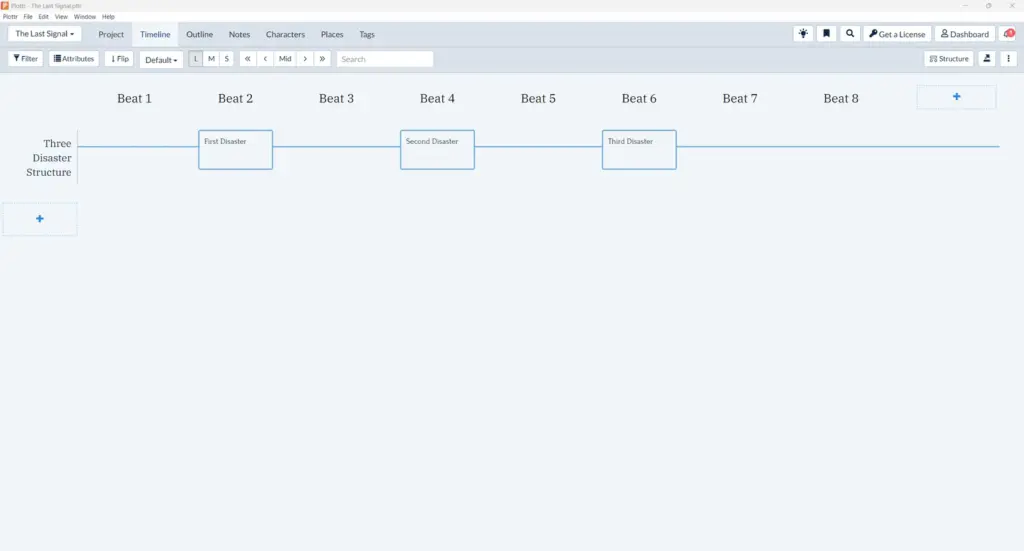
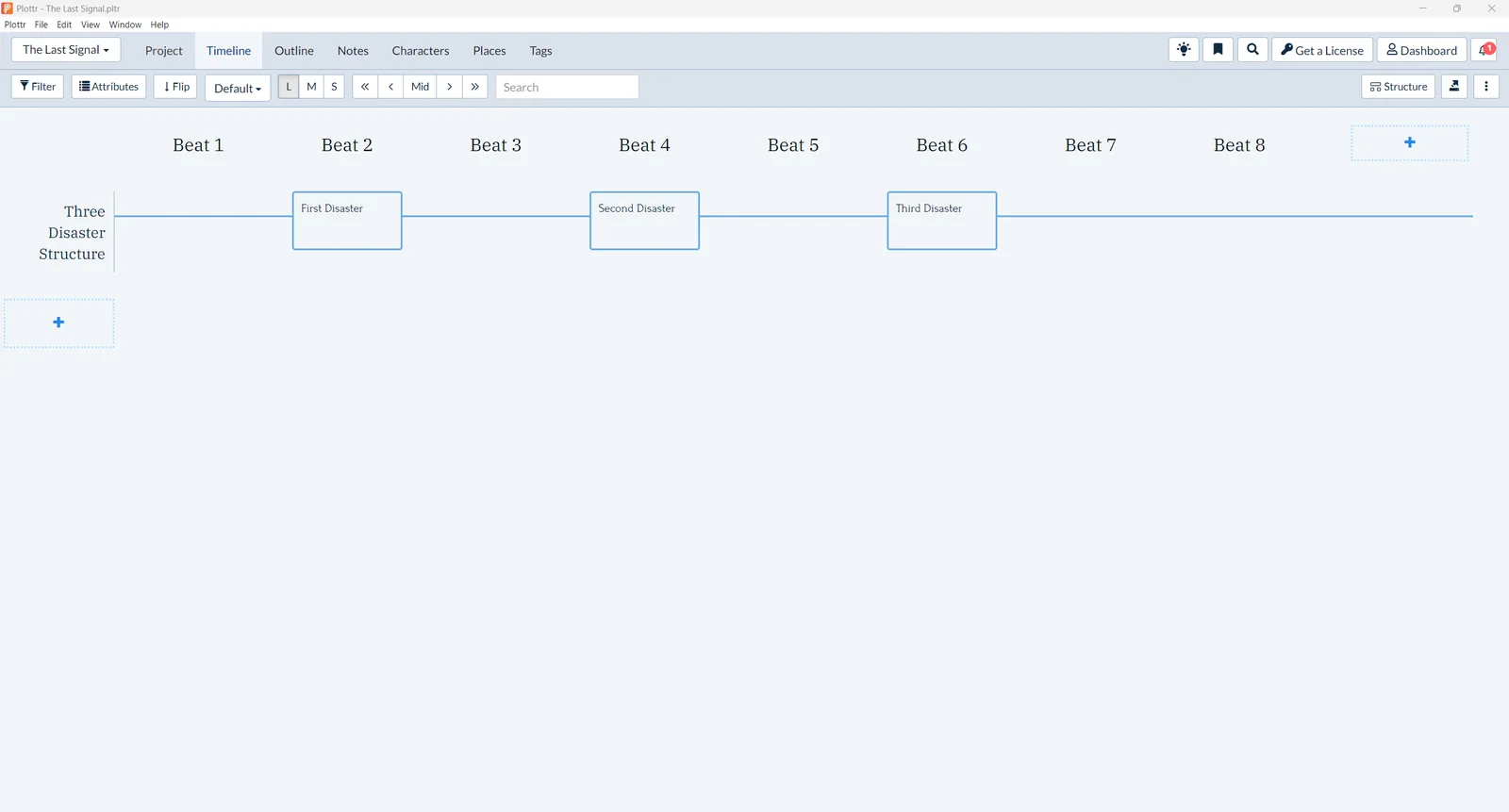
After registration and installation, the home screen offered blank projects, templates, existing files, and imports. The template picker contained project-level frameworks plus a long starter-template library. We selected Snowflake Method, which created eight beats and positioned First, Second, and Third Disaster cards at the expected stages.
This is Plottr's strongest onboarding move. A writer is not facing an empty canvas, and the built-in explanation shows what each structural milestone is meant to do. The trade-off is volume: the template also adds a large notes library and instructional copy that can remain mixed with the writer's own material.
The Snowflake Method created eight beats and three pre-positioned disaster cards.
5.2 Timeline and scene editing
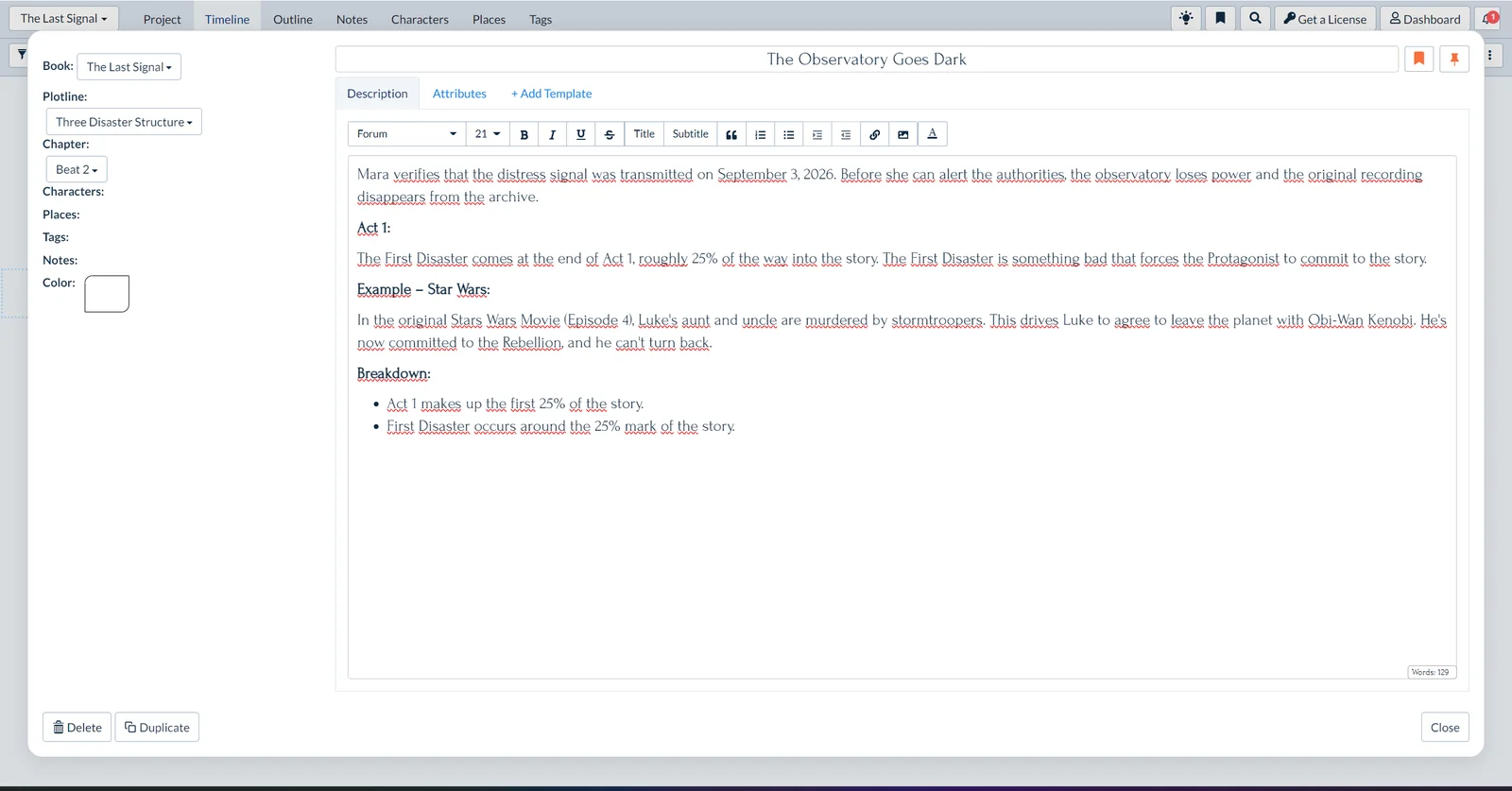
We changed First Disaster to 'The Observatory Goes Dark' and added a scene in which Mara verifies a distress signal dated September 3, 2026 before the observatory loses power and the recording disappears. The title, rich text, chapter assignment, plotline, and word count all behaved as expected.
The interface is functional rather than modern. Toolbars are dense, typography feels dated, and valid English prose received heavy red underlining. None of that prevented work, but it adds visual noise. The timeline itself remained clear and gave the scene an immediately understandable position in the story.
Our custom disaster scene retained the exact date and sat inside the template guidance.
5.3 Characters, places, notes, and links
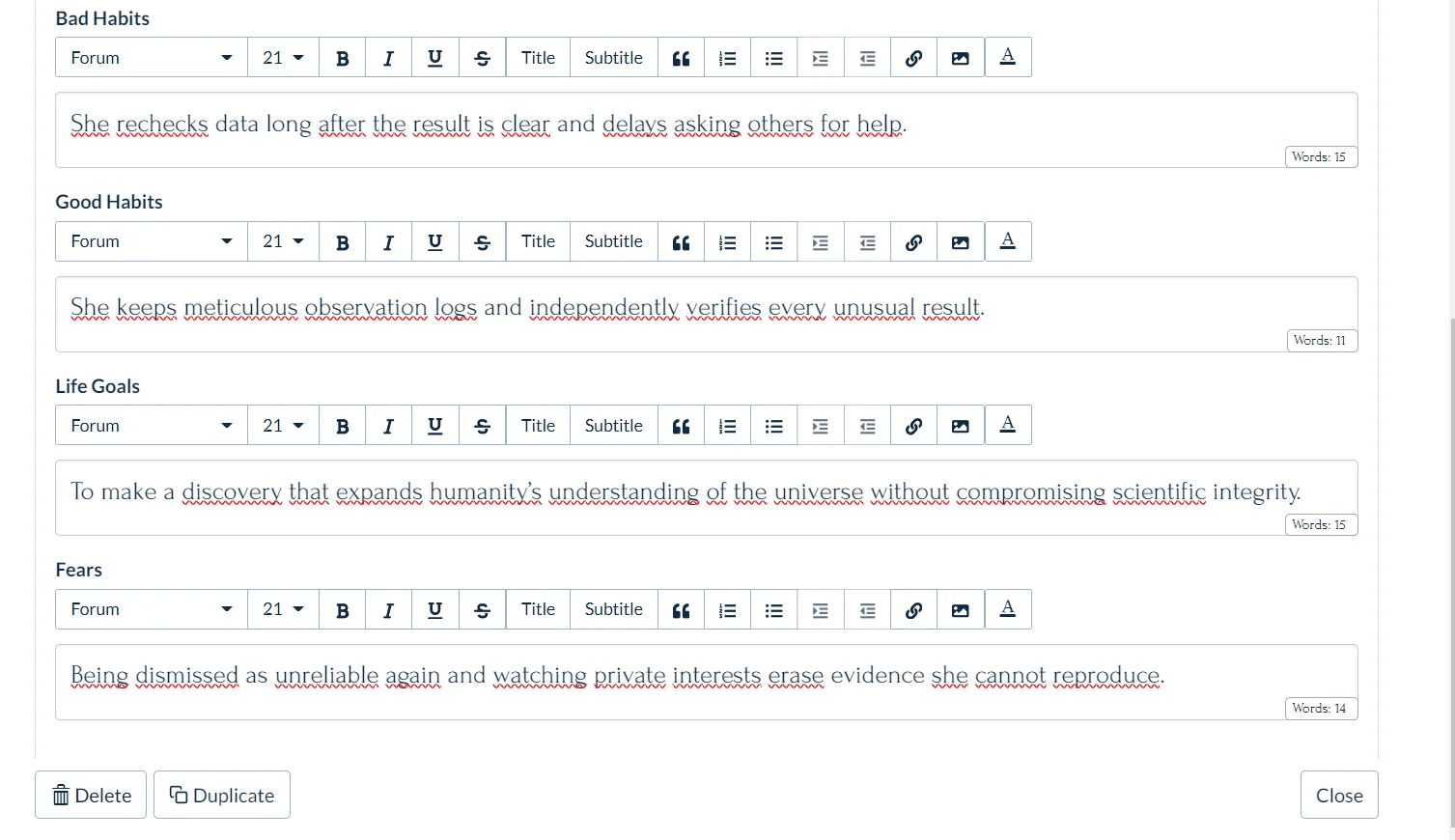
Plottr's value increased when we moved beyond the timeline. We created Dr. Mara Voss, added a Character Bio template, entered her age, profession, habits, goal, and fear, and wrote a concise internal/external conflict note. The template is deeper than a simple name-and-description card and can support a reusable series bible.
Character Bio stored structured traits, habits, goals, and fears for Dr. Mara Voss.
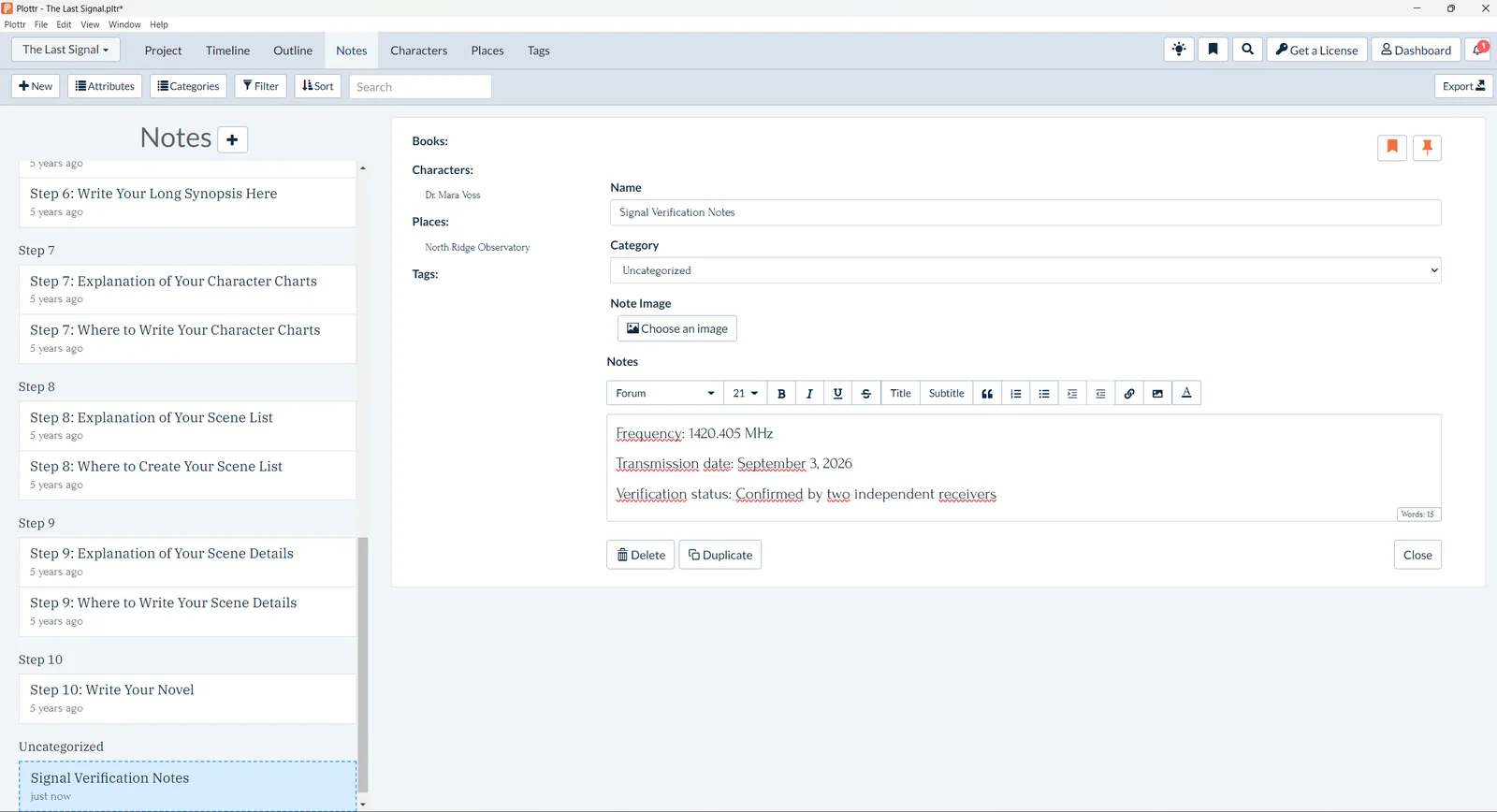
We also created North Ridge Observatory with notes about backup generators, satellite links, and the archive server. A custom Signal Verification Notes record preserved 1420.405 MHz, the transmission date, and confirmation by two independent receivers.
Linking the character and place to the scene worked, but discoverability was weaker than it should be. The add control appeared only when we hovered in the relevant area. Once found, the links became visible in the card and in the outline details.
A technical note preserved the exact frequency and linked the character and location.
5.4 Plan and Fulltext views
Plan view turned the outline into a chapter-by-chapter grid, while Fulltext presented the same cards as a readable linear document. Fulltext also offered layout controls for chapter/card titles, alignment, spacing, page color, and a Pin Details panel.
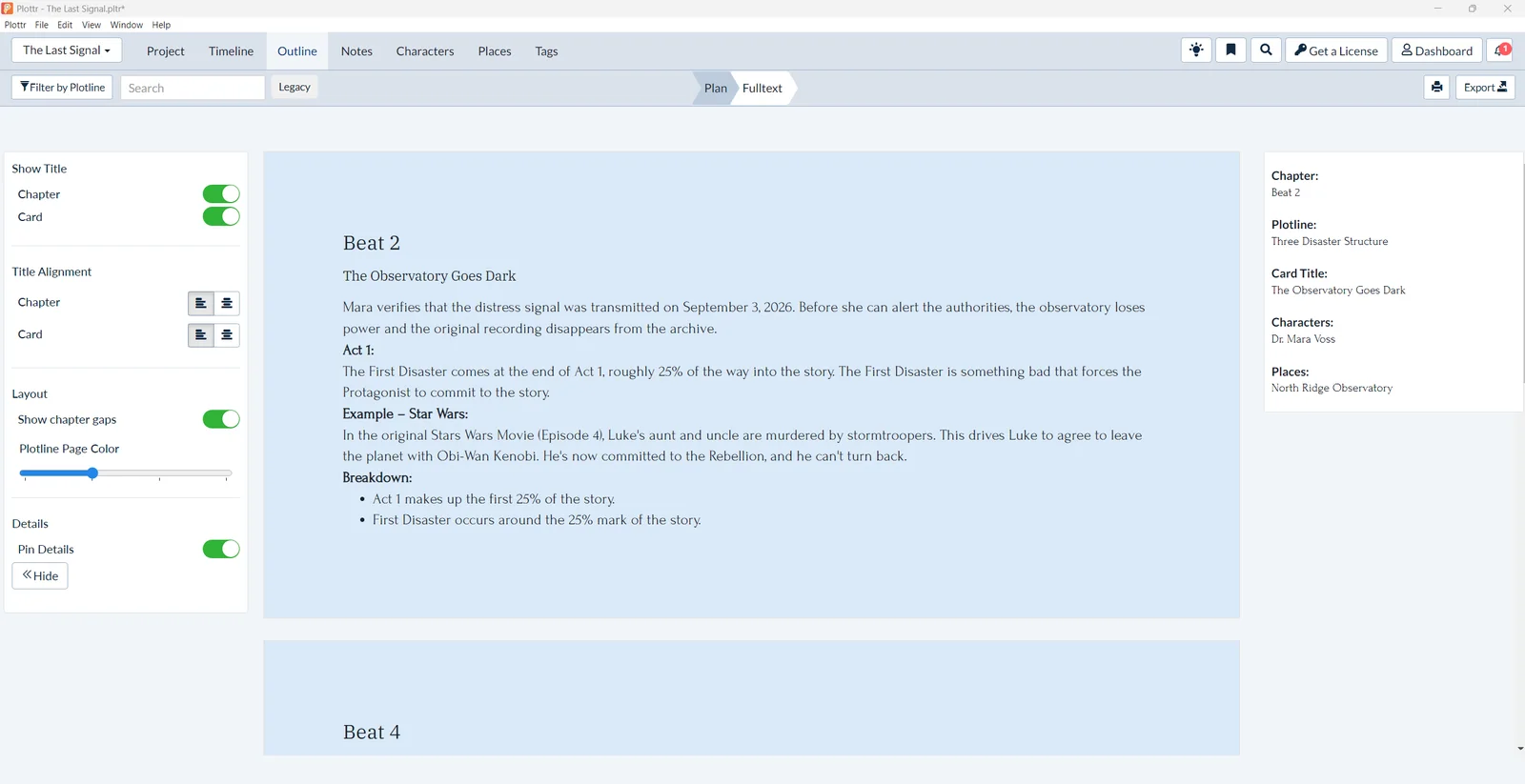
Pin Details was particularly useful. Selecting the scene exposed its beat, plotline, title, character, and place without forcing us back into the card editor. Writers preparing a handoff or checking continuity can use this as a compact audit view.
Fulltext combined the scene text with pinned character and place details.
5.5 Microsoft Word export
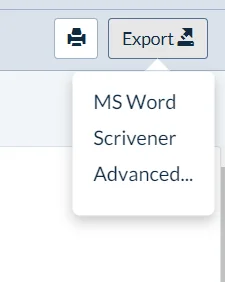
The Export menu offered Microsoft Word, Scrivener, and Advanced Export. The official guide says Word and Scrivener export can include Timeline, Notes, Characters, and Places, while Advanced Export lets users choose content groups. We tested only the standard Microsoft Word path.
The export succeeded during the trial and produced a 15-page DOCX. We rendered and inspected every page. There was no clipping, overlap, missing glyph, or broken image. The document preserved our exact date and frequency plus the character, place, custom note, timeline, and Snowflake instructional notes.
Fidelity was better than polish. The title page was plain, some pages had large empty areas, and template instructions made the output much longer. A few inherited source placeholders appeared as '#.' The default export also omitted the premise and theme. Advanced Export may improve the handoff, but we did not test it.
The trial exposed Word, Scrivener, and Advanced Export options.
06
Pricing
Standard $60/year; lifetime $150
Free trial available
Pricing was checked on August 26, 2026 from Plottr's official USD pricing page. The figures below were the current public prices visible at that check. Plottr sometimes presents crossed-out reference prices or promotions, so buyers should confirm the checkout total.
Plan / term
Current USD price
Key difference
Access / renewal
Plottr annual
$60/year
Desktop app, local files and backups
Keeps working after expiry; no new updates/fixes
Plottr lifetime
$150 one time
Lifetime Standard desktop license
No recurring Standard fee
Plottr Pro monthly
$9.99/month
Browser, cloud files/backups, sync, collaboration
Auto-renews; Pro access requires renewal
Plottr Pro annual
$99/year
Same Pro feature set at annual billing
Auto-renews
Plottr Pro lifetime
$599 one time
Lifetime Pro access at current offer
Large up-front cost
Pro + Community monthly
$14.99/month
Pro plus community membership
Auto-renews
Pro + Community annual
$129/year
Pro plus community at annual billing
Auto-renews
Pro + Community lifetime
$649 one time
Lifetime Pro plus community at current offer
Largest up-front cost
Standard Plottr has no monthly plan. A 30-day free trial is available. The pricing page says subscriptions auto-renew and cannot be switched off inside the account; customers must contact support to cancel. It also states that purchases are non-refundable and that prorated refunds are not offered. These are stricter terms than many writers will expect, so cancellation timing deserves attention.
Value judgment: Standard annual is the sensible starting point for one writer. At current rates, the $150 lifetime price overtakes annual billing after about two and a half years. Pro is justified when browser access, cloud backup, sync, or collaboration reduces real risk; its lifetime prices require stronger long-term confidence.
Standard
$60/year
$150 lifetime option
Key features
Desktop planning workflow
Limits
No monthly Standard option
Pro
$9.99/month
$99/year or $599 lifetime
Key features
Pro feature set and cloud-oriented options
Pro + Community
$14.99/month
$129/year or $649 lifetime
Key features
Pro plus community access
07
Our Experience
Plottr did what a specialist planner should do: it made story structure visible without trying to write the story. The Snowflake template gave us a meaningful framework in minutes. Characters, places, and notes were not isolated databases; they became useful because they could be connected to scene cards and surfaced again in Fulltext details.
The best moment was seeing one fictional event stay coherent across formats. September 3, 2026 appeared in the premise, scene, technical note, and Word export. The frequency 1420.405 MHz survived export as well. That continuity is more important than decorative features because it shows the tool can carry specific planning facts through a real workflow.
The main friction was presentation and portability. Linking depended on hover discovery, valid English received heavy red underlining, and the interface looked older than many writing apps. Standard also makes the user responsible for locating, backing up, and synchronizing the project file.
Export was successful but not publication-ready. It is useful as an archive, handoff, or starting point for another document. It is not a clean manuscript or concise outline by default. Writers should review Advanced Export settings and remove template instructions before sharing the file.
What We Did Not Test
Plottr Pro cloud files, cloud backups, real-time synchronization, live collaboration, or multi-device conflict handling
Scrivener export, Advanced Export customization, or updating an existing Scrivener project
Mobile workflows, the Linux browser experience, or accessibility with assistive technology
Large multi-book series, very long timelines, performance at scale, or multi-year file stability
08
Alternatives
Alternative
Choose it for
Trade-off versus Plottr
Exploripo take
Scrivener
Drafting, research, compilation, and manuscript production
Less immediate visual plotting and story-bible linking
Choose it when writing and compiling matter more than the timeline
Dabble
Cloud-first outlining and drafting in one subscription
No Plottr-style lifetime Standard option
Better for writers who want planning and prose in one app
Aeon Timeline
Complex chronology, dates, dependencies, and continuity
Steeper and less fiction-template-driven
Best when temporal logic is the real problem
Campfire
Modular worldbuilding and community-oriented tools
Can become broader and more complex than needed
Consider it for deep worldbuilding beyond a novel outline
09
How it compares
Plottr is the focused visual-planning option in this group. Scrivener puts more emphasis on drafting and manuscript organization, Dabble combines cloud planning with drafting, Aeon Timeline specializes in chronology, and Campfire offers broader worldbuilding tools.
10
Final Verdict
Plottr earned its 8.0/10 by making a complicated planning project feel concrete. The timeline was clear, the Snowflake template was substantial, linked records worked, auto-save behaved reliably, and Word export preserved the important facts from our test. The product's no-AI stance will also appeal to writers who want structure without generated prose.
It is not the most polished or effortless tool in the category. New users should expect a learning period, Standard users need a real file-backup plan, and the default Word export requires cleanup. Pro solves cloud access and synchronization at a much higher price, while auto-renewal and no-refund terms reduce purchasing flexibility.
For visual plotters, series planners, and template-driven novelists, the strengths outweigh those limitations. Discovery writers and authors who mainly need a drafting environment should spend their money elsewhere.
Exploripo rating: 8.0/10
Recommended for: novelists and series writers who want visual structure, deep templates, and linked story-bible records. Less suitable for: discovery writers, Linux desktop users, teams seeking inexpensive cloud collaboration, or anyone expecting a manuscript editor and polished export in one app.