No spam. Just software we’ve actually tested, plus useful reviews, comparisons and recommendations. We’ll send a confirmation email (double opt-in). You can unsubscribe anytime.
Business / Sales / CRM
Close
We tested it
By Exploripo Editorial Team
Close delivers an unusually coherent inside-sales workflow with strong record context, pipeline visibility and practical follow-up. A partial opportunity import, higher workflow pricing, variable communication costs and untested production communication keep it below the top tier.
Close is a focused sales CRM for leads, contacts, opportunities and follow-up. Our 14-day trial used synthetic data to test a CSV import, lead records, pipeline work, Smart Views, reporting, AI limits and an inactive workflow draft.
Bottom line
Close delivers an unusually coherent inside-sales workflow with strong record context, pipeline visibility and practical follow-up. A partial opportunity import, higher workflow pricing, variable communication costs and untested production communication keep it below the top tier.
02
At a glance
Pros & Cons
+Pros
Lead, contact, task and opportunity context stays together
Clear pipeline, Smart Views and practical daily follow-up
Import flow exposes mapping and duplicate-handling choices before execution
Trial exposed useful reporting, workflow drafting and a cautious AI response
−Cons
No permanent free plan; every user is billed on paid plans
Workflows start at Growth, well above the entry price
Our generic opportunity status caused a partial import failure
Calling, SMS, AI credits and other usage can add variable costs
03
Audience fit
Who it’s for / Who it’s not for
✓Who it’s for
Founders and small B2B sales teams that organize work around leads, conversations, opportunities and next actions.
Inside-sales teams that want email, calling and SMS available in the same product as their CRM records.
Teams moving from spreadsheets that value guided mapping, duplicate controls and saved working lists.
Sales organizations prepared to choose Growth or Scale when workflows, dialers, governance or coaching become essential.
×Who it’s not for
Very small teams that need a permanent free CRM rather than a time-limited trial.
Companies seeking one broad suite for advanced marketing, service, commerce and content operations.
Cost-sensitive teams that need automation for many users but cannot justify Growth pricing and separate usage charges.
Buyers who require proven telephony quality, complex governance or forecasting accuracy from this review.
04
Overview
Close uses a lead-centric model. A lead usually represents a company or selling context, contacts sit inside it, and opportunities carry value, stage, confidence, expected close date and ownership. Notes, tasks and communication history accumulate on the same timeline. This differs from contact-first CRMs, but it became intuitive once our imported companies appeared as leads.
The product is narrower than a customer-platform suite. Its emphasis is prospecting and sales execution, supported by Smart Views, pipelines, workflows, reporting, email, calling, SMS and Chloe AI. Close documents web, iOS and Android access and integrations through native connections, Zapier, Make and an API. We tested the web app only and connected none of those services.
Independent review platforms were positive when checked on September 29, 2026. Capterra showed 4.7/5 from 164 reviews, Trustpilot 4.3/5 from 52, and TrustRadius 8/10 from 47 reviews and ratings. Recurring praise covered usability, onboarding and integrated communication; recurring criticism covered price sensitivity, reporting depth and occasional call-quality concerns. These samples describe different audiences and did not determine our score.
05
Features
5.1 Lead and Opportunity Management
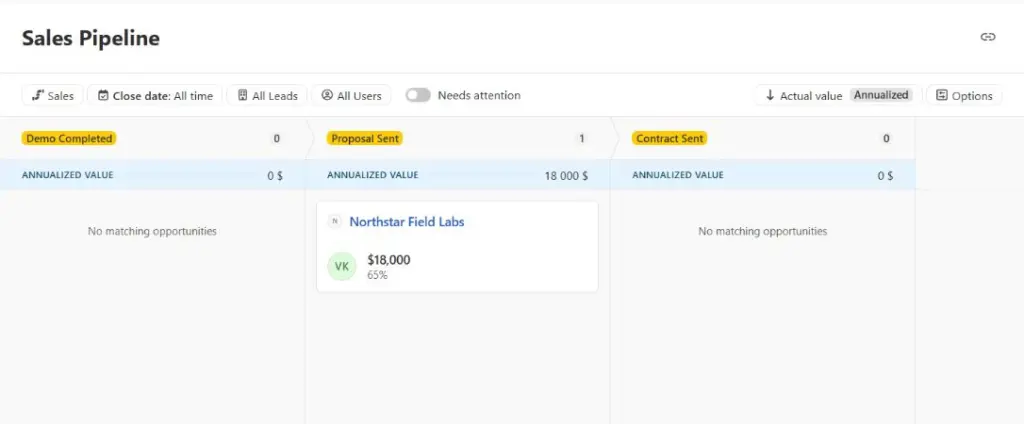
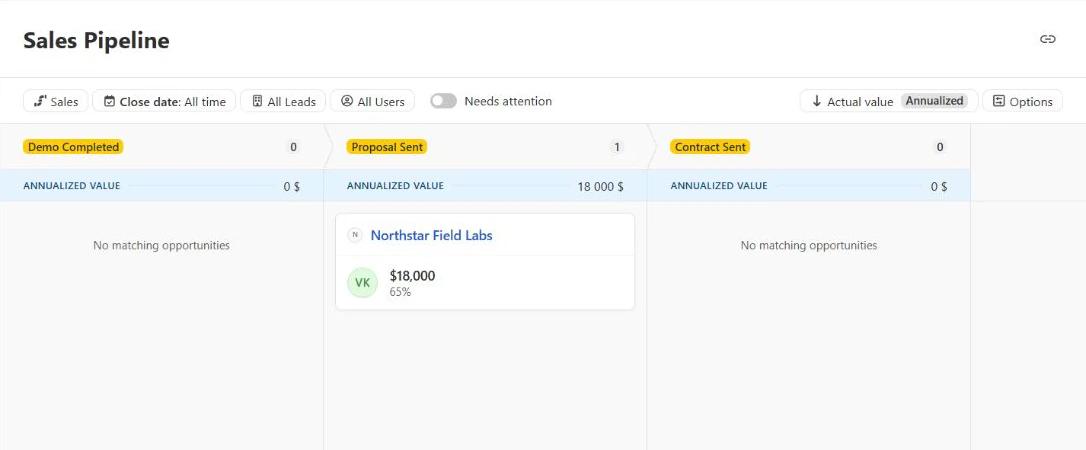
The imported Northstar Field Labs record placed a fictional contact, company URL and status beside the activity timeline. We added a private note and a due-today task, then created a one-time $18,000 opportunity in Proposal Sent at 65% confidence. The pipeline card showed the amount, stage and probability without requiring another screen.
Figure 1. The pipeline showed the synthetic $18,000 opportunity in Proposal Sent at 65% confidence.
This supported the daily sales use case we expected: open the lead, review context, define the next action and scan the pipeline. One small record cannot establish collaboration quality, permission behavior or forecast accuracy, but the tested path was easy to follow.
5.2 Import Smart Views and Export
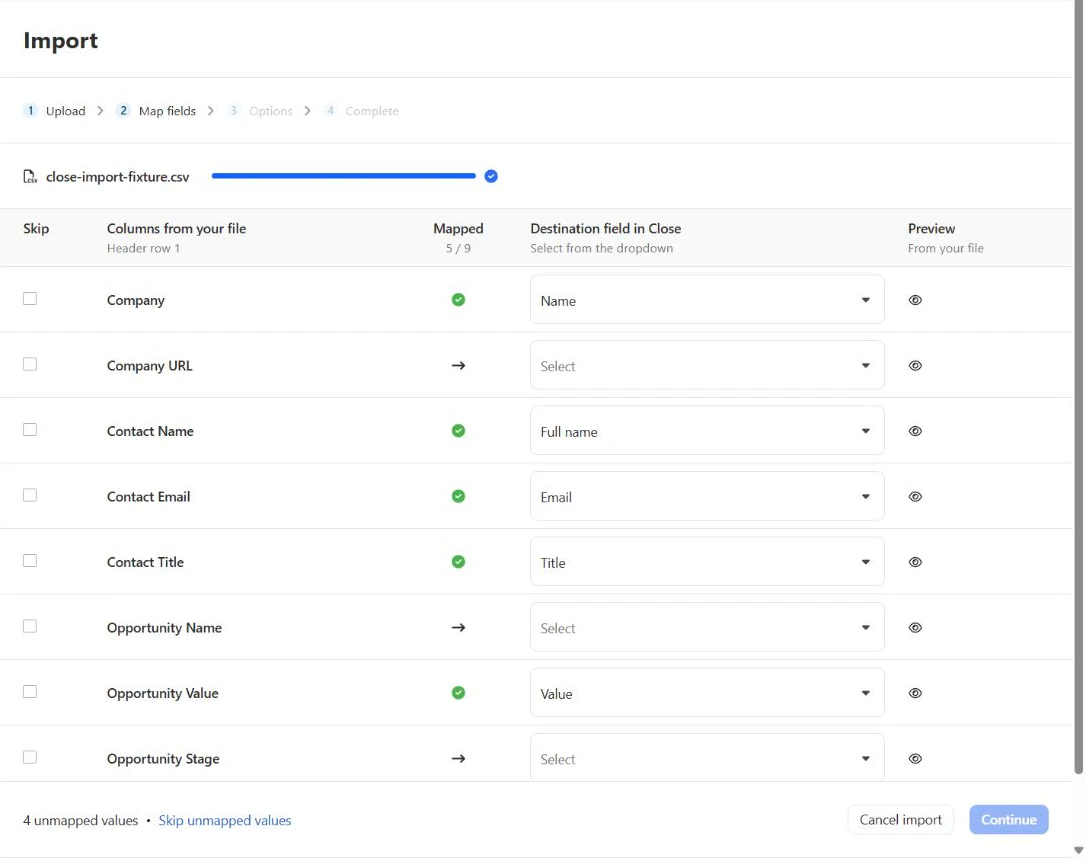
We uploaded a four-row CSV. Close mapped five of nine columns automatically, and we manually assigned Company URL and Opportunity Stage. The screen made unmapped fields visible before execution, so we intentionally skipped Opportunity Name and the test-segment column rather than forcing a questionable destination.
Close’s help documentation also describes XLS, XLSX and pasted-table imports, but the live upload screen in our trial presented a CSV-only path. We tested CSV only and do not treat the broader documented formats as hands-on verified.
Figure 2. The CSV mapper showed five of nine fields mapped and kept unresolved columns visible before import.
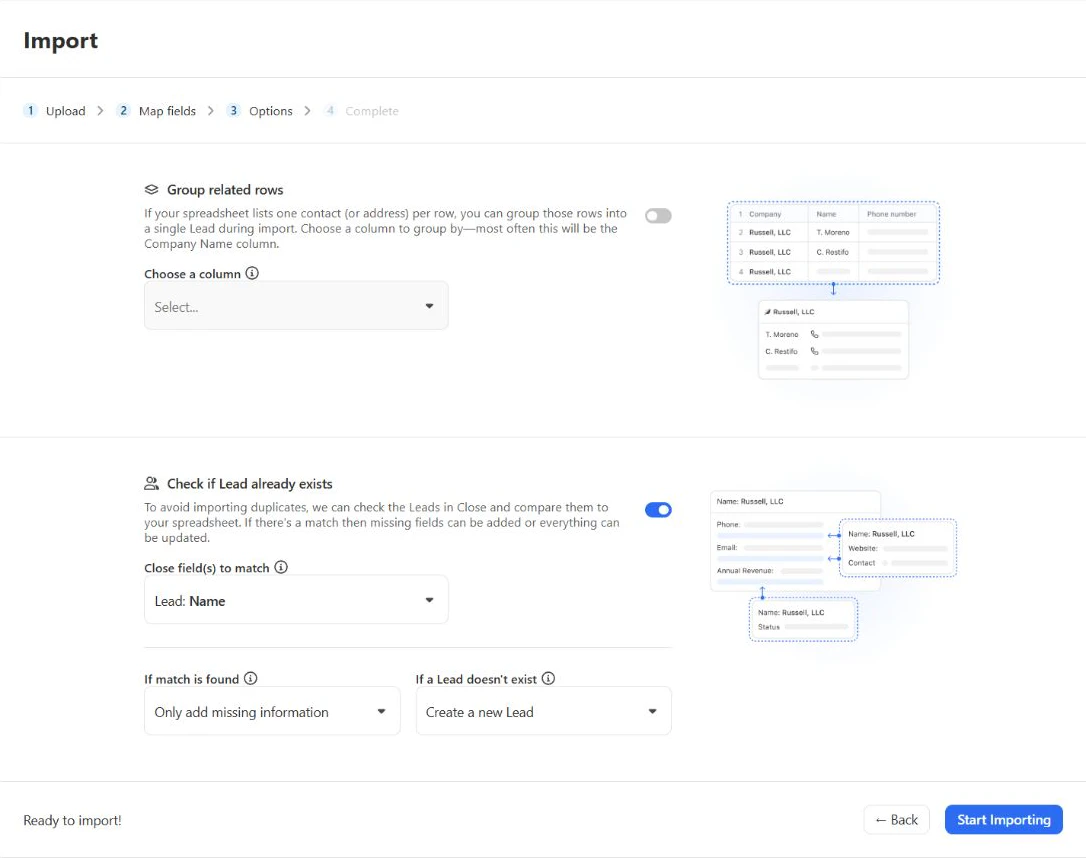
The options step separated row grouping from duplicate checks. We left grouping off, matched existing leads by name, kept the rule to add missing information to matches and created new leads when no match existed.
Figure 3. Import options separated related-row grouping from name-based duplicate handling and update behavior.
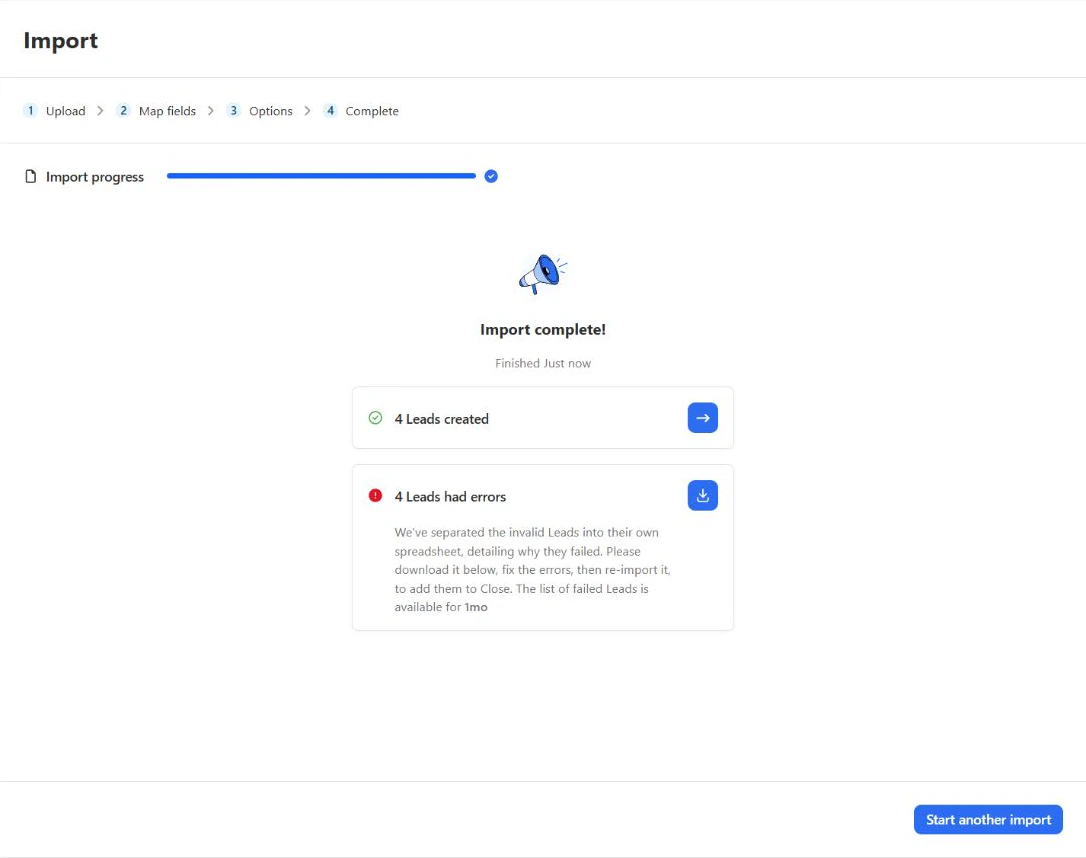
The outcome was partial. Close created four leads, but all four opportunity components failed with “Invalid or ambiguous opportunity status” because our fixture used the generic value Active. The downloaded error file named the rejected value for every row. This was a useful safeguard, although the result screen’s wording could make the lead and opportunity outcomes easier to distinguish.
Figure 4. The job created four leads while reporting four related errors that required correction.
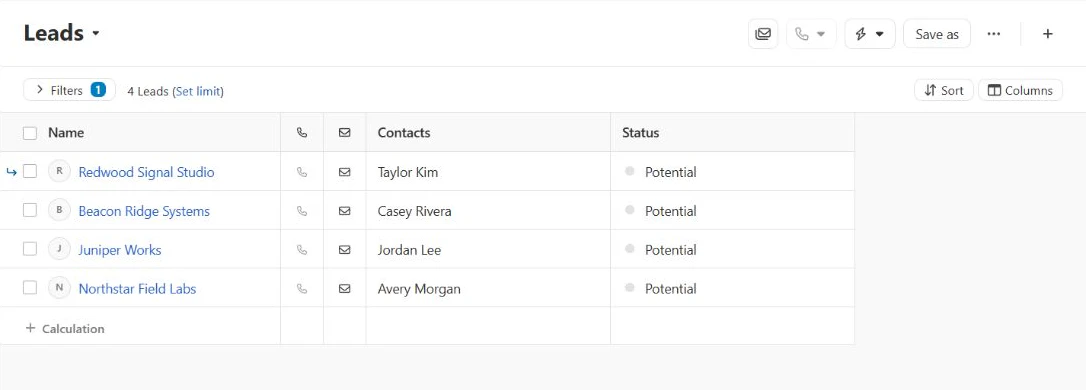
We saved the imported cohort as a private Smart View, which returned the same four leads. Close also exposed exports for leads, contacts or opportunities in CSV/Excel or JSON, with current-view, common or all fields. Our request was accepted, but Close generated the file asynchronously and said it would email the download link, so we did not inspect the final export contents during this session.
Figure 5. The saved imported-lead view returned the four fictional companies and contacts created by the CSV job.
5.3 Workflow Automation
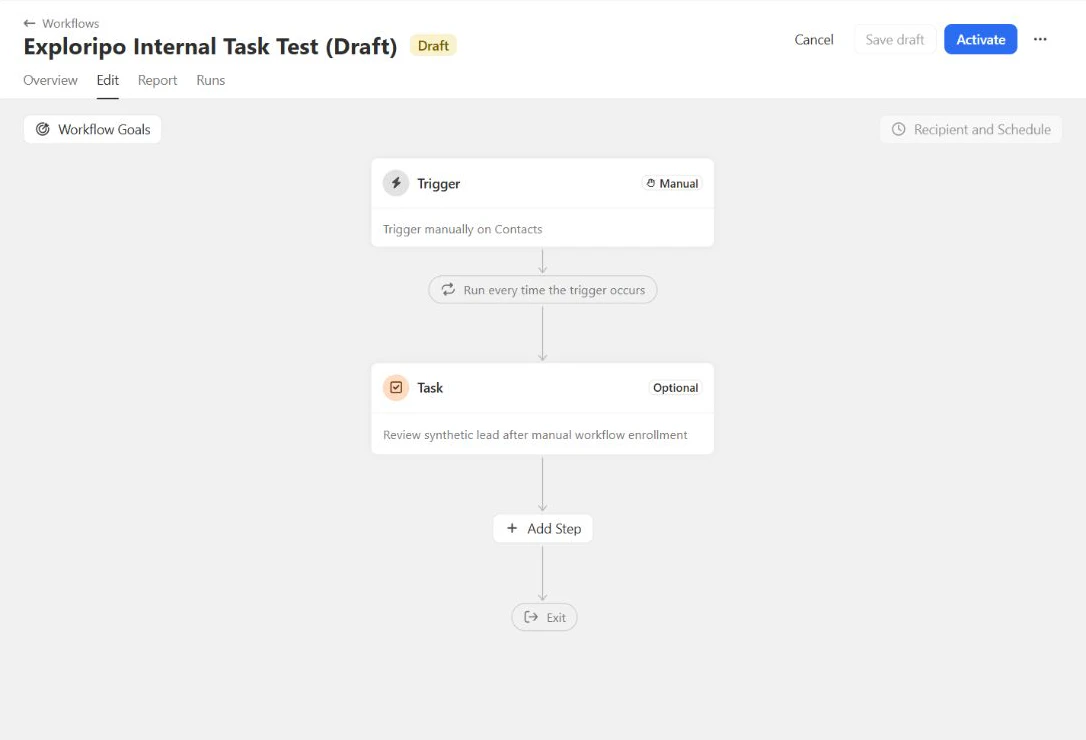
Official pricing places Workflows on Growth and Scale. The trial let us create a manual contact trigger and inspect steps for email, calls, SMS, assignment, tasks, filters and opportunity or lead updates. We configured only an internal task and saved the workflow as an inactive draft. It was never activated or enrolled, so this test covers builder clarity, not run reliability or outreach performance.
Figure 6. The inactive draft linked a manual contact trigger to an optional internal task without sending outreach.
5.4 Reporting and AI
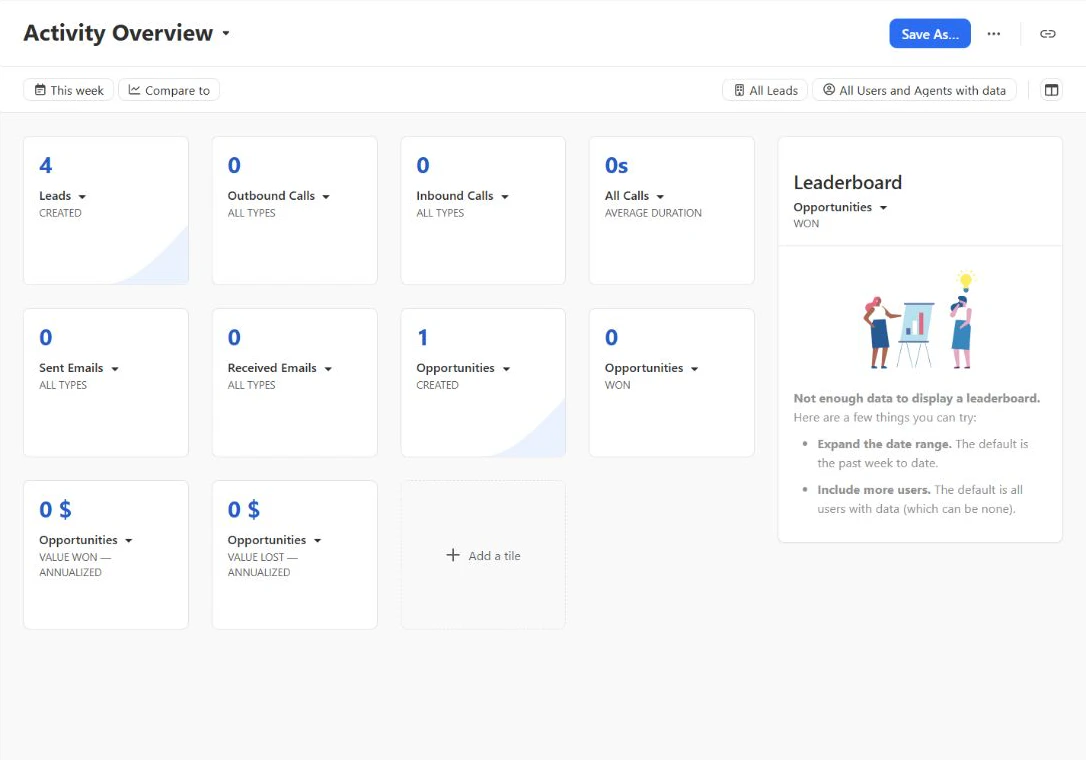
Activity Overview reflected four created leads and one created opportunity. It also showed zero calls and zero sent or received emails, which matched our safety boundary. The layout was readable for basic activity counts, but a tiny synthetic dataset says little about long-term trend analysis, custom reporting or forecast accuracy.
Figure 7. Activity Overview reflected four created leads, one opportunity and no communication activity.
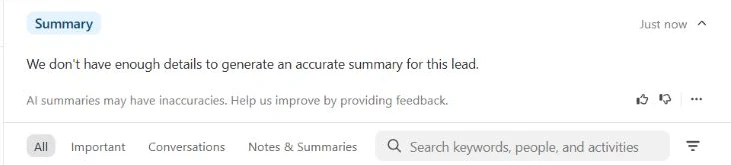
Summarize Lead did not invent a narrative for the sparse Northstar record. It said there were not enough details to generate an accurate summary and displayed its general inaccuracy warning. That restraint was welcome, but it does not prove summary quality on a mature sales history. We did not test Chloe Voice Agents, enrichment, Auto Updates or paid credit consumption.
Figure 8. Summarize Lead declined to generate a result when the synthetic record lacked enough history.
5.5 Communication Integrations and Administration
Close documents two-way email, templates, calling and SMS inside the CRM, with plan-specific limits and separate telephony charges. It also documents native email, calendar, Zoom and Slack connections, plus Zapier, Make and API access. We left every external connection disabled and sent no message or call. Security and compliance materials in the Close Trust Center are vendor documents, not an Exploripo audit.
06
Pricing
Solo $19/user/month monthly or $9 annual equivalent; Essentials $49/$35; Growth $109/$99; Scale $149/$139
Free trial available
US-dollar prices were checked on September 29, 2026. Every plan is priced per user. The annual figures below are monthly equivalents for prepaid annual billing; they are not month-to-month prices. Taxes and regional charges can change the final amount.
Plan
Current price
Selected boundary
Best fit
Solo
$19 monthly; $9 annual equivalent
One user; 10,000 leads; no workflows
Solo founder evaluating Close
Essentials
$49 monthly; $35 annual equivalent
Unlimited leads and contacts; no workflows
Small collaborative sales team
Growth
$109 monthly; $99 annual equivalent
Workflows, power dialer, bulk email and custom activities
Teams automating outreach and follow-up
Scale
$149 monthly; $139 annual equivalent
Roles, visibility rules, predictive dialer and live coaching
Larger governed sales operations
The 14-day trial requires no credit card or contract and currently includes 1,000 AI credits plus $5 in calling or enrichment credit. Close also documents a 30-day money-back guarantee after purchase. Base subscriptions do not make communication usage unlimited: calls, SMS and phone numbers use variable rates, Call Assistant costs $50 per month plus $0.02 per transcribed minute, enrichment is $0.05 per field, and extra AI credits start at $20 per month for 1,200 credits. Confirm the current rate card and plan limits before buying.
Solo
$19/user/month
$9/month annual equivalent when billed annually
Best for: Solo founder evaluating Close
Key features
One user
Up to 10,000 leads
Limits
No workflows
Recommended
Best value
Essentials
$49/user/month
$35/month annual equivalent when billed annually
Best for: Small collaborative sales team
Key features
Unlimited leads and contacts
Core team CRM workflow
Limits
No workflows
Growth
$109/user/month
$99/month annual equivalent when billed annually
Best for: Teams automating outreach and follow-up
Key features
Workflows and power dialer
Bulk email and custom activities
Limits
Usage charges can apply
Scale
$149/user/month
$139/month annual equivalent when billed annually
Best for: Larger governed sales operations
Key features
Roles and visibility rules
Predictive dialer and live coaching
Limits
Usage charges can apply
07
Our Experience
Close reached a useful state quickly after the import. The lead-centric model kept company context, a fictional contact, the follow-up task, the internal note and the opportunity visible without much navigation. The pipeline and Smart View then provided two practical ways to return to the work.
Import was the most instructive workflow. Mapping and duplicate choices were visible before execution, but the generic opportunity status caused a partial result. A migration owner should map destination stages exactly, review the error file and confirm both record and opportunity counts before treating a job as complete. Export also needs planning because Close delivers the generated file through an emailed link rather than immediately in the app.
The workflow builder was broad enough to understand the available actions without activating outreach. Basic reporting matched our records, and the AI summary handled insufficient context conservatively. Those are encouraging results, but they do not replace production tests with real permissions, communication channels, record volume and governance.
What We Did Not Test
• Email or calendar synchronization, deliverability, templates, bulk email or shared inbox behavior
• Calls, SMS, phone-number provisioning, recordings, transcription, coaching or carrier and regulatory setup
• Workflow execution, sequences, production volume, run limits or multi-user ownership
• Mobile apps, API behavior, third-party integrations, permissions, lead visibility rules or Scale administration
• Large imports, rollback, the emailed export file, forecasting accuracy, support response, billing or cancellation
08
Alternatives
Alternative
Choose it when
Main trade-off versus Close
Exploripo take
Pipedrive
You want the clearest visual pipeline and activity rhythm
Less communication-first and still paid per seat
Easier pipeline adoption; Close integrates outreach more tightly
HubSpot CRM
You want a permanent free entry point and broader platform path
Paid packaging becomes complex as needs grow
Broader ecosystem; Close stays more focused on inside sales
Zoho CRM
You want lower published prices and deep customization
Denser interface and more administration
Stronger value breadth; Close offers a more cohesive rep workflow
Business / Sales / CRM
Pipedrive
Rating
8.8 / 10
Price
Lite from €14/user/month billed annually (€24 monthly); Growth €39; Premium €59; Ultimate €79 on annual billing
Best for: Small and midsize sales teams that want a clear pipeline and disciplined follow-up
Choose Pipedrive for the clearest visual pipeline; choose Close when communication-centered sales execution matters more.
Close competes most directly with sales CRMs that promise a shorter route from lead to conversation. Compared with Pipedrive, Close places more emphasis on communication inside the record, while Pipedrive offers the more immediately visual deal-board experience. Compared with HubSpot, Close is narrower and easier to frame as a sales tool, but it lacks HubSpot’s permanent free entry point and broader marketing and service ecosystem. Zoho CRM generally offers more suite breadth and lower entry pricing, with a heavier configuration burden.
The decision usually comes down to operating style. Choose Close when representatives spend much of the day contacting leads and need context, tasks and pipeline status close to those conversations. Choose an alternative when free access, broader business-suite coverage, deep enterprise administration or the simplest visual pipeline matters more than an integrated inside-sales workspace.
Comparison of the current reviewed software with selected alternatives
Pipedrive
Choose Pipedrive for the clearest visual pipeline; choose Close when communication-centered sales execution matters more.
HubSpot CRM
Choose HubSpot CRM for a permanent free entry point and broader platform path; choose Close for a more focused inside-sales workspace.
Overall rating
8.8 / 10
8.8 / 10
8.7 / 10
Price
Solo $19/user/month monthly or $9 annual equivalent; Essentials $49/$35; Growth $109/$99; Scale $149/$139
Lite from €14/user/month billed annually (€24 monthly); Growth €39; Premium €59; Ultimate €79 on annual billing
Free Tools $0; Smart CRM Starter $20/seat/month; Sales Hub Starter $20/seat/month list with a $7 annual-equivalent promotion observed
Free plan
No
No
Yes
Free trial
Yes
Yes
Yes
Best for
Small and midsize inside-sales teams that want lead context, communication and pipeline work in one focused CRM
Small and midsize sales teams that want a clear pipeline and disciplined follow-up
Founders, two-person teams and growing revenue organizations that can govern a shared customer platform
10
Final Verdict
Close earns 8.8/10. The trial produced a credible small sales workspace: imported leads, a clear record timeline, an internal follow-up, a visible opportunity, a useful Smart View, an understandable pipeline, an inactive workflow draft and a report that matched our synthetic activity. The AI summary also refused to overstate what it knew.
It misses a higher score because the generic opportunity status caused a partial import, the live upload screen did not match the broader file-type support described in documentation, and export completion moved to email. More importantly, the practical cost rises when a team needs workflows, dialers, permissions or usage-heavy communication. None of the untested calling, email, SMS, integration or governance capabilities receives hands-on credit here.
Recommended for small and midsize inside-sales teams that want focused CRM context around prospecting and follow-up. Less suitable for buyers who need a free plan, a broad customer platform or low-cost automation across many users. Price the required plan, seats and usage together before committing.
Frequently Asked Questions
Is Close CRM free?
No. Close currently offers a 14-day trial with no credit card or contract, but it does not list a permanent free plan.
How much does Close cost?
Our September 29, 2026 check showed Solo at $19, Essentials at $49, Growth at $109 and Scale at $149 per user per month on monthly billing. Annual monthly equivalents were $9, $35, $99 and $139.
Which Close plan includes workflows?
Workflows start with Growth. Our trial exposed the builder, but we saved only an inactive internal-task draft and did not test production runs.
Does Close include calling and SMS?
Close provides calling and SMS inside the CRM, subject to plan, country, number and regulatory limits. Usage and phone-number costs are separate. We did not place a call or send a message.
Can Close import and export CRM data?
Yes. We tested a four-row CSV import and requested a lead export. The import created four leads but rejected the opportunity status, and the export was delivered asynchronously through an emailed link.
What does Chloe AI do?
Close documents chat, search, summaries, assistance, enrichment, Auto Updates and Voice Agents with different plan and credit rules. We tested only Summarize Lead, which declined because the synthetic record lacked enough detail.
Is Close good for a small business?
Yes, when sales work centers on prospecting, follow-up and a focused pipeline. A business needing a free CRM or broad marketing and service tools should compare HubSpot, while teams prioritizing a visual deal board should also consider Pipedrive.