No spam. Just software we’ve actually tested, plus useful reviews, comparisons and recommendations. We’ll send a confirmation email (double opt-in). You can unsubscribe anytime.
Business / Sales / CRM
HubSpot CRM
We tested it
By Exploripo Editorial Team
HubSpot CRM is one of the strongest permanent free CRM entry points. Its record model, import flow, tasks, dashboard and Breeze summary impressed us, while complex paid packaging, selective exports and major automation gates kept it below the top tier.
Exploripo rating8.7/10Excellent
Starting priceFree Tools $0; Smart CRM Starter $20/seat/month; Sales Hub Starter $20/seat/month list with a $7 annual-equivalent promotion observed
HubSpot CRM combines contacts, companies, deals, activities, imports and reporting in a broad customer platform. Our Free Tools test used synthetic records across core CRM, data migration and follow-up workflows.
Bottom line
HubSpot CRM is one of the strongest permanent free CRM entry points. Its record model, import flow, tasks, dashboard and Breeze summary impressed us, while complex paid packaging, selective exports and major automation gates kept it below the top tier.
02
At a glance
Pros & Cons
+Pros
Genuinely useful permanent free CRM for up to two users
Connected contacts, companies, deals, activities and property history
Strong multi-object import flow with explicit mapping and associations
Basic dashboards, tasks and Breeze Assistant were useful in the free account
−Cons
Smart CRM and Sales Hub are separate ladders, which complicates buying
Advanced workflows, sequences, forecasting and Sales Workspace require higher tiers
Automatic company matching can create cleanup when domains are inconsistent
View-based exports can omit properties and expose date/time normalization issues
03
Audience fit
Who it’s for / Who it’s not for
✓Who it’s for
Founders and very small teams moving from spreadsheets who want a permanent free CRM with contacts, companies, deals and tasks.
Small and midsize B2B teams that value clean record associations, a visible activity history and guided imports.
Revenue teams that expect sales, marketing, service and content work to share one customer record over time.
Organizations prepared to pay for Sales Hub Professional when sequences, workflows, forecasting and a dedicated sales workspace become essential.
×Who it’s not for
Teams that want a permanently simple pipeline-only CRM with a short, predictable upgrade ladder.
Cost-sensitive companies that need advanced automation and reporting across many paid users.
Businesses without an owner for data quality, permissions and lifecycle governance as the platform grows.
Buyers who expect email, calendar, calling, integrations and enterprise controls to be fully included or validated by this free-account test.
04
Overview
HubSpot is a customer platform built around Smart CRM. Free Tools provide a persistent limited foundation; paid Smart CRM expands data management, while Sales Hub separately adds prospecting, sequences, automation, forecasting and analytics. Smart CRM Professional at $50 per seat is not equivalent to Sales Hub Professional at $100.
Contacts, companies, deals, tickets and activities carry properties, associations and a timeline. Our deal stayed connected to its contact and company while notes, tasks and stage changes accumulated. Web, iOS and Android apps exist; we tested the browser only.
The Marketplace displayed 2,516 apps, agents and templates on our research date, alongside APIs, webhooks and data sync. Connections have separate permissions, pricing and support; none was connected.
Independent feedback praises usability, integrations and shared records while warning about cost, packaging, renewals and administration at scale. These themes were context only and did not determine our score.
05
Features
5.1 Contact, deal and activity management
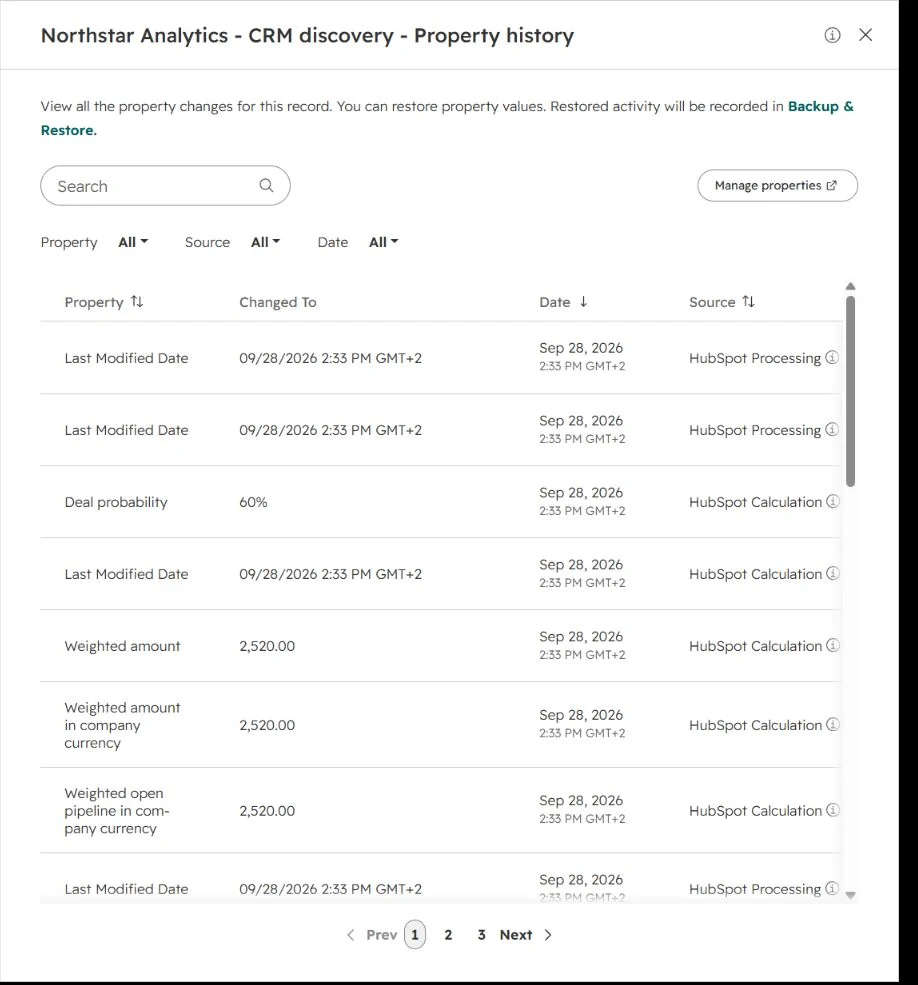
We built a synthetic $4,200 opportunity, added a note and task, then moved it from Appointment Scheduled to Qualified To Buy and Presentation Scheduled. HubSpot logged both moves and recalculated probability and weighted value.
Figure 1. Property history showed HubSpot’s probability and weighted-value recalculations after the synthetic deal changed stage.
Associations were clear, but inference needs supervision. Our contact email used northstar-analytics.example.com while the company used northstar-analytics.example, so HubSpot generated a second empty company. We made the intended record primary. Inconsistent domains can create real cleanup work.
5.2 Import, custom properties and export
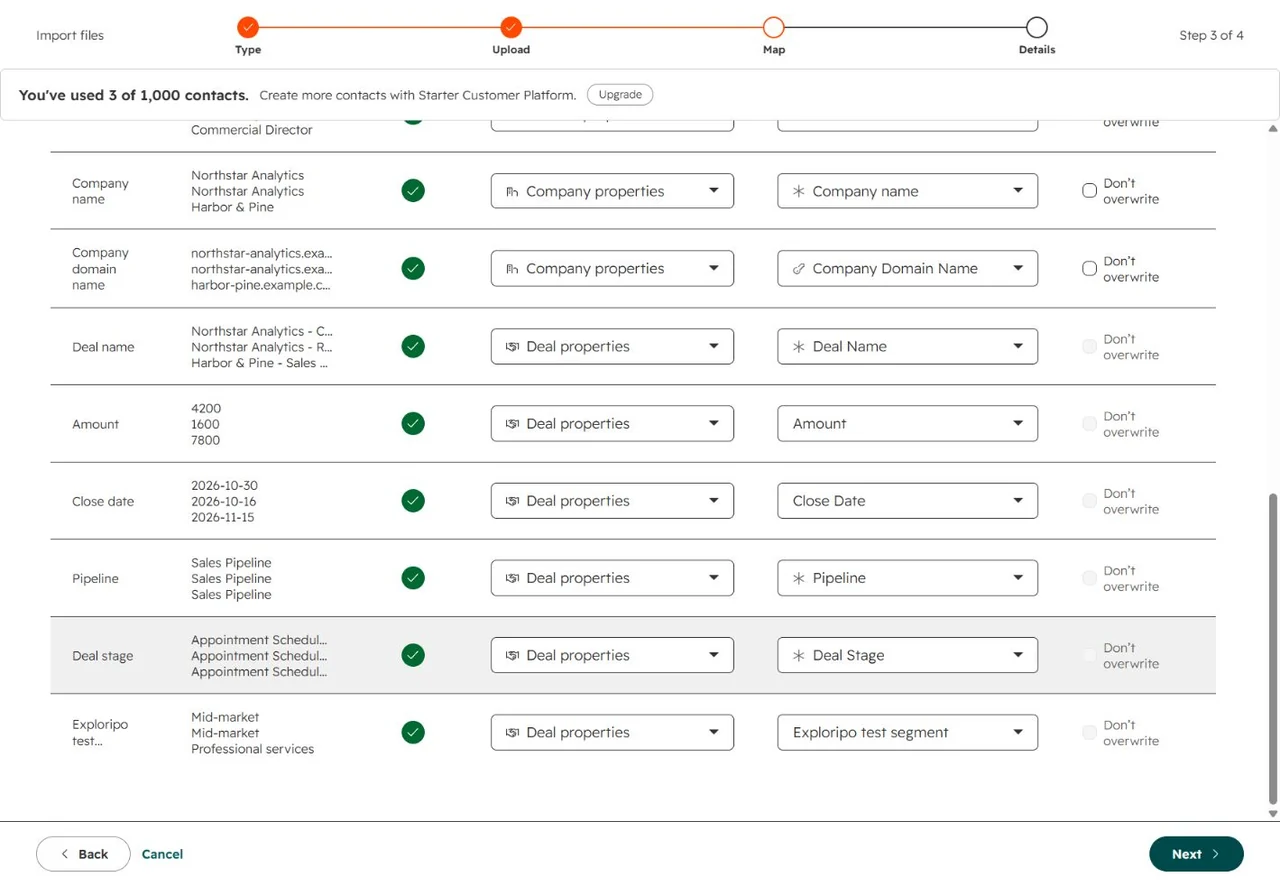
Our CSV held three contacts, three companies and four deals. Email and company domain were create/update identifiers; deals were new because updates need Record ID or another eligible unique property. The mapper also let us create Exploripo test segment inline.
Figure 2. The free import flow mapped company and deal fields, including a new test-segment property.
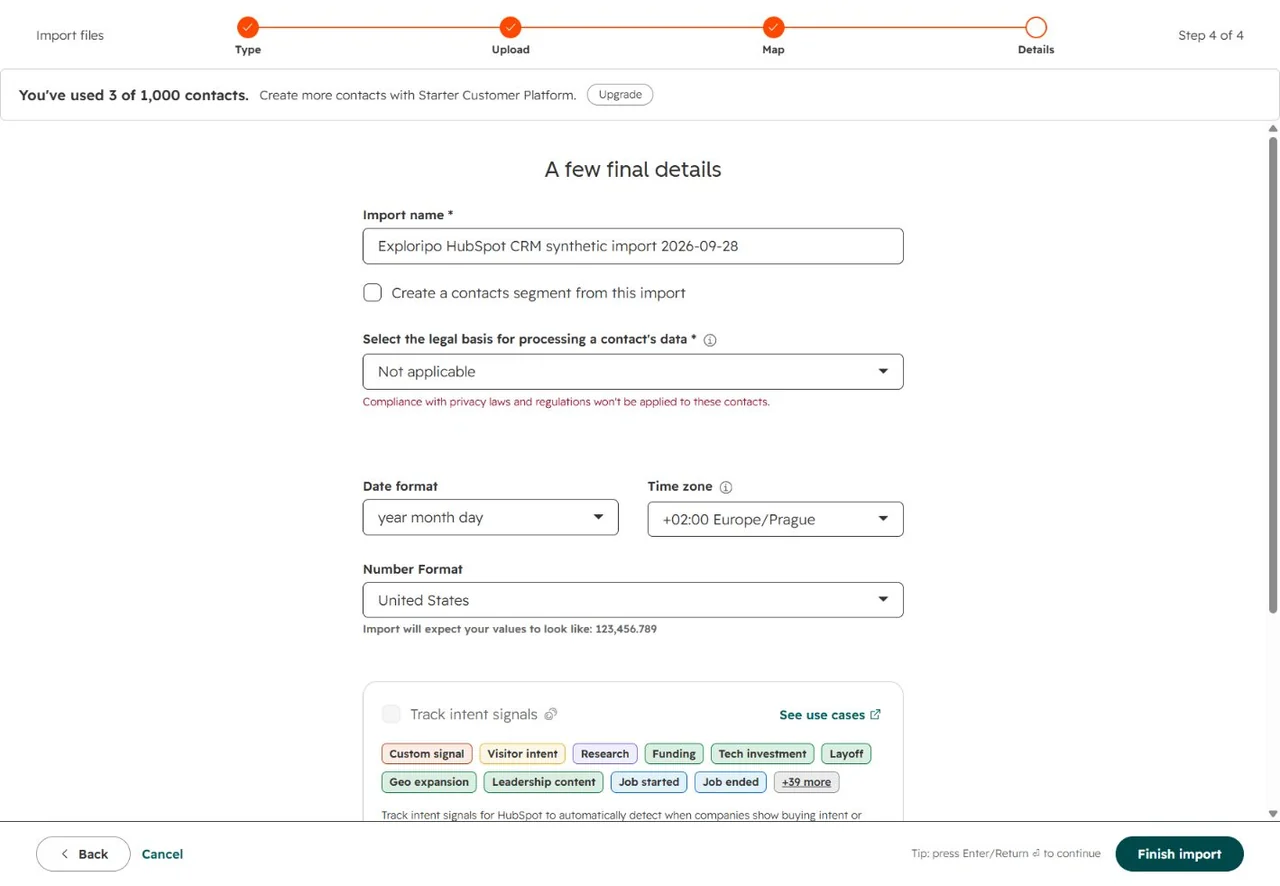
The final step required legal basis, date, time-zone and number-format choices, reducing compliance and locale ambiguity.
Figure 3. Final import controls made legal basis, date, time-zone and number-format choices explicit before execution.
The job reported four rows, eight new records, two updates, ten associations and no errors. A filtered export returned four deals but only the view’s seven columns, omitting the custom property. Date-only close dates also became timezone-bearing datetimes. Design export views deliberately and normalize dates downstream.
5.3 Tasks, queues and automation boundaries
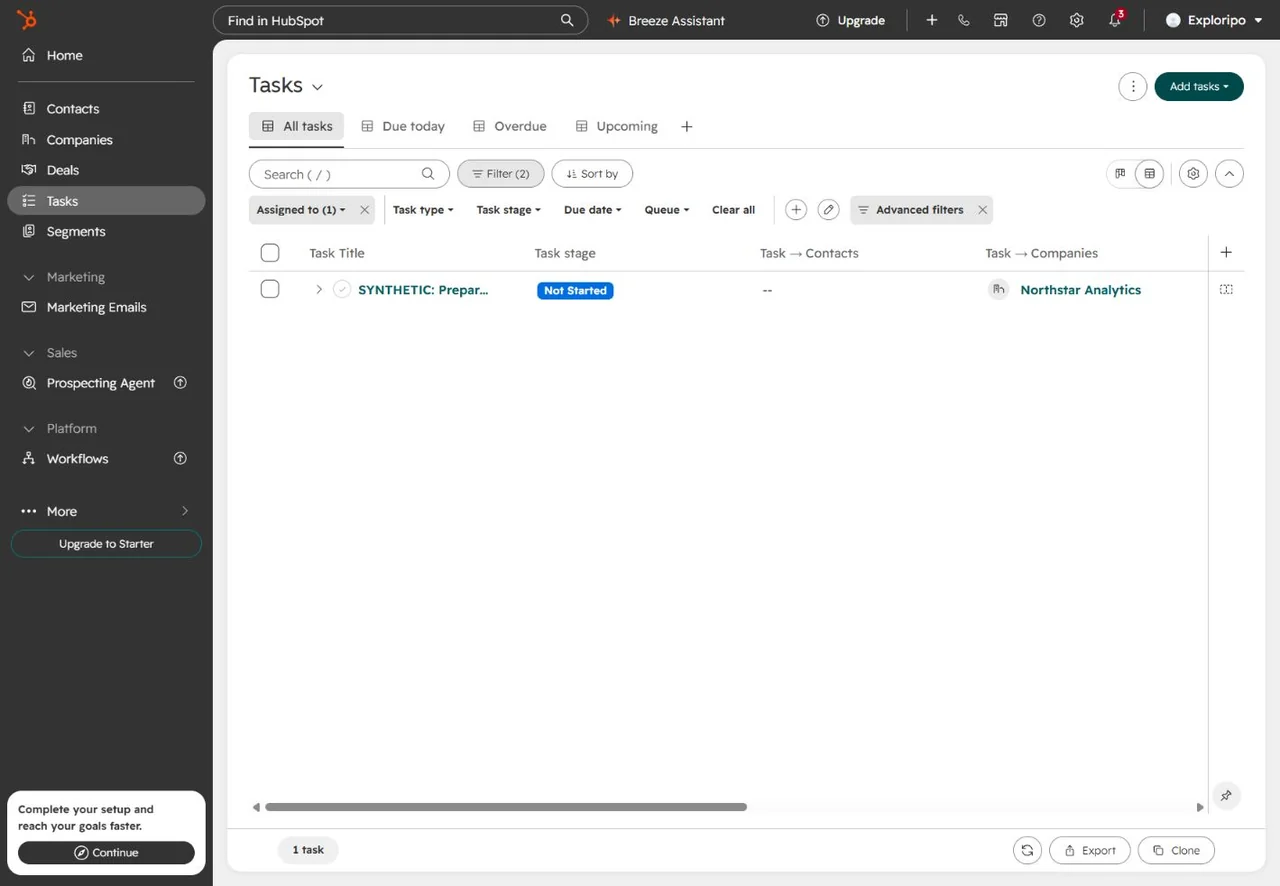
Free Tasks supplied All, Due today, Overdue and Upcoming views, filters, sorting, table/board controls and export. The synthetic task stayed tied to its company.
Figure 4. The Free Tasks area included practical views, filters, sorting and export around the synthetic follow-up.
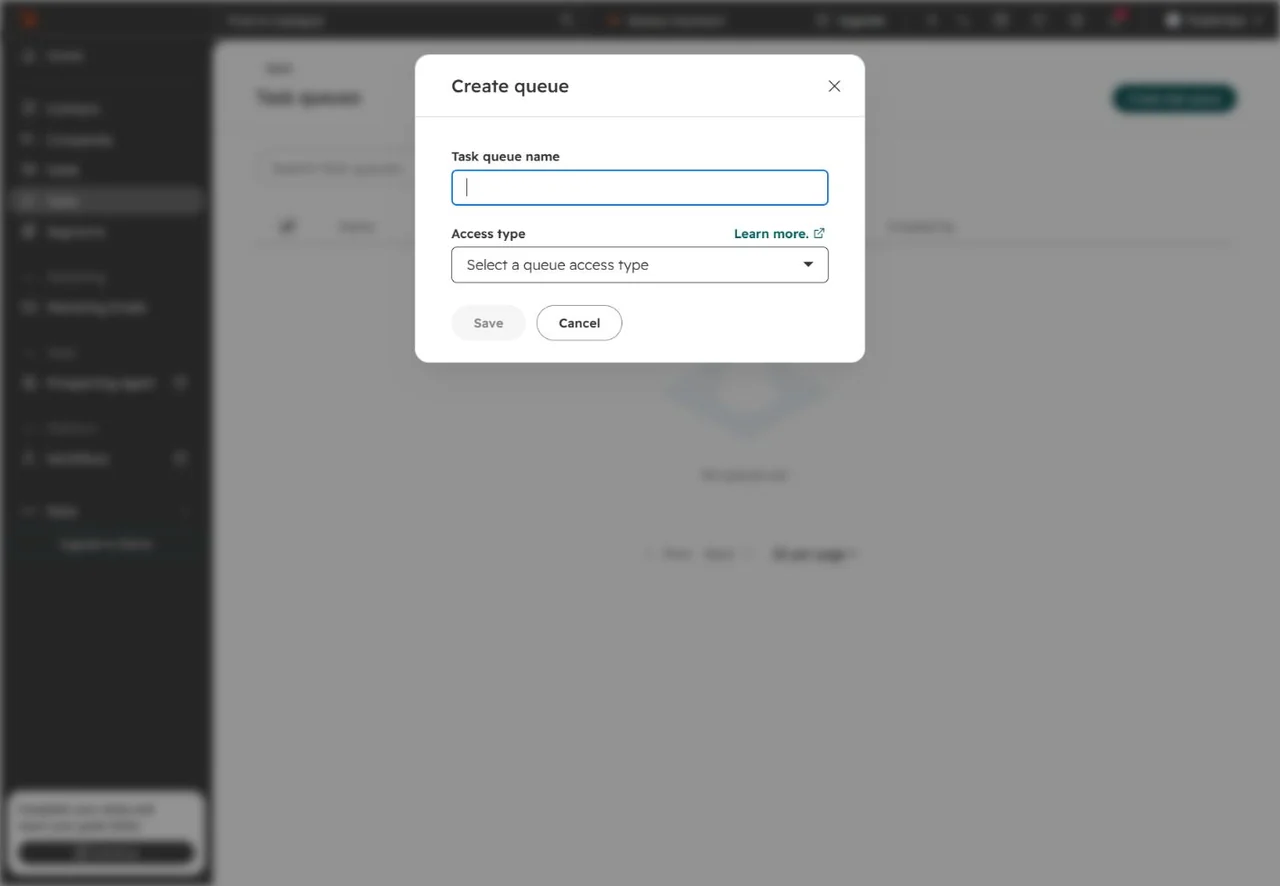
Free Tools also exposed Task queues and a create form; we did not save one. Reviewed documentation placed user-created queues at Starter, so this dated live result may reflect a rollout, packaging change or documentation lag.
Figure 5. A Free account opened the task-queue creation form, although reviewed documentation placed queues at Starter.
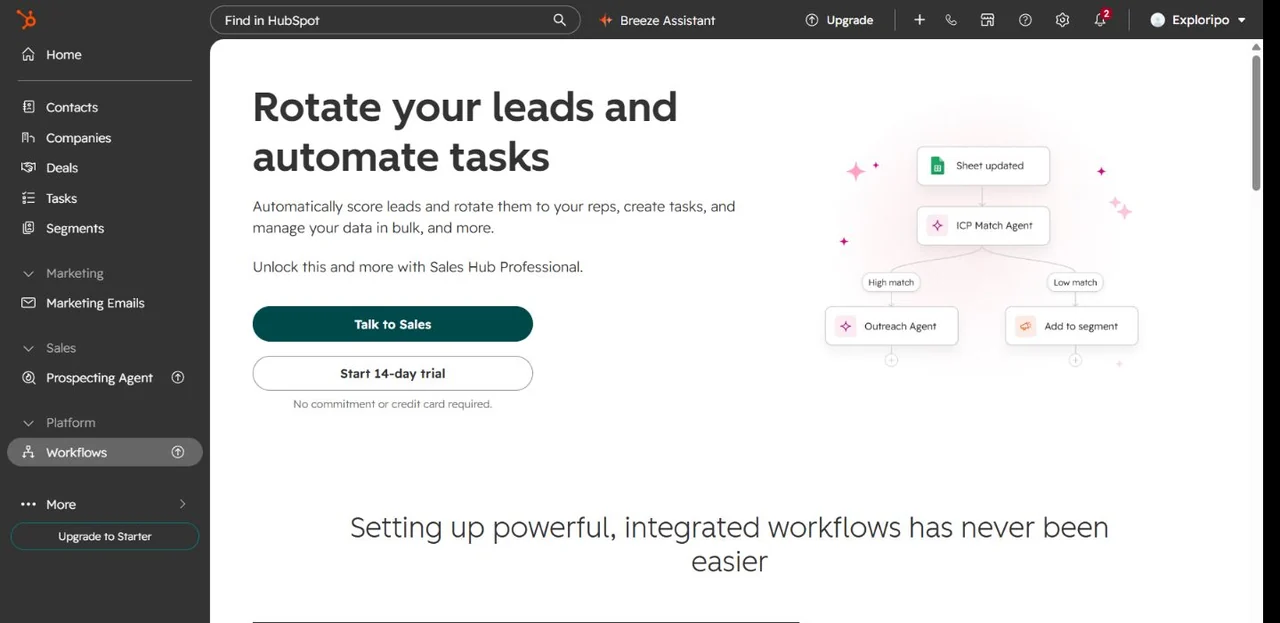
General Workflows required Sales Hub Professional; sequences, forecasting, sales analytics and Sales Workspace were also locked. Ordinary tasks are broad, while reusable automation and guided execution require a higher tier.
Figure 6. The general workflow builder stopped at a Sales Hub Professional upgrade boundary; no trial was activated.
5.4 Dashboards and Breeze Assistant
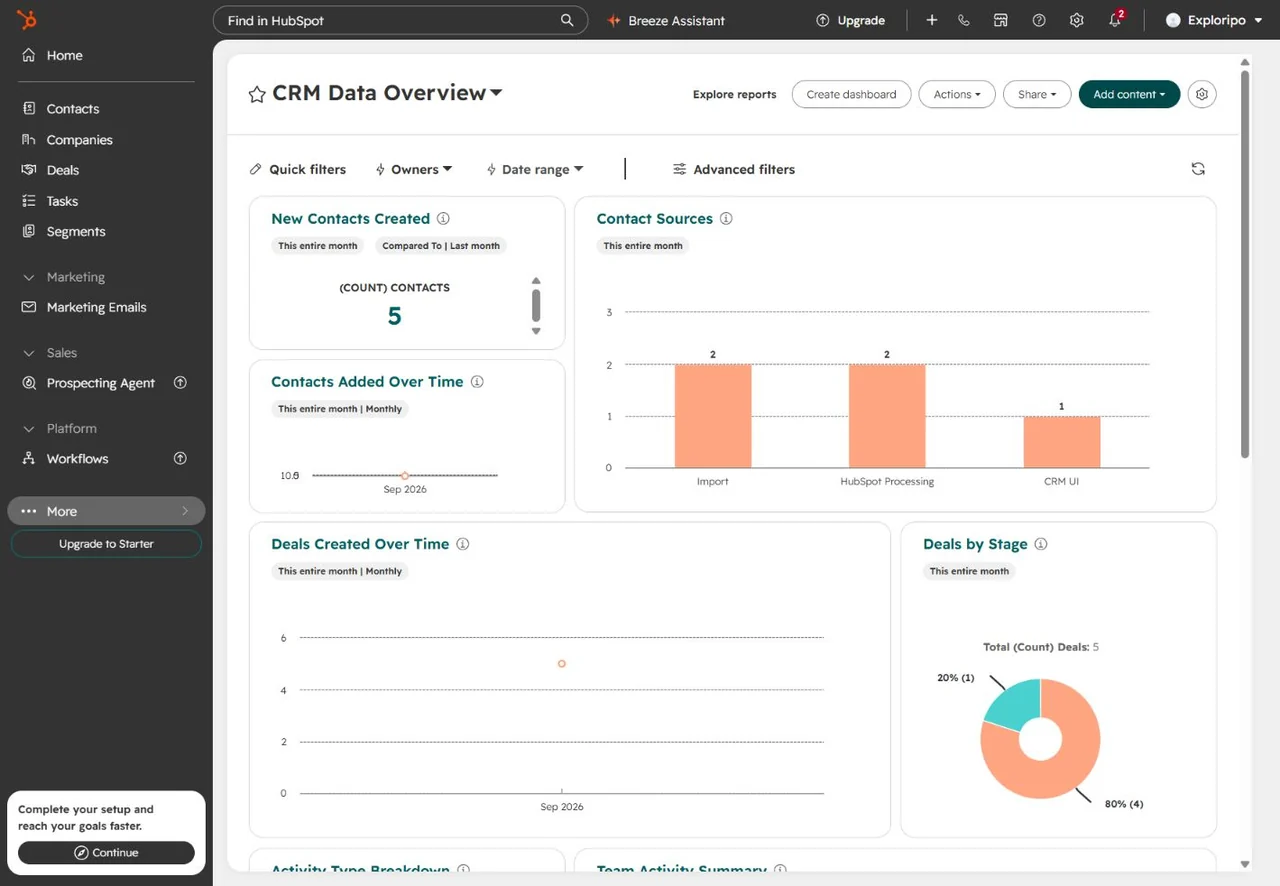
The Free CRM Data Overview populated without setup. It showed five contacts, five deals and the expected four-to-one stage split, with quick and advanced filters visible.
Figure 7. The free dashboard reflected five synthetic contacts and five deals, including the observed four-to-one stage split.
Breeze correctly summarized five open deals, $21,000 total and $5,880 weighted pipeline, plus the four-to-one stage split and assignment status. That useful small-data result is not proof of accuracy on messy production data. We used no sensitive content or paid Credits.
5.5 Email, integrations and administration
HubSpot documents email, templates, scheduling, sequences and integrations with edition-specific limits. We connected none, so they are not presented as tested. Multi-user permissions, SSO, regional hosting, sensitive-data controls, API limits and support quality also remain untested.
06
Pricing
Free Tools $0; Smart CRM Starter $20/seat/month; Sales Hub Starter $20/seat/month list with a $7 annual-equivalent promotion observed
Free plan available
Free trial available
Prices were checked on September 28, 2026; taxes, cadence, currency and promotions can change. Free Tools cost $0, do not expire and allow two users, 1,000 contacts and up to one million records for each other standard object type—not one million free contacts.
Higher limits and enterprise controls; $3,500 onboarding
Larger sales organizations
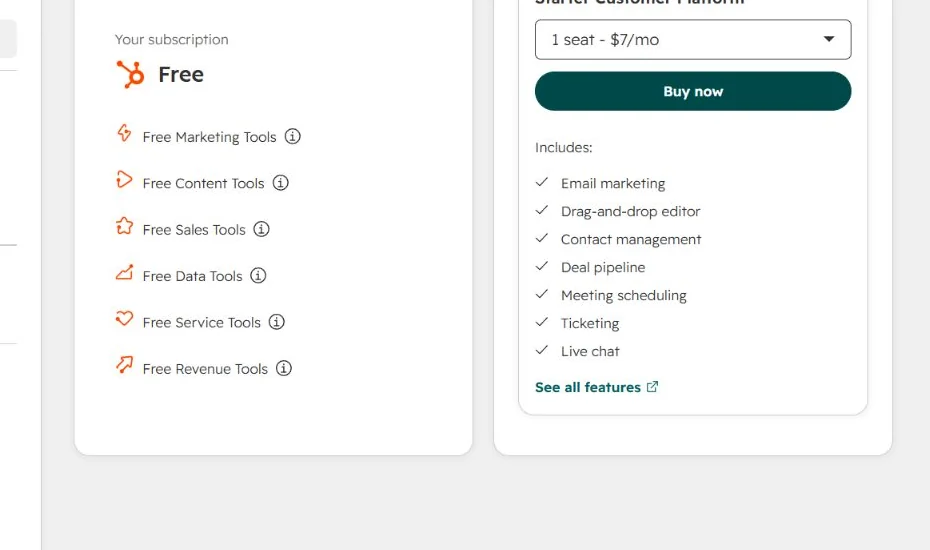
Sales Hub includes 500, 3,000 or 5,000 monthly Credits by tier. They reset monthly and do not roll over; extra usage costs more. Professional and Enterprise need the appropriate Sales Seats. Budget seats, onboarding, Credits and other Hubs together.
Figure 8. The authenticated account identified itself as Free while separately promoting a $7-per-month Starter offer.
Recommended
Best value
Free Tools
$0
No card and no expiry
Best for: Very small teams starting a CRM
Key features
Two users and 1,000 contacts
Core records, tasks, imports and a basic dashboard
Limits
Advanced sales automation and workspace features require paid tiers
Smart CRM Starter
$20/seat/month
List price
Best for: Teams expanding shared CRM data
Key features
Paid Smart CRM foundation
Starter-level controls
Smart CRM Professional
$50/seat/month
List price
Best for: RevOps-owned CRM configuration
Key features
Deeper data management
Expanded customization
Smart CRM Enterprise
$75/seat/month
List price
Best for: Complex data operations
Key features
Higher administration
Enterprise governance controls
Sales Hub Starter
$20/seat/month list
$7/month annual-equivalent promotion observed
Best for: Small teams adding sales execution
Key features
Entry sales tools
500 included monthly Credits
Sales Hub Professional
$100/seat/month list
$90/month promotion observed; $1,500 onboarding
Best for: Growing managed sales teams
Key features
Sequences and workflows
Forecasting and custom reports
Sales Hub Enterprise
$150/seat/month
$3,500 onboarding
Best for: Larger sales organizations
Key features
Higher limits
Enterprise sales controls
07
Our Experience
HubSpot became useful quickly. Associations were visible, the timeline encouraged follow-up, and property history added auditability.
Import was the standout: identity, overwrite behavior and mapping were explicit, and inline field creation saved a detour. Export followed the view’s columns, so migration teams should test completeness and datetime conversion before treating files as a round-trip backup.
The main risk is gradual complexity. Free Tools surface adjacent products, while workflows, sequences, forecasting and Sales Workspace arrive in Sales Hub Professional. Breadth helps growing teams and distracts buyers who only want a pipeline.
What We Did Not Test
Live email or calendar sync, templates, tracking, meetings, sequences, calling or automatic activity capture
External integrations, data sync, APIs, webhooks, mobile apps or offline behavior
Multi-user permissions, enterprise governance, regional migration, support response, billing or cancellation
Large datasets, malformed imports, rollback, long-term reporting accuracy or production performance
08
Alternatives
Alternative
Choose it when
Main trade-off versus HubSpot
Exploripo take
Pipedrive
You want a focused visual pipeline and activity rhythm
No permanent free CRM and less suite breadth
Simpler sales focus; HubSpot has the broader platform
Zoho CRM
You want lower published prices and deeper suite customization
Denser interface and more configuration
Strong value for teams willing to administer it
Salesforce Sales Cloud
You need enterprise customization, governance and ecosystem depth
Higher cost and implementation burden
Choose scale and control over quick adoption
monday CRM
You prefer flexible work-management boards
Less native all-in-one customer-platform depth
Useful when custom workflows matter most
09
How it compares
HubSpot offers a stronger free entry point and broader marketing/service path than Pipedrive. Zoho provides deep customization at lower published prices with a denser interface. Salesforce leads for governed enterprise deployments; monday CRM resembles flexible work management adapted to sales.
HubSpot’s advantage is continuity: start free, then add execution and Hubs without replacing the database. The same path raises switching cost. Compare the paid configuration needed in twelve months, not only today’s free CRM.
10
Final Verdict
HubSpot CRM earns 8.7/10. Free Tools handled linked records, follow-up, stage history, a multi-object import, filtered export, dashboard and accurate synthetic Breeze summary. This is a usable early-stage CRM, not a demo shell.
It falls short of the top tier because data inference caused cleanup, exports need deliberate views, and the upgrade path is complex. Concentrating advanced automation and workspace features in Sales Hub Professional changes the economics quickly.
Recommended for founders, two-person teams and growing revenue organizations that can govern a shared platform. Less suitable for buyers seeking a narrow pipeline or low-cost advanced automation across many users.
Frequently Asked Questions
Is HubSpot CRM really free?
Yes. Free Tools cost $0, need no card, do not expire and support two users. The limit is 1,000 contacts plus up to one million records for each other standard object type.
What is the difference between Smart CRM and Sales Hub?
Smart CRM is the shared data foundation. Sales Hub separately adds sales execution such as sequences, workflows, forecasting and analytics.
Which HubSpot plan includes workflows?
The general builder required Sales Hub Professional in our account. Starter can include narrower embedded automation.
Can HubSpot import data from another CRM?
Yes. We tested a four-row multi-object CSV, mapped contacts, companies and deals, created a custom property and finished without errors.
Does HubSpot CRM include task queues for free?
Our Free account opened the creation form, while reviewed documentation placed queues at Starter. Treat the entitlement as date- and account-sensitive.
Does HubSpot have AI features on the free plan?
Breeze Assistant summarized our synthetic pipeline on Free. Paid agents can use Credits, and availability depends on account settings and the tool.
Is HubSpot good for a small business?
Yes, especially for one or two users who may later connect sales, marketing or service. Before upgrading, price the exact Hubs, seats, onboarding and Credits required.