Business / Sales / CRM

Zoho CRM

We tested it By Exploripo Editorial Team

Zoho CRM offers exceptional capability for the price, with a coherent lead-to-deal model, clean small-file portability and deep process options. Dense navigation, substantial setup and unverified AI, communications and integrations keep it below the top tier.

Exploripo rating 8.9 Excellent
Starting price Free $0 for up to 3 users; Standard $20/user/month monthly or $14 annual equivalent; Professional $35/$23; Enterprise $50/$40; Ultimate $65/$52
Last updated
Pricing checked
Try it

We may earn a commission if you buy through this link, at no extra cost to you.

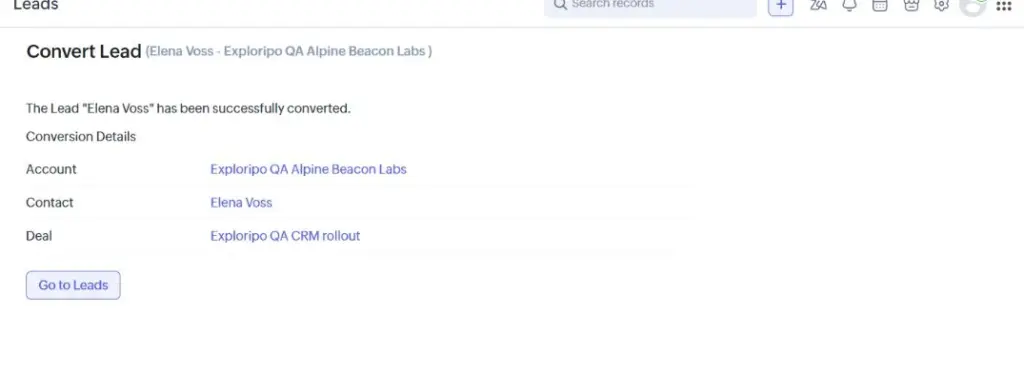
Zoho CRM conversion result showing the fictional Elena Voss lead converted to an Alpine Beacon Labs account, contact and CRM rollout deal

The essentials

Quick Summary

Zoho CRM combines leads, accounts, contacts, deals, activities, automation and reporting in a highly configurable sales platform. Our Enterprise-trial test used synthetic records across conversion, follow-up, import/export, workflow and reporting tasks.

Bottom line

Zoho CRM offers exceptional capability for the price, with a coherent lead-to-deal model, clean small-file portability and deep process options. Dense navigation, substantial setup and unverified AI, communications and integrations keep it below the top tier.

At a glance

Pros & Cons

Pros

  1. Strong lead, account, contact, deal and activity model
  2. Excellent value across five editions, including a three-user Free plan
  3. Clear small-file import, filtering and selected-record export
  4. Deep customization, workflow and Marketplace breadth

Cons

  1. Dense navigation and many administrative choices
  2. Important automation, AI and governance features move up the plan ladder
  3. Setup quality depends on careful field, stage and permission design
  4. Third-party listings and Enterprise-trial access do not prove integration quality

Audience fit

Who it’s for / Who it’s not for

Who it’s for

  • Small and midsize businesses that want leads, deals, tasks, reporting and automation in one configurable CRM.
  • Teams already using Zoho apps and willing to invest time in setup, field design and process ownership.
  • Cost-conscious organizations that need more depth than a basic contact manager without enterprise-level entry pricing.
  • Sales operations teams that expect their CRM to grow from simple pipelines into governed workflows, territories or custom modules.

Who it’s not for

  • Teams that value the simplest visual pipeline and shortest learning curve above customization breadth.
  • Companies that want marketing, service and content tools to share one broader customer-platform buying path from day one.
  • Inside-sales groups whose daily work revolves around integrated calling, SMS and email more than broader CRM administration.
  • Buyers who need proven Zia accuracy, telephony quality, integration reliability or enterprise governance from this review.

Overview

Zoho CRM is the standalone sales CRM in Zoho’s wider product portfolio. It should not be confused with the lighter Bigin product or the broader Zoho One and CRM Plus bundles. The standard model separates unqualified Leads from Accounts and Contacts, then tracks revenue work as Deals. Tasks, meetings, calls, notes and email can attach to those records. A qualified lead can become an account, contact and deal in one conversion, which is the path we tested.

The current interface is Zoho’s CRM for Everyone design, which replaced the old UI across editions in July 2026. Navigation now centers on a left rail, teamspaces and multiple module views. The change makes the product feel more coherent than older screenshots suggest, but it does not remove the underlying breadth. Setup still spans channels, modules, pipelines, workflows, process management, security, data administration, Marketplace extensions, developer tools and Zia.

Independent feedback shows the same split. Users often praise value, customization and lead management, while recurring criticism covers the learning curve, advanced settings, third-party integrations and support. Those comments span different editions and implementations, so they provide context rather than determine our score.

Features

5.1 Lead Conversion and Deal Management

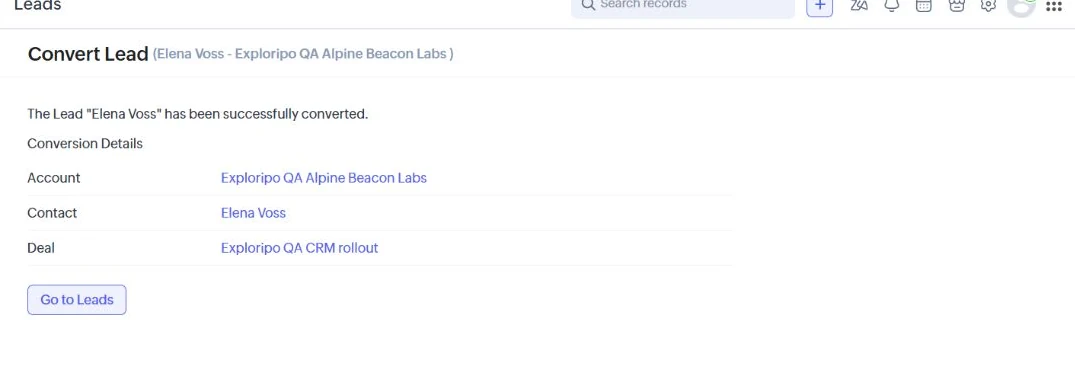
We created Elena Voss at the fictional Alpine Beacon Labs, then used Convert Lead. Zoho produced linked Account, Contact and Deal records without duplicating the core details. That separation is useful when a prospect becomes a qualified buying organization, although teams should agree on conversion rules before importing real data.

Zoho CRM conversion result showing the fictional Elena Voss lead converted to an Alpine Beacon Labs account, contact and CRM rollout deal
Figure 1. Converting the synthetic lead created linked Account, Contact and Deal records.

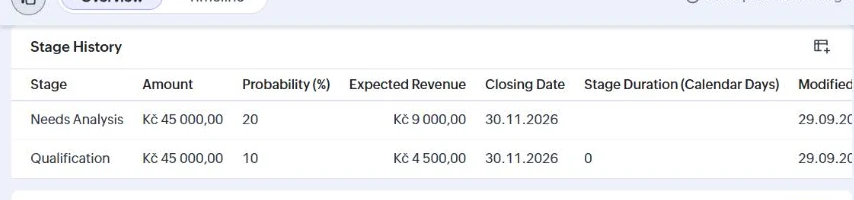
The Kč45,000 deal carried its close date and stage context. We added the task Exploripo QA: confirm requirements and a private qualification note. Moving the deal from Qualification to Needs Analysis changed probability from 10% to 20% and expected revenue from Kč4,500 to Kč9,000. The history view preserved both stages, so the relationship between pipeline movement and weighted value was easy to verify.

Zoho CRM open activities panel with one synthetic follow-up task due October 2 2026
Figure 2. The deal kept a visible follow-up task and due date beside the record context.
Zoho CRM deal stage history showing Qualification at 10 percent and Needs Analysis at 20 percent for a synthetic 45000 Czech koruna deal
Figure 3. Stage history recorded the move from Qualification to Needs Analysis and the change in expected revenue.

5.2 Import Filtering and Export

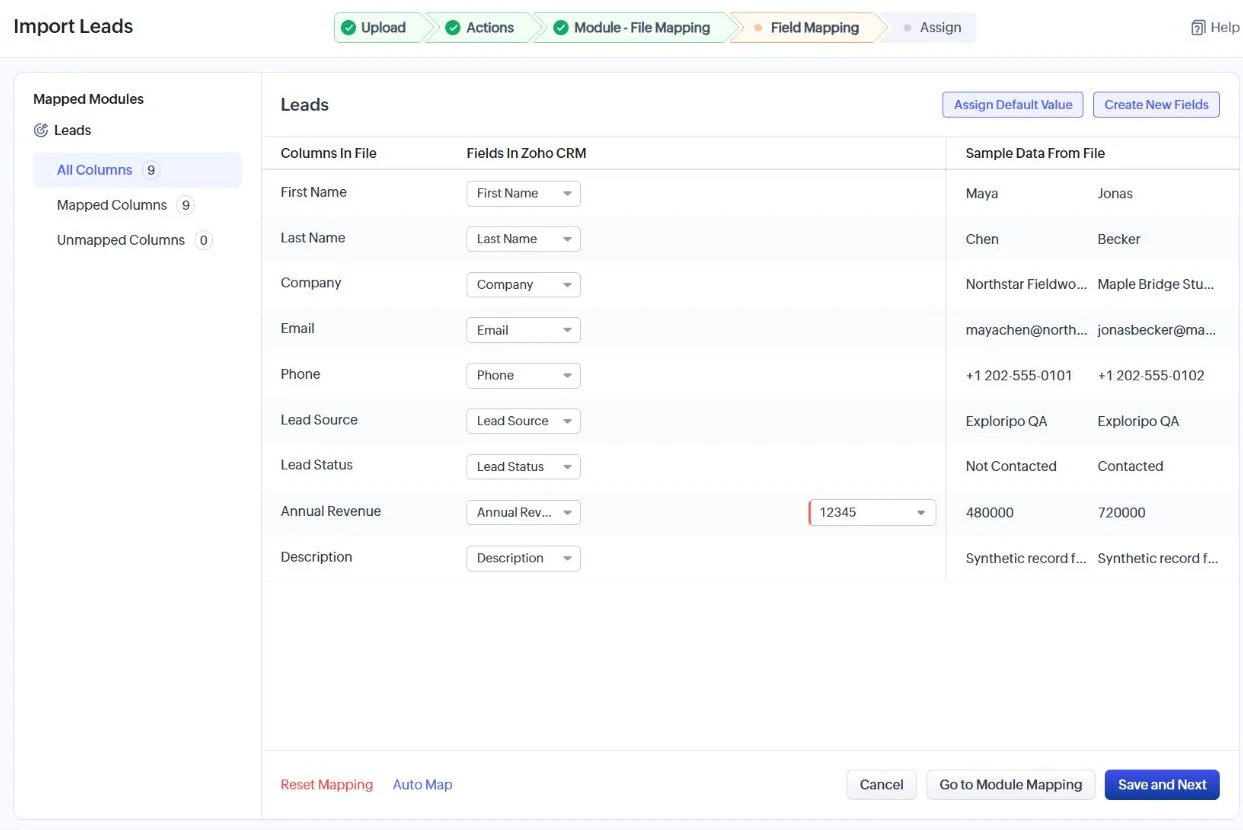
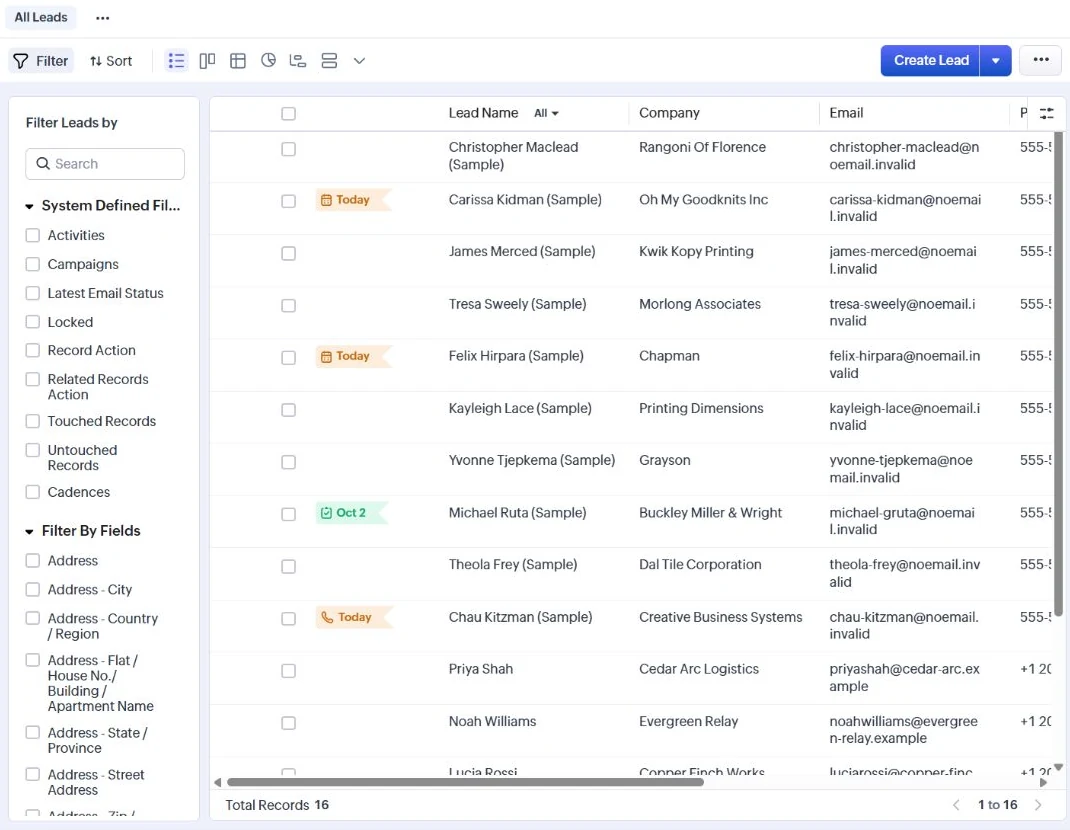
Our six-row CSV used fictional companies, reserved example-domain emails and a common Lead Source value. Zoho mapped all nine columns, displayed sample values and exposed an explicit consent checkpoint before import. The job completed with six leads added and no reported failure.

Zoho CRM field mapping screen with nine mapped columns for a synthetic lead CSV
Figure 4. The importer mapped all nine fixture columns and previewed sample values before execution.
Zoho CRM Leads module after a six-record synthetic import
Figure 5. The Leads module contained the completed import alongside Zoho’s sample records.

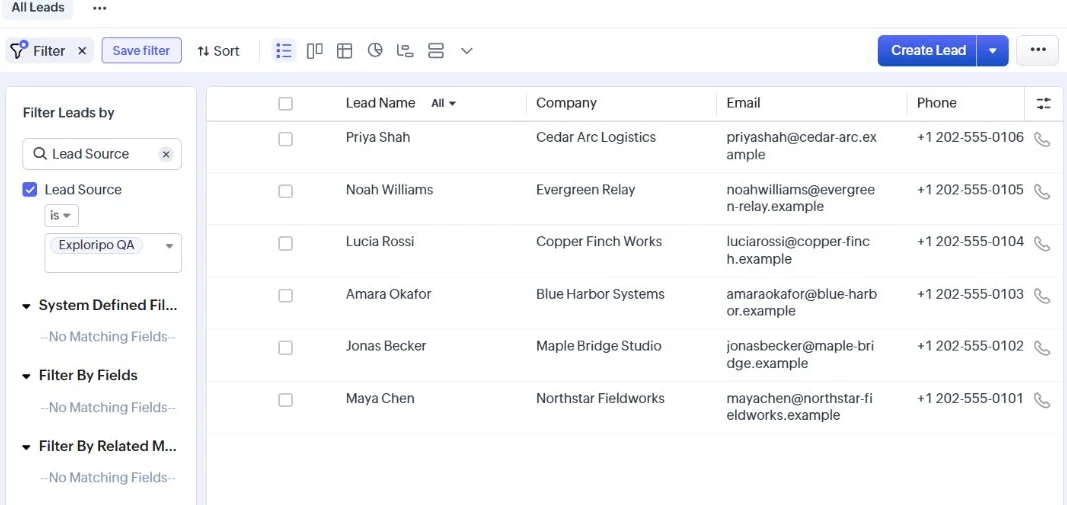
A saved filter for Lead Source = Exploripo QA returned exactly six records. We selected only that cohort and exported it. The downloaded archive contained one CSV with the same six names and no non-test row. This was a stronger portability result than a confirmation screen alone, but it remains a tiny flat-file test rather than a production migration.

Zoho CRM filtered Leads view showing six synthetic records with Lead Source Exploripo QA
Figure 6. The saved filter isolated exactly the six imported Exploripo QA leads before export.

5.3 Workflow Automation and Process Control

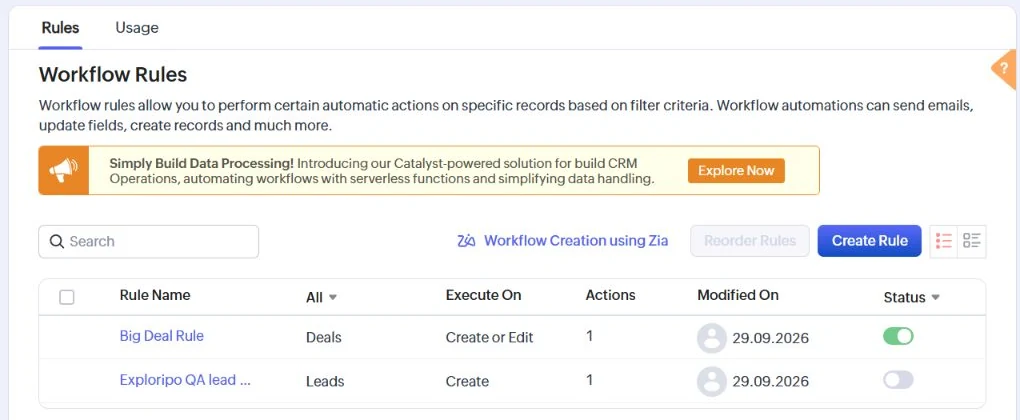
The Enterprise trial exposed Workflow Rules. We built Exploripo QA lead review for records created with Lead Source = Exploripo QA and added one internal field update that sets Lead Status to Not Contacted. No email, webhook or external action was configured. We then used the confirmation dialog to deactivate the rule and verified that its switch remained off. The test supports a claim about builder clarity and safe deactivation, not execution reliability. Blueprint, approvals, cadences and assignment rules were not run.

Zoho CRM Workflow Rules list showing the Exploripo QA lead rule inactive
Figure 7. The internal test workflow remained saved with its status switch off.

5.4 Reports and Zia

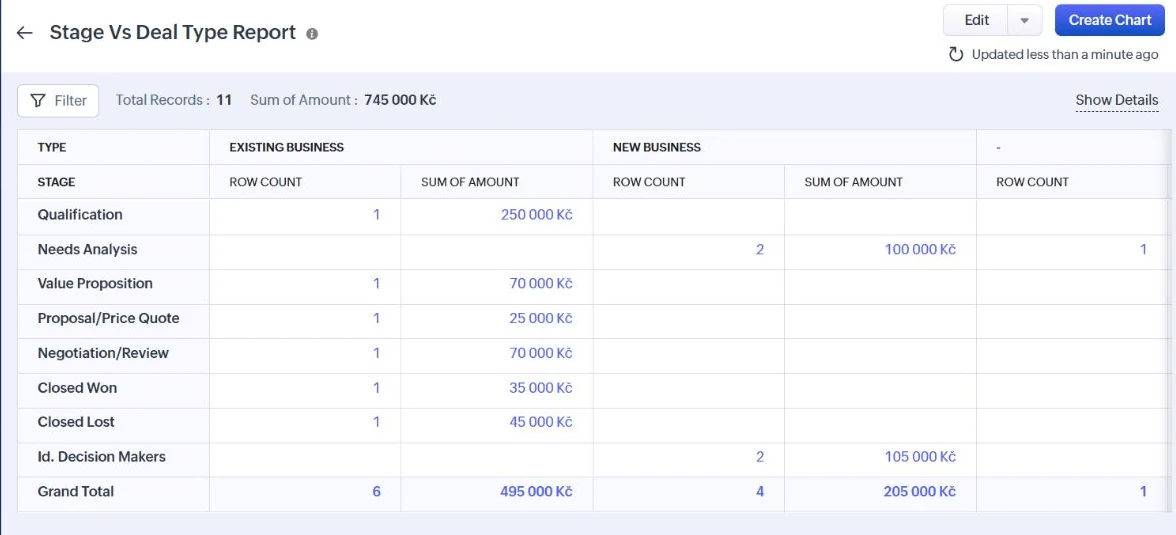
The standard Stage Vs Deal Type report loaded 11 deals worth Kč745,000 and included our Kč45,000 record under Needs Analysis. That confirms the stage update reached a report. It does not establish forecast accuracy, custom-report flexibility or performance on a mature dataset.

Zoho CRM Stage Versus Deal Type report with a synthetic deal counted under Needs Analysis
Figure 8. The standard stage report included the synthetic deal in Needs Analysis.

Zia is broader on paper than our live test could verify. Zoho documents scoring, predictions, recommendations, communication intelligence, anomalies and generative assistance with edition-specific access. Our visible agent panel offered How-to and Customization agents, but no data-insight route suitable for querying the synthetic pipeline. We sent no prompt and give Zia no hands-on accuracy credit.

5.5 Communication Integrations and Administration

Paid editions can connect a mailbox, and Zoho provides telephony through its own and Marketplace providers. Our email settings still showed Get Started, while Telephony opened a provider catalogue. We connected neither. Marketplace breadth does not prove setup quality, permissions or reliability. Zoho also documents roles, sharing, territories, SSO, audit logs, sandboxing and compliance controls; these remain vendor claims rather than an Exploripo security audit.

Pricing

Free $0 for up to 3 users; Standard $20/user/month monthly or $14 annual equivalent; Professional $35/$23; Enterprise $50/$40; Ultimate $65/$52

  • Free plan available
  • Free trial available

US-dollar prices were checked on September 29, 2026. Paid prices are per user. Annual figures are monthly equivalents for prepaid annual billing; monthly prices apply to month-to-month billing. Taxes, currency and regional presentation can change the final amount.

PlanCurrent priceSelected boundaryBest fit
Free$0 for up to 3 usersCore records and activities; tight limitsVery small teams testing structured CRM
Standard$20 monthly; $14 annual equivalentMultiple pipelines, custom fields/modules, workflows and emailSMBs formalizing a sales process
Professional$35 monthly; $23 annual equivalentBlueprint, inventory/CPQ, portals and SignalsTeams enforcing repeatable processes
Enterprise$50 monthly; $40 annual equivalentBroader Zia, territories, approvals, sandbox and customizationComplex sales operations and governance
Ultimate$65 monthly; $52 annual equivalentHighest published limits and analytics capacityLarger teams needing maximum headroom

Standard, Professional and Enterprise currently offer a 15-day trial without a credit card. All regular users in one organization share the same edition, so a few advanced users can raise the subscription choice for the whole team. Published limits for workflows, fields, custom modules, extensions, storage and imports rise sharply by tier. Buyers should compare the exact edition matrix against their process before using the low entry price as a total-cost estimate.

Free

$0 for up to 3 users

No subscription fee

Best for: Very small teams testing structured CRM

Key features

  • Core lead, contact, account, deal and activity records
  • Permanent entry point for up to three users

Limits

  • Tight record, storage, customization and integration limits

Professional

$35/user/month

$23/month annual equivalent when billed annually

Best for: Teams enforcing repeatable processes

Key features

  • Blueprint, inventory and CPQ
  • Portals, Signals and higher limits

Limits

  • Less Zia and governance depth than Enterprise

Enterprise

$50/user/month

$40/month annual equivalent when billed annually

Best for: Complex sales operations and governance

Key features

  • Broader Zia, territory and approval features
  • Sandbox and deeper customization

Limits

  • Higher per-user cost; hands-on findings came from a trial

Ultimate

$65/user/month

$52/month annual equivalent when billed annually

Best for: Larger teams needing maximum headroom

Key features

  • Highest published limits
  • Maximum analytics and customization capacity

Limits

  • Highest listed price; scale benefits were not tested

Pricing note: US-dollar pricing was checked September 29, 2026. Annual figures are monthly equivalents for prepaid annual billing. Taxes, currency, region, seats and optional services can change the total cost.

Pricing checked:

Try it

Our Experience

Once the lead existed, conversion, related records, follow-up and stage movement worked as one connected process. Probability and expected revenue changed with the stage. Notes and tasks stayed near the deal, and the standard report reflected the new stage without extra configuration.

Import was the strongest usability result. Mapping exposed every fixture column, the consent step was explicit, a saved filter isolated the cohort, and the export matched all six test leads. It was a useful small-data check, but real migrations still need tests for identifiers, duplicates, dates and relationships.

The workflow builder was understandable, but it also showed why Zoho needs careful administration. Triggers, criteria and actions sit beside Blueprint, approvals, assignments, schedules and cadences. We built a safe internal update and turned it off; a team without a clear owner could still accumulate rules quickly. Channels, Marketplace and Zia carry similar plan, provider and data dependencies.

What We Did Not Test

• Live email or calendar synchronization, deliverability, templates, bulk email or shared-inbox behavior.

• Calls, SMS, WhatsApp, number provisioning, recordings, transcription, carrier setup or provider billing.

• Workflow execution, Blueprint enforcement, cadences, approvals, assignments or production notifications.

• Predictive scoring, recommendations, forecasting accuracy or Zia analysis on a mature dataset.

• Multi-user permissions, territories, sandbox governance, mobile use, API behavior, support response or large-volume performance.

Alternatives

AlternativeChoose it whenMain trade-off versus Zoho CRMExploripo take
PipedriveYou want the clearest visual pipeline and faster adoptionLess suite breadth and customization depthSimpler daily selling; Zoho offers more process and admin range
HubSpot CRMYou want a useful free entry point and broader marketing/service pathPaid expansion follows a different, often costlier packaging modelEasier platform entry; Zoho is stronger on low-cost CRM depth
CloseInside-sales communication should sit at the center of the recordNo permanent free plan and higher workflow-enabled pricingMore focused rep workflow; Zoho is broader and cheaper at entry
  • Business / Sales / CRM

    Pipedrive

    Rating
    8.8
    Price
    Lite from €14/user/month billed annually (€24 monthly); Growth €39; Premium €59; Ultimate €79 on annual billing

    Best for: Small and midsize sales teams that want a clear pipeline and disciplined follow-up

    Choose Pipedrive for the clearest visual pipeline and faster adoption; choose Zoho CRM for broader customization and process depth.

    View review
  • Business / Sales / CRM

    HubSpot CRM

    Rating
    8.7
    Price
    Free Tools $0; Smart CRM Starter $20/seat/month; Sales Hub Starter $20/seat/month list with a $7 annual-equivalent promotion observed

    Free plan available

    Best for: Founders, two-person teams and growing revenue organizations that can govern a shared customer platform

    Choose HubSpot CRM for a polished free entry point and broader marketing or service path; choose Zoho CRM for lower-cost standalone CRM depth.

    View review
  • Business / Sales / CRM

    Close

    Rating
    8.8
    Price
    Solo $19/user/month monthly or $9 annual equivalent; Essentials $49/$35; Growth $109/$99; Scale $149/$139

    Best for: Small and midsize inside-sales teams that want lead context, communication and pipeline work in one focused CRM

    Choose Close for a focused communication-led sales desk; choose Zoho CRM for wider sales operations and lower entry pricing.

    View review

How it compares

Zoho CRM competes on capability per dollar. Pipedrive is faster to scan because the pipeline is its center of gravity. Zoho adds deeper process, module and governance options, but asks the team to learn more. HubSpot offers a polished free start and broader customer platform; Zoho keeps substantial standalone CRM depth at lower listed seat prices. Close centers inside-sales communication, while Zoho serves wider sales operations.

Choose Zoho CRM when someone can own fields, stages, automation and permissions as needs grow. Choose Pipedrive for straightforward pipeline adoption, HubSpot for a broader marketing and service journey, or Close for a communication-led sales desk. None is universally better.

Comparison of the current reviewed software with selected alternatives
Detail Current review Zoho CRM Pipedrive Choose Pipedrive for the clearest visual pipeline and faster adoption; choose Zoho CRM for broader customization and process depth. HubSpot CRM Choose HubSpot CRM for a polished free entry point and broader marketing or service path; choose Zoho CRM for lower-cost standalone CRM depth. Close Choose Close for a focused communication-led sales desk; choose Zoho CRM for wider sales operations and lower entry pricing.
Overall rating 8.9 / 10 8.8 / 10 8.7 / 10 8.8 / 10
Price Free $0 for up to 3 users; Standard $20/user/month monthly or $14 annual equivalent; Professional $35/$23; Enterprise $50/$40; Ultimate $65/$52 Lite from €14/user/month billed annually (€24 monthly); Growth €39; Premium €59; Ultimate €79 on annual billing Free Tools $0; Smart CRM Starter $20/seat/month; Sales Hub Starter $20/seat/month list with a $7 annual-equivalent promotion observed Solo $19/user/month monthly or $9 annual equivalent; Essentials $49/$35; Growth $109/$99; Scale $149/$139
Free plan Yes No Yes No
Free trial Yes Yes Yes Yes
Best for Small and midsize sales teams that want a configurable CRM and can assign clear ownership for setup and administration Small and midsize sales teams that want a clear pipeline and disciplined follow-up Founders, two-person teams and growing revenue organizations that can govern a shared customer platform Small and midsize inside-sales teams that want lead context, communication and pipeline work in one focused CRM

Final Verdict

Zoho CRM earns 8.9/10. Our Enterprise trial produced a credible small sales system: a lead became linked account, contact and deal records; the task and note stayed with the deal; stage history updated probability and expected revenue; six CSV leads imported cleanly; a saved filter isolated them; and the exported file contained the intended cohort only. A safe internal workflow could be built and deactivated, while the standard report reflected the synthetic deal.

The rating stops short of the top tier because power creates friction. The interface exposes a large administrative surface, features move between editions, and many claims depend on external providers or mature data. The available Zia agents did not provide a responsible CRM-data test, so AI quality is not part of the score.

Recommended for small and midsize teams that want a configurable CRM with strong economics and can appoint a capable system owner. Less suitable for buyers who prioritize immediate simplicity, a communication-first workspace or proof of advanced AI and integration behavior before purchase. Start with the edition matrix, build one representative process and test migration rules before committing every user.

Frequently Asked Questions

Is Zoho CRM really free?

Yes. The Free edition currently supports up to three users with core lead, contact, account, deal and activity management, subject to lower limits than paid editions.

How much does Zoho CRM cost?

Our September 29, 2026 check found annual monthly equivalents of $14 for Standard, $23 for Professional, $40 for Enterprise and $52 for Ultimate per user. Month-to-month prices were $20, $35, $50 and $65.

How long is the Zoho CRM trial?

Standard, Professional and Enterprise currently offer a 15-day trial without a credit card. We tested the Enterprise trial, not every edition.

Which Zoho CRM plan includes workflows and Blueprint?

Standard introduces workflow automation. Professional adds Blueprint and broader process features. Limits increase on higher editions, so check the current comparison before purchase.

Can Zoho CRM import and export data?

Yes. We imported six synthetic leads from CSV, filtered them and downloaded a selected-record export containing the same six rows. Large or relational migrations were not tested.

Does Zoho CRM include email and calling?

Zoho documents mailbox synchronization and multiple telephony routes on paid editions, subject to edition and provider rules. We inspected setup surfaces but connected no mailbox or phone provider.

Is Zoho CRM good for a small business?

Yes, especially when the business values customization and low entry pricing and can own the setup. A team wanting the simplest pipeline should also compare Pipedrive; a team wanting a wider free platform path should compare HubSpot CRM.

Sources 12 sources
  1. Zoho CRM product page (opens in a new tab)

    Official product positioning and canonical vendor destination checked September 29, 2026.

  2. Zoho CRM edition comparison (opens in a new tab)

    Official USD monthly and annual-equivalent prices and edition boundaries checked September 29, 2026.

  3. Zoho CRM edition and role guide (opens in a new tab)

    Official editions, 15-day trial, billing and role guidance.

  4. Zoho CRM complete feature list (opens in a new tab)

    Official plan features and quantitative limits checked September 29, 2026.

  5. Import data into Zoho CRM (opens in a new tab)

    Official format, mapping and duplicate-handling guidance; hands-on use covered one six-row CSV.

  6. Export CRM data (opens in a new tab)

    Official export formats and limits; the selected six-record export was inspected.

  7. Zia artificial intelligence (opens in a new tab)

    Official Zia feature family; no suitable data-insight route was available in the tested agent panel.

  8. Zoho CRM UI comparison (opens in a new tab)

    Official CRM for Everyone navigation and interface transition guidance.

  9. Zoho CRM support plans (opens in a new tab)

    Official support tiers; support response quality was not tested.

  10. Zoho CRM security controls (opens in a new tab)

    Vendor security and governance capabilities; no independent security audit was performed.

  11. Zoho CRM email configuration (opens in a new tab)

    Official mailbox-integration behavior; no mailbox was connected.

  12. Zoho CRM telephony (opens in a new tab)

    Official telephony setup paths; no phone provider was connected.