No spam. Just software we’ve actually tested, plus useful reviews, comparisons and recommendations. We’ll send a confirmation email (double opt-in). You can unsubscribe anytime.
Everyday Productivity
Xero
We tested it
By Exploripo Editorial Team
Xero is an excellent choice for small businesses that want scalable, accountant-friendly books, but more system than a solo operator needs for basic invoicing alone. It earns 8.6/10.
Exploripo rating8.6/10Excellent
Starting price30-day trial; US Early $25/month before the current promotion
Bottom line: Xero is full cloud accounting software rather than a lightweight invoice maker. In our Czech Republic trial organization, it handled a realistic accounting chain cleanly and kept each saved record visible in the next step.
Bottom line
Xero is an excellent choice for small businesses that want scalable, accountant-friendly books, but more system than a solo operator needs for basic invoicing alone. It earns 8.6/10.
02
At a glance
Pros & Cons
+Pros
Strong end-to-end accounting flow across invoices, bills, bank statement imports, reconciliation, and dashboard reporting.
Clear CSV mapping and transaction preview, including visible debit treatment and a duplicate check before import.
Useful draft controls: the invoice stayed unsent, previewed accurately, and exported as a clean one-page PDF.
Broad official coverage includes cash-flow views, sales tax, reports, document capture, payments, roles, integrations, and modular data export.
Collaboration is a core strength; the US pricing model does not add a per-user licence fee, which suits owner-bookkeeper-accountant workflows.
−Cons
The Bills list did not show our saved draft until the page was manually refreshed.
A manually added account offered only Credit card and Other; Other explicitly had no bank feed and there was no distinct Bank type.
The CSV Reference field required manual mapping, and the unapproved draft bill was not available in Find & Match.
Plan names, prices, promotions, and included features vary by country or account context, so comparison requires care.
Recurring independent criticism concerns advanced settings, reporting and template customization, inventory depth, multi-entity work, and technical-support response.
03
Audience fit
Who it’s for / Who it’s not for
✓Who it’s for
Xero is best for small businesses that need genuine double-entry bookkeeping alongside customer invoicing, supplier bills, and bank reconciliation.
It is especially persuasive when several people touch the books:
an owner can monitor cash flow, a bookkeeper can process transactions, and an external accountant can review the same ledger without exchanging desktop files.
Growing service businesses, agencies, professional firms, retailers with modest inventory needs, and internationally minded teams are the clearest fit.
In the US plan structure, Early can work for very small volumes, but its 20-invoice and 5-bill caps make Growing the realistic starting point for many active businesses.
Established becomes relevant when multicurrency, projects, expense claims, mileage, and deeper analytics matter.
×Who it’s not for
A freelancer who only needs occasional estimates and simple invoices may find FreshBooks, Wave, or a lower-cost invoicing tool easier to justify.
Businesses that need sophisticated inventory, consolidated multi-entity reporting, or highly customized operational reporting may require add-ons or a different platform.
US companies wanting payroll bundled into the base subscription should also account for Xero's separate Gusto integration.
Finally, buyers who expect immediate telephone support as the default route may prefer a provider with a more direct support model.
04
Overview
Xero organizes the accounting cycle around familiar business areas: Sales, Purchases, Accounting, Tax, Contacts, and Projects. Onboarding asked about our current accounting software, who manages the books, other tools in use, desired outcomes, and the first job to complete. That made the opening experience feel guided without hiding the underlying accounting structure.
Our trial organization was configured for the Czech Republic, Prague time zone, CZK, and a 31 December financial year end. The account opened without a captured payment-card step and identified its plan as Premium in trial, although the exact expiry was not visible. Navigation exposed invoices, bills, bank accounts, bank rules, the chart of accounts, fixed assets, and manual journals, so the trial was substantial enough for a defensible core-workflow test.
Independent ratings were consistently strong when checked: 4.4/5 on G2 and Capterra, 8.4/10 on TrustRadius, and 4.1/5 on Trustpilot. The recurring pattern is more useful than any single score. Users commonly praise reconciliation, remote bookkeeping, accountant collaboration, and automation after setup; the most repeated reservations concern accounting complexity for newcomers, customization limits, support, and inconsistent results from some integrations or automated matching.
05
Features
Invoicing and bills
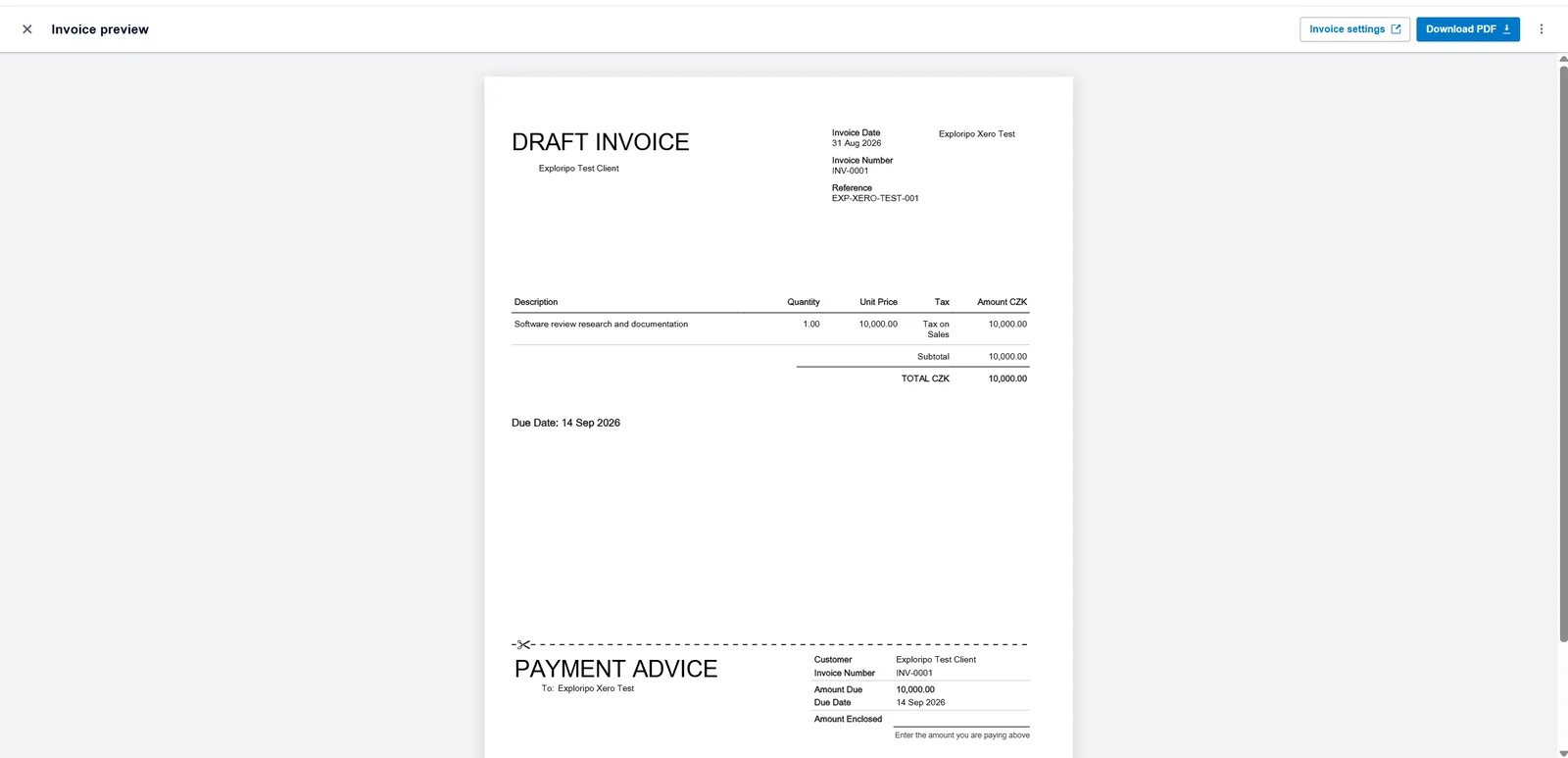
The invoice editor covered the essential commercial fields without forcing an external action. We created a fictional customer, set issue and due dates, entered reference EXP-XERO-TEST-001, selected the Sales account and 0% sales tax, and produced a CZK 10,000 draft. Preview clearly labelled it DRAFT INVOICE, and the downloaded PDF preserved the customer, dates, line item, reference, and total. The invoice remained in Draft after Save & close; we did not approve, email, or submit it for payment.
The draft invoice preview preserved the customer, dates, reference, line item, and CZK 10,000 total without sending it.
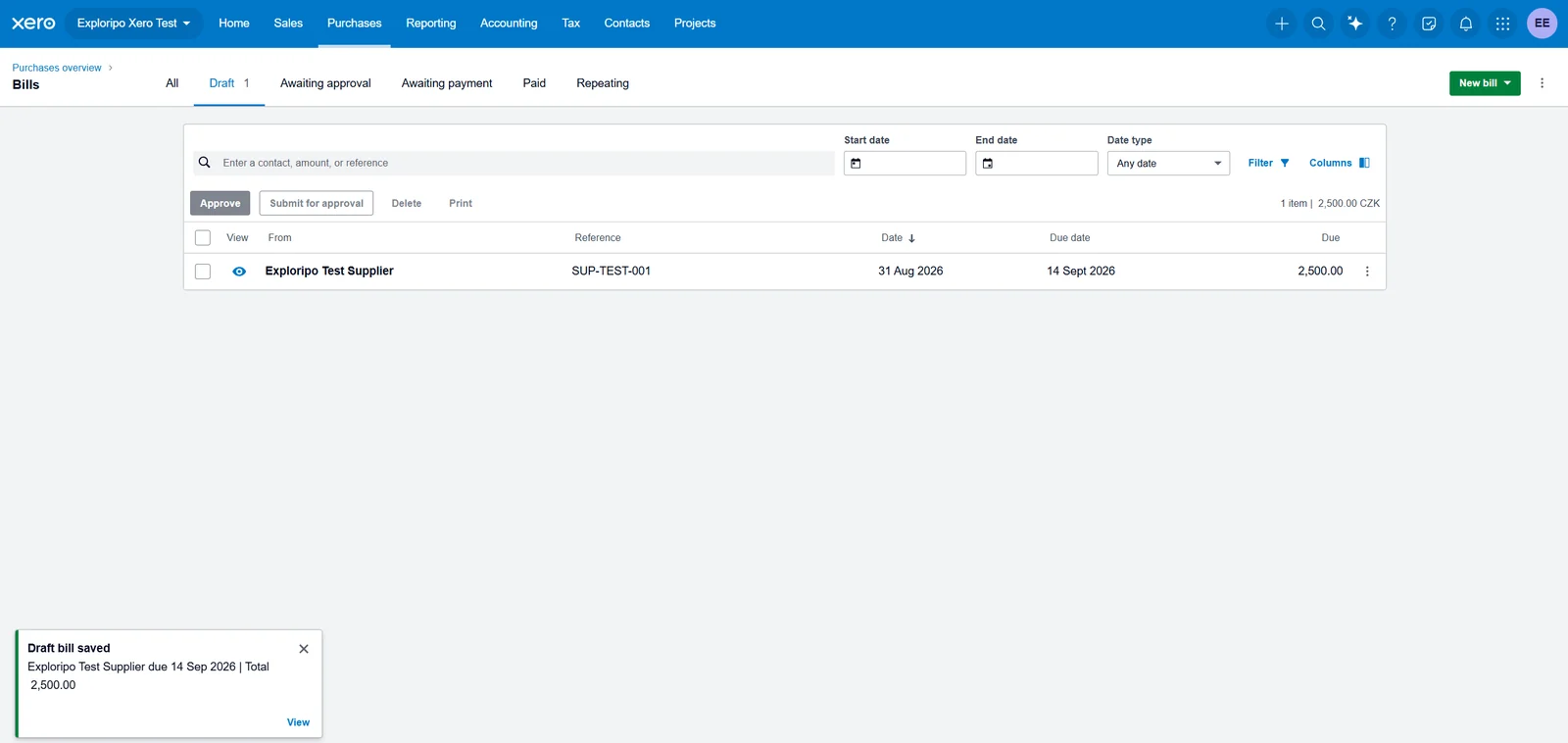
The purchase side offered upload, email forwarding, and manual bill entry. Our fictional supplier bill used reference SUP-TEST-001, account 485 - Subscriptions, 0% purchase tax, and a CZK 2,500 total. Saving worked, but the list stayed stale until a manual refresh. After refresh, the draft and its confirmation notification appeared correctly. The bill was never approved or paid.
After a manual page refresh, Xero showed the saved CZK 2,500 supplier bill in Draft.
Bank import and reconciliation
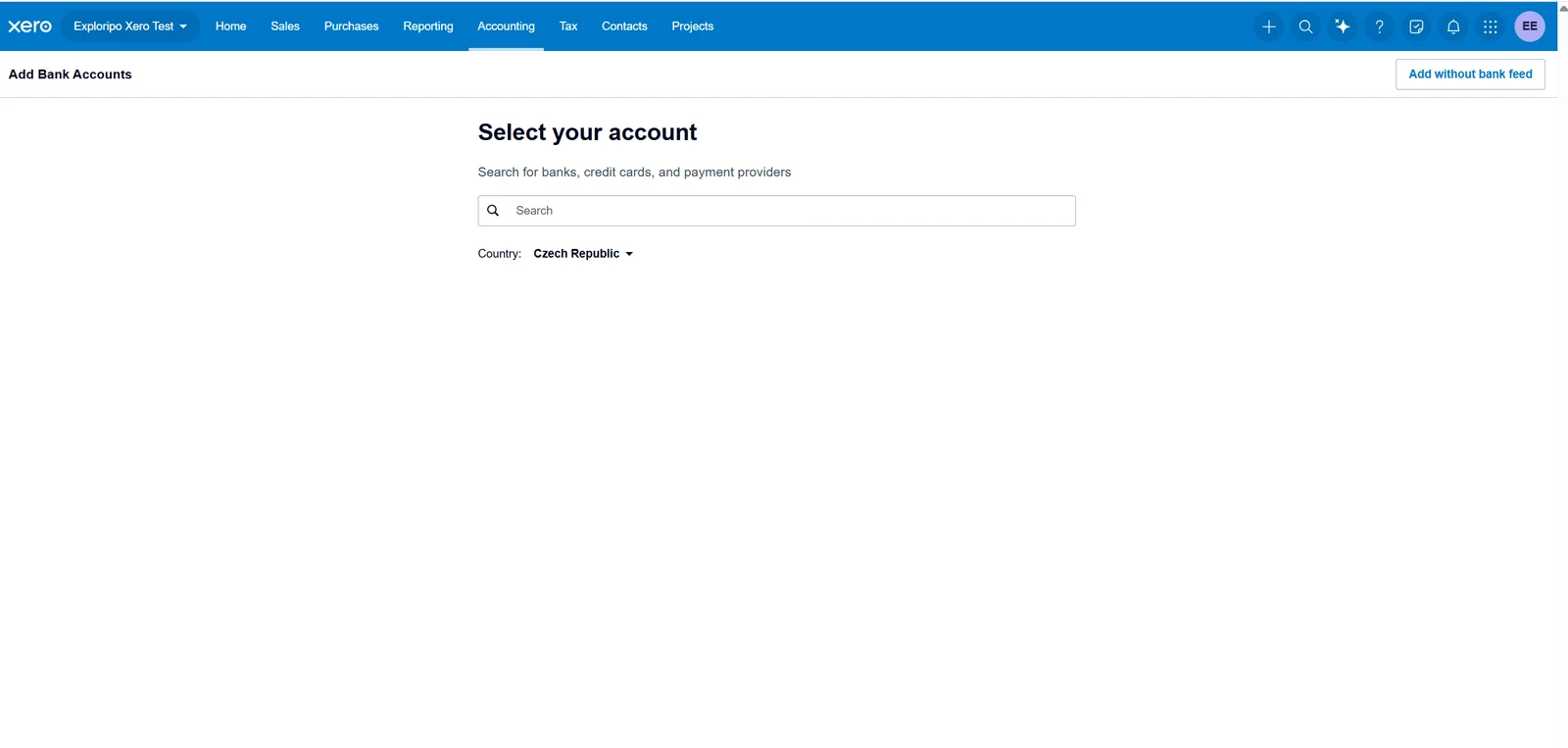
Xero promotes connected bank feeds, but it also supports a manual route. We chose Add without bank feed and created a fictional CZK account. The form's only account types were Credit card and Other; choosing Other warned that bank feeds were unavailable. That is workable for a controlled import, though the generic label is less intuitive than a dedicated manual bank-account type.
The add-account screen kept a visible manual route through Add without bank feed.
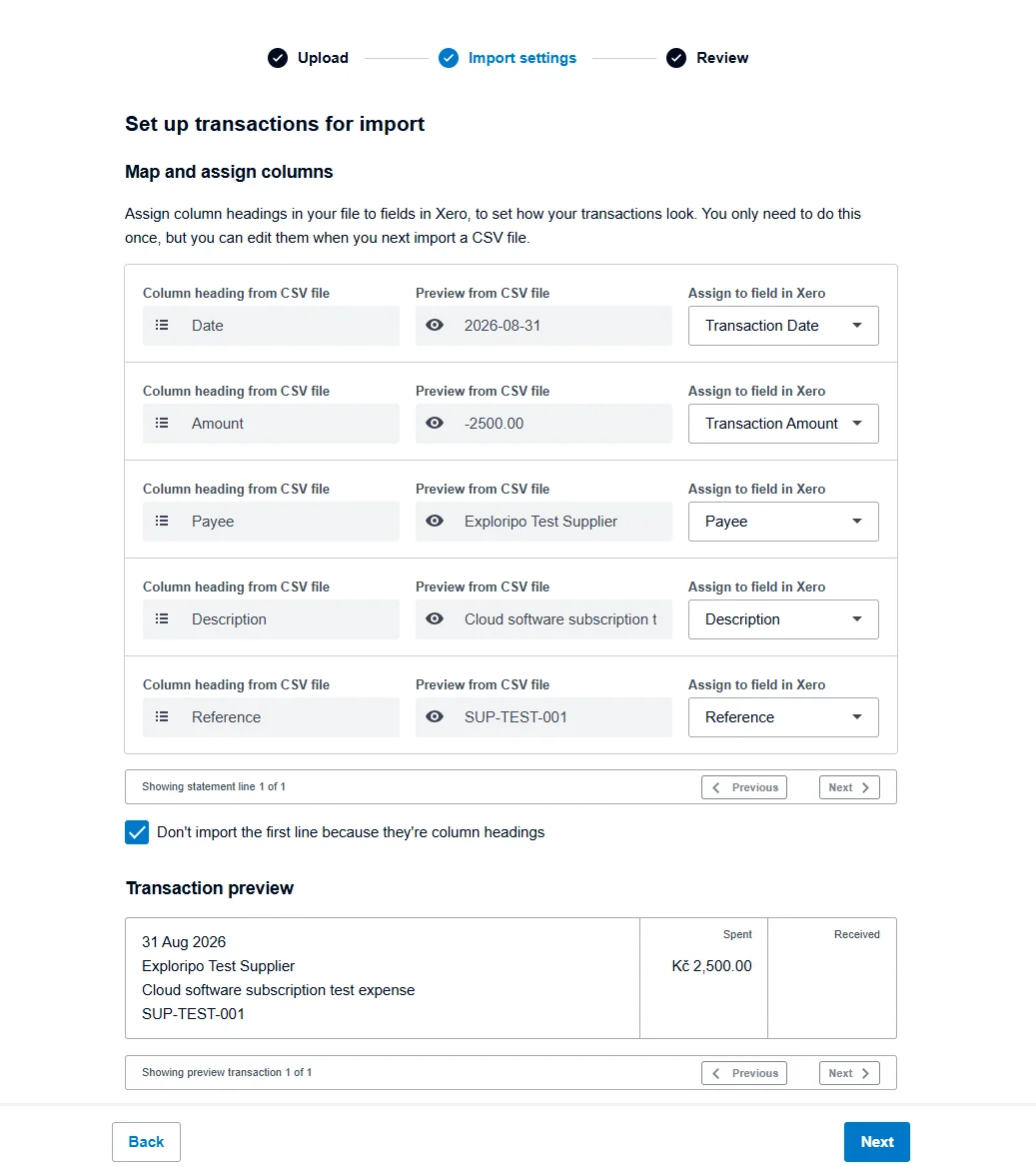
The import screen accepted OFX, QFX, QIF, QBO, and CSV. Our one-line CSV contained an ISO date, a negative CZK 2,500 amount, supplier, description, and reference. Xero automatically mapped date, amount, payee, and description, interpreted the line as Spent, and showed a transaction preview. Reference needed one manual assignment. The next screen reported one transaction ready to import and later confirmed one imported line with zero duplicates.
The completed CSV mapping exposed every assigned field and previewed the CZK 2,500 debit before import.
Reports, automation, and portability
Officially, plan-dependent features include automated bill entry, auto-reconciliation, cash-flow forecasts, projects, expenses, multicurrency, and deeper analytics. We did not test those advanced functions or run a dedicated report export, so they are not scored as hands-on findings. The dashboard write-through after reconciliation was verified directly.
Portability is capable but fragmented. Xero does not provide a single one-click organization backup. Instead, contacts, chart of accounts, invoices, bills, assets, and reports are exported from their own areas. Reports can use formats including CSV/XLS, Google Sheets, or PDF depending on the report, while invoice and bill CSV exports are limited to 500 transactions per batch and exclude repeating templates.
06
Pricing
30-day trial; US Early $25/month before the current promotion
Free trial available
Pricing needs a regional label. The current US public page used Early, Growing, and Established, while our signed-in Czech organization displayed Lite, Starter, Standard, and Premium. These are separate contexts and should not be combined.
The 90% US promotion was still available to eligible new customers buying their first organization through September 30, 2026 and excluded add-ons, usage, payment fees, and taxes. Xero's announced October 1, 2026 prices remain $27, $59, and $97. Standard direct signup advertises a 30-day no-card trial; optional US payroll through Gusto is listed separately at $36 per month plus $6 per employee or contractor.
Pricing shown inside our Czech organization
Plan
Base monthly price shown
Three-month promotional price
Lite
$7
$1.40
Starter
$29
$5.80
Standard
$50
$10
Premium
$75
$15
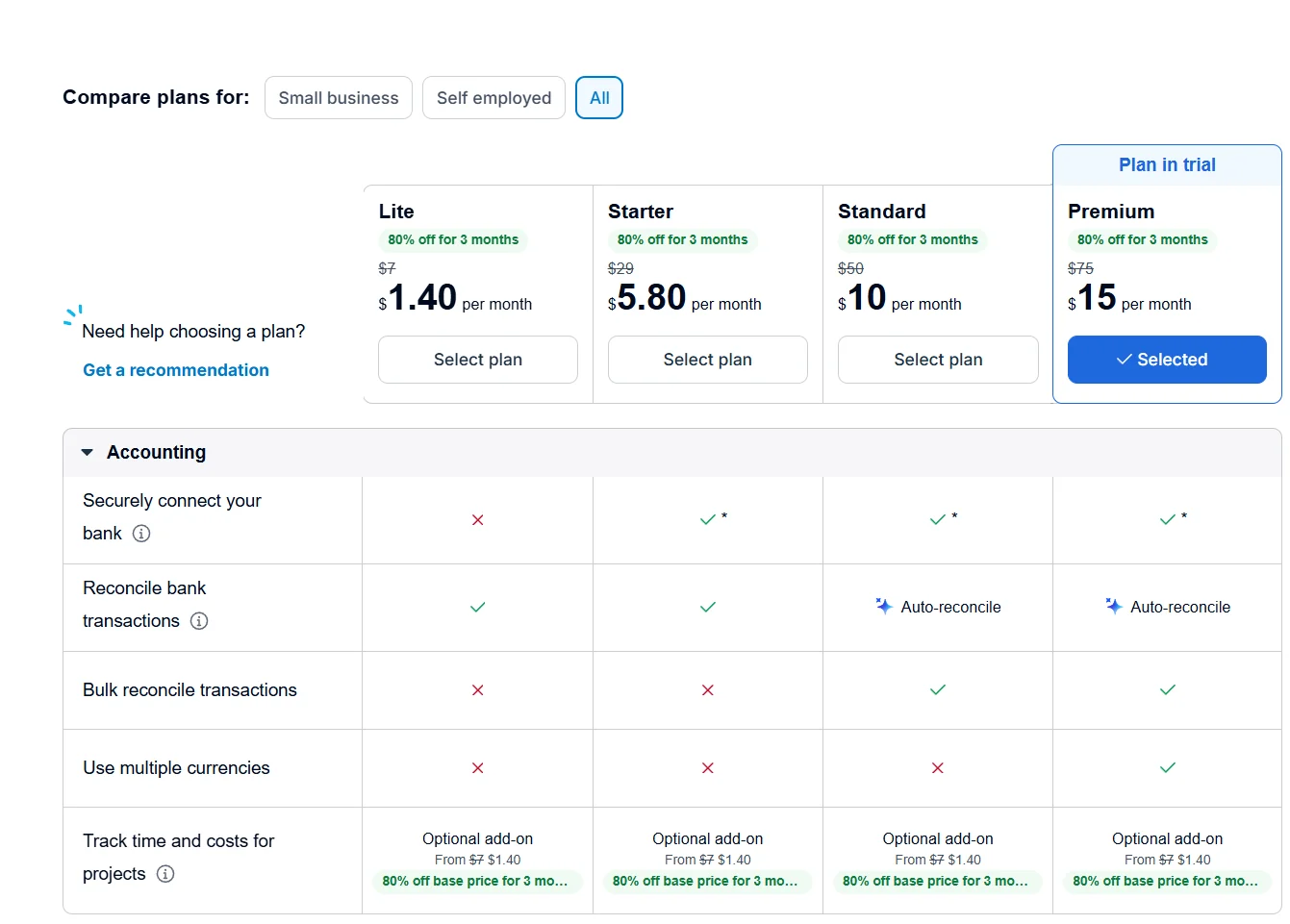
The signed-in comparison labelled Premium as Plan in trial and advertised 80% off for three months. It showed secure bank connection unavailable on Lite, auto- and bulk reconciliation on Standard and Premium, and multicurrency only on Premium. Project time and cost tracking appeared as an optional add-on. The screen used a dollar sign but did not identify the currency code, taxes, renewal terms, or exact trial expiry, so those details remain unverified.
The signed-in Czech organization used a Lite-to-Premium ladder and identified Premium as the trial plan.
Early
$25/month
$2.50/month for the first six months for eligible new US customers through September 30, 2026
Key features
Twenty invoices and five bills
Growing
$55/month
$5.50/month for the first six months for eligible new US customers through September 30, 2026
Key features
Uncapped invoices and bills
More automation
Established
$90/month
$9/month for the first six months for eligible new US customers through September 30, 2026
Key features
Multicurrency, projects, expenses, and deeper analytics
07
Our Experience
Workflow 1: Customer to safe draft invoice
Customer creation and invoicing were the quickest steps. The editor presented quantity, price, account, tax, project, and online-payment controls in one grid. Preview and PDF export made it possible to inspect a realistic document without sending anything. Status remained clearly Draft throughout, which made the safety boundary easy to maintain.
Workflow 2: Supplier bill to bank statement line
Bill entry itself was straightforward, but the stale list after saving was the clearest interface defect in the test. Once refreshed, all fields and totals were intact. We deliberately left the bill unapproved. When the matching bank line was imported, Find & Match returned no eligible result; we record that as an approval-state limitation, not as proof that approved bills cannot match.
Workflow 3: Import, reconcile, and verify the books
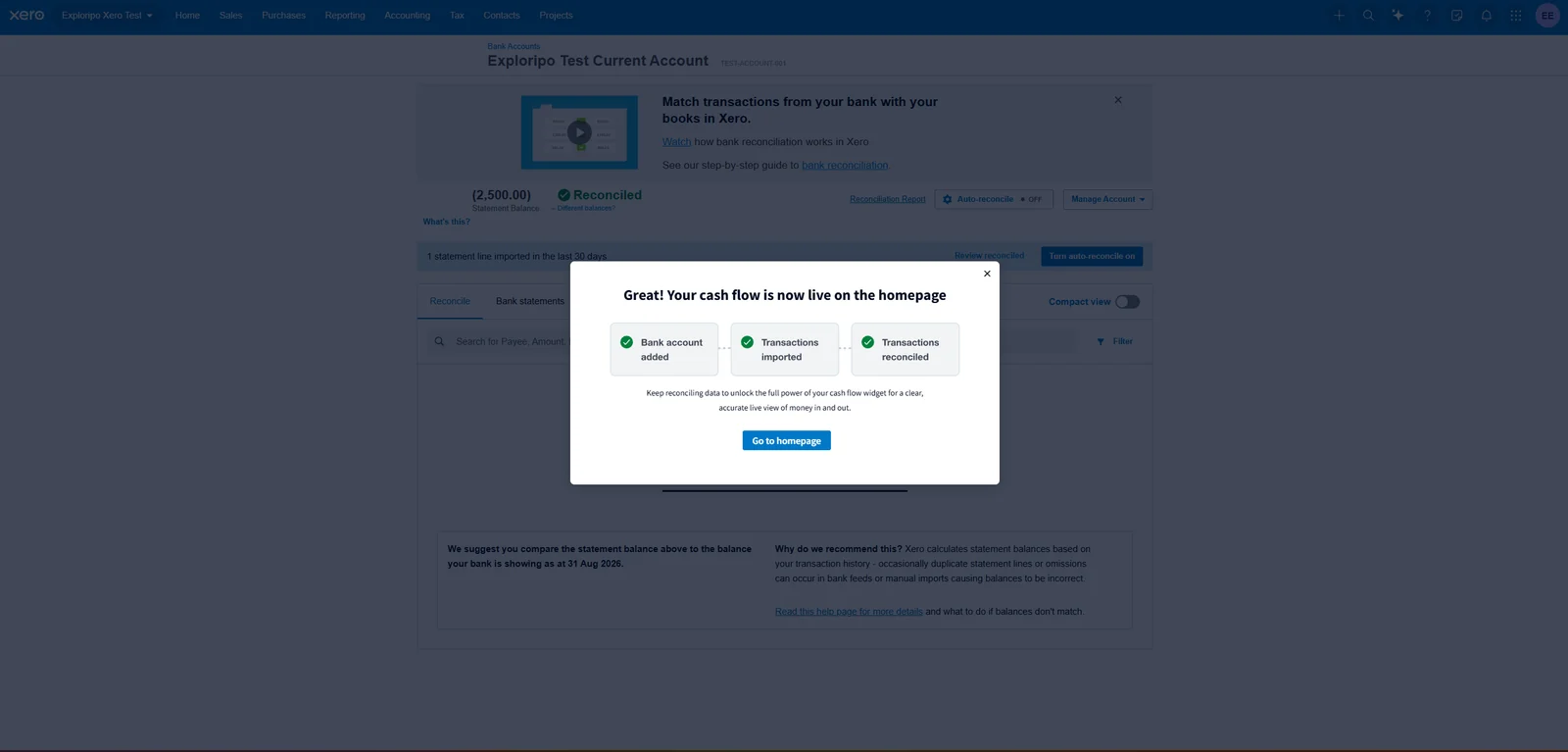
The bank-import sequence was unusually transparent. Mapping, debit interpretation, transaction preview, and duplicate checking were all visible before commitment. Because no approved bill was available, we reconciled through Create using the existing supplier, the Subscriptions account, the original description, and 0% purchase tax. Xero then marked the statement balance reconciled.
The completed reconciliation moved the imported statement line into a reconciled state.
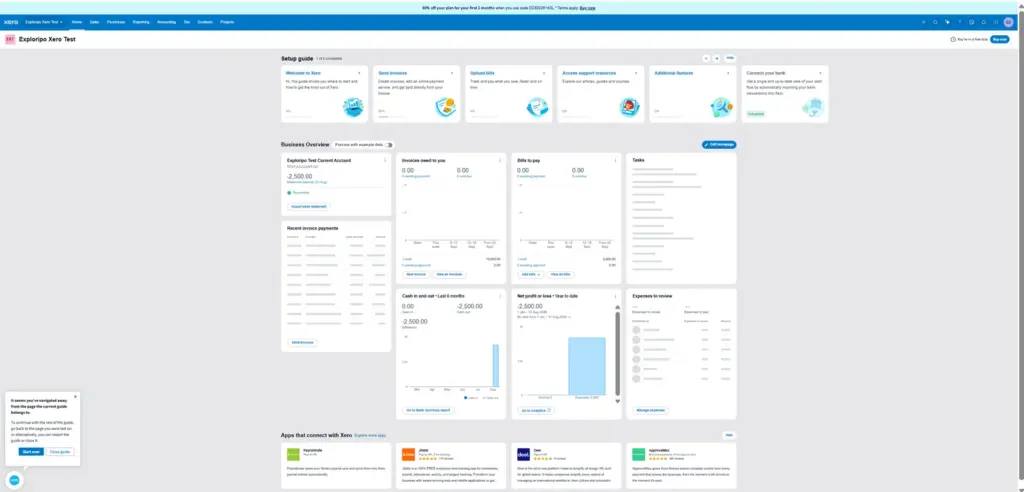
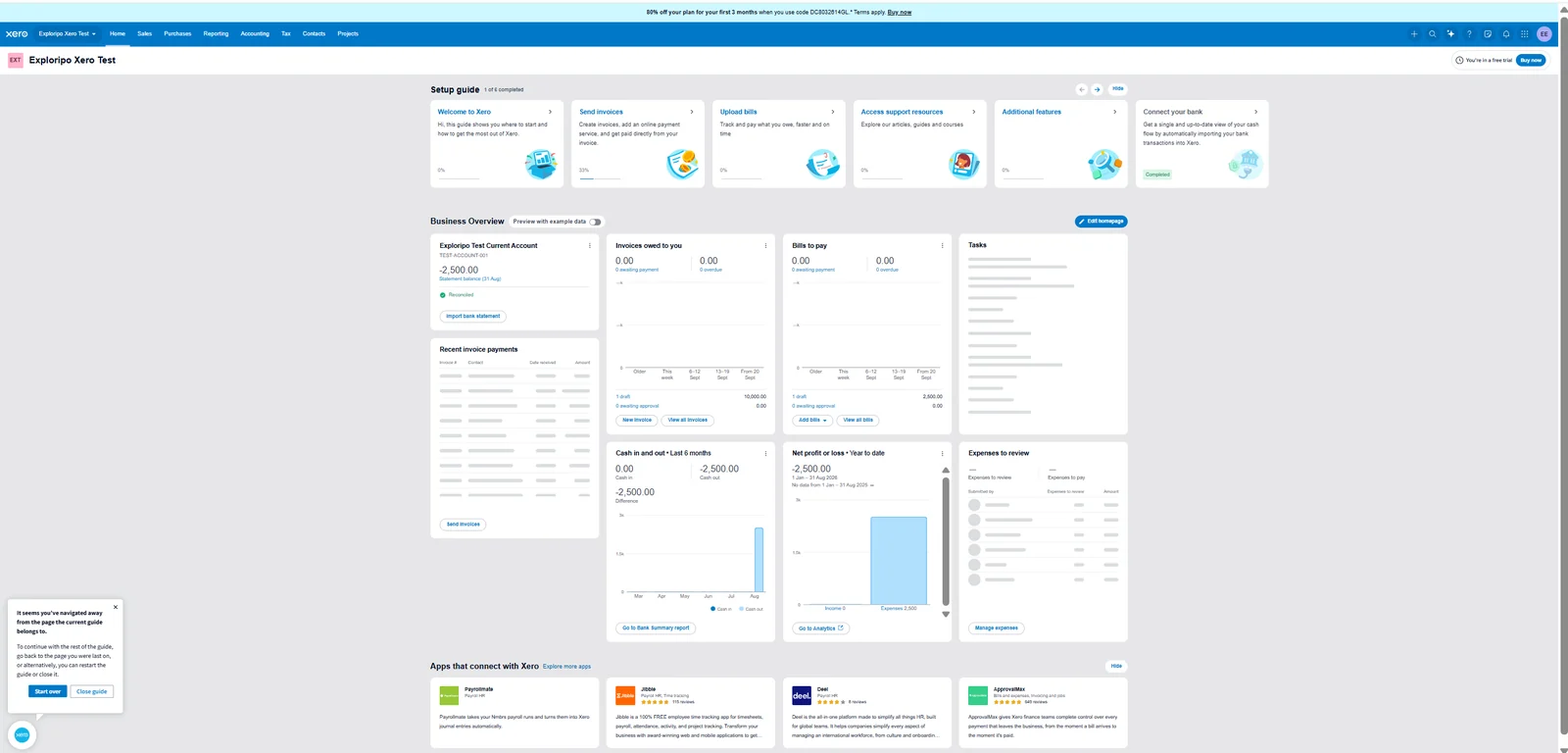
The dashboard completed the proof. It showed the fictional account at negative CZK 2,500, cash out of CZK 2,500, year-to-date net loss of CZK 2,500, one CZK 10,000 draft invoice, and one CZK 2,500 draft bill. That state change is why Xero feels like an integrated accounting system rather than a collection of forms.
The dashboard reflected the reconciled cash outflow while retaining the draft invoice and bill totals.
The test did not include a real bank feed, payment processor, payroll, multicurrency transaction, project, expense claim, user invitation, support ticket, or dedicated P&L export. Those omissions limit the score's scope but do not weaken the directly observed invoice, bill, import, reconciliation, and dashboard results.
08
Alternatives
QuickBooks Online
QuickBooks Online is the obvious US comparison when accountant familiarity, payroll breadth, inventory-adjacent work, or a large domestic ecosystem matters. It can support more complex operations, but many small businesses find its interface and plan structure heavy. Choose it over Xero when US accounting conventions and advisor familiarity outweigh Xero's collaboration and reconciliation appeal.
FreshBooks
FreshBooks is easier to approach when the central loop is client work: estimate, track time, record project expenses, and invoice. Xero offers deeper accounting structure and stronger accountant-led books. A solo consultant may prefer FreshBooks; a growing company that wants the ledger to remain the source of truth is more likely to prefer Xero.
Zoho Books
Zoho Books is the value and suite-integration alternative, especially for organizations already using Zoho CRM or other Zoho apps. Regional availability and plan details need checking, but its broader suite can offer more automation per dollar. Xero retains an advantage in accountant familiarity and its integration ecosystem.
Wave
Wave targets very small businesses that prioritize low-cost invoicing and basic bookkeeping. It is easier to justify for a tiny operation with simple needs, but it is not a full substitute for Xero's collaboration, controls, reconciliation depth, and growth path.
Everyday Productivity
FreshBooks
Rating
8.4 / 10
Price
Lite $23/month or $248.40/year regular price
Best for: Freelancers and small service teams connecting client billing, project time, and billable expenses
FreshBooks is the tested alternative for simpler client billing, projects, and time tracking.
Collaborative books, reconciliation, and scalable controls
Growing small businesses and accountant-led teams
QuickBooks Online
Often premium
US accounting depth and advisor ecosystem
Operationally complex US small businesses
FreshBooks
Mid-to-high
Client billing, projects, time, and approachable UX
Freelancers and small service businesses
Zoho Books
Value-focused
Zoho suite integration and automation
Price-sensitive suite users
Wave
Low-cost entry
Basic invoicing and bookkeeping
Very small, simple businesses
Xero wins when the buyer wants one cloud ledger shared across day-to-day staff and external accounting professionals. Reconciliation and collaboration are more central to its value than being the cheapest option. It loses ground when requirements are either much simpler - occasional invoices and elementary books - or materially more complex, such as advanced inventory and consolidated multi-entity reporting. Plan caps matter: in the US, an active company can outgrow Early's invoice and bill limits quickly enough that Growing is the honest comparison.
10
Final Verdict
Exploripo rating: 8.6/10
Xero earns a strong recommendation for small businesses that want invoicing, payables, bank reconciliation, and accountant collaboration to operate as one accounting system. Our trial produced four convincing outputs: an accurate draft invoice and PDF, a saved supplier bill, a transparent one-line bank import, and a completed reconciliation that changed the dashboard exactly as expected. The interface usually made record status and totals easy to verify.
The recommendation has limits. A manual refresh was needed after saving the bill, the no-feed account used a generic Other type, Reference required manual mapping, and an unapproved bill could not be matched. More broadly, Xero's regional pricing is difficult to compare, new users still need accounting context, and advanced reporting, customization, inventory, and multi-entity needs can push a business toward add-ons or alternatives.
For a growing business working with a bookkeeper or accountant, the connected workflow and collaboration model justify the price. For a freelancer who mainly sends invoices, Xero may be unnecessary overhead. The 8.6/10 rating reflects excellent core accounting execution in the tested scope, balanced by setup complexity, regional pricing ambiguity, and the untested depth of higher-tier features.
Testing disclosure
Exploripo tested one live Xero trial organization on August 31, 2026 using fictional internal records in CZK. The account identified Premium as Plan in trial. We did not approve or send invoices, pay bills, connect a real bank, process payments, invite users, run payroll, contact support, or test production-scale use.