No spam. Just software we’ve actually tested, plus useful reviews, comparisons and recommendations. We’ll send a confirmation email (double opt-in). You can unsubscribe anytime.
Everyday Productivity
FreshBooks
We tested it
By Exploripo Editorial Team
FreshBooks earns 8.4/10 and a strong recommendation for freelancers and small service businesses that want billing, project time, and expenses to behave like one workflow. The tested experience is excellent, but the economics keep it below the very top tier.
Exploripo rating8.4/10Excellent
Starting priceLite $23/month or $248.40/year regular price
FreshBooks is approachable accounting and invoicing software built around the daily work of freelancers, consultants, and small service businesses. FreshBooks is easiest to recommend when billing is central and a clean workflow matters more than the lowest price or deepest accounting stack.
Bottom line
FreshBooks earns 8.4/10 and a strong recommendation for freelancers and small service businesses that want billing, project time, and expenses to behave like one workflow. The tested experience is excellent, but the economics keep it below the very top tier.
02
At a glance
Pros & Cons
+Pros
Excellent client-to-invoice workflow with clear draft status, automatic totals, discounts, and a verified PDF download.
Projects, billable time, services, and invoices connect cleanly; saving our time-derived draft cleared the corresponding unbilled hour.
Manual expenses can be assigned to a project, marked billable, surfaced in reports, and exported without a bank connection.
The interface uses helpful defaults and visible status labels without making the core workflow feel like accounting software for accountants only.
Broad official coverage includes recurring invoices, payments, mobile apps, reports, exports, integrations, and accounting tools as needs grow.
−Cons
Lite is capped at five billable clients and Plus at 50; meaningful accounting and automation features are gated above the entry tier.
Regular pricing is substantial, and extra team members were listed at $11 per user per month.
The live account showed zero trial days even though standard signup material described a 30-day trial; access still worked, but the state was confusing.
The report action labelled Export for Excel produced CSV rather than an XLSX workbook.
Independent feedback repeatedly raises price, feature-depth, payment, support, and occasional mobile or receipt-capture concerns.
03
Audience fit
Who it’s for / Who it’s not for
✓Who it’s for
FreshBooks is best for solo professionals and small service teams that invoice clients, track hours, and recover project expenses. Designers, consultants, agencies, tradespeople, a
Plus is the most plausible long-term tier for established freelancers: its 50-client limit and proposals, retainers, e-signatures, bank reconciliation, accountant access, and doubl
×Who it’s not for
Choose another platform if you need inventory-heavy accounting, extensive accountant-led collaboration, a permanent free entry point, many included users, or advanced reporting at
04
Overview
FreshBooks combines invoicing, estimates, payments, expenses, time tracking, projects, accounting, reports, clients, and integrations in one web service with companion mobile apps. Its organizing idea is straightforward: start with the client work, then let billable time and expenses feed the invoice and reporting process. That is different from accounting-first tools that expect the chart of accounts to be the user’s main mental model.
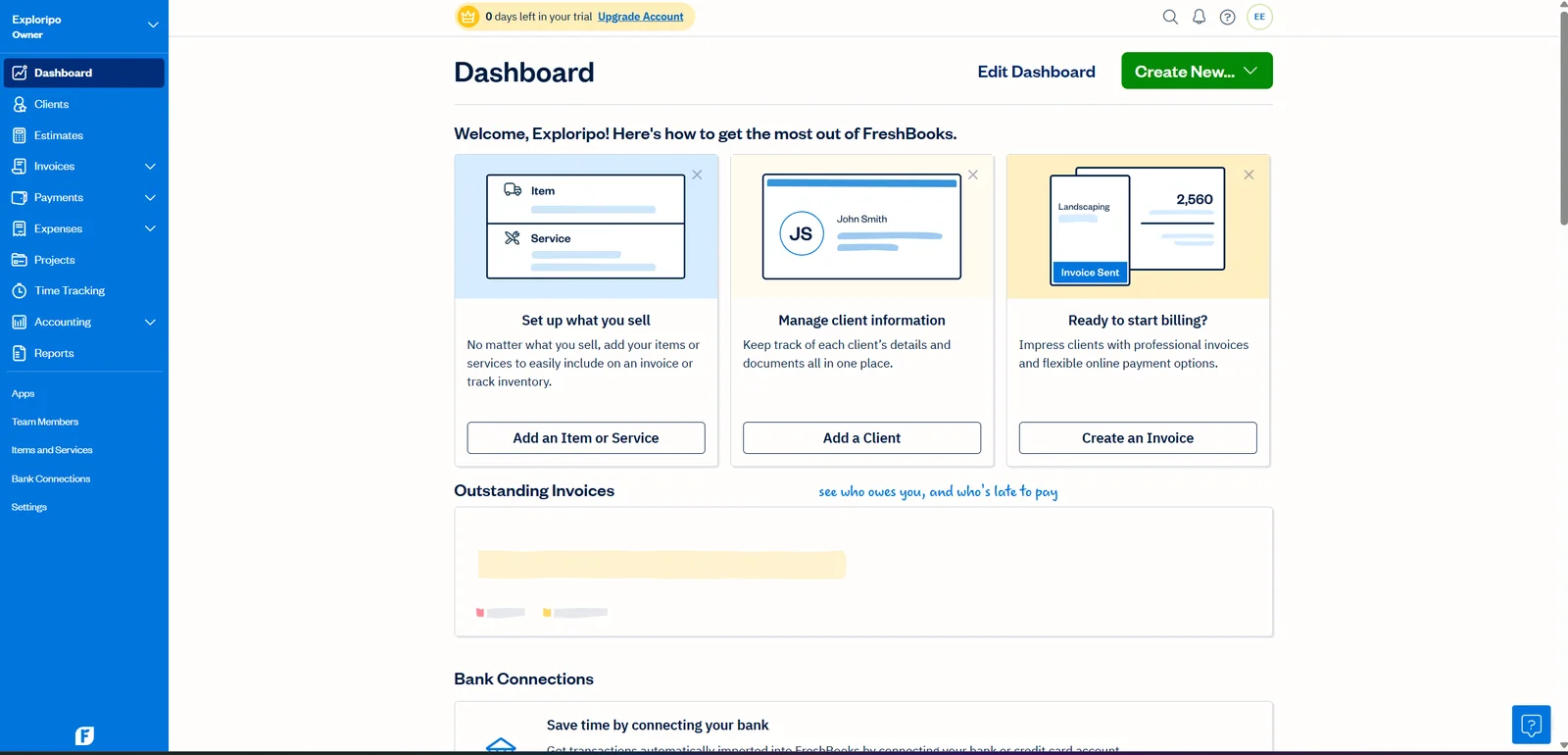
Our account reached the dashboard without payment details. The navigation immediately exposed Clients, Estimates, Invoices, Payments, Expenses, Projects, Time Tracking, Accounting, Reports, Apps, Team Members, Items and Services, Bank Connections, and Settings. The banner showed zero days remaining, yet every core workspace used in this review remained accessible. We treat that as a dated account observation rather than evidence that FreshBooks normally offers a zero-day trial.
The authenticated dashboard exposed the full navigation while the account banner showed zero trial days remaining.
Independent sentiment supports that positioning. G2 and Capterra both showed 4.5/5 averages when checked, with frequent praise for ease, invoicing, and time tracking. Trustpilot was more polarized at 3.5/5. These scores are context, not inputs to ours; recurring complaints concern price, limits, payments, support, and feature depth.
05
Features
Invoices and client billing
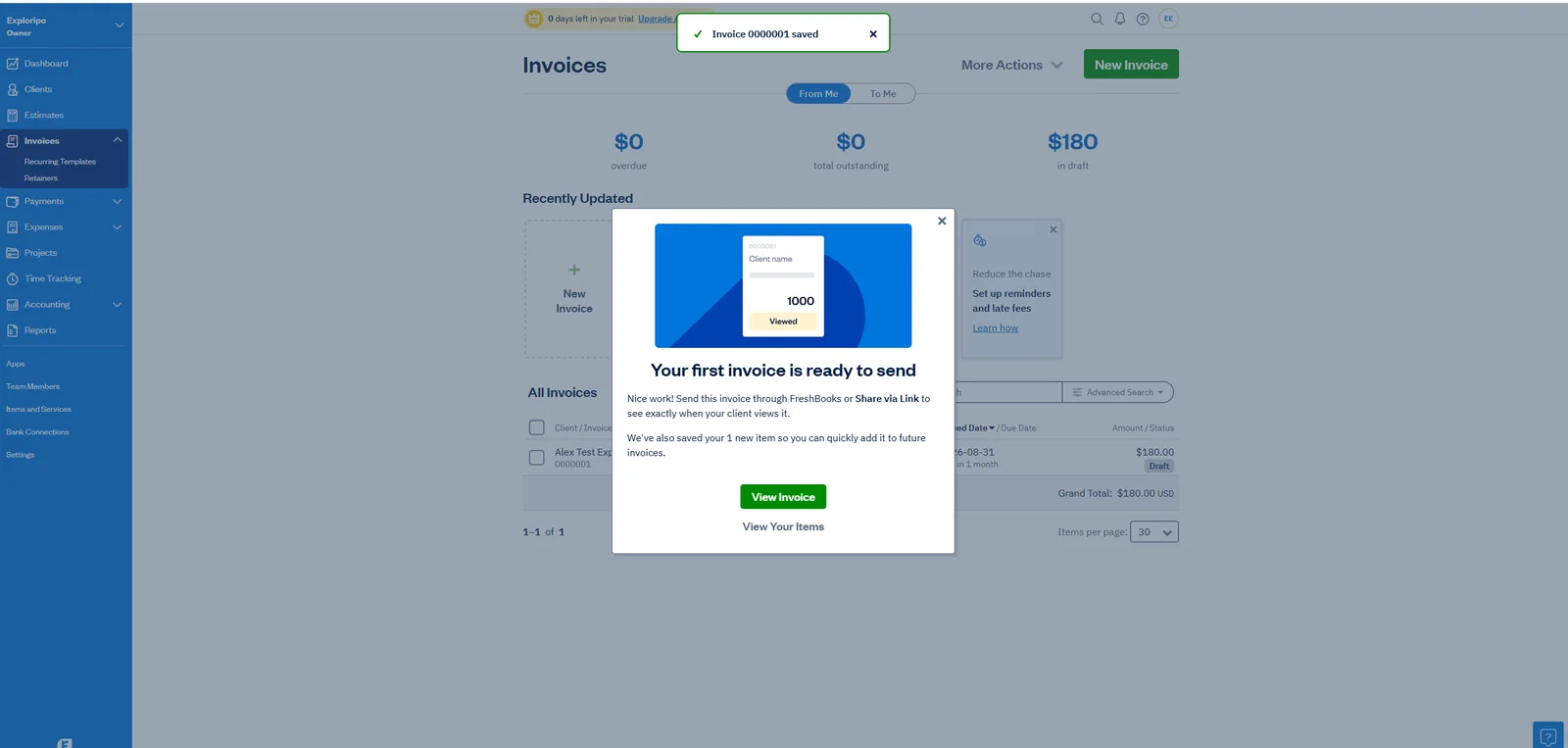
The invoice editor handled the essentials well. We assigned the fictional client, added a $100 service, changed quantity to two, applied a 10% discount, and saw the total recalculate from $200 to $180. Online payments, reminders, and late fees stayed off, and an internal do-not-send note made the safety boundary explicit. Saving preserved the invoice as Draft rather than triggering an external action.
FreshBooks confirmed invoice 0000001 as a $180 draft and retained it in the invoice list.
The action menu included PDF download, print, duplicate, project assignment, archive, and audit log options. Our downloaded one-page PDF matched the client, dates, quantity, discount, and amount due and rendered without clipping. We did not send the invoice, share a link, add a payment, or mark it as sent.
Projects and time tracking
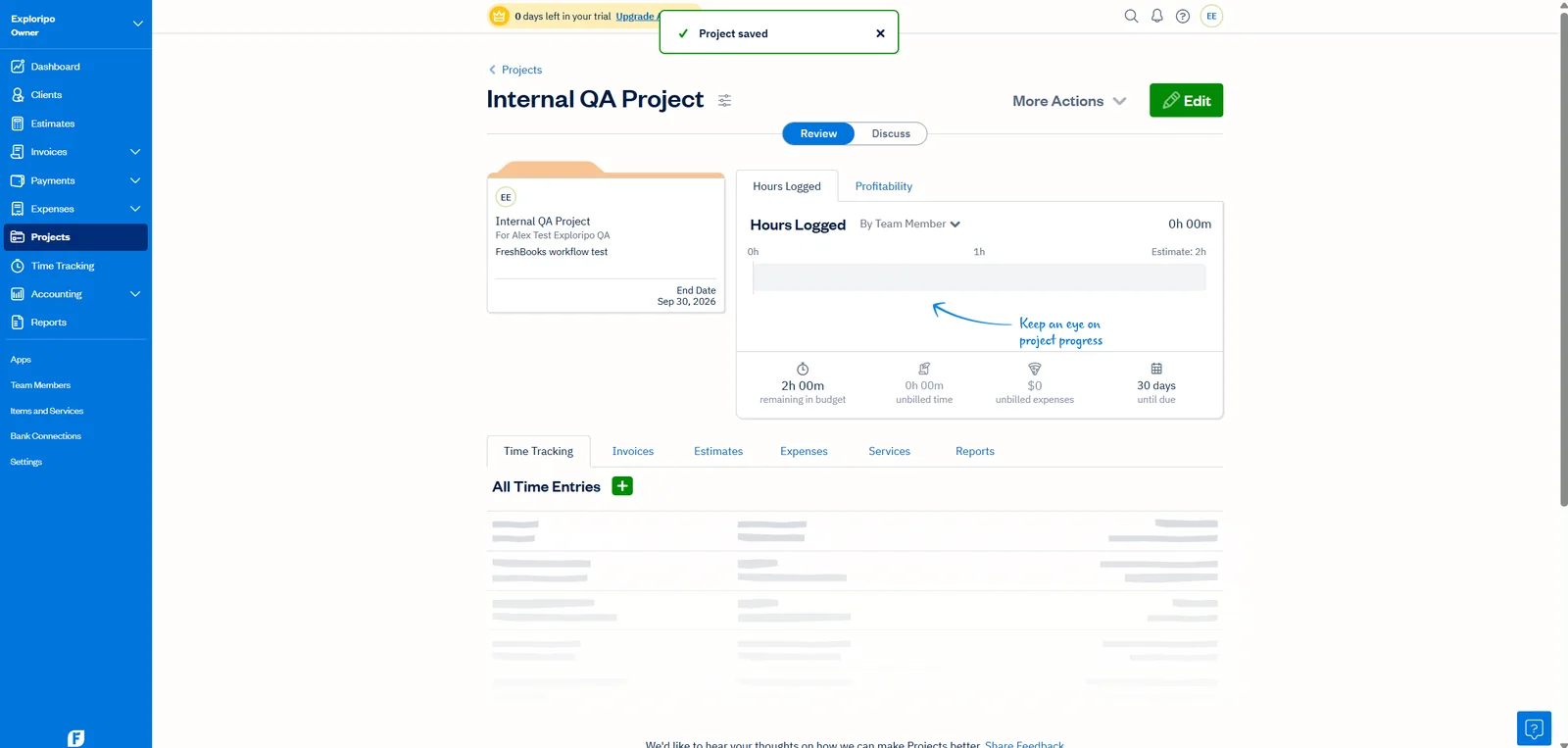
FreshBooks supports flat-rate and hourly projects. Our hourly project used a two-hour estimate, a $100 hourly rate, one service, and one fictional client. The project view made budget consumption easy to read and organized related invoices, estimates, expenses, services, and reports into tabs.
The saved hourly project started with a two-hour estimate, zero logged time, and no unbilled amount.
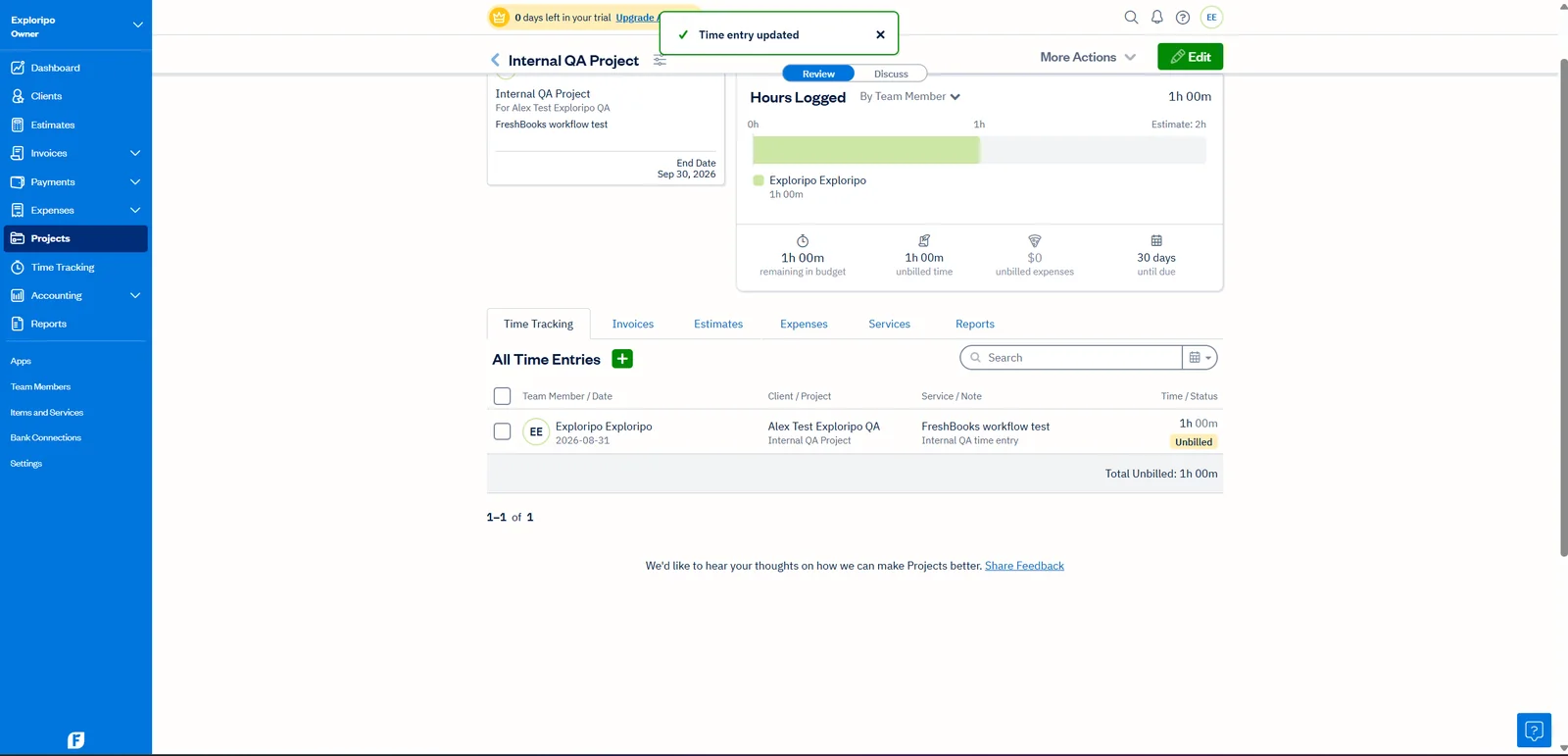
For time entry, users can start a live timer or add time manually. We chose a one-hour manual entry, associated the service, entered an internal note, and kept Billable enabled. The saved row increased logged time to one hour, reduced remaining budget to one hour, and created one hour of unbilled time.
The one-hour billable entry updated logged time, remaining budget, and unbilled status immediately.
Expenses, reports, and exports
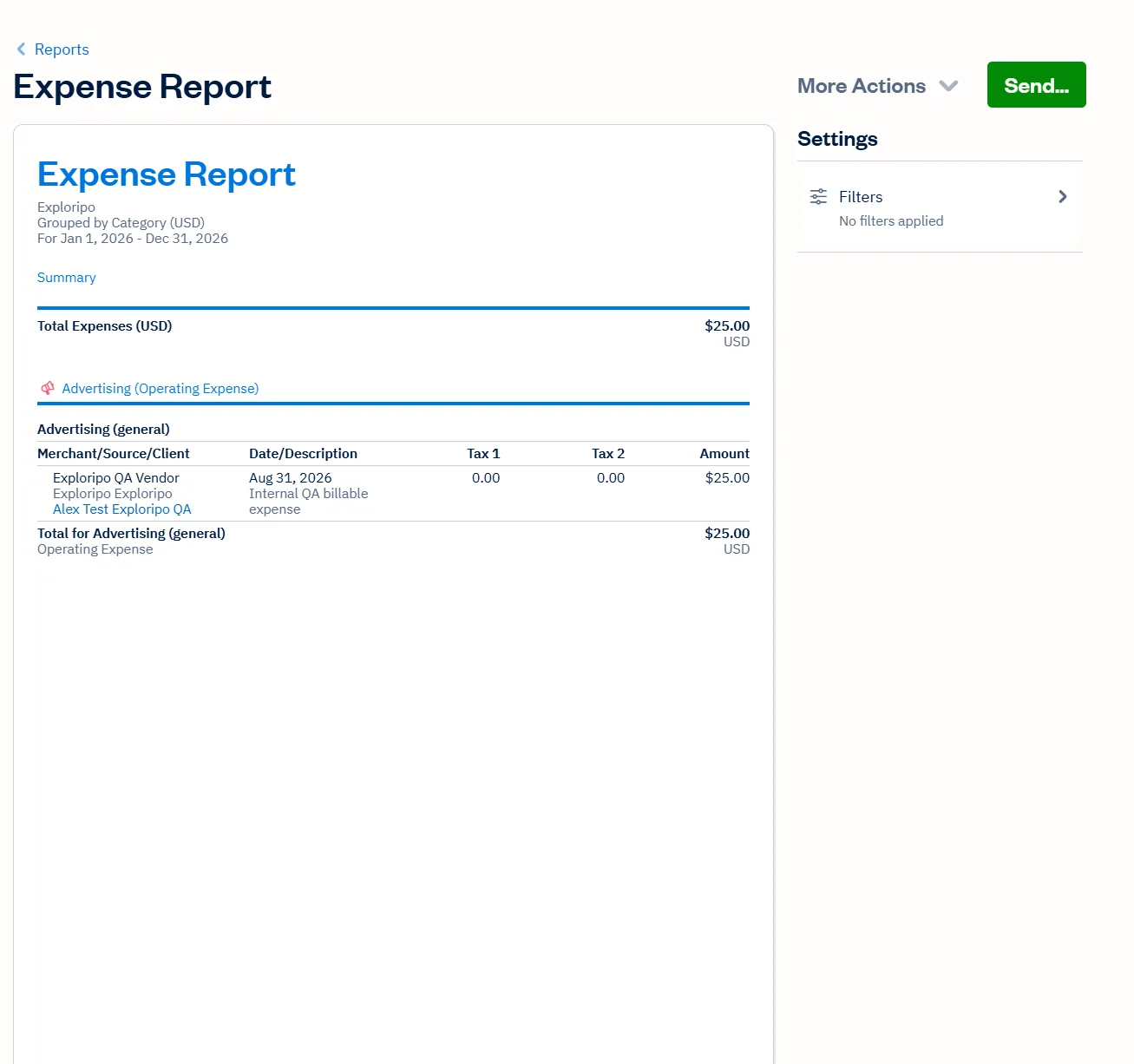
Manual expense entry exposed category, merchant, description, receipt upload, taxes, currency, recurrence, and client or project assignment. A project-linked expense could be marked billable, optionally include its receipt on an invoice, and apply a markup. Reports then summarized the saved data by category and client. The tested Expense Report export preserved 15 fields in CSV, including project, client, description, taxes, amount, and currency.
Payments, accounting, mobile, and integrations
Official documentation covers payments, bank connections, mobile invoicing and expense capture, recurring billing, payroll, and an app/API ecosystem. Accounting depth is plan-dependent: double-entry reports and bank reconciliation begin above Lite, while bill capture, accounts payable, and project profitability sit higher. We saw an Apps catalog with Zapier and Dropbox, but tested no integration, payment, bank, mobile, payroll, or accountant workflow.
06
Pricing
Lite $23/month or $248.40/year regular price
Free trial available
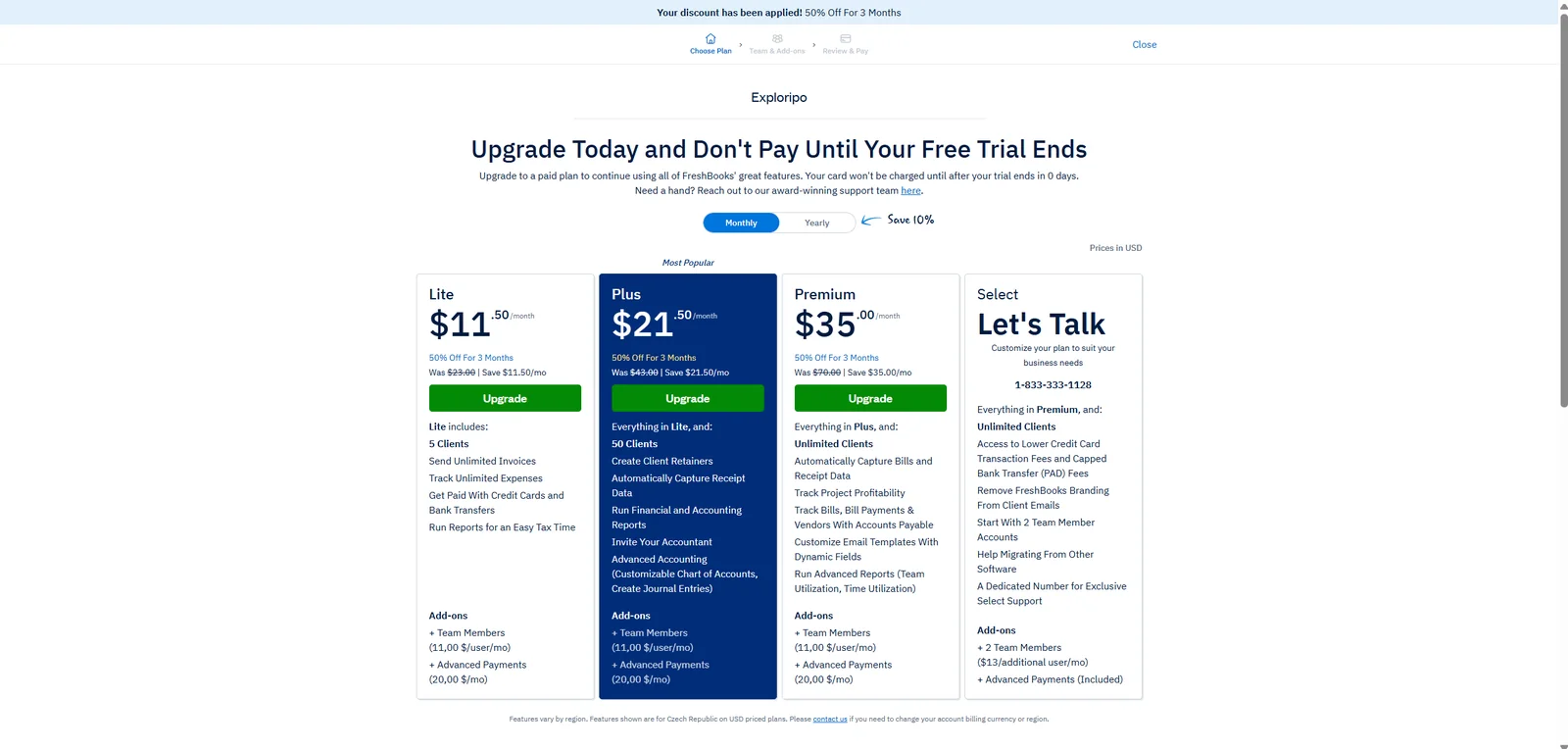
FreshBooks pricing was rechecked against the official US pricing page on September 12, 2026. Regular monthly list prices remain $23, $43, and $70 for Lite, Plus, and Premium. A temporary promotion showed 90% off the first three months; it is not the regular renewal price and may vary by account or region.
The authenticated account view captured on August 31, 2026 showed an earlier promotion. Current regular prices and the current temporary offer were rechecked on September 12, 2026.
Plan
Regular monthly
Current annual total
Major client limit
Lite
$23/month
$248.40/year
5 billable clients
Plus
$43/month
$464.40/year
50 billable clients
Premium
$70/month
$756/year
Unlimited billable clients
Select
Custom
Custom
Custom package
The annual totals are the current official USD figures and represent a 10% discount from twelve monthly list-price payments. They replace the older annual values in the approved review and are the only annual totals presented as current.
All non-Select plans showed one included user in the captured account view. Additional seats, payment processing, taxes, currency conversion, payroll, and optional services can add cost. Standard signup material describes a 30-day no-card trial, but our account displayed zero days while core features remained accessible, so buyers should verify their own trial state.
Lite
$23/month
$248.40/year
Key features
Up to 5 billable clients
Limits
Entry-tier client and accounting limits apply
Plus
$43/month
$464.40/year
Key features
Up to 50 billable clients
Broader accounting and automation features
Premium
$70/month
$756/year
Key features
Unlimited billable clients
Higher-tier accounting and project features
Select
Custom pricing
Contact FreshBooks
Key features
Sales-led plan for larger requirements
07
Our Experience
Workflow 1: Client to safe draft invoice
The client-to-invoice path was the quickest part of the test. Client creation exposed sensible defaults for reminders, late fees, attachments, currency, and language. Once the client was saved, the invoice editor made the financial effect of quantity and discount changes immediately visible. The clear Draft label and the ability to download a PDF without sending anything made it easy to test safely. The output was accurate, although the invoice PDF used a very sparse layout with substantial unused space.
Workflow 2: Project time to billable draft
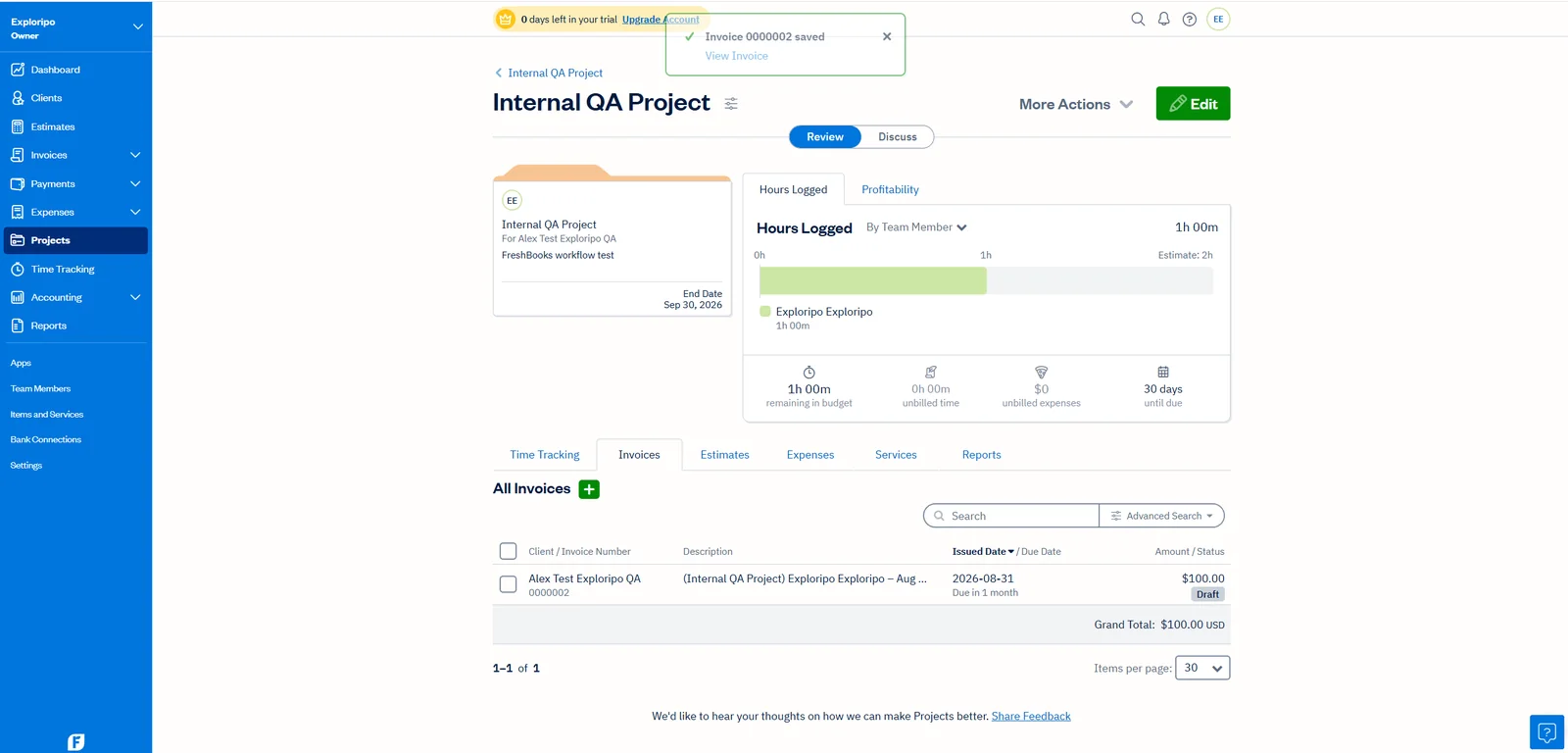
The project workflow demonstrated why FreshBooks is more useful than a standalone invoice maker. The saved hour flowed into an unbilled-time review where Detailed, Grouped, and Simple formats were available. Detailed preview showed the service, project, team member, date, note, $100 rate, quantity one, and $100 line total before the invoice was created.
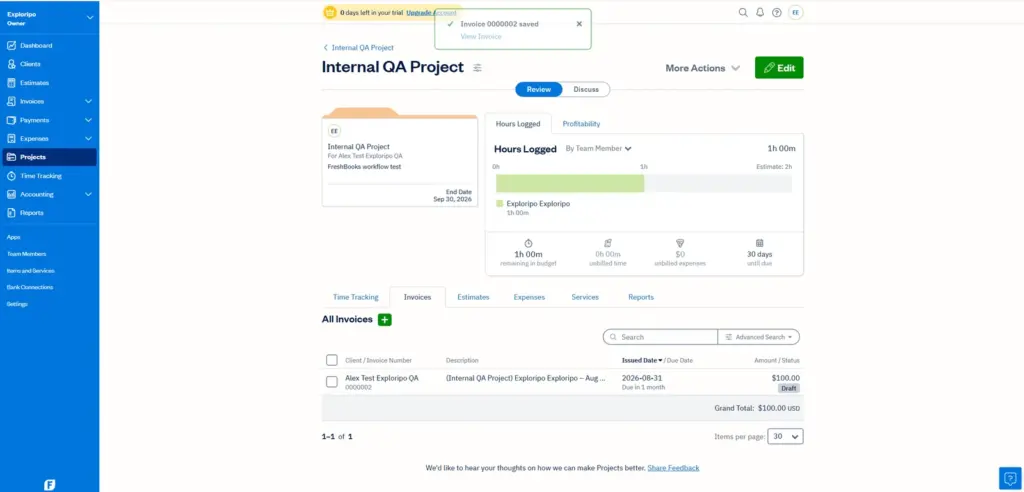
Saving invoice 0000002 as a $100 project draft reduced unbilled time from one hour to zero.
After saving invoice 0000002 as Draft, unbilled time returned to zero while logged time and the project estimate remained intact. That state change is exactly what a small service business needs: the system showed what had been captured, what remained in budget, and what had already moved into billing. We did not send or pay the invoice, so delivery and payment collection remain outside the score.
Workflow 3: Billable expense to report and export
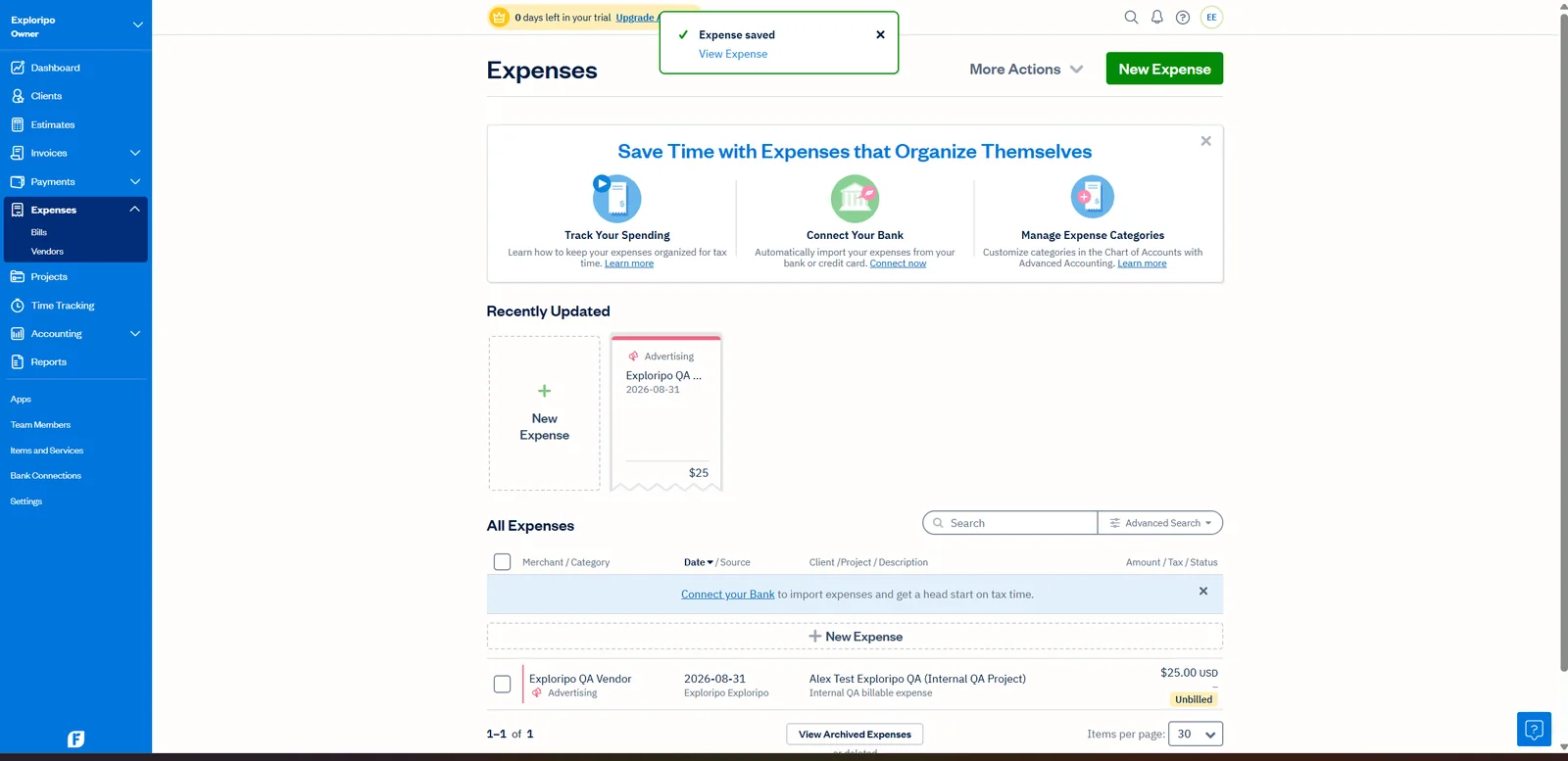
The manual expense path was similarly coherent. We selected Advertising, entered a fictional merchant and description, assigned the project, left the expense billable, and saved $25 with no receipt or tax. The global Expenses list retained the merchant, category, date, client, project, amount, and Unbilled status.
The saved $25 project expense retained its client, project, description, category, and Unbilled status.
The Expense Report then reproduced the same $25 total and categorized it correctly. Export for Excel created a 354-byte CSV rather than a native workbook, but the file was structurally sound: one record, 15 columns, zero tax values, and a parsed total matching the report. For portability, the result matters more than the label, yet users expecting XLSX may find the wording imprecise.
The generated Expense Report grouped the fictional $25 expense under Advertising with no filters applied.
Friction and testing limits
Most friction came from commercial boundaries. The zero-day banner was confusing, promotions differed between the public view and account upgrade flow, and valuable accounting features require Plus or Premium. No real customer, bank, payment, recipient, or production credential was used.
08
Alternatives
QuickBooks Online
QuickBooks Online is stronger when deeper accounting, inventory-adjacent work, payroll breadth, or accountant familiarity outweigh simplicity. It supports more complex finance operations but may feel heavy to a solo professional focused on billing and project work.
Xero
Xero suits growing businesses that expect collaborative, accountant-led workflows. Its model is more accounting-centered than FreshBooks. Choose it when scalable books matter more than the fastest route from time entry to invoice.
Zoho Books
Zoho Books is the value alternative, especially for organizations already using the Zoho suite. Regional plan availability needs checking, but the ecosystem can deliver more breadth per dollar. FreshBooks remains simpler for client-first billing.
Wave
Wave suits very small businesses prioritizing low-cost basic invoicing and bookkeeping over a broader project workflow. It is not a full substitute, but it creates real price pressure at the simplest end of the market.
Everyday Productivity
Xero
Rating
8.6 / 10
Price
30-day trial; US Early $25/month before the current promotion
Best for: Growing small businesses that need invoicing, bills, bank reconciliation, and accountant collaboration in one cloud ledger
Invoice-led projects, time, expenses, and approachable UX
Freelancers and small service businesses
QuickBooks Online
Often premium
Accounting depth and accountant familiarity
Operationally complex small businesses
Xero
Paid accounting platform
Scalable, collaborative accounting
Accountant-led growing companies
Zoho Books
Value-focused
Zoho ecosystem and broad automation
Price-sensitive suite users
Wave
Low-cost entry
Basic invoicing and bookkeeping
Very small, simple businesses
FreshBooks wins this comparison when the buyer’s core loop is client work: quote or scope, track time and costs, invoice, and review. It loses ground when the decision is driven by free access, included users, advanced accounting, inventory, or a broader suite. The 5-client Lite cap is especially important because it can force an otherwise satisfied freelancer into Plus.
10
Final Verdict
Exploripo rating: 8.4/10
FreshBooks earns a strong recommendation for freelancers and small service businesses that want billing, project time, and expenses to behave like one workflow. Our trial produced three convincing results: a correct $180 invoice and PDF, a one-hour project entry that converted cleanly into a $100 draft, and a $25 billable expense that matched its report and CSV export. Status changes were visible, totals held together, and no external action happened accidentally.
The recommendation is not unconditional. Lite’s five-client ceiling is tight, Plus carries a much higher regular price, additional users cost extra, and deeper accounting or profitability functions sit in upper tiers. Buyers should ignore the emotional pull of a short promotion and evaluate the regular plan, client limit, seat count, payment fees, and required accounting features together.
For a solo consultant or small agency that values clarity and invoices frequently, FreshBooks can justify its price. For a larger or accounting-heavy company, QuickBooks Online or Xero may scale better; for a budget-first buyer, Zoho Books or Wave deserves a close look. The tested experience is excellent, but the economics keep FreshBooks below the very top tier.
Testing disclosure
Exploripo tested one FreshBooks trial account on August 31, 2026 using fictional internal records. We verified draft invoicing, PDF export, an hourly project, manual billable time, time-to-invoice conversion, a billable expense, Expense Report generation, CSV export, account pricing, integration-catalog availability, and the owner-only team state. We did not send messages, process payments, connect a bank, upload a receipt, test mobile apps, authorize integrations, invite users, run payroll, contact support, or evaluate production-scale use.