No spam. Just software we’ve actually tested, plus useful reviews, comparisons and recommendations. We’ll send a confirmation email (double opt-in). You can unsubscribe anytime.
Everyday Productivity
Bonsai (Hello Bonsai)
We tested it
By Exploripo Editorial Team
Bonsai offers a coherent client, project, time, and billing system whose consolidation value can justify the price. It earns 8.7/10.
Exploripo rating8.7/10Excellent
Starting price7-day trial; Basic $15/user/month or $9/user/month billed annually
Bottom line: Bonsai is a convincing all-in-one work platform for freelancers and compact service teams. The client-to-project-to-billing flow was smooth, but the complete operating workflow begins above the entry-level Basic plan.
Bottom line
Bonsai offers a coherent client, project, time, and billing system whose consolidation value can justify the price. It earns 8.7/10.
02
At a glance
Pros & Cons
+Pros
Clean, approachable interface with a logical client-to-billing flow.
CRM records, projects, tasks, time and invoices stay connected rather than feeling like separate add-ons.
Flexible project billing choices include time and materials, fixed fee, retainer and non-billable work.
Time totals and invoice amounts reconciled exactly in our controlled test.
Useful portability: separate CSV exports are available for core account datasets.
Timesheet PDF output was clean, readable and immediately useful.
−Cons
Basic does not include the proposals, contracts and invoicing bundle that defines the full Bonsai experience.
Native invoice-PDF download was gated behind trial selection in our no-active-subscription account.
Official pages describe the trial activation sequence differently, so buyers should read the current signup terms carefully.
Per-user pricing becomes harder to justify as a team grows, especially when advanced reporting and controls require higher tiers.
Independent feedback repeatedly suggests that project management, reporting, customization and integrations are not as deep as specialist products.
Payment processing adds separate provider, regional and payout considerations beyond the subscription price.
03
Audience fit
Who it’s for / Who it’s not for
✓Who it’s for
Bonsai is best suited to independent professionals and compact client-service teams that manage repeatable work: designers, marketers, developers, consultants, coaches and small ag
It also makes sense for a growing studio that has outgrown disconnected documents and spreadsheets but does not yet need enterprise resource planning. Essentials is the practical s
×Who it’s not for
Bonsai is less suitable for teams that need advanced dependency planning, highly configurable automation, deep reporting or specialist accounting controls. It may also be excessive
04
Overview
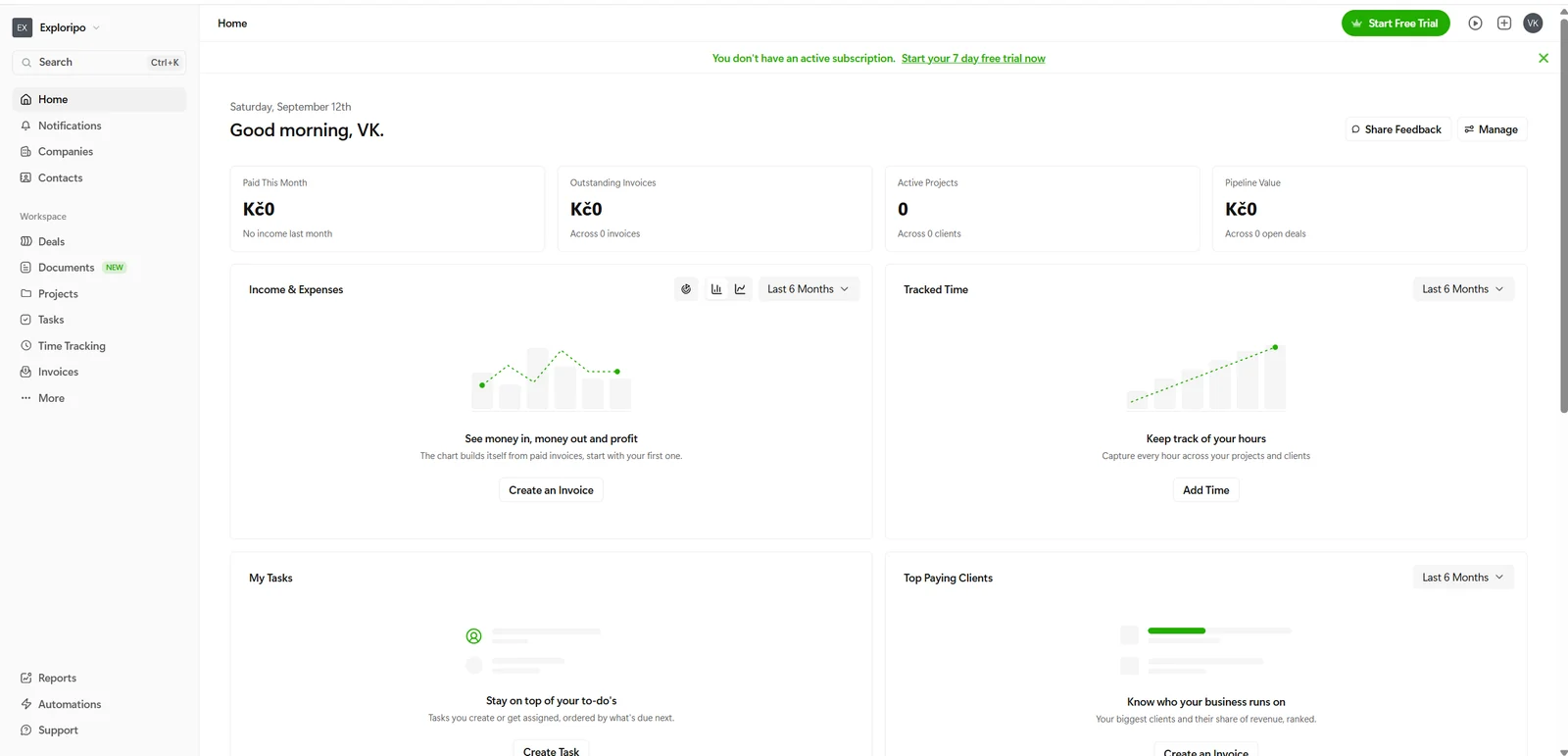
The registered workspace remained usable while clearly showing that no subscription or trial was active.
Bonsai brings client management and delivery into a single workspace. The tested interface, branded Bonsai by Zoom, exposed Companies, Contacts, Deals, Documents, Projects, Tasks, Time Tracking, Invoices, Reports and Automations from one navigation system. The product's strongest idea is continuity: a client record can lead to a project, the project contains tasks and time, and that time can flow into billing.
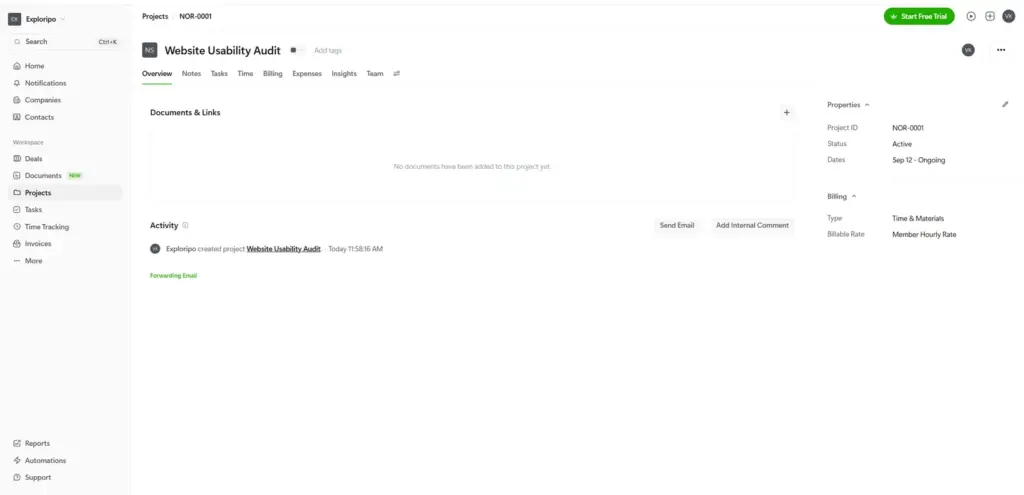
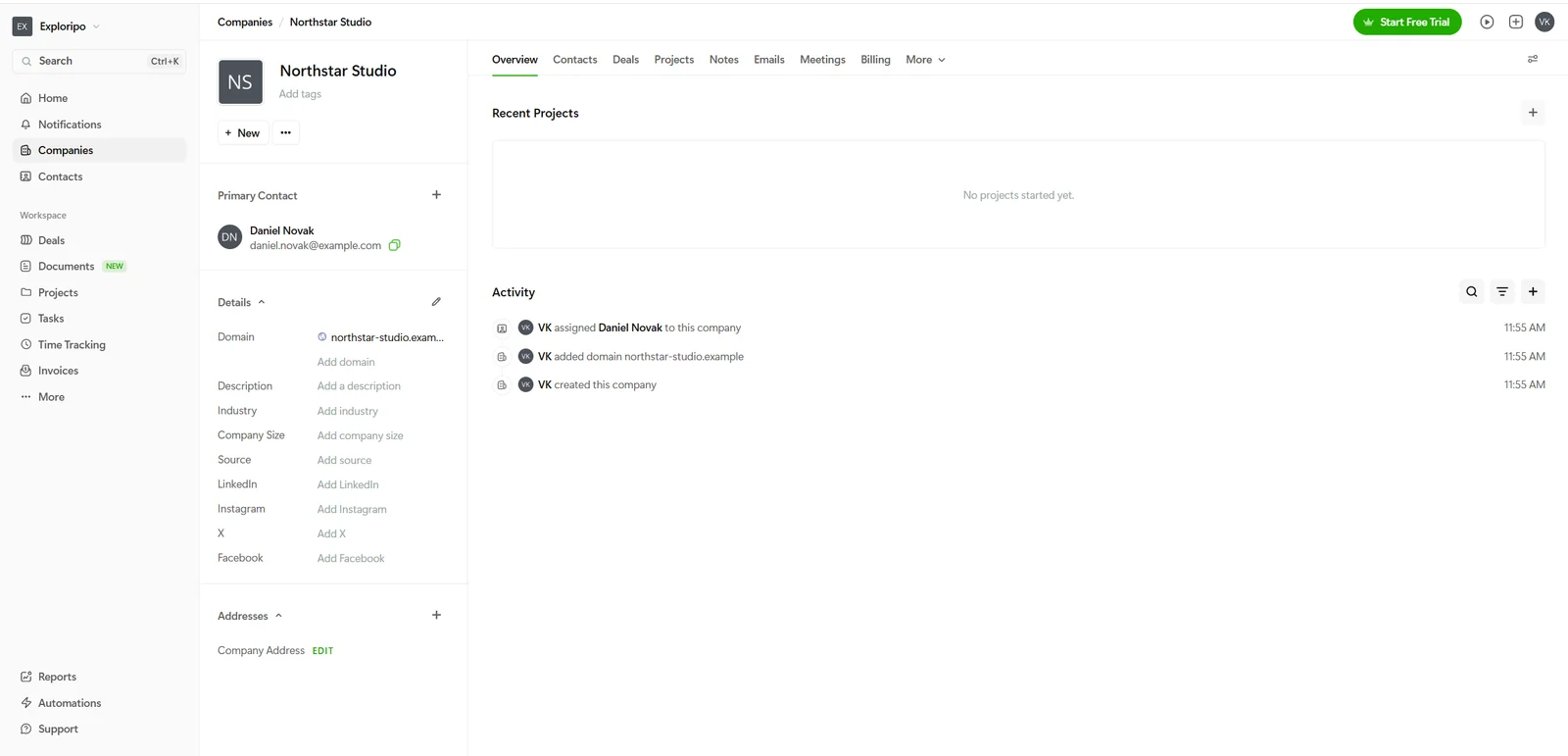
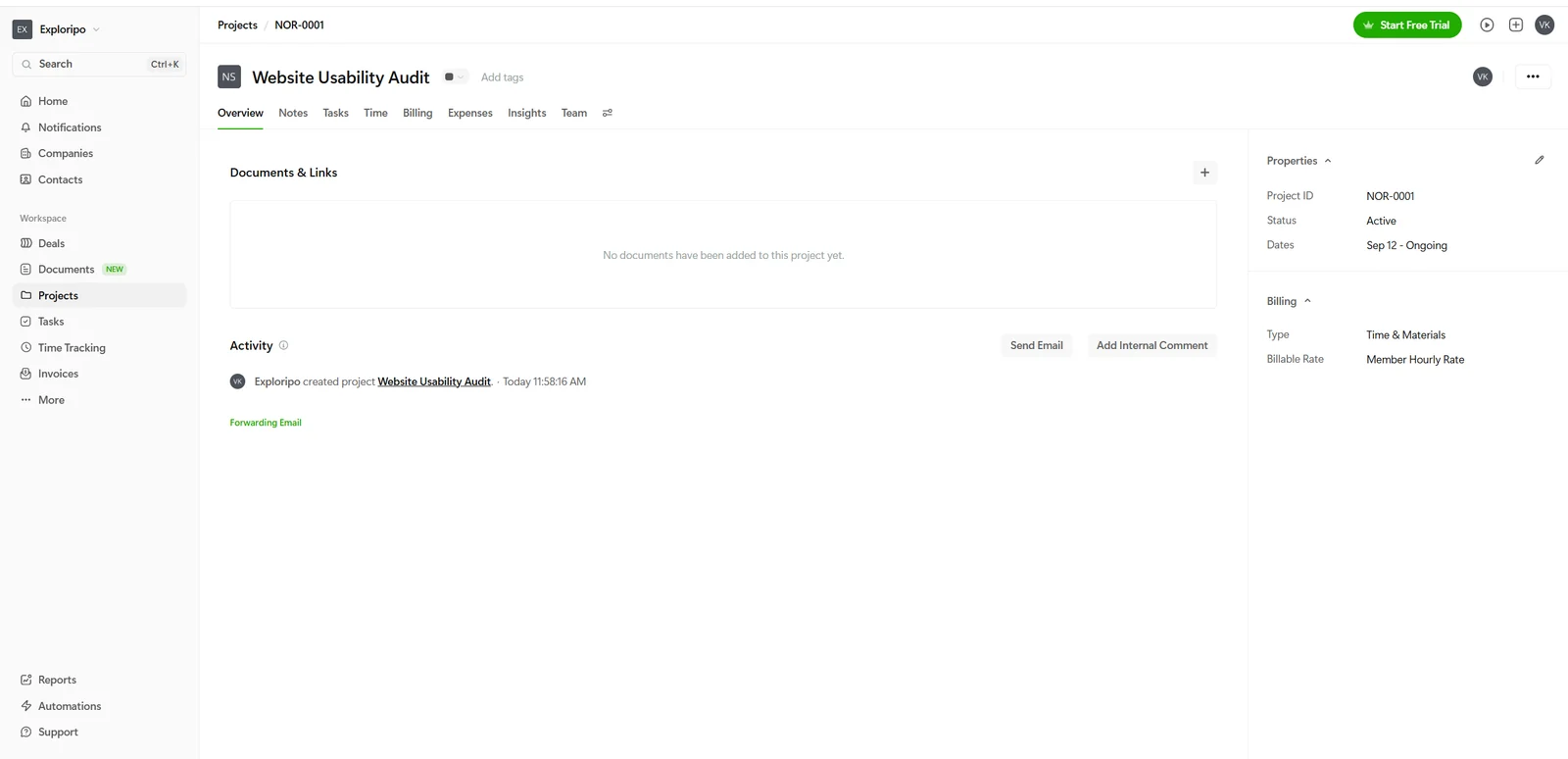
Our fictional Northstar Studio record demonstrated the CRM side without contacting anyone. The company page combined the primary contact, profile fields, recent projects and a timestamped activity trail. Creating the related Website Usability Audit project took only a small form, and the project then exposed its own notes, tasks, time, billing, expenses, insights and team areas.
Independent review platforms broadly support this ease-of-use story. At the Research Lock, Bonsai held 4.3/5 from 101 G2 reviews, 4.6/5 from 95 verified GetApp reviews and 4.3/5 from 630 Trustpilot reviews. Across those sources, recurring praise centered on setup, invoicing, time tracking and keeping client administration together. Repeated concerns focused on feature depth, customization, integrations, pricing and mixed support or payment experiences. These external ratings informed context only; they were not averaged into our score.
A fictional company record combines contact details, profile fields and an auditable activity trail.
05
Features
Client and project management
Company and contact records form the CRM layer. Projects can then carry one of four billing types: time and materials, fixed fee, retainer or non-billable. In our test, the project workspace kept its status, billing basis, documents, activity and delivery tabs together. Tasks supported assignees, priority, dates, recurrence, estimates, subtasks, dependencies, tags, files and comments, although we only created and renamed a straightforward billable task.
The project workspace keeps delivery, billing and activity in one view.
Time tracking and billing
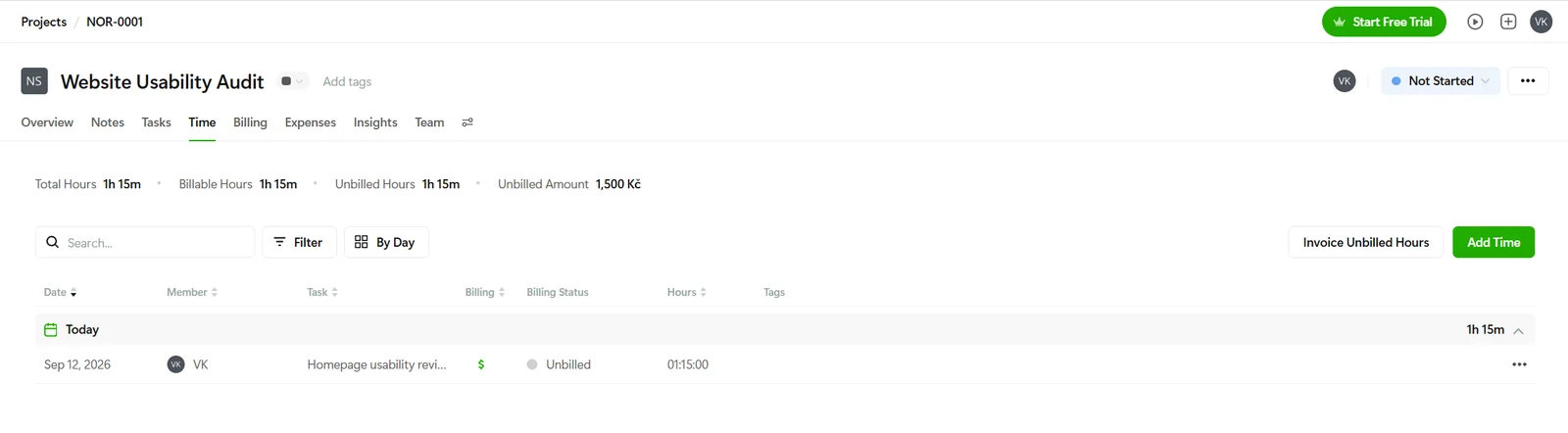
Time can be entered against a project and task with notes, tags, billing status and an hourly rate. The project view distinguishes total, billable and unbilled hours and converts billable time into an unbilled amount. Our 1 hour 15 minute entry at CZK 1,200 per hour became CZK 1,500, exactly as expected. Bonsai then offered to turn the unbilled time into an invoice while preserving rounding and display choices.
The saved time entry reconciled 1 hour 15 minutes to CZK 1,500 of unbilled work.
Documents, client experience and payments
Official plan information places proposals, contracts, forms, scheduling, invoices, payments and the client portal in Essentials and above. We did not create or send proposals or contracts, invite a client to a portal, enable payment methods or move real money. Those capabilities remain vendor-verified or untested rather than Exploripo findings. Buyers should also separate subscription cost from payment-processing fees, regional availability and payout timing.
Reporting and data ownership
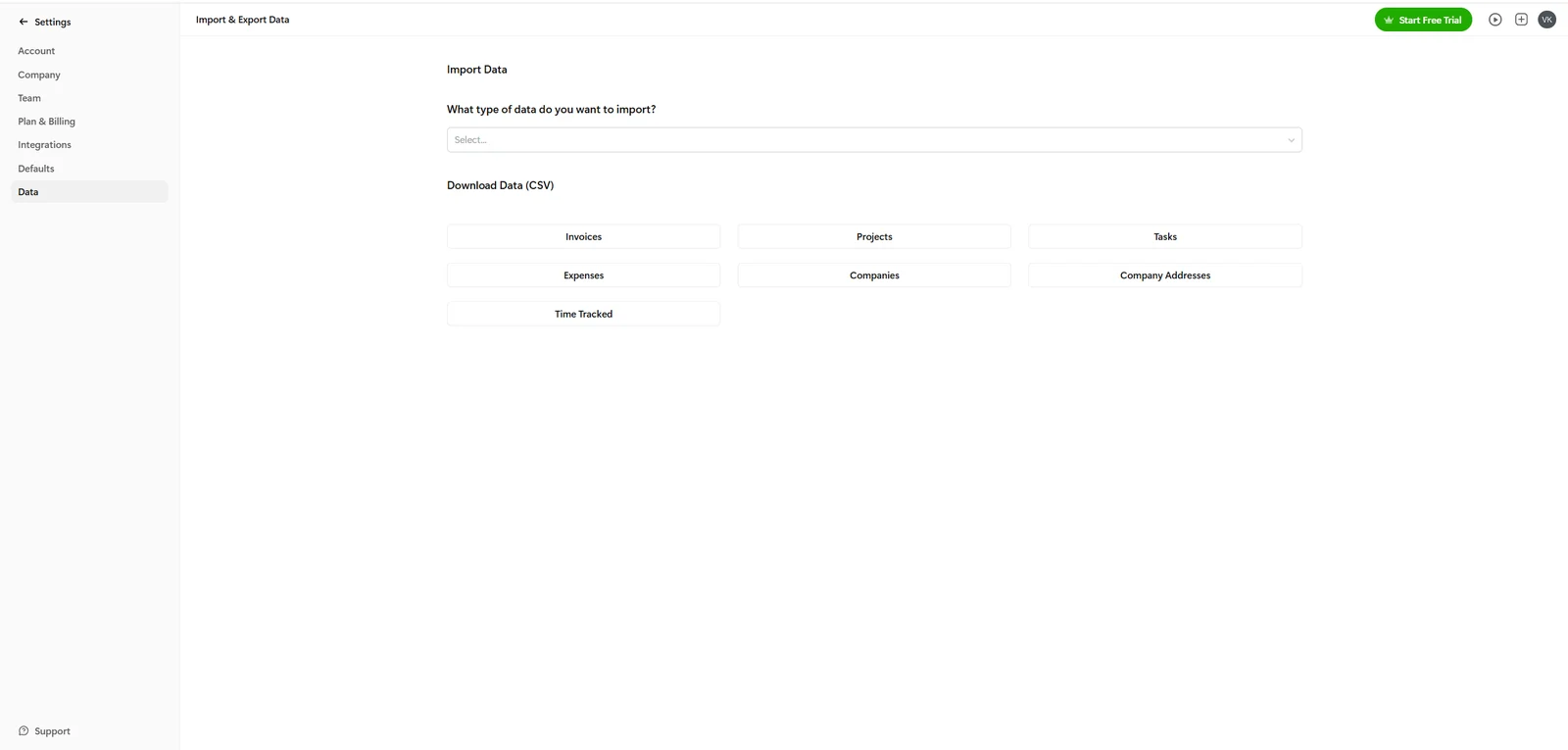
Premium and Elite add progressively deeper reporting, workload, customization and team controls. We did not test those higher-tier tools. We did reproduce account-data export, however: the Data page offered separate CSV downloads for invoices, projects, tasks, expenses, companies, company addresses and tracked time. That is a practical ownership feature for backup, analysis or migration.
06
Pricing
7-day trial; Basic $15/user/month or $9/user/month billed annually
Free trial available
Pricing was rechecked on September 13, 2026. Basic remains $15 per user monthly or $9 per user per month billed annually; Essentials $25 or $19; Premium $39 or $29; and Elite $59 or $49 with a three-user minimum. Bonsai continues to advertise a seven-day trial.
Plan
Monthly billing
Annual billing equivalent
Best fit
Basic
$15/user/month
$9/user/month
Client records, projects, tasks and time tracking
Essentials
$25/user/month
$19/user/month
End-to-end client work with invoices and documents
Premium
$39/user/month
$29/user/month
Reporting, workload, pipeline, customization and integrations
Elite
$59/user/month
$49/user/month
Advanced team controls; three-user minimum
Prices checked: September 2026. Annual prices are monthly equivalents billed annually. The prominent $9 figure belongs to Basic on annual billing; it should not be mistaken for the full proposal-to-payment product. For most freelancers considering Bonsai as an operational hub, Essentials at $19 per user per month annually or $25 monthly is the more realistic comparison point.
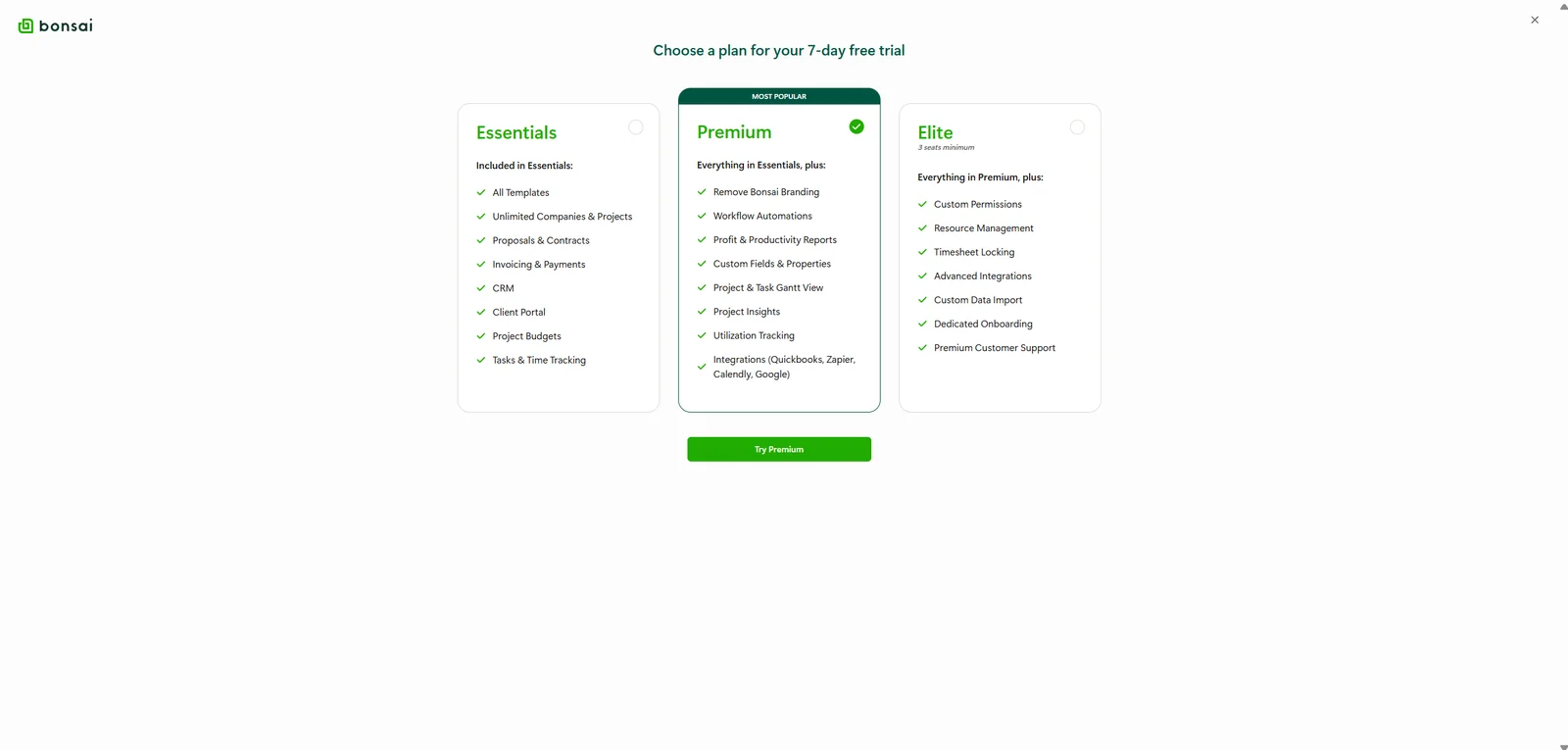
Bonsai advertises a seven-day trial. Its current Help Center says activation requires a credit or debit card and that billing begins after the seventh day unless the trial is cancelled. The public pricing FAQ describes the sequence differently, saying the trial begins at signup and plan or card details are requested later if needed. Our actual registration did not start a trial: the dashboard said there was no active subscription and continued to show a Start Free Trial action. We stopped when invoice-PDF download opened plan selection, so we did not personally traverse the card step.
The tested state should not be called Bonsai's free Limited plan. Official documentation describes Limited as a restricted post-cancellation or downgrade state that cannot create new invoices or client documents. Our newly registered account did create a draft invoice, so we refer to it only by the label we observed: a registered account with no active subscription.
Attempting to download the invoice PDF opened the seven-day trial plan selector.
Basic
$15/user/month
$9/user/month billed annually
Key features
Client records, projects, tasks, and time tracking
Essentials
$25/user/month
$19/user/month billed annually
Key features
Invoices, proposals, contracts, forms, scheduling, and client portal
Premium
$39/user/month
$29/user/month billed annually
Key features
Reporting, workload, pipeline, customization, and integrations
Elite
$59/user/month
$49/user/month billed annually
Key features
Advanced team controls
Limits
Three-user minimum
07
Our Experience
We tested Bonsai with a fictional Northstar Studio client and a Website Usability Audit project. Creating the company and primary contact was quick, and the form explicitly said the company would not be notified simply because it was added. The resulting record immediately showed the contact, domain and activity log. Project creation was similarly compact, with the four billing choices visible before save.
The task flow had one small quirk: choosing Add a Task created an Untitled task immediately instead of opening a separate pre-save form. Renaming it to Homepage usability review was easy, and the detailed task view exposed more controls than we needed. This was not a blocker, but users who prefer completing fields before a record exists may notice the behavior.
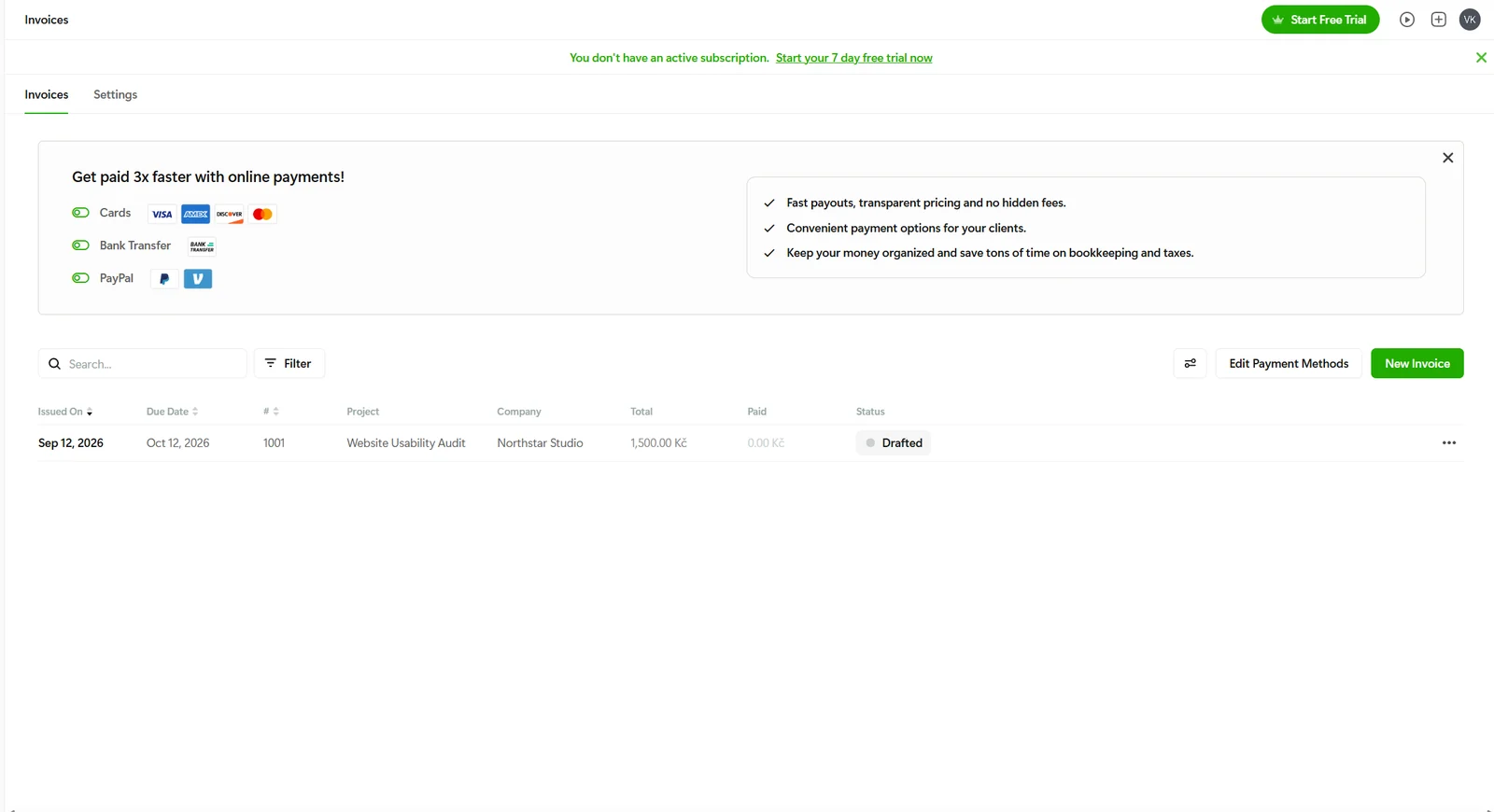
The strongest part of the test was the time-to-invoice chain. The manual time form initially inherited a zero billable rate, so we entered a fictional CZK 1,200 hourly rate. After saving 1 hour 15 minutes, the project displayed 1 hour 15 minutes as total, billable and unbilled time and calculated CZK 1,500. The invoice step showed the same total before creation, then produced draft invoice 1001 with quantity 1.25, the correct hourly rate, a linked timesheet and a 30-day due date. The draft remained in the invoice list after navigation.
Draft invoice 1001 persisted with the correct project, company and CZK 1,500 total.
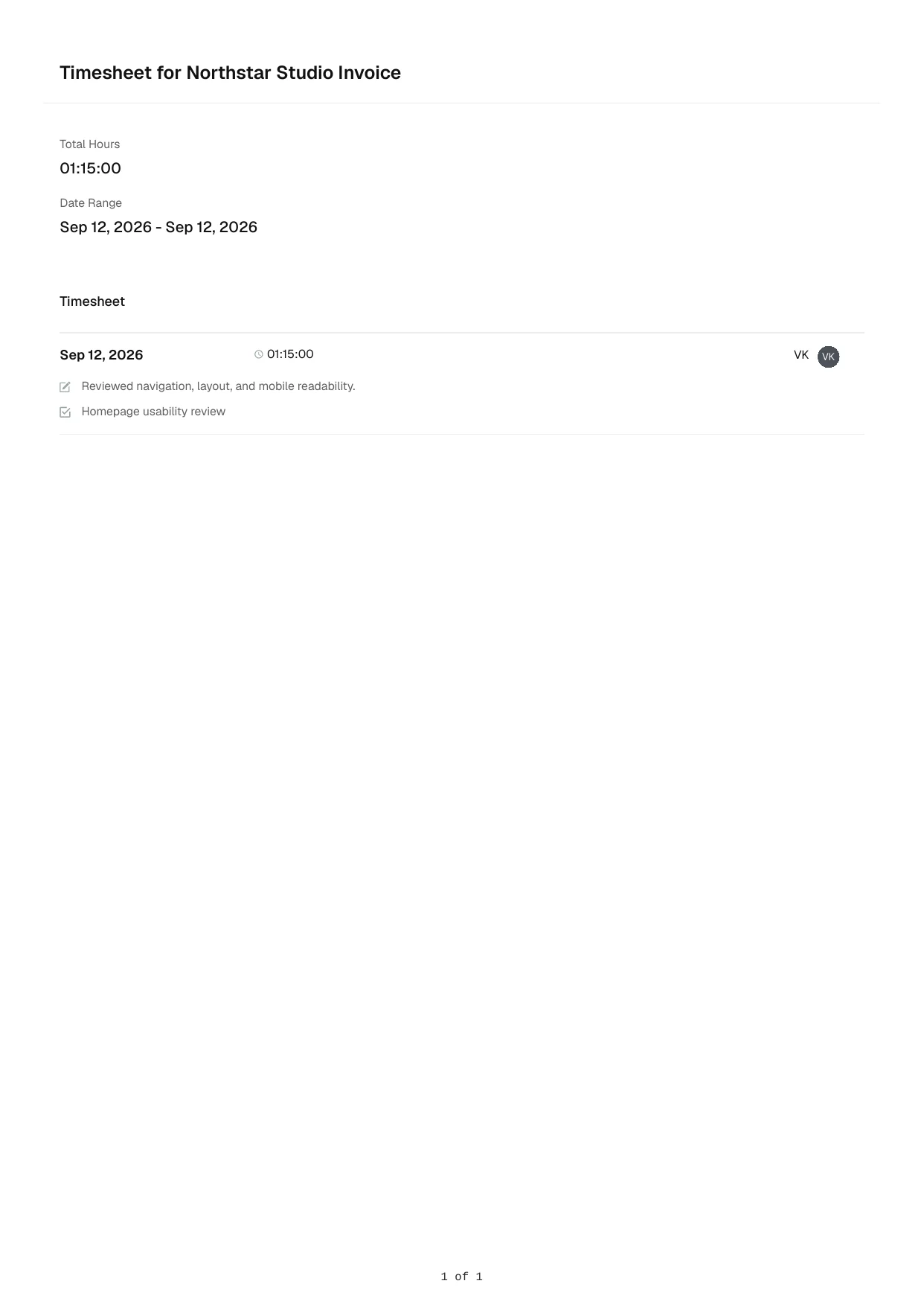
The experience was smooth and generally clear, but export behavior exposed a meaningful boundary. The row menu offered Download Timesheet, which produced a clean one-page PDF. The separate Download PDF action inside the invoice editor carried a crown icon and opened the seven-day trial plan selector instead of downloading the invoice. We did not start the trial or send the invoice.
The exported timesheet was clean, readable and matched the controlled entry.
Data portability was better. Account settings exposed each supported dataset as a separate CSV button without a visible plan marker. The Time Tracked export contained one row and 15 fields, including the company, project, task, note, raw and formatted duration, rate and billing status. Its 4,500 seconds matched 1 hour 15 minutes, and the rate again implied CZK 1,500. Empty service and tag fields remained in the schema as blanks.
Core account datasets can be downloaded separately as CSV files.
We deliberately did not send documents, activate online payments, test payouts, start the card-backed trial, invite collaborators or assess the mobile apps.
08
Alternatives
HoneyBook
HoneyBook is a strong alternative for businesses that prioritize polished lead capture, client communication and workflow automation. Its onboarding and client-facing experience can be compelling, and it advertises a longer trial without a credit card. Availability and payment features can be market-dependent, so it is not automatically the better choice for every location.
Dubsado
Dubsado is the better comparison when flexible forms, intake logic, workflows and customization matter more than rapid setup. It can support highly tailored client journeys, but that flexibility usually requires more configuration. Bonsai felt faster to understand in our core project and billing test.
FreshBooks
FreshBooks is the accounting- and invoicing-first option. It is a better fit when bookkeeping context, expenses and financial reporting matter more than contracts, client portals and connected project operations. Bonsai has the stronger freelancer workflow narrative; FreshBooks has the clearer accounting identity.
Everyday Productivity
FreshBooks
Rating
8.4 / 10
Price
Lite $23/month or $248.40/year regular price
Best for: Freelancers and small service teams connecting client billing, project time, and billable expenses
FreshBooks is the tested alternative for simpler client billing, time tracking, expenses, and accounting-led workflows.
Market availability and a different project-management emphasis
Dubsado
Businesses needing configurable forms and intake automation
Deep workflow customization
More setup and a steeper learning curve
FreshBooks
Invoicing and accounting-led small businesses
Stronger bookkeeping and financial context
Less emphasis on contracts and full client project operations
Bonsai's advantage is balance. It does not try to turn project delivery into a heavyweight planning system or accounting into an enterprise ledger. Instead, it gives a small service business enough CRM, task, time, document and billing structure to keep work moving in one place. That balance is also its limitation: a buyer with one dominant requirement can find a deeper specialist.
Compared with HoneyBook and Dubsado, Bonsai feels more like a compact operating system for the work after a client exists, with less emphasis on elaborate intake automation. Compared with FreshBooks, it places projects, contracts and client workflow closer to the center. The right choice depends less on the longest feature list than on where a business spends its administrative time.
10
Final Verdict
Bonsai earns an Exploripo rating of 8.7/10. It handled our core freelancer workflow cleanly, kept related records connected and produced internally consistent billing data and useful exports. The interface was generally clear enough that the product's breadth did not become overwhelming.
We recommend it most strongly to freelancers, consultants and small agencies ready to consolidate client administration, project delivery and billing. Start the buying decision at Essentials rather than the headline Basic price if invoices, proposals and contracts are central. Premium is easier to justify for teams that will genuinely use its reporting, workload and integration features.
The score stops below 9 because plan boundaries appeared during a basic invoice-export task, official trial wording is not fully consistent, and recurring external feedback points to limitations in advanced project management, customization and support or payment experiences. Those concerns do not erase the quality of the tested workflow, but they matter when evaluating cost and long-term fit.