No spam. Just software we’ve actually tested, plus useful reviews, comparisons and recommendations. We’ll send a confirmation email (double opt-in). You can unsubscribe anytime.
AI Images / Video / Voice
Synthesia
We tested it
By Exploripo Editorial Team
Synthesia is our preferred tested tool when the goal is a complete presenter video. Its final quality was strong, but signup delay, prompt drift, Free-plan export restrictions, and unresolved pricing inconsistencies keep it at 8.0/10.
We may earn a commission if you buy through this link, at no extra cost to you.
01
The essentials
Quick Summary
Bottom line: Synthesia produced the strongest complete AI-presenter result in this test cycle. Both our English and final Czech videos combined a natural voice, convincing facial movement, clean lip synchronization, and correct delivery of the tested numbers and dates.
Bottom line
Synthesia is our preferred tested tool when the goal is a complete presenter video. Its final quality was strong, but signup delay, prompt drift, Free-plan export restrictions, and unresolved pricing inconsistencies keep it at 8.0/10.
02
At a glance
Pros & Cons
+Pros
Very good English voice, facial movement, and lip sync
Final Czech video read the amount and date correctly
Editor became straightforward after we controlled the scene
Free plan allowed generation and in-account playback
Czech language and a matching free Czech voice were available
Completed videos looked professional for short explainers
−Cons
Verification email took roughly 30 minutes in our first attempt
AI Video Assistant rewrote the exact script and added scenes
Assistant draft contained malformed placeholder text
Download and watermark removal were paywalled
Authenticated and public Starter prices did not match
Only one English and one Czech final output were evaluated
03
Audience fit
Who it’s for / Who it’s not for
✓Who it’s for
Teams creating polished presenter-led training, onboarding, internal communication, or product explainers without filming a person.
Marketers and educators prioritizing avatar realism, voice quality, lip sync, and multilingual output over a generous Free export tier.
Users willing to review AI-generated outlines and keep factual scripts under manual editorial control.
Czech publishers who can test the chosen voice and final render instead of relying only on editor preview audio.
×Who it’s not for
Free users who need a downloadable, watermark-free file for publication or external editing.
Creators expecting a prompt-to-video assistant to preserve a strict one-scene, verbatim script without cleanup.
Voice-only projects that do not need an avatar and can use a specialist such as ElevenLabs.
Projects requiring proven long-form consistency, paid support, billing, cancellation, API, or team workflows we did not test.
04
Overview
Synthesia is a browser-based AI video platform for creating presenter videos from scripts, prompts, documents, or URLs. Its editor combines avatars, voices, layouts, captions, media, dubbing, and collaboration features. Our review focused on the core presenter workflow rather than the broader paid feature set.
Independent review platforms were positive overall when checked on 2026-08-23, although their audiences, moderation rules, and sample sizes differ. These ratings provide context rather than a formula for our 8.0/10 score.
Source
Rating checked
Review count checked
Product Hunt
3.9 / 5
24
Trustpilot
3.9 / 5
1,820
Recurring praise centered on ease of use, fast production, professional training or presentation output, avatar quality, and time savings. Recurring concerns included pricing and subscription limits, support, moderation or content restrictions, pronunciation, lip sync, rendering, and requests for more control. We reproduced only some themes: ease of use after cleanup, strong final avatar quality, and restrictive Free output access.
Ratings and review counts can change after the check date.
05
Features
5.1 AI Video Assistant
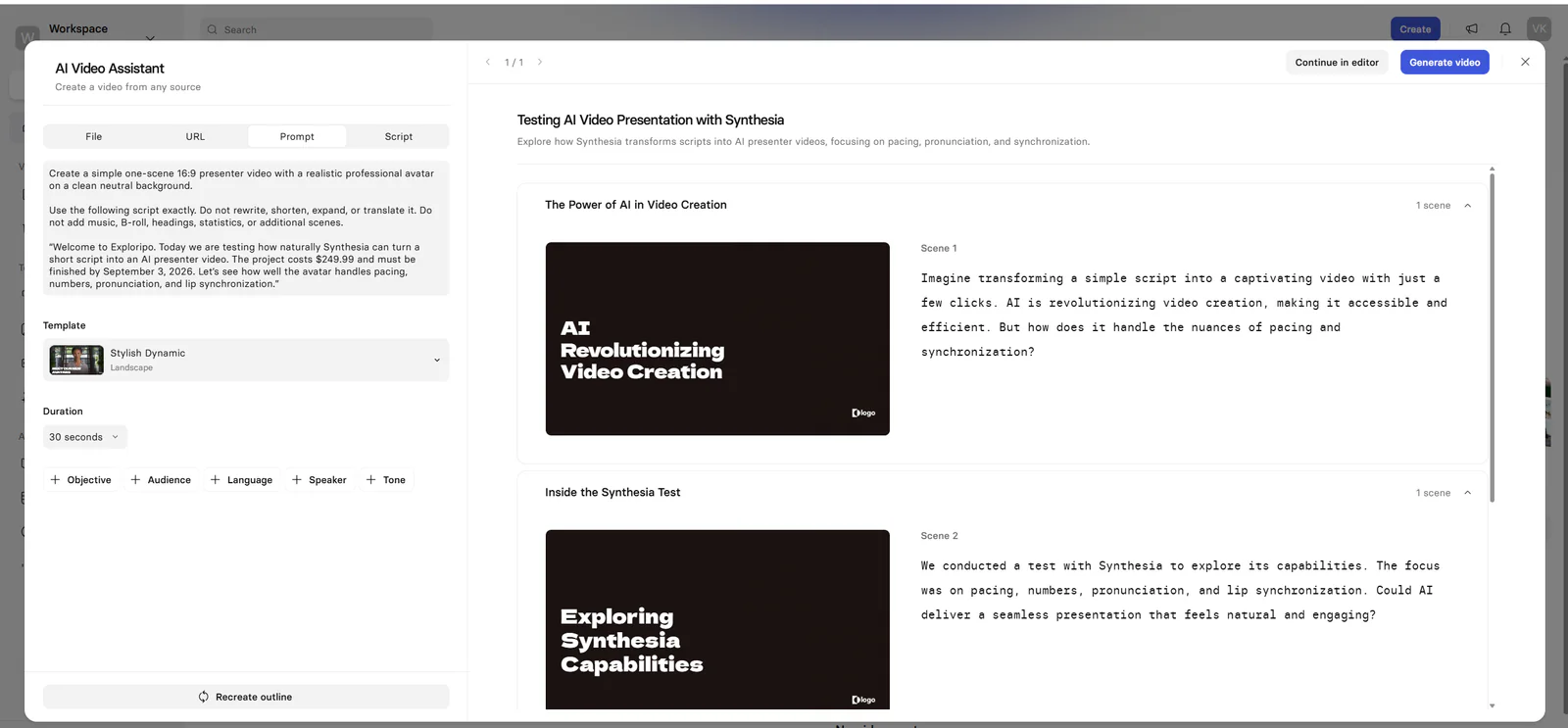
The first-run AI Video Assistant accepted a prompt, URL, script, or file and could build an outline before opening the editor. We asked for one 16:9 presenter scene, a realistic avatar, a neutral background, and verbatim use of our supplied script. The generated outline did not follow those constraints: it rewrote the copy, added headings and multiple scenes, and later produced malformed placeholder text.
Evidence boundary: This finding applies to one prompt and one generated outline. It shows that strict prompts still need review; it does not prove every Synthesia outline will drift in the same way.
Figure 1. The AI Video Assistant rewrote the requested exact script and expanded it into multiple scenes.
5.2 Single-scene editor control
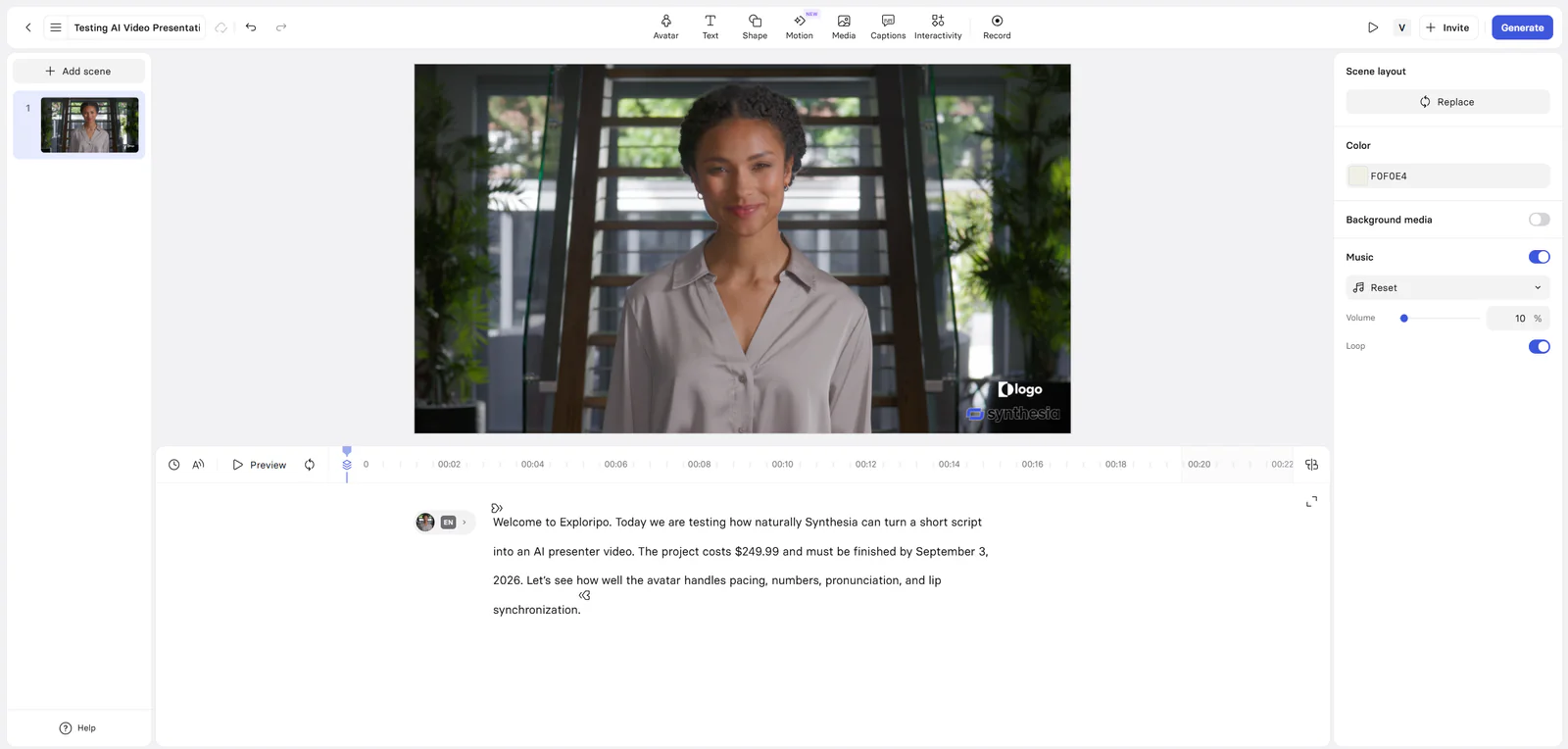
We bypassed the assistant-generated structure, kept one scene, selected a clean avatar layout, removed music, and restored the exact script. Once the project was reduced to that controlled state, the editor was clear and manageable. Avatar, voice, language, scene layout, media, captions, and generation controls were easy to locate.
Figure 2. Controlled one-scene English setup after removing the assistant-generated structure.
5.3 English presenter test
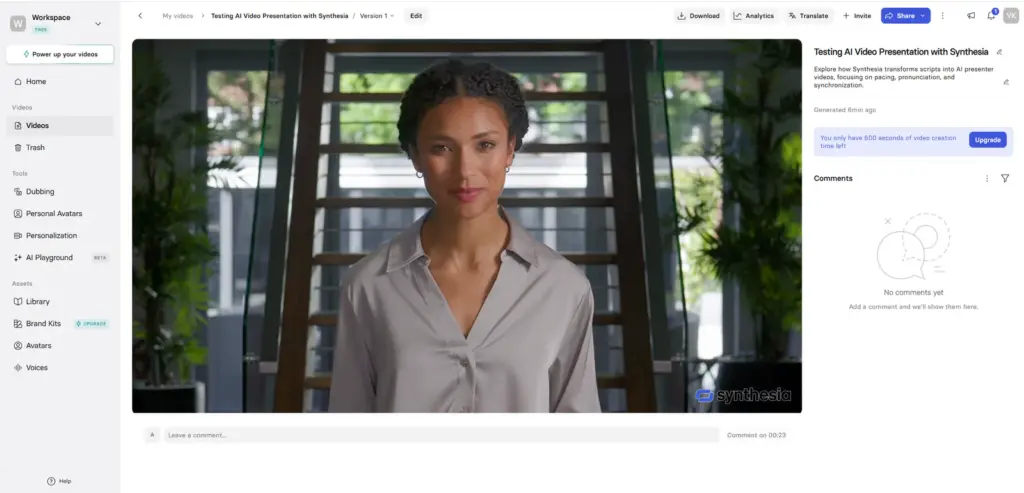
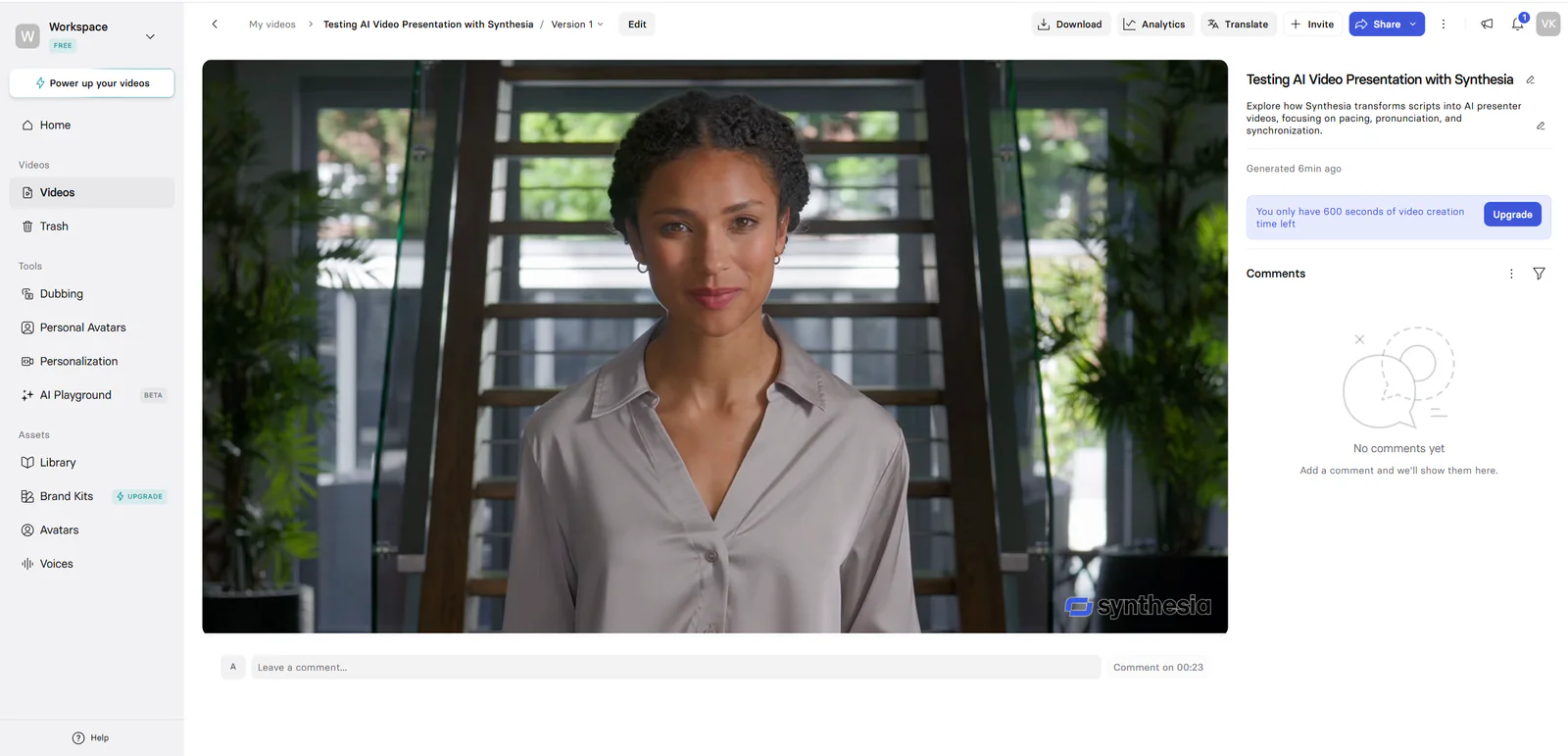
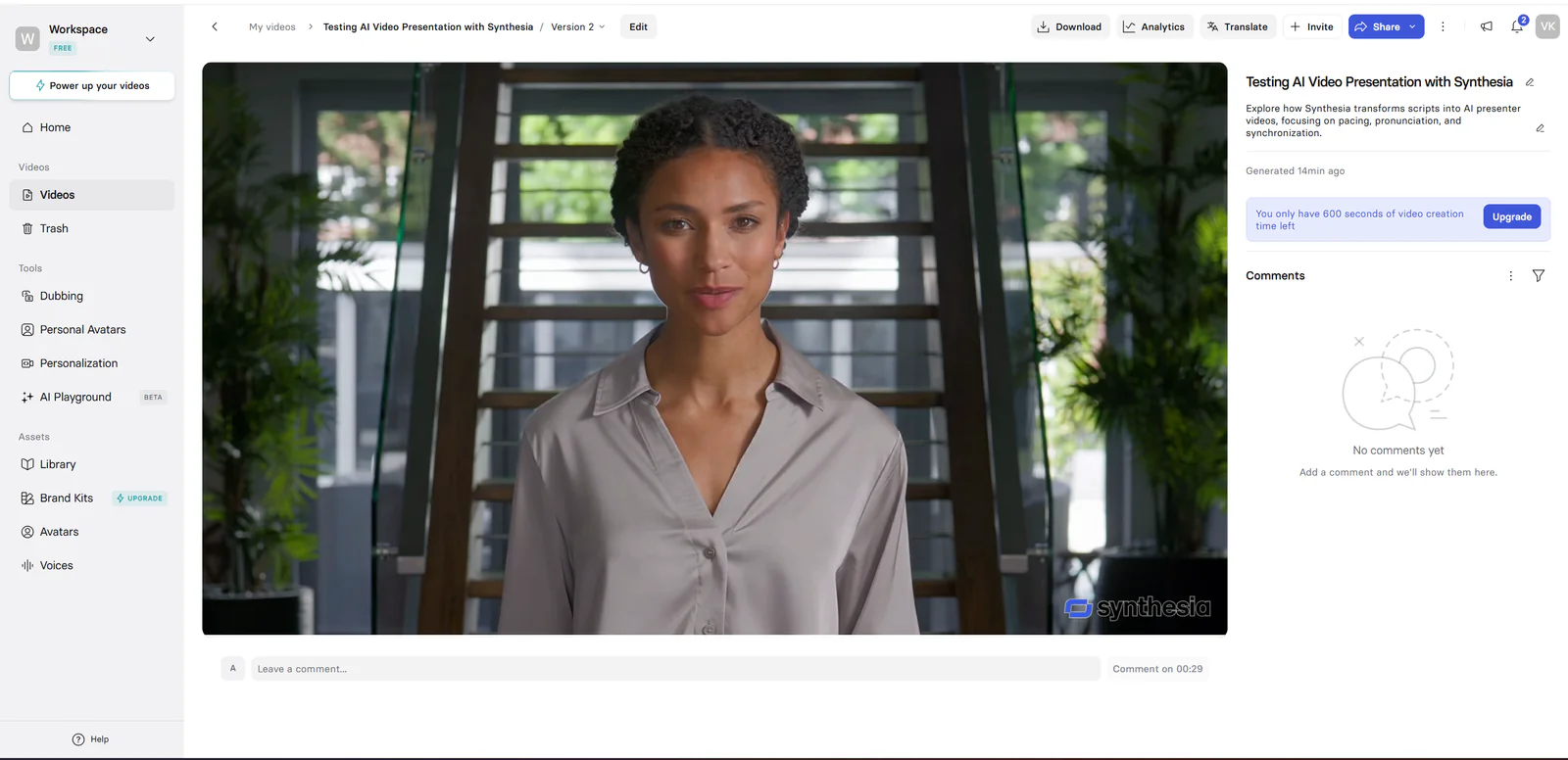
The English test used the Zola avatar, Amanda Professional English voice, one scene, no music, and the exact Exploripo script. The completed 23-second video delivered a natural voice, appropriate pacing, convincing facial movement, and clean lip synchronization. It also read the dollar price and full date correctly.
Figure 3. Completed English presenter video; voice, movement, numbers, date, and lip sync were all judged very good.
5.4 Czech presenter test
For Czech we kept Zola, switched the project to Czech, selected the available Zola Neutral voice, and pasted the exact Czech script. Several alternative Czech voices were visible but upgrade-gated in our account. The editor preview misread the amount while reading the date correctly; the completed Version 2 then read both 5 749 korun and 3. září 2026 correctly.
Scoring decision: The final generated video is the scored output. We retain the preview misread as workflow evidence because preview and final generation did not behave identically in this test.
Figure 4. Completed Czech Version 2; the final render read both the amount and date correctly.
5.5 Czech voices and language selection
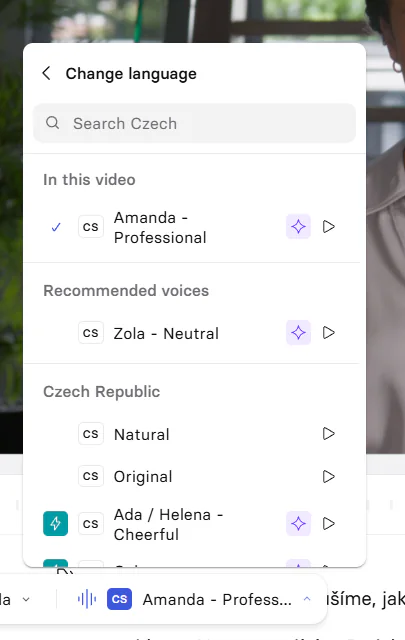
Synthesia recognized Czech as a project language and presented Czech-specific voice options. Amanda Professional remained assigned initially; Zola Neutral was recommended and available for our final test. Other voices such as Natural, Original, and Ada / Helena - Cheerful appeared in the picker, but paid markers limited the low-cost comparison.
Figure 5. Czech voice picker in our Free account; several alternatives were upgrade-gated.
5.6 Download and watermark limits
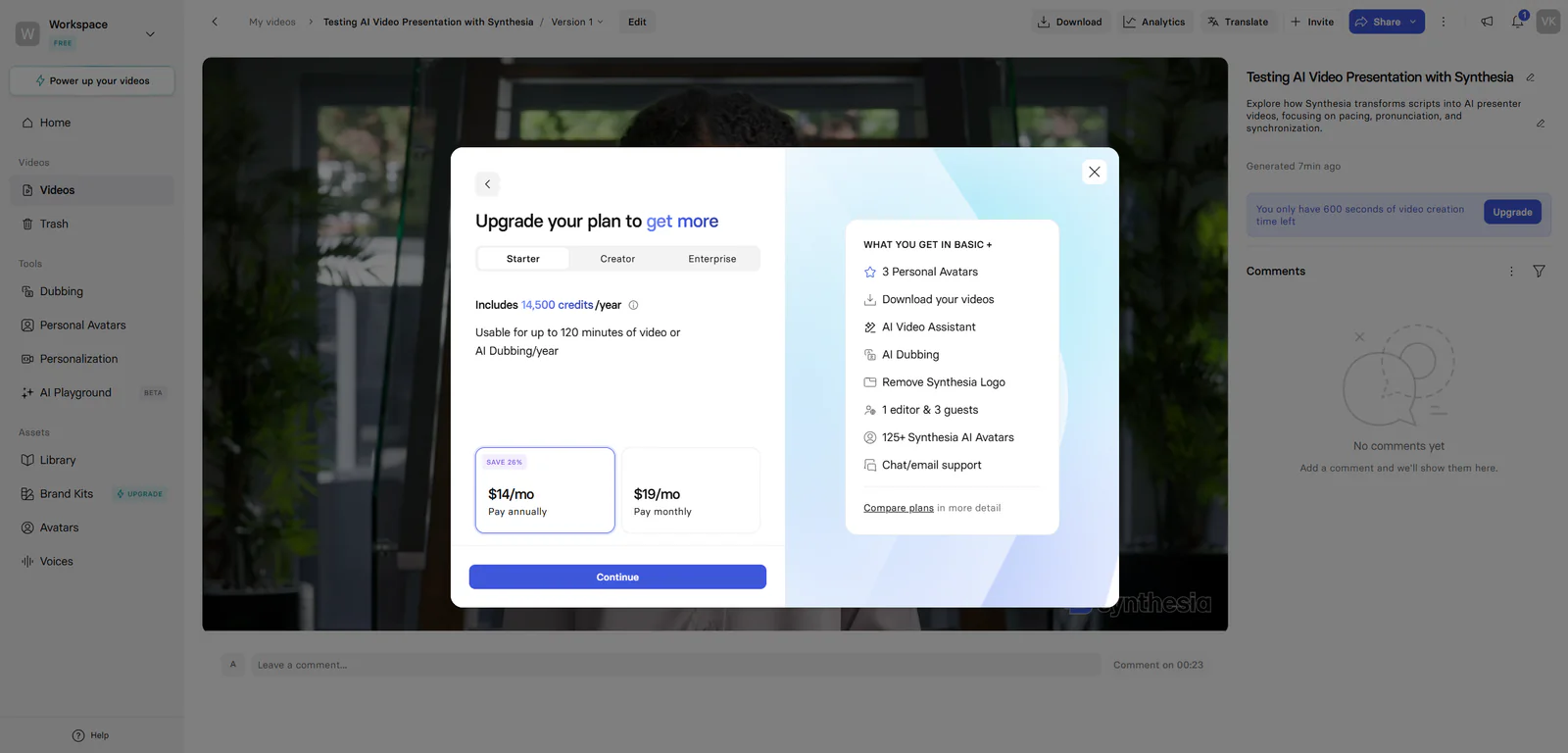
Both generated videos remained playable inside the account, but Download opened an upgrade dialog. Watermark removal was also locked behind a paid plan in the generation panel. For the Free workflow we therefore preserved screenshots rather than video files.
Figure 6. Download was paywalled in our Free account and exposed the authenticated Starter offer.
06
Pricing
Free Basic plan; Starter $29/month
Free plan available
Pricing update checked September 12, 2026
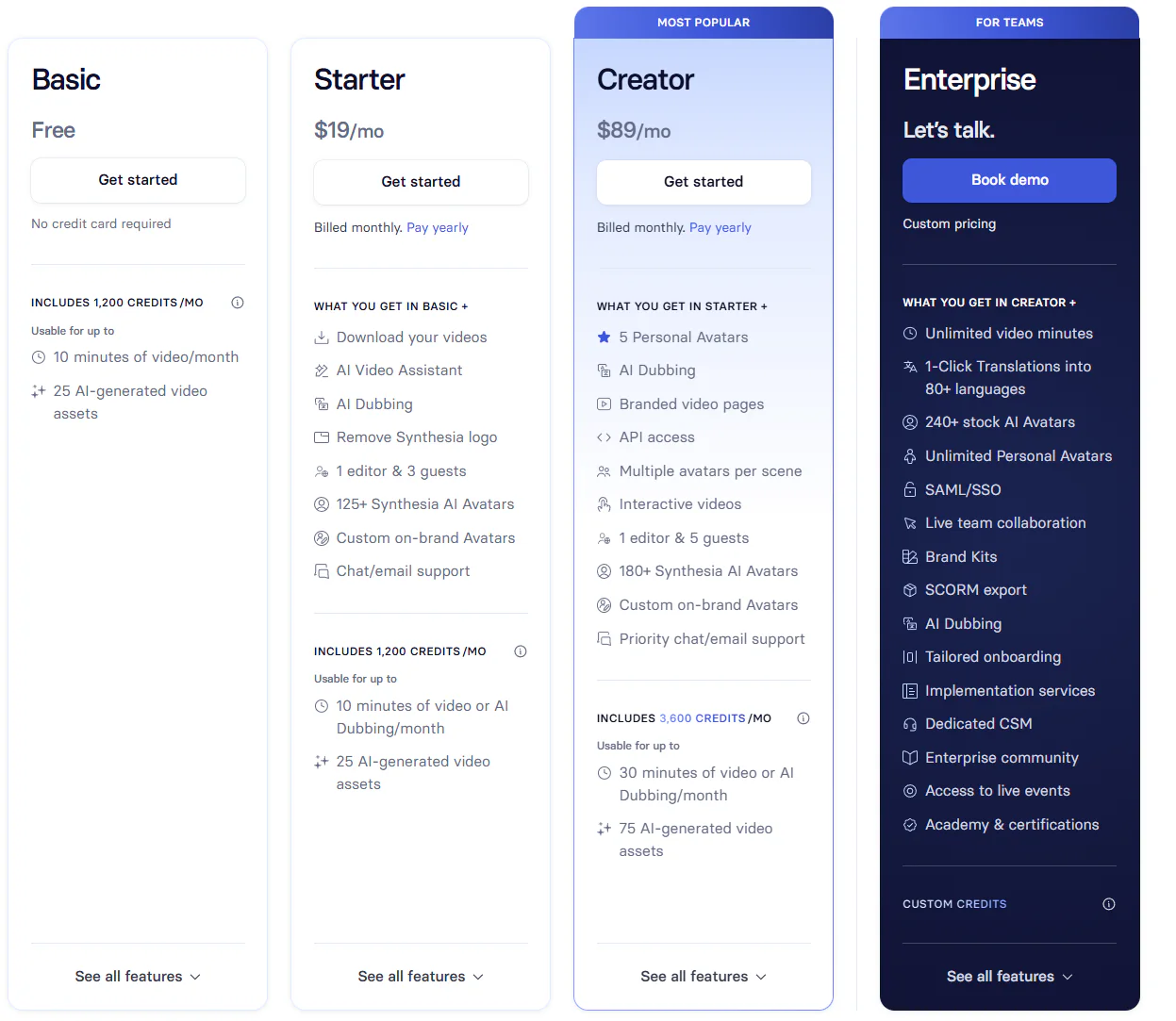
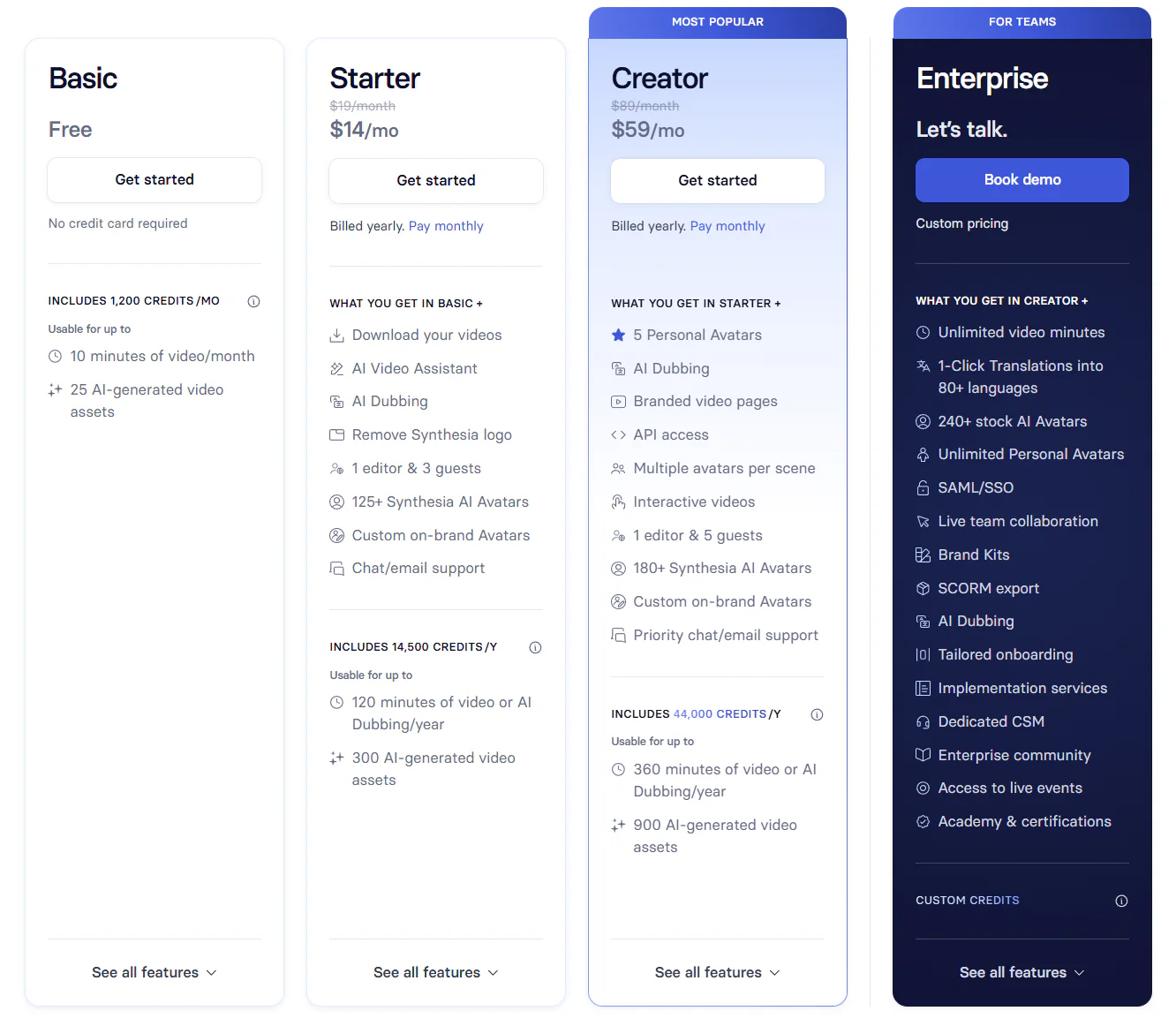
The live public monthly cards now show Basic at $0, Starter at $29 per month, Creator at $89 per month, and Enterprise as custom. The annual cards and the FAQ on the same official page showed inconsistent effective monthly and annual totals during our recheck. We therefore use the stable monthly figures in the structured pricing cards and do not present one annual equivalent as definitive. Verify the final checkout total, billing cadence, credits, and limits before purchase.
We checked the public pricing page and authenticated pricing surfaces on 2026-08-23. They did not agree on the Starter month-to-month price. Rather than silently choosing one figure, the table below preserves the discrepancy.
Plan
Authenticated session
Public page crawled
Key evidence
Free / Basic
$0
$0
Generation and playback; download and watermark removal gated in our account
Starter
$19 monthly; $14/mo annual equivalent
$29/month
Download gate showed 14,500 credits/year and up to 120 minutes/year
Creator
$89 monthly; $59/mo annual equivalent
$89/month
Higher allowances and broader creator features
Enterprise
Custom
Custom
Sales-led pricing
Pricing note: Our logged-in offer and the public pricing page did not match for Starter. Session, region, promotion, or account state may explain the difference. Verify the live checkout price, billing cadence, credits, and usage limits immediately before purchase.
Figure 7. Monthly pricing captured in our authenticated session on 2026-08-23.Figure 8. Annual pricing displayed as monthly equivalents; annual billing applies.
Basic
$0/month
No credit card required
Key features
1,200 credits per month
Up to 10 video minutes per month
Limits
Download and watermark removal were gated in our test
Starter
$29/month
Annual public displays were internally inconsistent on 2026-09-12
Key features
1,200 credits per month on the live monthly card
Limits
Verify annual total and credits at checkout
Creator
$89/month
Annual public displays were internally inconsistent on 2026-09-12
Key features
3,600 credits per month on the live monthly card
Limits
Verify annual total and credits at checkout
Enterprise
Custom pricing
Contact Synthesia
Key features
Sales-led plan
07
Our Experience
7.1 Signup and verification
Account creation was the weakest onboarding step. The first verification email arrived after roughly 30 minutes despite a resend. Support reset the account, and the replacement message also took several minutes. We eventually gained access and completed the test. This is one observed signup incident, not a claim about every new account.
7.2 Assistant-to-editor workflow
The AI Video Assistant looked convenient but was not dependable for a strict benchmark. Its first outline altered the content and structure, so we moved into the editor and rebuilt the project as one exact-script scene. The editor itself was more predictable than the assistant and allowed us to produce a controlled result without purchasing a plan.
7.3 English workflow
Matching the Zola avatar with Amanda Professional, disabling music, previewing the voice, and generating the English scene required little explanation. The final video was professional-looking and accurately read the price and date. The visible Synthesia watermark and locked download were the only practical obstacles to publication from the Free account.
7.4 Czech workflow
Switching the project to Czech and choosing Zola Neutral was straightforward. The preview's amount error briefly suggested weaker numeric handling, but the completed Version 2 corrected it. The final Czech voice, avatar movement, lip sync, number handling, date, and overall presentation were all judged very good.
What we did not test
Paid downloads, watermark removal, paid Czech voices, billing, cancellation, refunds, or commercial production rights.
Personal or custom avatars, avatar cloning, AI dubbing, translation, API access, collaboration, analytics, or brand kits.
Long-form consistency, repeated regenerations, blind listening, a broader Czech pronunciation benchmark, or statistically meaningful evaluation.
Customer-support resolution quality beyond the observed account reset and verification delay.
08
Alternatives
HeyGen is the closest tested alternative for short talking-avatar videos. It had a simpler first-run path and a competent English output, but our HeyGen Czech sample misread important numbers, its framing was weaker, and its Free plan also blocked download. Synthesia produced the stronger final English and Czech presenter results in our tests.
ElevenLabs is the stronger fit when the job is voice generation rather than avatar video. It delivered our best English and Czech voice-only results, handled comparable numbers correctly, and allowed selected Free outputs to be downloaded. Murf offered a clear editor, but its Czech sample sounded more artificial, misread important numbers, and its Free trial did not allow export.
AI Images / Video / Voice
HeyGen
Rating
7.0 / 10
Price
Free plan; Creator $29/month
Free plan available
Best for: Fast short-form AI-presenter drafts with approachable avatar and voice controls
HeyGen had a quicker first-run path, but Synthesia produced the stronger final English and Czech presenter results in our tests.
HeyGen also creates avatar video; ElevenLabs and Murf primarily served voice-only tests
English sample
Very good voice, movement, numbers, date, and lip sync
Stronger complete presenter result than our HeyGen sample
Czech sample
Final video correctly read amount and date
HeyGen and Murf misread important Czech numeric content; ElevenLabs was correct
Free output access
Playback available; download paywalled
HeyGen and Murf also blocked export; ElevenLabs allowed selected downloads
First-use workflow
Assistant drifted; editor was clear after cleanup
HeyGen onboarding was quicker; Murf editor was also approachable
Exploripo rating
8.0/10
ElevenLabs 9.0/10; HeyGen 7.0/10; Murf 6.0/10
Comparison conclusion: Synthesia is our preferred tested tool when a complete presenter video is the goal. ElevenLabs remains our preferred specialist for voice-only output. Synthesia's final quality is strong enough to justify serious consideration, but its Free plan is an evaluation environment rather than a publication workflow.
Comparison of the current reviewed software with selected alternatives
HeyGen
HeyGen had a quicker first-run path, but Synthesia produced the stronger final English and Czech presenter results in our tests.
ElevenLabs
Choose ElevenLabs when the job is voice generation rather than a complete avatar-video workflow.
Murf.ai
Murf offered a clear editor, but its tested Czech sample was less natural and its Free trial did not allow export.
Overall rating
8.0 / 10
7.0 / 10
9.0 / 10
6.0 / 10
Price
Free Basic plan; Starter $29/month
Free plan; Creator $29/month
Free plan available; paid plans from $6/month
Free plan; Creator $29/month or $19/month billed annually
Free plan
Yes
Yes
Yes
Yes
Free trial
No
No
No
No
Best for
Polished multilingual AI-presenter videos without filming a person
Fast short-form AI-presenter drafts with approachable avatar and voice controls
Creators testing natural short-form AI narration and multilingual voiceovers
Beginners and teams evaluating a structured visual voiceover editor before buying a production plan
10
Final Verdict
Final verdict: Synthesia turned both English and Czech benchmark scripts into polished, convincing presenter videos. The final voice, avatar movement, lip synchronization, amount, and date were all very good. Signup delay, prompt noncompliance, Free-plan export restrictions, and pricing inconsistency prevent a higher score.
The 8.0/10 score reflects a strong product with a less consistent surrounding workflow. Synthesia earns credit for the best complete AI-presenter output in this test group, including a successful Czech final render. It loses points because the first-run assistant ignored strict instructions, account verification was unusually slow in our session, the Free plan did not provide a downloadable file, and the live Starter offer conflicted with the public pricing page.
Editorial rating: 8.0/10. Authenticated and public pricing were manually checked on 2026-08-23. Affiliate commission has 0% influence on the rating or recommendation.