No spam. Just software we’ve actually tested, plus useful reviews, comparisons and recommendations. We’ll send a confirmation email (double opt-in). You can unsubscribe anytime.
Business / Sales / CRM
Pipedrive
We tested it
By Exploripo Editorial Team
Pipedrive is an excellent focused sales CRM for smaller teams. Its clear pipeline, careful import flow and practical automation impressed us, while plan-gated features, add-on costs and an incomplete AI-generated report kept it below the top tier.
Exploripo rating8.8/10Excellent
Starting priceLite from €14/user/month billed annually (€24 monthly); Growth €39; Premium €59; Ultimate €79 on annual billing
Pipedrive is a sales-focused CRM built around visual pipelines, activities, imports, automation and reporting. Our Premium-trial test used synthetic contacts, organizations and deals across three practical workflows.
Bottom line
Pipedrive is an excellent focused sales CRM for smaller teams. Its clear pipeline, careful import flow and practical automation impressed us, while plan-gated features, add-on costs and an incomplete AI-generated report kept it below the top tier.
02
At a glance
Pros & Cons
+Pros
Visual pipeline and activity workflow are easy to understand
Importer supports mapping, previews, contact merging and inline custom fields
Useful automation and reporting without enterprise-style setup
Clear export path and a 48-hour import-revert window
−Cons
No ongoing free plan; every user with deals access needs a paid seat
Automatic mapping made one semantically wrong match in our test
Email sync and automation start at Growth; richer controls are concentrated in Premium
AI report generation simplified our requested two-measure chart to one measure
03
Audience fit
Who it’s for / Who it’s not for
✓Who it’s for
Small and midsize B2B sales teams that organize work around deals, stages and next activities.
Founders and sales managers moving from spreadsheets who need a guided import and a visible pipeline.
Teams that want practical automation, forecasting and email tools without adopting a broad marketing-and-service platform.
Organizations willing to pay per seat and choose a plan based on email, automation, reporting and permission needs.
×Who it’s not for
Very small teams that need a permanent free CRM rather than a 14-day trial.
Companies seeking one suite for advanced marketing automation, customer service and a public CMS.
Enterprises that need extensive custom objects, development tooling and administration across many business functions.
Buyers who expect email, phone, meeting intelligence, enrichment and prospecting to be fully tested or included at the entry price.
04
Overview
Pipedrive organizes sales work around people, organizations, leads, deals, pipelines, stages and activities. Deals can carry value, close dates, notes, products, custom fields and a change history. The next call, meeting or task stays close to the opportunity.
The lineup has four plans: Lite, Growth, Premium and Ultimate. All include pipelines, contacts, activities, import and export, Insights, API access, webhooks and Marketplace access. Growth adds email sync, automation and forecasting. Premium adds deeper reporting, team controls and included LeadBooster, Projects and Smart Docs. Ultimate adds security controls, enrichment and a sandbox.
Pipedrive runs in a browser and offers iOS and Android apps. The vendor says the mobile apps work offline, while the web CRM requires connectivity. It also advertises 500+ integrations. We did not test mobile sync or connect external accounts.
External feedback is positive but mixed. G2 showed 4.3/5 across 5,057 seller-profile reviews, Trustpilot 4.4/5 from 3,453 and Capterra 4.5/5 from 3,062. Pipeline clarity recurs in praise; setup, reporting, integrations, price and support recur in criticism. These samples did not determine our score.
05
Features
5.1 Pipeline and activity management
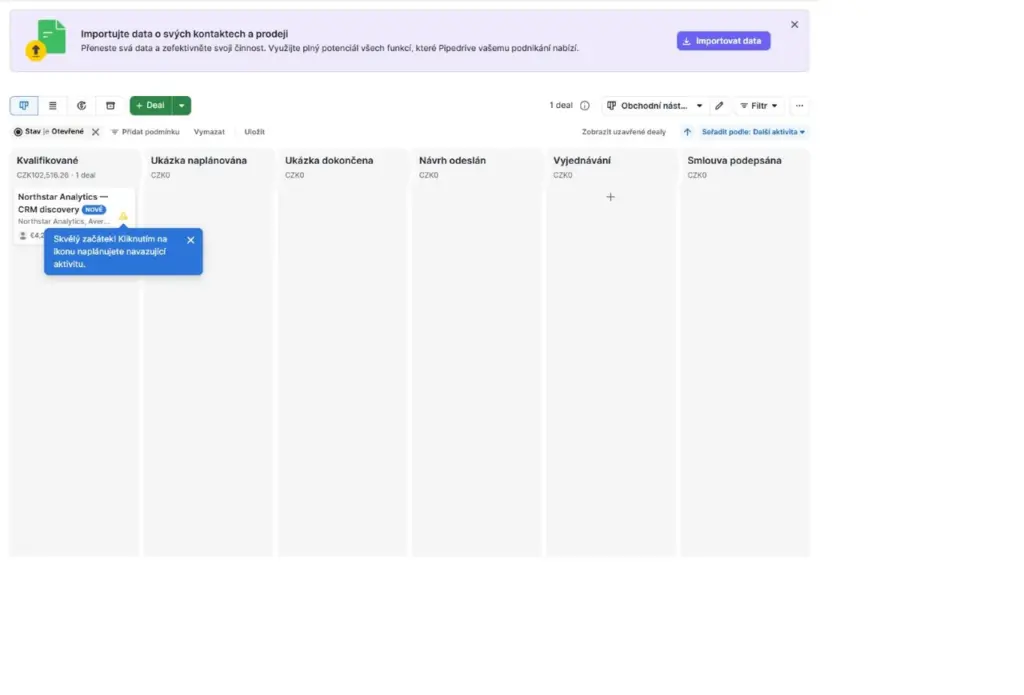
We created a fictional contact and organization, then added a €4,200 deal with an expected close date. The default pipeline immediately showed the new card. The deal retained its EUR value while the aggregate pipeline total appeared in the account's CZK display currency. We added a discovery note, scheduled an all-day call and moved the deal from qualified to demo scheduled and then demo completed. Both moves appeared in the change log with timestamps.
Figure 1. The visual pipeline showed the first synthetic deal, its EUR value and the account-level aggregate in CZK.
The record, pipeline card and next activity stayed connected. We did not test team permissions, email threads or long-term reminders.
5.2 Import, custom fields and duplicate handling
Our CSV contained four deals, three people and three organizations. It passed five checks, and the live interface showed a 200,000-row limit. A checked support article still stated 50,000, so the higher figure is a dated observation.
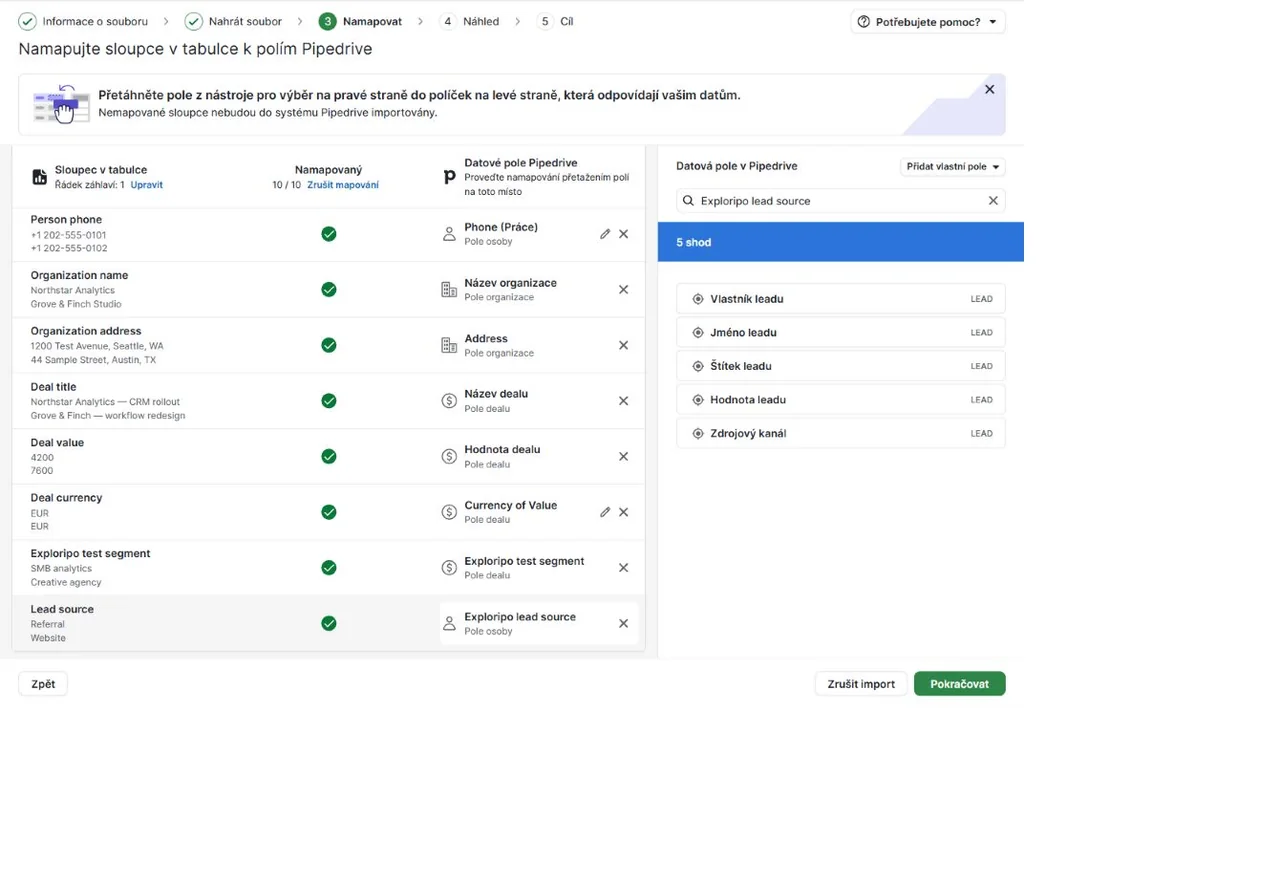
Automatic mapping found 9 of 10 columns but assigned Lead source to the wrong field. We removed the match, created dedicated person and deal text fields and reached 10 of 10 without restarting. Automatic mapping still needed semantic review.
Figure 2. The importer mapped all ten columns after we corrected one automatic match and created two text fields.
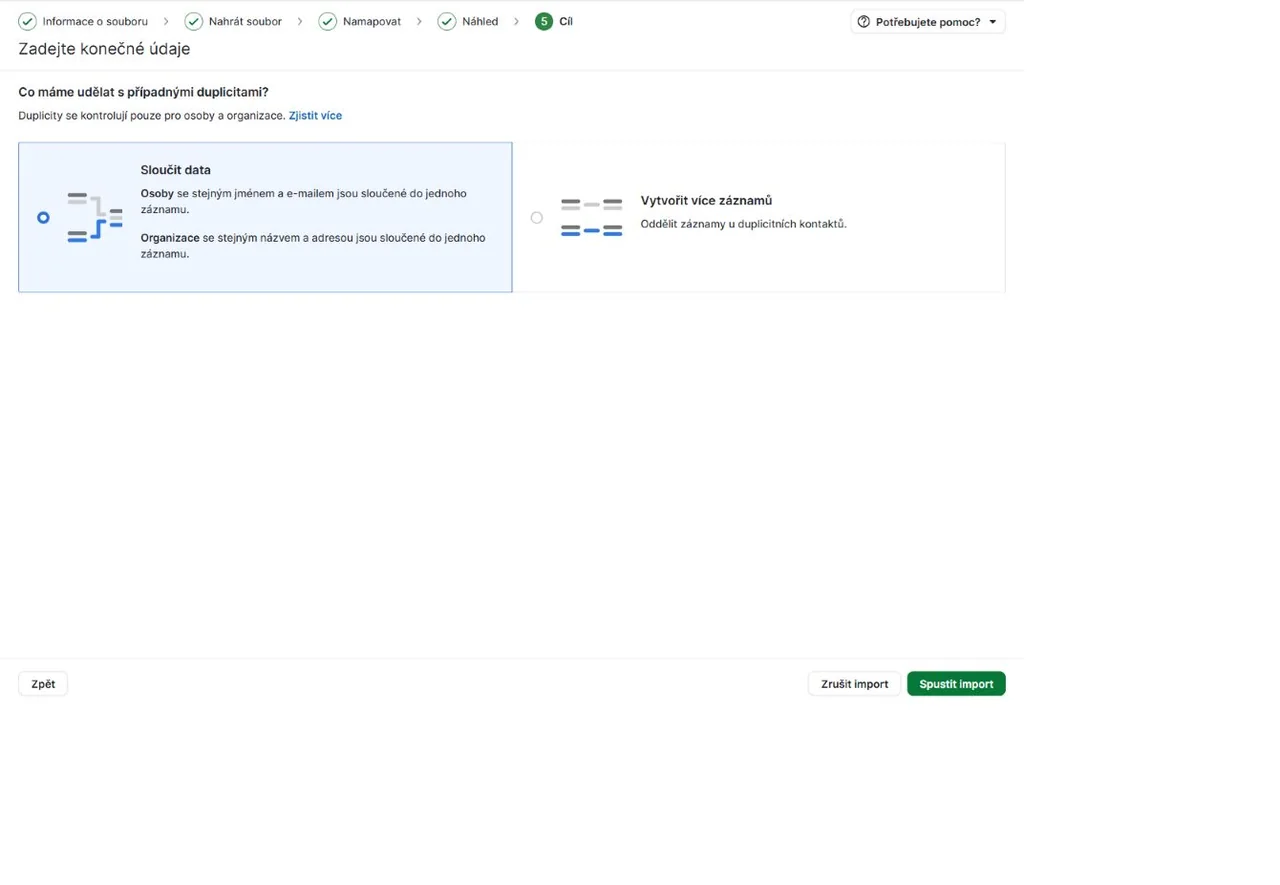
The duplicate step could merge matching people and organizations. Deals were outside the check, so separate rows stayed separate deals.
Figure 3. Duplicate controls covered people and organizations while leaving deals outside the merge check.
The job reported 11 additions, three merges, no updates and no skipped rows. It created four deals, two people, three organizations and two custom fields. Import history offered a 48-hour revert window; we did not use it.
Figure 4. The completed import separated added and merged records and reported no skipped rows.
The deal export contained five data rows and 53 columns, including our custom field. Pipedrive said it would remain available for 28 days. We did not test XLSX, large files, skipped-row repair or rollback.
5.3 Follow-up automation
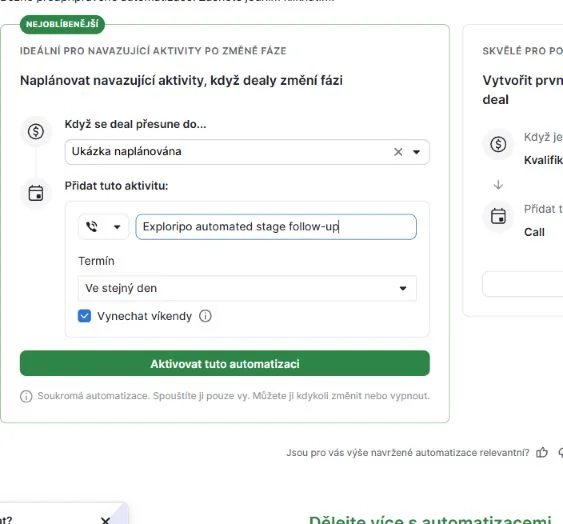
We configured a template automation that created a same-day call when a deal entered the demo-scheduled stage, skipping weekends. The Premium trial showed 150 slots. Moving a fictional deal triggered the expected linked activity; we then deactivated the automation.
Figure 5. The automation linked a stage-change trigger to a same-day call activity and a skip-weekends rule.
This proves one event-to-activity path, not reliability at scale. Email actions, branching, delays and multi-user ownership remain untested.
5.4 Insights and AI-assisted reporting
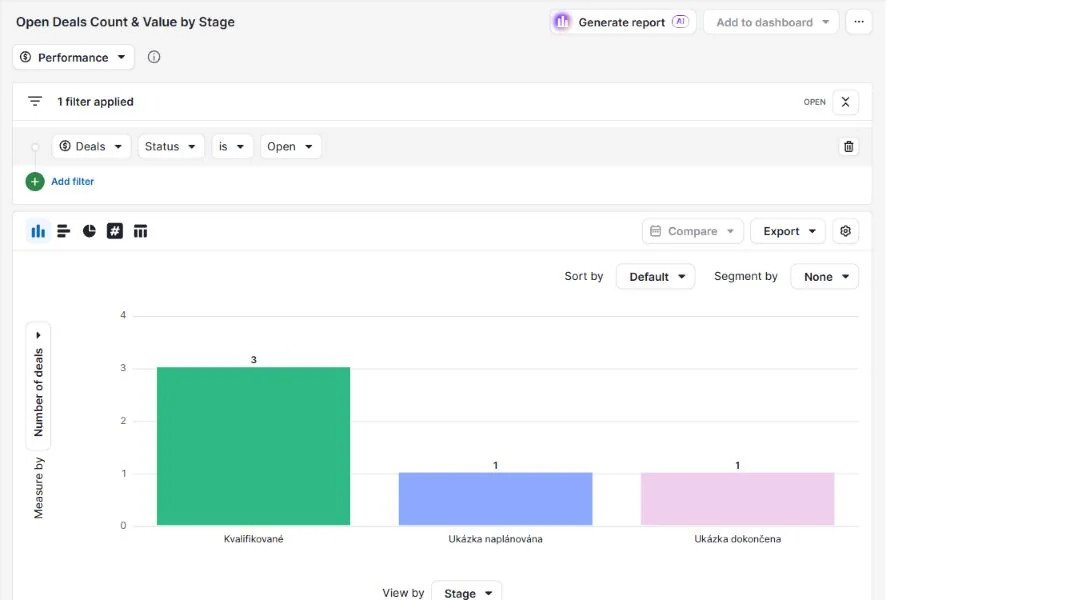
We asked Insights for open-deal count and total value by stage. It said it could not combine both measures and created a count-only report. The chart correctly showed three qualified deals, one demo scheduled and one demo completed. Saving it changed the counter from 0/250 to 1/250.
Figure 6. Insights grouped five open deals by stage, but the AI assistant omitted the requested total-value measure.
The result saved time but still required inspection. A maintenance banner warned that report data might be inaccurate, although the displayed counts matched our pipeline. We did not test dashboard sharing, chart export, forecast accuracy, goals or larger datasets.
5.5 Email, AI, integrations and administration
Growth adds email sync, templates, scheduling, group email and tracking. Premium supports multiple accounts, a team inbox and email AI. Nova can prepare briefs, record and transcribe meetings, summarize them and propose CRM updates. We did not connect email or calendar accounts or record a meeting.
All plans include API access, webhooks, SSO and 2FA. Pipedrive's Trust Center lists ISO/IEC 27001:2022, ISO/IEC 27701, SOC 2 Type 2 and SOC 3. These are vendor statements, not our audit. Teams using Nova or synced communication data should review consent, permissions, subprocessors and retention terms.
06
Pricing
Lite from €14/user/month billed annually (€24 monthly); Growth €39; Premium €59; Ultimate €79 on annual billing
Free trial available
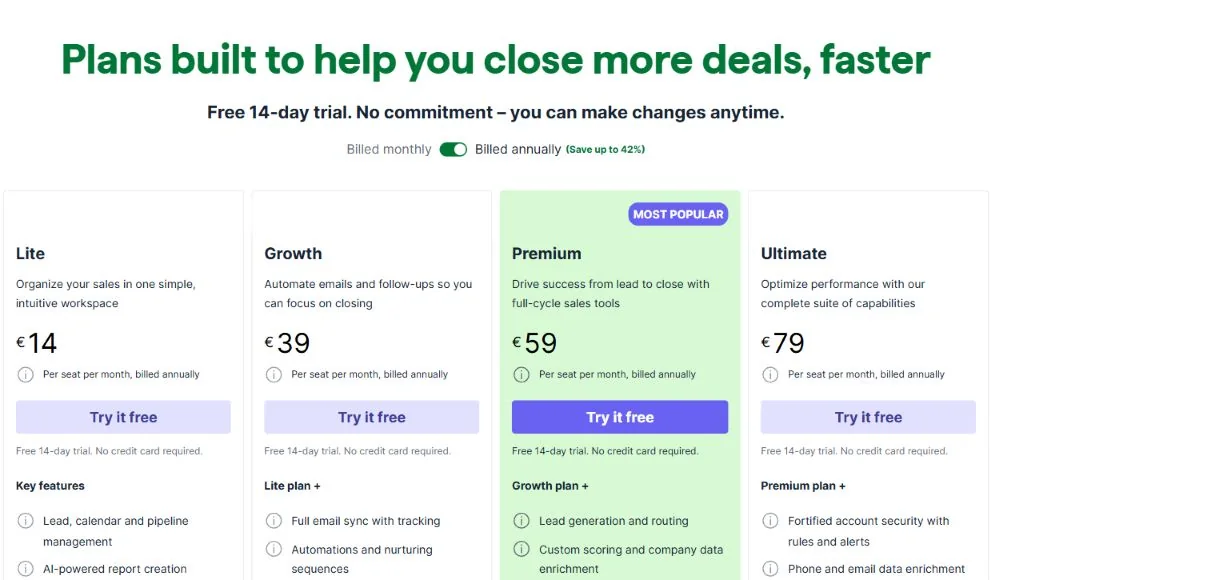
Pipedrive pricing was checked from a Czech/EU locale on September 25, 2026. The page displayed euros and excluded VAT. Annual subscriptions are prepaid; the vendor advertises savings of up to 42%, but the discount differs by plan. Currency and payment methods can vary by location.
Figure 7. Annual pricing lowered the monthly equivalent, with Premium at €59 per seat per month billed as €708 yearly.
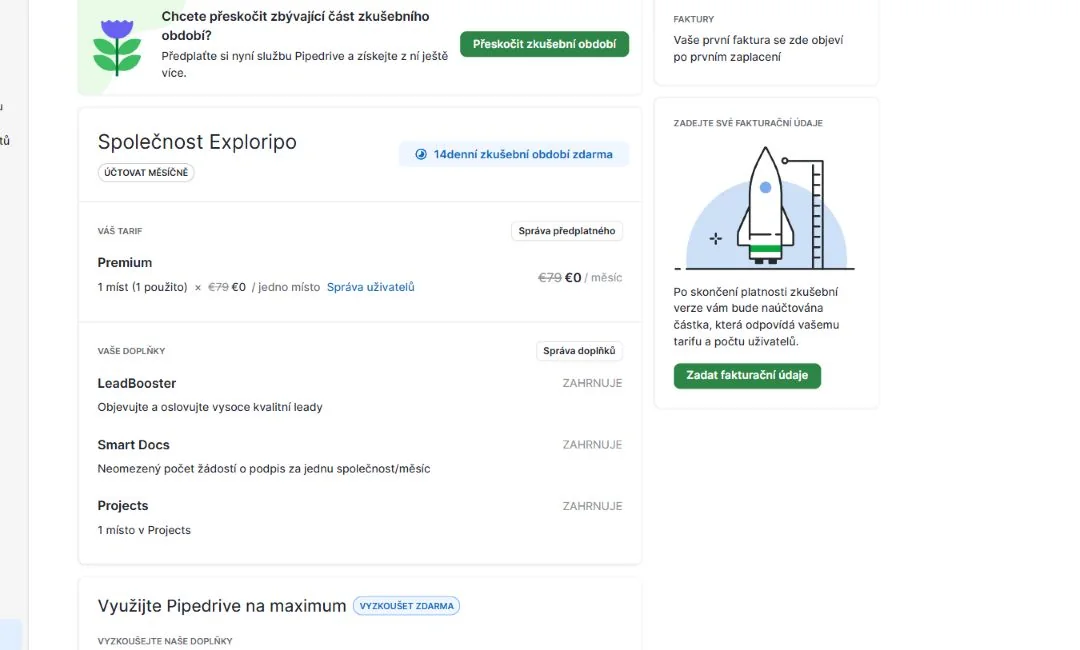
The 14-day trial requires no credit card. Our account specifically identified itself as a Premium trial and showed LeadBooster, Projects and Smart Docs as included. That tested entitlement should not be read as a promise that every trial has identical access.
Figure 8. The tested 14-day Premium trial included LeadBooster, Smart Docs and Projects for one seat.
LeadBooster, Projects and Smart Docs are paid add-ons on Lite and Growth but included on Premium and Ultimate. Campaigns and Web Visitors stay separate. Starting amounts ranged from €13.33 for Campaigns to €41 for Web Visitors in our locale; confirm frequency, quantity and tax before purchase.
Growth is the practical starting point for email sync and automation. Premium suits teams that will use lead capture, documents, richer reporting and tighter permissions. Lite handles pipeline basics but not automated follow-up.
Lite
€24/user/month
€168/user/year (€14/month equivalent) when billed annually
Best for: Basic pipeline tracking
Key features
2,500 leads and deals multiplied by paid seats
30 custom fields and 15 reports
Limits
No workflow automation or email sync
Recommended
Growth
€49/user/month
€468/user/year (€39/month equivalent) when billed annually
Best for: Teams adding email and automation
Key features
Email sync, forecasting and 50 automations
5,000 leads and deals multiplied by paid seats
Best value
Premium
€79/user/month
€708/user/year (€59/month equivalent) when billed annually
Best for: A fuller small-team sales workflow
Key features
150 automations, 250 reports and deeper team controls
LeadBooster, Projects and Smart Docs included
Ultimate
€99/user/month
€948/user/year (€79/month equivalent) when billed annually
Best for: Higher controls and sandboxing
Key features
250 automations, 500 reports and 50 sequences
Security controls, enrichment and a sandbox
07
Our Experience
Pipedrive worked best in its intended rhythm: create a deal, define the next activity, move the card and review the history. We reached a useful state quickly without production data.
Import was the strongest workflow. Validation, previews, duplicate rules and a clear result summary reduced guesswork. Creating fields without restarting saved time. The wrong automatic match showed why every mapping still needs review.
The automation worked in our narrow scenario. Reporting was mixed: AI created a valid chart and explained its compromise, but users still need to check filters, measures and rows.
What We Did Not Test
Live email or calendar sync, templates, tracking, group email, team inboxes or AI email tools
Nova recording, transcription, summaries, consent controls or CRM-update approval
Mobile offline synchronization, calling, messaging or automatic call logging
Marketplace integrations, API calls, webhooks, team permissions, security rules or sandbox behavior
Support response quality, paid billing, cancellation, refunds, account deletion or data-retention outcomes
Large datasets, import rollback, malformed files, longitudinal forecasting or reporting accuracy at scale
08
Alternatives
Alternative
Choose it when
Main trade-off versus Pipedrive
Exploripo take
HubSpot CRM
You want a free entry point and broader marketing, service and content tools
Advanced hubs and bundled growth can become complex and expensive
Broader platform; Pipedrive keeps sales work more focused
Zoho CRM
You want deep customization and a wider business-software ecosystem
More configuration and a busier interface
Stronger suite breadth; Pipedrive is easier to adopt
Salesforce Sales Cloud
You need enterprise customization, governance and a large implementation ecosystem
Higher cost, administration and rollout burden
Choose enterprise flexibility over Pipedrive's speed
09
How it compares
Pipedrive occupies a useful middle ground. It is more structured than a lightweight contact manager and easier to deploy than an enterprise CRM. HubSpot is the better choice when marketing and service breadth or a permanent free tier matters. Zoho offers more suite-level flexibility. Salesforce supports deeper enterprise customization and governance.
Pipedrive's advantage is focus: pipeline, activity, automation and reporting all support sales progress. Compare seat cost, add-ons and the plan required for email, permissions and reporting before treating the entry price as the full budget.
10
Final Verdict
Pipedrive earns 8.8/10. It combines an understandable visual pipeline with practical activities, a careful import workflow, useful automation and accessible reporting. Our Premium-trial test produced a working mini-CRM, a clean four-row import, a complete export, a triggered follow-up and a saved Insights chart without exposing real customer data or connecting external accounts.
It misses a higher score because there is no permanent free plan, key capabilities start at Growth or Premium, add-ons complicate the budget and AI reports need supervision. It is easy to recommend for smaller sales teams; buyers seeking a free suite or enterprise administration should compare alternatives.
Exploripo rating: 8.8/10
Recommended for: small and midsize sales teams that want a clear pipeline, disciplined next activities, workable imports and practical automation. Less suitable for: buyers who need a permanent free CRM, broad marketing and service tools, or enterprise-level customization across many departments.
Frequently Asked Questions
Is Pipedrive free?
No. Pipedrive currently offers a 14-day trial with no credit card required, but the new Lite, Growth, Premium and Ultimate lineup has no permanent free plan.
How much does Pipedrive cost?
Our September 2026 EU check showed €24, €49, €79 or €99 per seat monthly. Annual equivalents were €14, €39, €59 and €79, billed upfront, excluding VAT.
Which Pipedrive plan includes automation?
Automation starts with Growth. Premium raises the company limit to 150 automations and adds richer reporting, permissions, email and included add-ons. Our hands-on automation test used a Premium trial.
Can Pipedrive import data from another CRM?
Pipedrive supports CSV, XLS and XLSX. We tested a four-row CSV with people, organizations, deals and custom fields, then exported the deals again.
Is Pipedrive good for a small business?
Yes, when sales work revolves around deals, stages and follow-ups. Small teams should still price the plan and add-ons they actually need, because email sync and automation are not included on Lite.
Does Pipedrive have AI features?
Yes. Current features include AI-assisted report creation and Nova meeting intelligence, with additional email AI on higher plans. We tested report generation only; we did not connect a mailbox or record a meeting.
Can Pipedrive work offline?
The web CRM requires an internet connection. Pipedrive says its iOS and Android apps can work offline and sync changes later, but we did not test mobile synchronization.