No spam. Just software we’ve actually tested, plus useful reviews, comparisons and recommendations. We’ll send a confirmation email (double opt-in). You can unsubscribe anytime.
AI Images / Video / Voice
Adobe Firefly
We tested it
By Exploripo Editorial Team
Adobe Firefly is the most complete low-cost creative workspace we tested in this cycle. Its own image, edit, short-video, and sound tools all produced useful outputs, and free downloads worked for the image and audio assets. It earns 8.5/10.
Exploripo rating8.5/10Excellent
Starting priceFree tier; Standard from €11.17/month incl. VAT in the tested Czech region
Bottom line: Firefly was the broadest successful free creative workflow we tested in this review cycle. It generated a convincing hero image with the requested composition and a perfectly readable EXPLORIPO title, replaced an object cleanly with Generative Fill, animated the image without obvious structural damage, and produced a natural downloadable sound effect.
Bottom line
Adobe Firefly is the most complete low-cost creative workspace we tested in this cycle. Its own image, edit, short-video, and sound tools all produced useful outputs, and free downloads worked for the image and audio assets. It earns 8.5/10.
02
At a glance
Pros & Cons
+Pros
Strong prompt adherence, lighting, and materials in Firefly Image 5
Large EXPLORIPO title was spelled correctly and stayed readable
Generative Fill changed only the selected mug area cleanly
Firefly Video preserved the layout during a subtle push-in
Best sound-effect variation was natural and downloadable
One interface covered image, edit, video, and audio workflows
−Cons
Small secondary text still became gibberish
One object, the compass, looked slightly stylized
Selection skill matters: the unselected mug shadow remained
Firefly Video was 540p and five seconds in our free test
Several advanced partner models and settings were paywalled
Pricing, credits, promotions, and model eligibility take work to decode
03
Audience fit
Who it’s for / Who it’s not for
✓Who it’s for
Designers and marketers who already work in Photoshop, Adobe Express, or Creative Cloud and want generative tools close to established production software.
Teams that value Adobe's commercially oriented training-data position for Adobe-owned Firefly models and clear model labeling.
Creators who want to move from concept image to selective edit, motion, and sound without switching between several websites.
Low-volume users who can work within the free daily-generation limits and need downloadable image or audio outputs.
×Who it’s not for
Users who need long, high-resolution video generation from the free plan or predictable access to every partner model.
Buyers who want a simple, model-agnostic price with no distinction between standard, premium, promotional, and partner generations.
Text-heavy design projects where every small label must be exact without manual replacement in a design editor.
Creators who need unrestricted subject matter or who routinely encounter Adobe's moderation boundaries.
04
Overview
Adobe Firefly is now a multi-modal creative workspace rather than only a text-to-image generator. The web app exposes image generation and editing, video generation and editing, speech, sound effects, Boards, a timeline, production tools, and Adobe or partner models. Adobe-owned Firefly models are visually separated from partner models in the selectors we used, which helps users understand when Adobe's own commercial-safety position applies and when a partner's terms need separate review.
4.1 What other users repeatedly report
Independent feedback is mixed. G2 reviewers repeatedly praise ease of use, fast concepting, visual quality, and Creative Cloud integration; TechRadar likewise highlighted the improved interface, selection editing, and useful free access. Those themes matched our experience across four workflows.
Trustpilot and Reddit discussions skew more negative, repeatedly mentioning credits spent on unusable generations, prompt mismatch, moderation, subscription mechanics, and inconsistent value. These are self-selecting signals, not a representative benchmark. We did not buy a plan and therefore did not reproduce billing or paid-credit complaints, but we did confirm that model and plan eligibility require attention.
Community praise and complaints are contextual signals, not substitutes for our test. Our 8.5/10 score is based primarily on the controlled Firefly outputs from our test.
05
Features
5.1 Firefly Image 5 text-to-image
We selected Adobe's own Firefly Image 5 model, left the generation mode on Auto, and requested a wide editorial product image: a sunrise desk, silver laptop, red mug, folded map, brass compass, realistic right hand, and the large readable title EXPLORIPO. The result followed the central layout closely. The sunrise light and wood reflections were convincing, the laptop and hand were proportionally plausible, and the requested title was rendered perfectly — a meaningful win because text is a common failure point in image generation.
The result was not flawless. The smaller website copy was unreadable synthetic text, the compass had a stylized construction, and the 1152×896 image was landscape rather than especially wide. Still, it was a usable hero-image draft rather than a novelty output. The free account let us download the original PNG immediately.
Our downloaded Firefly Image 5 result preserved the requested composition and rendered EXPLORIPO correctly.
5.2 Generative Fill and selection discipline
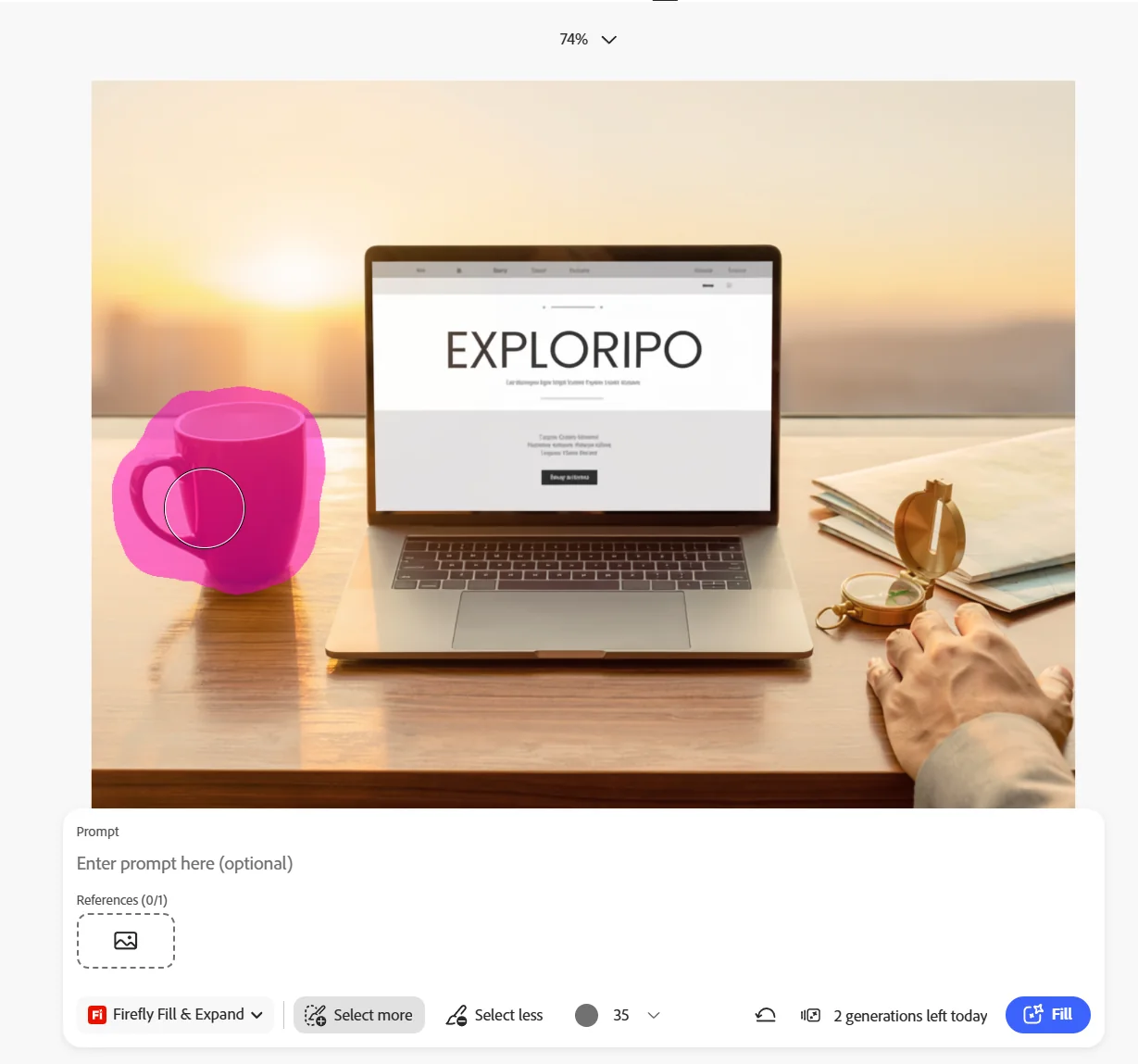
We uploaded the downloaded image into the editor labeled Powered by Photoshop, painted over the red mug and handle with a 35-pixel brush, and asked for a small green cactus in a matte white ceramic pot matching the existing perspective and warm sunrise light. Firefly replaced the mug cleanly. The cactus inherited the scene's color temperature and depth, while the laptop, title, hand, map, and compass remained stable.
The old mug's cast shadow remained on the desk. That is important, but it is not fair to call it a pure model failure: we did not include the shadow in the painted selection. The result demonstrates both Firefly's strength and the skill requirement of selective editing. Users must mask secondary effects — especially shadows, reflections, and contact areas — when replacing an object. We preserved the imperfect result rather than spending another free generation to hide the boundary of the test.
The mug was selected for replacement, but its cast shadow was left outside the mask.The cactus replacement matched the scene well; the old unselected mug shadow remained visible.
5.3 Firefly Video image-to-video
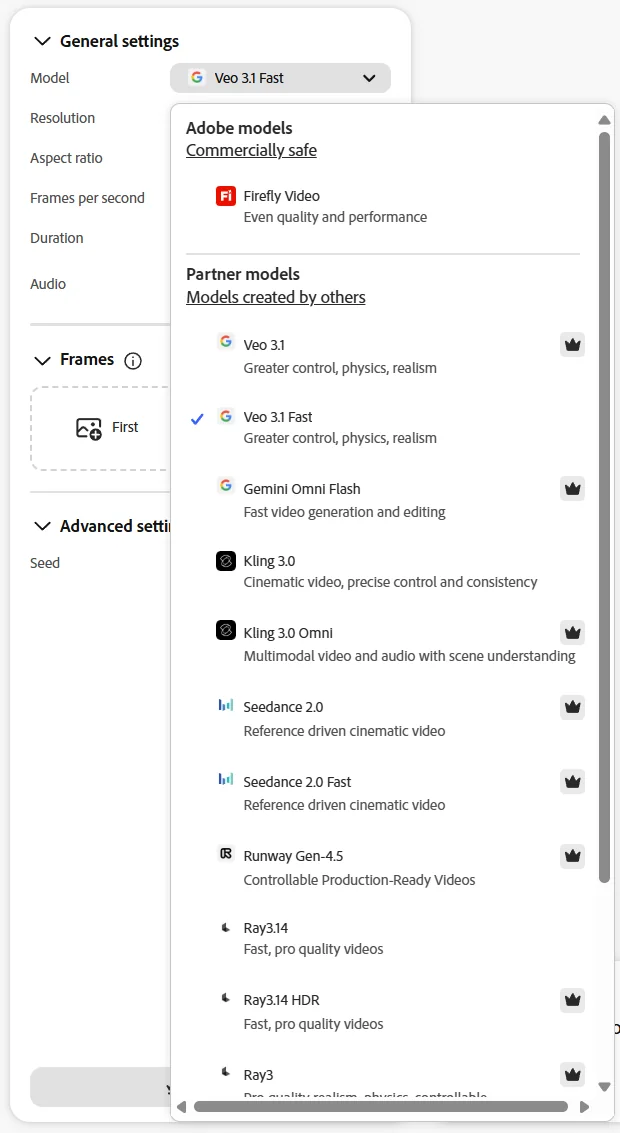
Firefly's video area exposed both Adobe and partner models. The default in our session was Google's Veo 3.1 Fast at 720p, eight seconds, with an audio toggle. We deliberately switched to Adobe Firefly Video so that the scored test evaluated Adobe's own model rather than a partner model. The available configuration changed to 540p, 16:9, 24 fps, and five seconds.
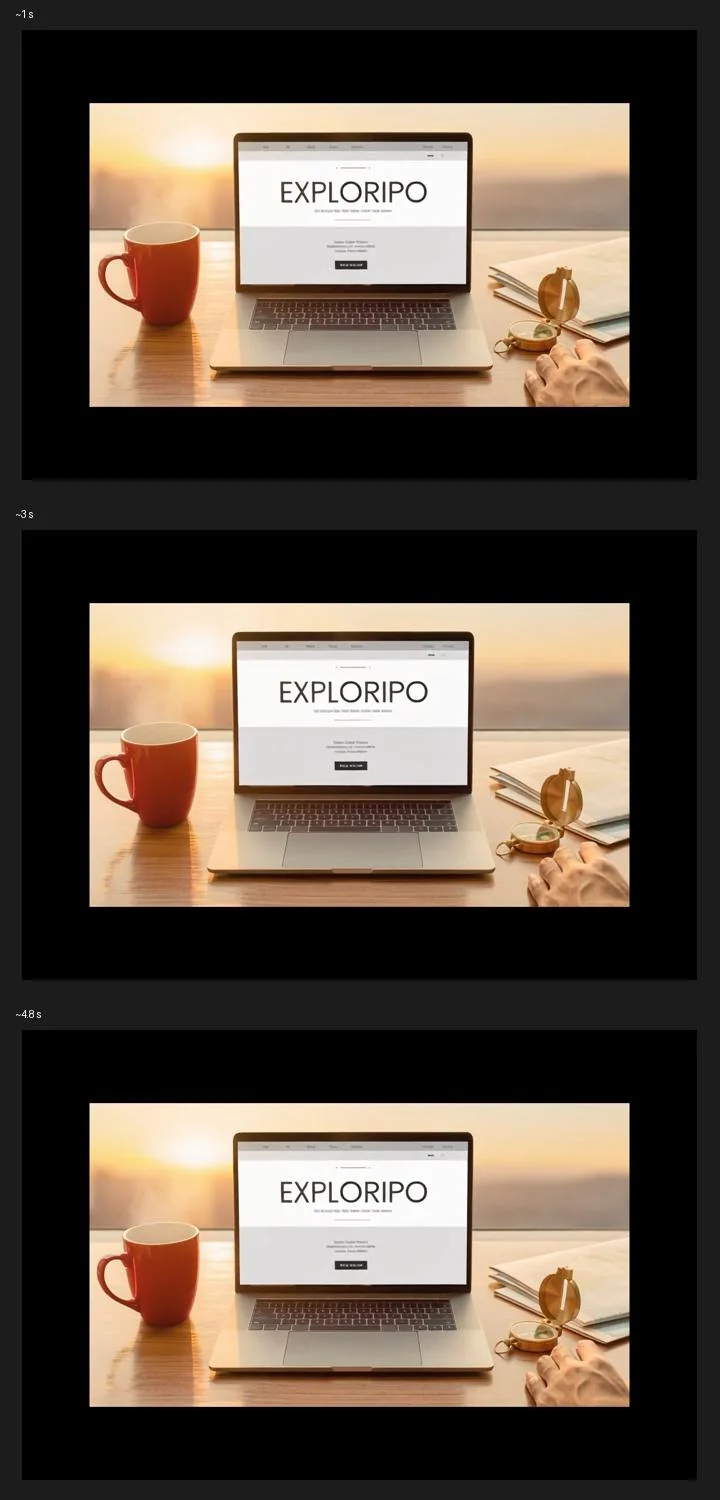
Using the original red-mug image as the first frame, we requested a slow cinematic push-in, gentle steam, subtle morning-light movement, a completely still hand and object layout, and an unchanged sharp EXPLORIPO title. The exported MP4 was exactly five seconds at 960×540 and 24 fps with no audio track. Across extracted keyframes, the scene geometry, laptop, hand, and wordmark remained stable. The push-in was restrained, and we found no obvious camera shake or newly invented objects. This was a successful short motion test, but it does not establish long-form temporal consistency.
Firefly separated Adobe's own video model from premium partner choices in the model selector.Keyframes from our five-second Firefly Video clip show stable composition and readable EXPLORIPO text.
5.4 Generate Sound Effects
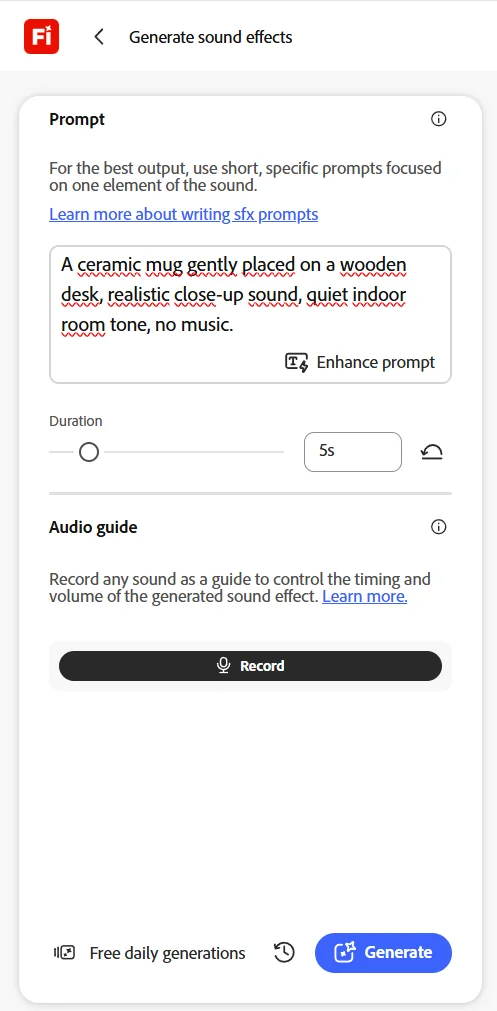
To avoid repeating the voice-heavy benchmark used for ElevenLabs and Murf, we tested Firefly's sound-effect generator. Adobe's interface advised using a short prompt focused on one sound, so we requested a ceramic mug gently placed on a wooden desk, with realistic close-up sound, quiet indoor room tone, and no music. We set the duration to five seconds.
Firefly returned several variations. The fourth was clearly the best to our listener: the ceramic-on-wood impact sounded natural, the room remained quiet, no music appeared, and there were no distracting digital artifacts. The free session allowed the WAV to be downloaded. The file was five seconds, stereo, 48 kHz, 16-bit PCM — practical quality for further editing.
Our controlled five-second sound-effect prompt before generation.
5.5 Adobe models, partner models, and commercial use
Adobe states that its Firefly models are trained on licensed content such as Adobe Stock and public-domain material where copyright has expired, not by broadly mining the open web. Adobe describes these models as designed to be commercially safe and says it does not claim ownership of generated content. Enterprise customers may receive additional intellectual-property indemnification under applicable terms.
That position should not be generalized to every model visible inside Firefly. Adobe also provides access to partner models from companies including Google, OpenAI, Black Forest Labs, Kling, Runway, and others. The interface clearly labeled the two groups, and Adobe says partner-model suitability remains the creator's responsibility. Buyers should therefore check the selected model, plan, and current terms before using an output in a sensitive commercial campaign.
06
Pricing
Free tier; Standard from €11.17/month incl. VAT in the tested Czech region
Free plan available
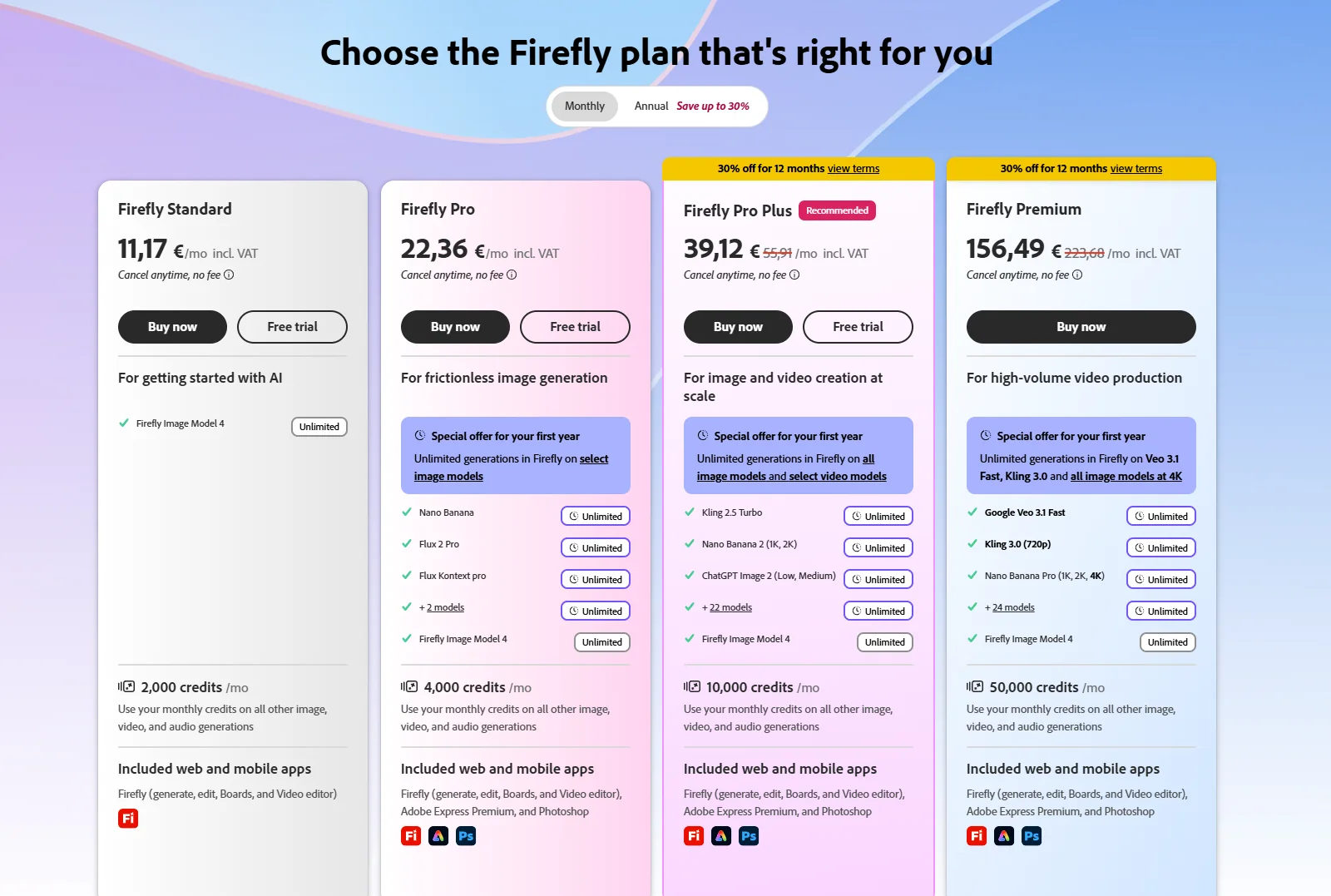
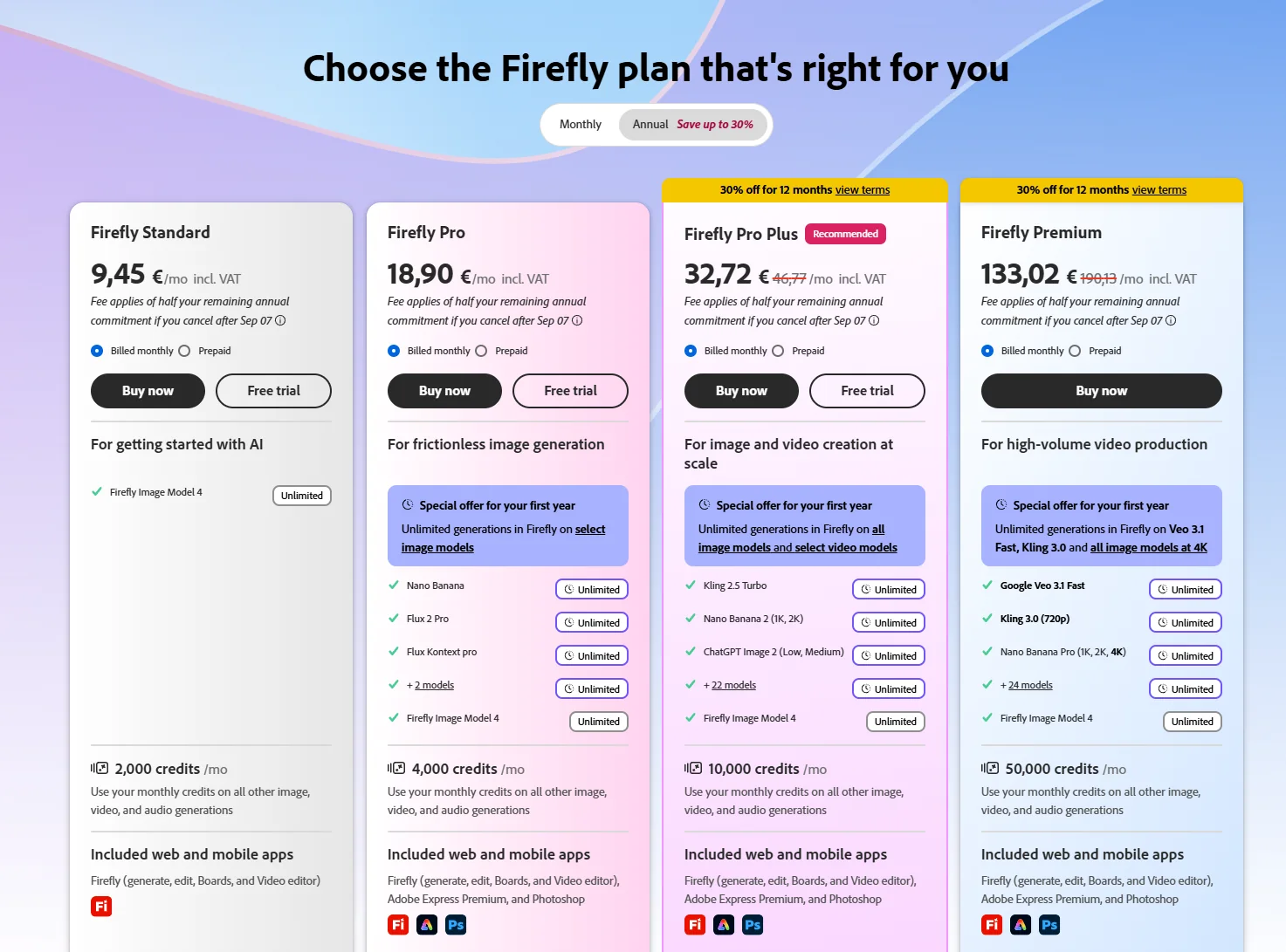
We checked Firefly pricing in an authenticated Czech-region session on 2026-08-24. The displayed prices included VAT. Adobe offered four paid individual plans and a Free tier with limited daily generations. Paid plans included unlimited standard generations and monthly credits for premium features; the exact models eligible for temporary unlimited use varied by plan and promotion.
Plan
Monthly
Annual commitment, billed monthly
Premium credits / month
Free
€0
Limited daily generations
Firefly Standard
€11.17
€9.45
2,000
Firefly Pro
€22.36
€18.90
4,000
Firefly Pro Plus
€39.12 promotional
€32.72 promotional
10,000
Firefly Premium
€156.49 promotional
€133.02 promotional
50,000
Standard was positioned as the entry plan and included the Firefly app. Pro, Pro Plus, and Premium also displayed Adobe Express Premium and Photoshop access. The monthly screen showed a 30% first-year offer on Pro Plus and Premium, while the annual screen showed an annual commitment and an early-cancellation fee warning. Because promotions, VAT, region, model eligibility, and credit consumption can all change, readers should verify the live checkout rather than treating this table as a permanent quote.
Pricing interpretation: The lower annual figures are monthly equivalents tied to an annual commitment; they are not cancel-anytime monthly prices. Standard generations are unlimited on paid Firefly plans, while premium generations use the stated credit pool.
For low-volume experimentation, the Free tier was genuinely useful in our session: we generated and downloaded an image, completed a Generative Fill edit, created a short Firefly Video clip, and downloaded a sound effect. The limits became visible as daily-generation counters and paywalled model badges rather than one simple free-credit number. This makes the free plan practical for evaluation but less predictable for a production calendar.
Monthly Firefly pricing captured in our authenticated session on 2026-08-24; VAT included.
The monthly screen was the cleaner option for users who want to avoid a long commitment. Standard and Pro were shown without promotional strike-through prices, while Pro Plus and Premium carried a 30% first-year banner. The substantial gap between Pro Plus and Premium reflects the jump from 10,000 to 50,000 premium credits and broader unlimited-model access.
Annual-commitment pricing shown as monthly equivalents; the interface warned about an early-cancellation fee.
Free
€0
No paid commitment
Key features
Limited daily generations
Limits
Availability depends on model and generation type
Firefly Standard
€11.17/month
€9.45/month equivalent with annual commitment in the captured Czech view
Key features
2,000 premium credits per month
Unlimited standard image and vector generations
Firefly Pro
€22.36/month
€18.90/month equivalent with annual commitment in the captured Czech view
Key features
4,000 premium credits per month
Unlimited standard image and vector generations
Firefly Pro Plus
€39.12/month promotional
€32.72/month promotional equivalent with annual commitment
Key features
10,000 premium credits per month
Firefly Premium
€156.49/month promotional
€133.02/month promotional equivalent with annual commitment
Key features
50,000 premium credits per month
07
Our Experience
7.1 Onboarding and navigation
An existing Adobe account let us enter without the verification delays seen with Synthesia or Murf. Navigation exposed every tested medium clearly, while model selectors separated Adobe models, partner models, and premium choices.
7.2 Output control and recoverability
The workflow stayed coherent: the downloaded image became an editing source and then a video frame, while the sound effect also downloaded directly. That continuity beats free plans that allow previews but block export.
7.3 Where manual judgment still matters
Manual judgment still matters: small text needs replacement, masks must include shadows, and model eligibility should be checked before generating. Firefly is a production accelerator, not an unattended final-output machine.
What We Did Not Test
Paid subscriptions, billing, cancellation, refunds, credit rollover, purchased credit add-ons, or support resolution.
Firefly Pro, Pro Plus, or Premium throughput; enterprise controls; custom models; API access; team collaboration; or production scaling.
Partner-model output quality, partner terms, 4K workflows, longer video editing, generated speech, translation, soundtrack generation, or avatars.
Midjourney is a common choice for style variety; Ideogram suits text-heavy graphics; and ChatGPT Image supports conversational revision. Runway, Kling, and Veo are video-first alternatives, while Canva is approachable for templated social design. Photoshop plus Firefly remains the natural fit for professional selective editing.
09
How it compares
Photoshop plus Firefly remains the natural fit for professional selective editing. Midjourney and Ideogram are more specialized alternatives for style variety or text-heavy graphics, while Runway, Kling, and Veo are video-first choices.
10
Final Verdict
Final verdict: Adobe Firefly is the most complete low-cost creative workspace we tested in this cycle. Its own image, edit, short-video, and sound tools all produced useful outputs, and free downloads worked for the image and audio assets. It earns 8.5/10.
The score reflects unusually broad hands-on success: convincing image quality, accurate headline text, a stable selective edit, restrained image-to-video motion, natural audio, a clear interface, and useful model labeling.
Limits remain: small text needs correction, selective edits require careful masks, free Adobe-model video was 540p for five seconds, and credits are needlessly complex. Affiliate commission has 0% influence on this rating.