No spam. Just software we’ve actually tested, plus useful reviews, comparisons and recommendations. We’ll send a confirmation email (double opt-in). You can unsubscribe anytime.
Everyday Productivity
1Password
We tested it
By Exploripo Editorial Team
1Password earns 8.8/10 for a refined vault workflow, responsive Watchtower feedback, and sharing controls that worked exactly as configured. The subscription and recovery discipline remain real trade-offs.
Exploripo rating8.8/10Excellent
Starting price14-day trial; Individual from $2.99/month equivalent for the first year
1Password is a polished cross-platform password manager whose strongest combination is secure vault organization, credential-health monitoring, and flexible item sharing.
Bottom line
1Password earns 8.8/10 for a refined vault workflow, responsive Watchtower feedback, and sharing controls that worked exactly as configured. The subscription and recovery discipline remain real trade-offs.
02
At a glance
Pros & Cons
+Pros
Clear vault workflow with useful item types, tags, editing, archive, and search-oriented organization
Watchtower produced an item-specific response to our weak synthetic credential and recalculated after cleanup
Strong published security model using end-to-end encryption, an account password, and a unique Secret Key
Broad support across Windows, macOS, Linux, mobile devices, and major browsers
−Cons
No permanent free personal tier
Introductory annual pricing requires careful reading of the ongoing renewal rate
The Secret Key and recovery-material model gives individual users more to protect
External feedback mentions autofill, extension, and repeated-unlock friction that we did not test
Analytics sharing appeared enabled on first entry, but our evidence did not show the final saved toggle state
03
Audience fit
Who it’s for / Who it’s not for
✓Who it’s for
People using several operating systems or browsers who want one consistent password-management layer.
Users sharing credentials or sensitive notes with a partner, contractor, or family member through controlled links.
Families that need five members, shared vaults, and organizer controls in the base plan.
Security-conscious users who want understandable credential-health feedback and reversible cleanup.
×Who it’s not for
Buyers whose priority is a permanent free plan or an open-source-first product.
Users satisfied with a built-in manager inside one platform ecosystem.
Anyone unwilling to store the Emergency Kit, Secret Key, and recovery material carefully.
04
Overview
1Password stores logins, passwords, passkeys, secure notes, identities, cards, documents, and other sensitive records in encrypted vaults. Official documentation says vault data is encrypted on the user’s device and that the account password and unique 128-bit-entropy Secret Key are combined to derive encryption material. Those are vendor-backed security facts, not claims we independently cryptographically audited. The company is based in Canada; customers who intentionally create an account on 1Password.eu use its European data region, but that should not be read as a claim that every 1Password account is hosted in the EU.
Our Individual trial opened without payment details and presented a Personal vault with onboarding routes for importing passwords and installing apps. The item menu immediately exposed Login, Secure Note, Credit Card, Identity, Password, and Document types, plus a migration path. The core interface was understandable without a tutorial: items sit in vaults, tags and favorites provide organization, and Watchtower surfaces security issues.
Independent feedback is broadly positive but not uniform. G2 showed 4.6/5 from 1,780 reviews, while Trustpilot showed 4.2/5 from 12,461 reviews when checked. Trustpilot also indicated that the company had no recent history of asking for reviews, so its sample should not be treated as representative of all customers. Repeated praise centers on usability, cross-device access, and confidence in the security model. Repeated complaints center on price, autofill reliability, extension behavior, and login friction. Support reports are mixed enough that we would not describe service quality as universally excellent or poor.
1Password also publishes security assessments, ISO certifications, SOC 2 Type 2 status, and a public bug bounty. Its 2023 Okta incident report said an employee-facing support-system incident did not expose customer vault data. Separate clickjacking research maintained a status table updated January 14, 2026 that listed 1Password browser extension version 8.11.27.2 as affected by two demonstrated methods. That entry predates our test; we did not reproduce it, and it does not establish a vulnerability in the current build.
05
Features
Vaults and item management
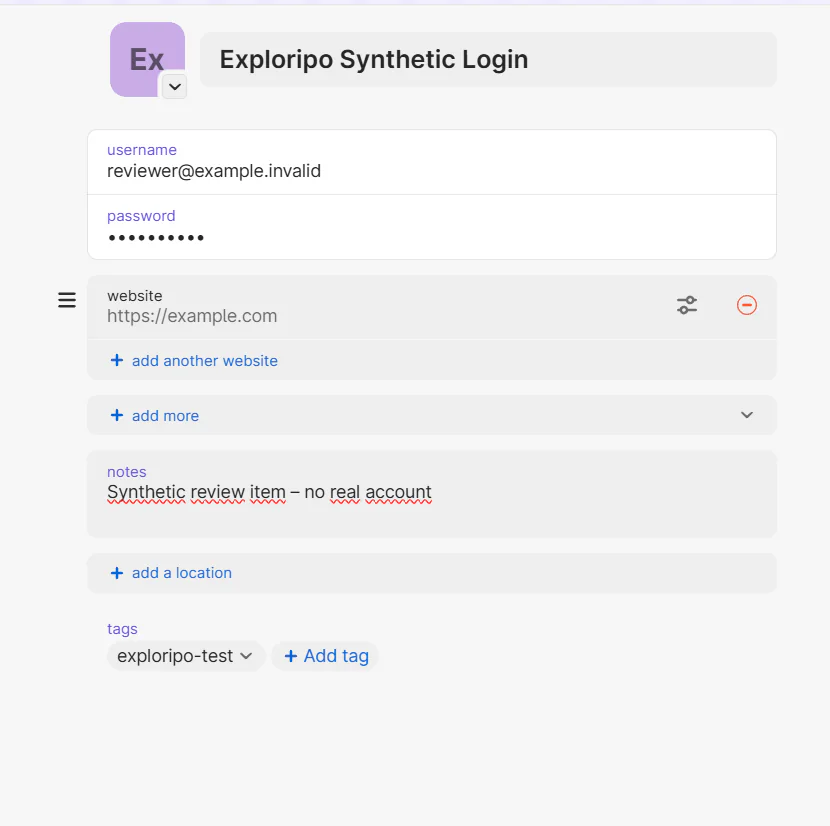
The tested Login editor supported a title, username, password, websites, notes, tags, location, and additional fields. We created a synthetic Login, saved it to the Personal vault, reopened it, confirmed that its website and tag persisted, and corrected its notes. The password remained masked in the safe evidence views. Archive and Delete were separate actions, making reversible cleanup easy.
A synthetic Login reopened in the Personal vault with its website, revised note, tag, and masked password preserved.
1Password officially supports password generation, browser save and fill, passkeys, one-time-password codes, desktop Quick Access, and mobile apps. We did not test the browser extension, autofill, passkeys, TOTP filling, Quick Access, or cross-device synchronization, so those capabilities remain verified product features rather than Exploripo hands-on findings.
Watchtower
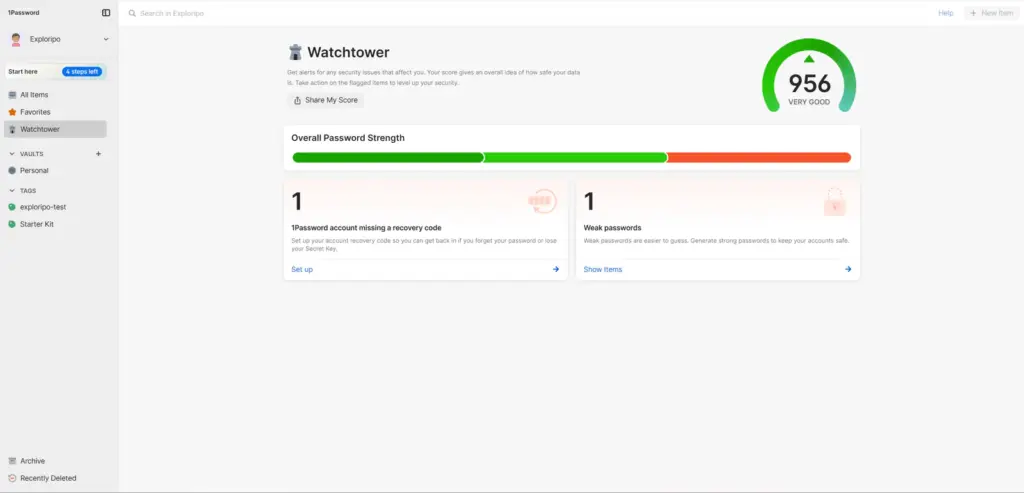
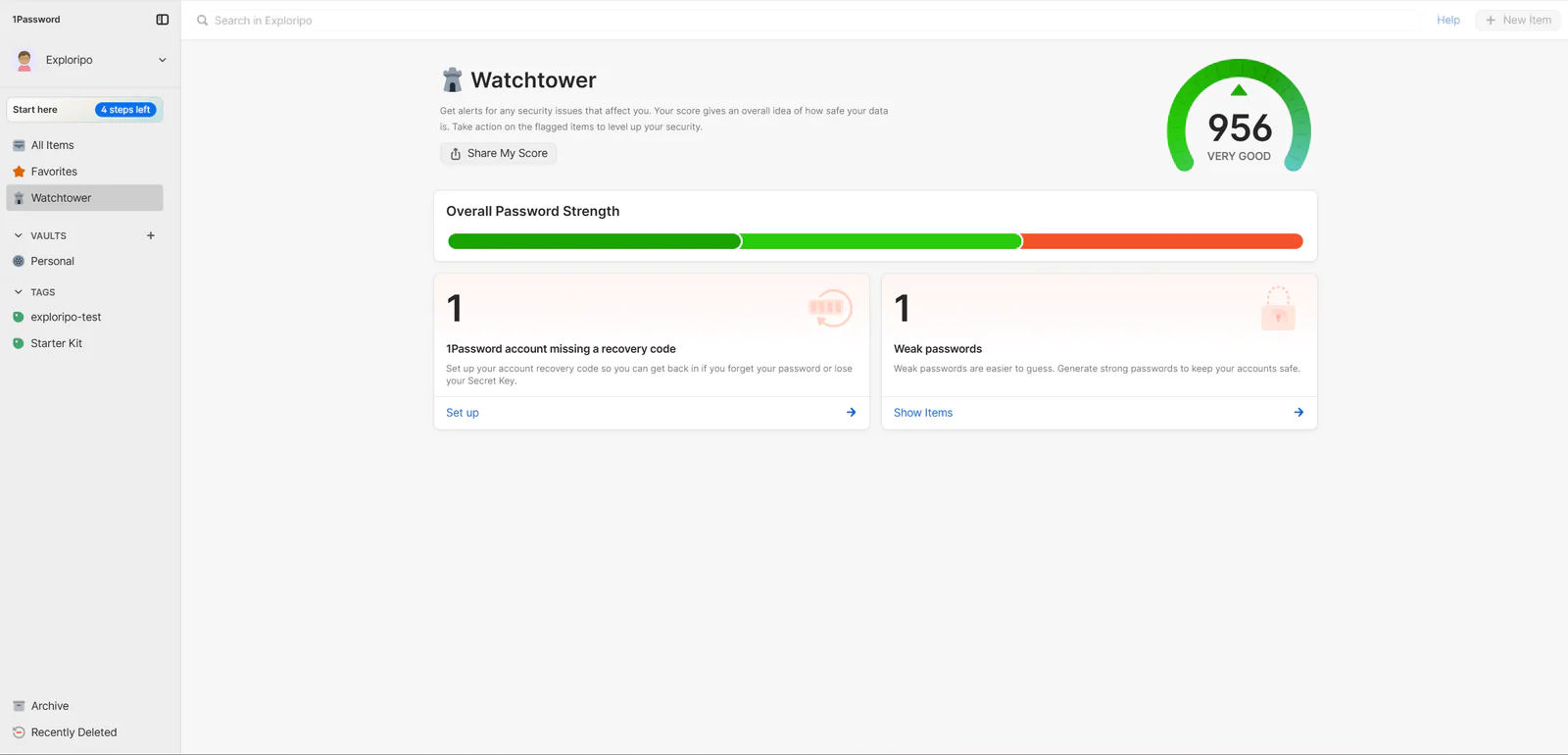
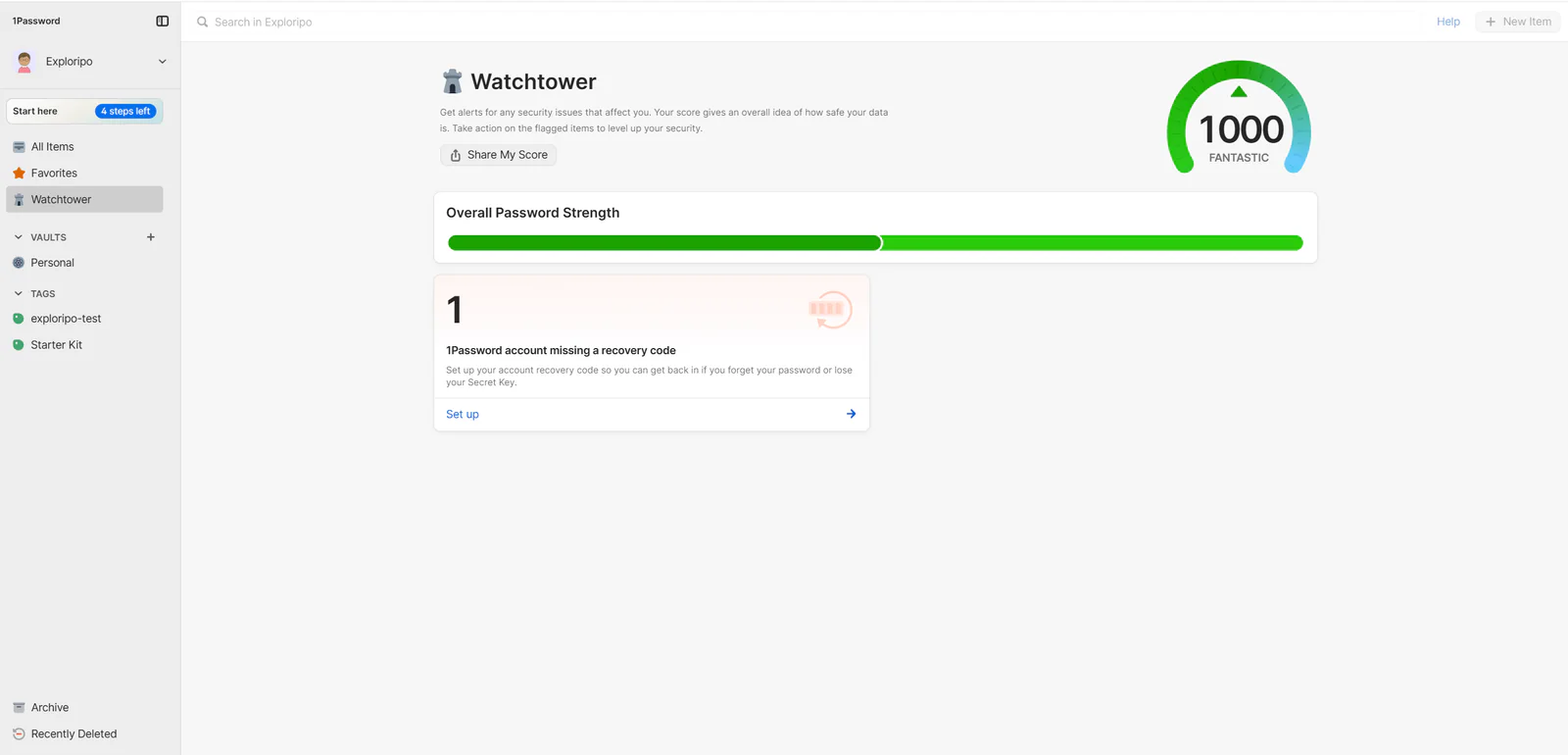
Watchtower was the clearest hands-on security feature. Our clean synthetic vault showed 1000 and “Fantastic,” alongside a separate reminder that the 1Password account lacked a recovery code. After we created one deliberately weak synthetic Login, the score fell to 956, the strength bar gained a red segment, and a Weak passwords card appeared with a count of one. Opening it led to the exact synthetic item and a “Terrible” strength label. Archiving that item removed the weak-password alert and restored the score to 1000.
Watchtower lowered the score to 956 and surfaced one weak-password warning after the synthetic test item was created.Archiving the weak test item removed the active warning and restored the Watchtower score to 1000.
That is a convincing feedback loop, but it is not a guarantee that Watchtower will detect every real-world risk. We did not test breach alerts, reused-password detection, passkey availability, expiring items, or missing two-factor authentication across production accounts.
Secure sharing
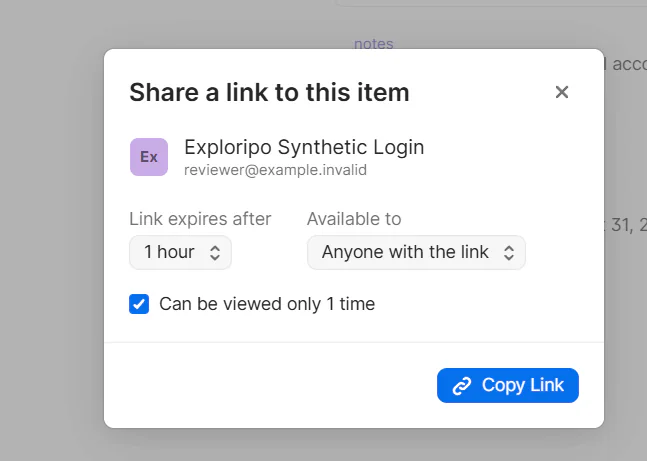
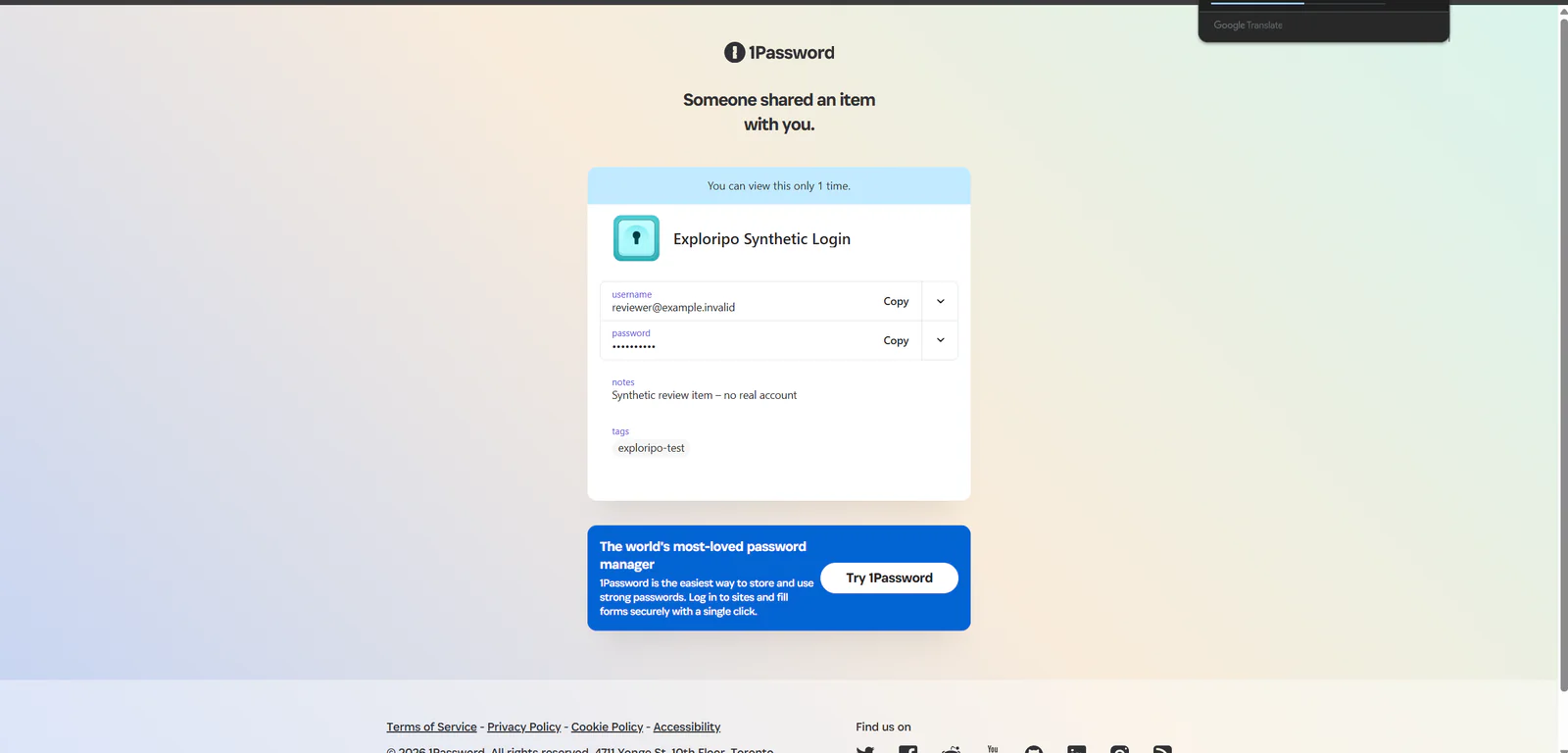
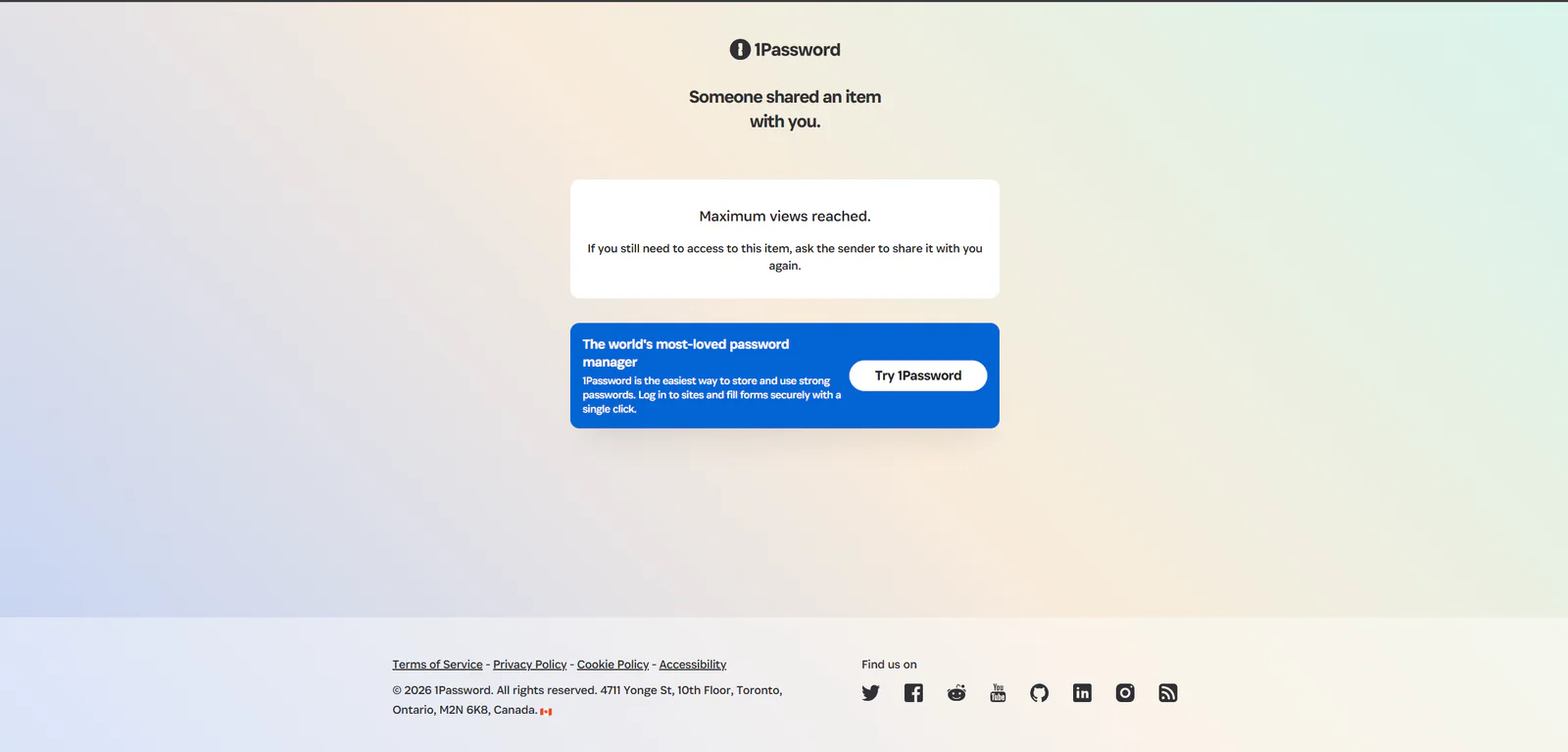
Item sharing is a standout. Our dialog offered expiries of one hour, one day, seven days, 14 days, and 30 days. Access could be open to anyone with the link or limited to specified email recipients; the restricted mode required recipient email verification. We configured a one-hour link that could be viewed once, opened it in a signed-out private session, and saw the synthetic item with its password still masked. A second fresh private-session attempt was blocked with “Maximum views reached.”
The tested link was configured to expire after one hour and permit only one view.The signed-out recipient page disclosed the one-view limit and displayed the synthetic item with the password masked.A second fresh private-session attempt was blocked with “Maximum views reached.”
The sender-side history recorded whether a link had been viewed and whether it had expired. Deleting an unused link changed it to Expired and removed its active controls. Updating an original item does not update a previously shared copy, according to 1Password, so users should create a new link when the shared data changes. Official documentation says trial users can share items except files; we verified link sharing but did not test file sharing.
Travel, recovery, and portability
Travel Mode, imports, exports, recovery codes, and the Emergency Kit are decision-relevant features, but we did not exercise them. Travel Mode can remove vaults not marked safe for travel from synced apps. Exported CSV and 1PUX files are plaintext artifacts and require careful handling. Official guidance currently limits passkey export to the iOS and Android apps. Family organizers can help recover family members, while individual users must protect their own recovery materials. Those materials are highly sensitive; we deliberately avoided generating or capturing them for this review.
06
Pricing
14-day trial; Individual from $2.99/month equivalent for the first year
Free trial available
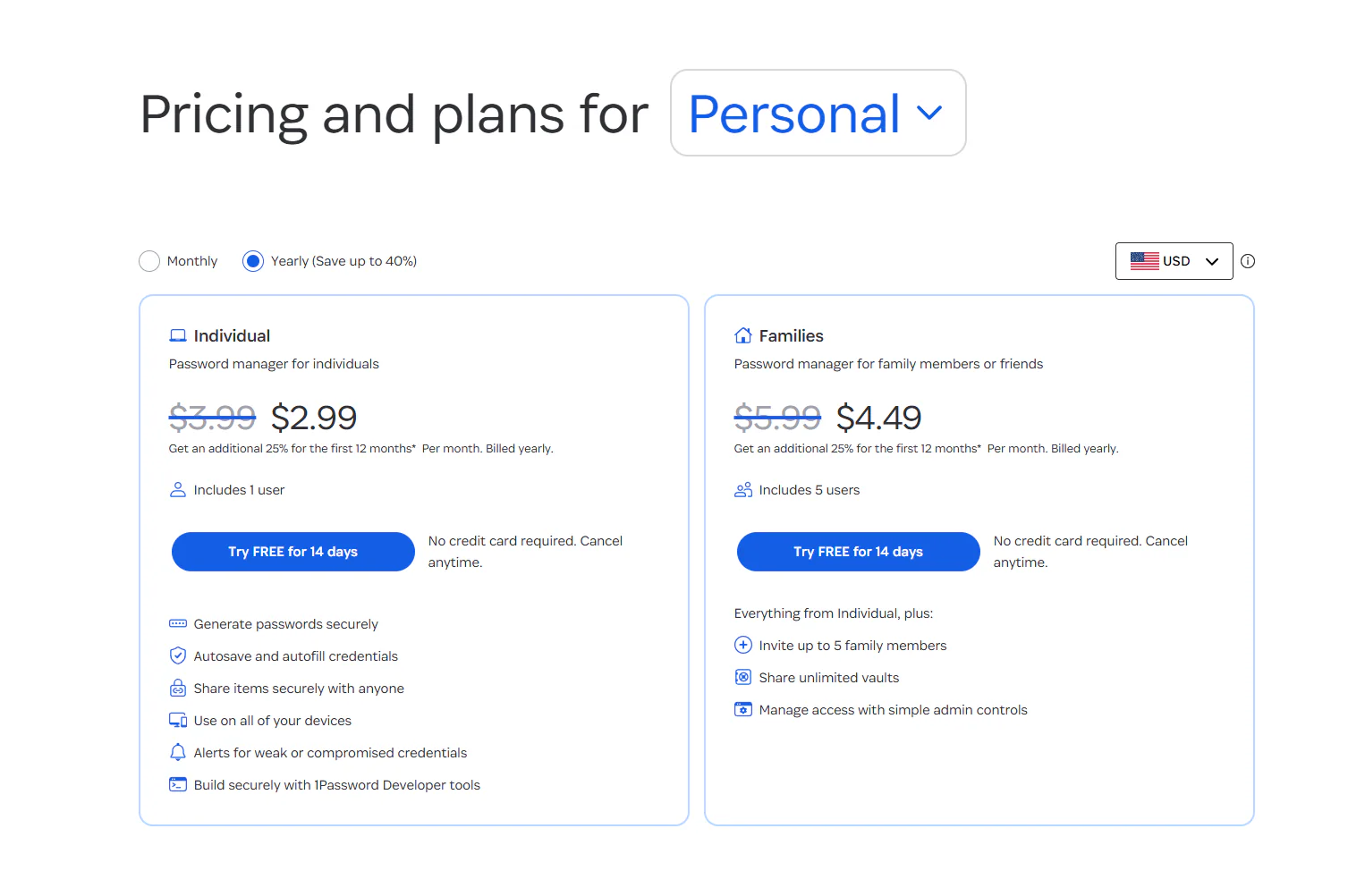
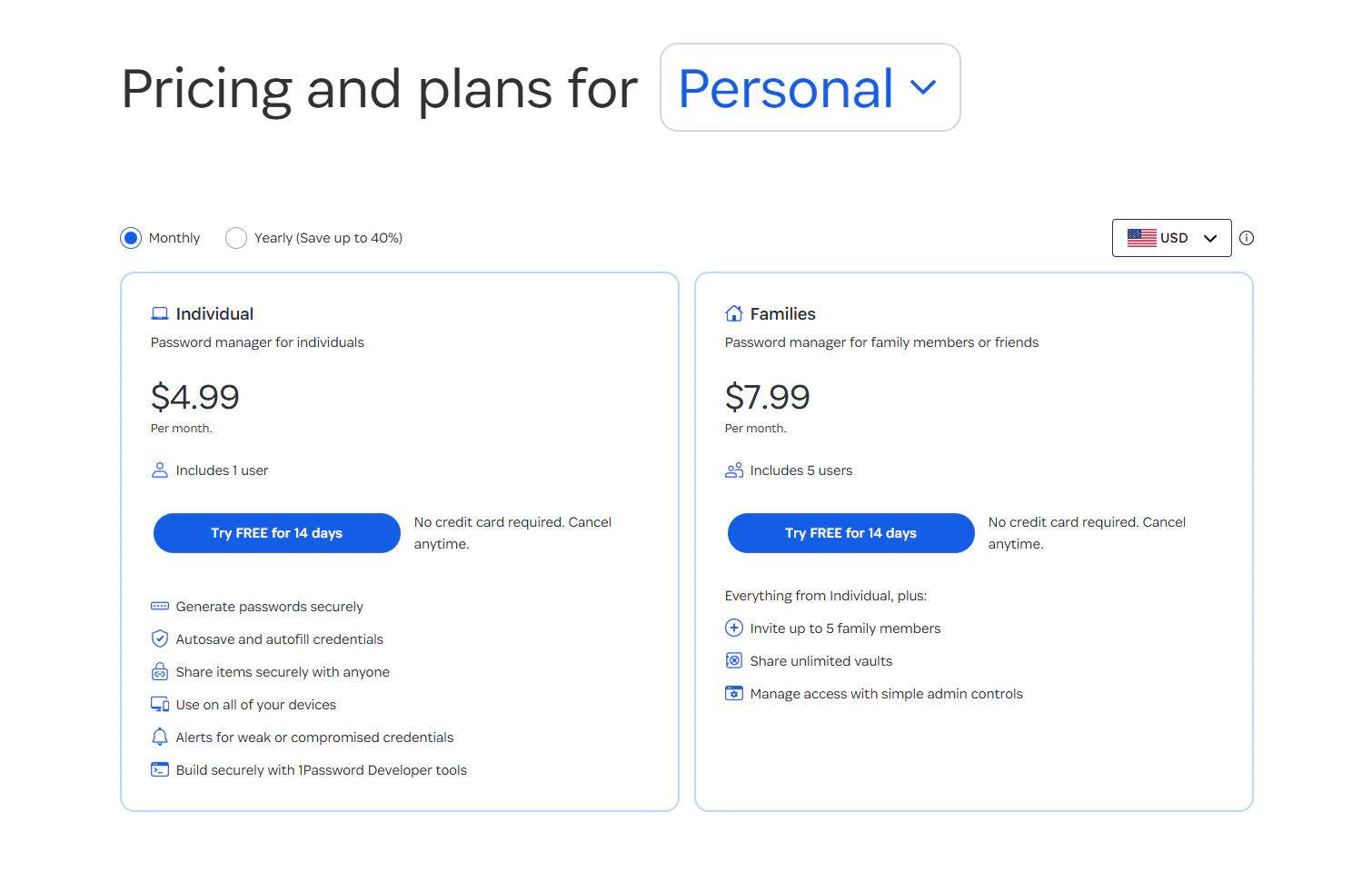
Prices below are the live US-dollar figures we captured on August 31, 2026. Taxes, currency, and promotions can vary by region.
Annual personal pricing captured on August 31, 2026; the displayed discounts applied to the first 12 months.Monthly personal pricing captured on August 31, 2026: $4.99 Individual and $7.99 Families.
Plan
Monthly billing
Annual billing shown
Included users
Individual
$4.99/month
$2.99/month equivalent for the first 12 months; $3.99 regular reference price
1
Families
$7.99/month
$4.49/month equivalent for the first 12 months; $5.99 regular reference price
5
Both personal plans offered a 14-day trial with no credit card required, and our trial registration completed without payment details. The annual promotional figures must not be treated as permanent renewal prices. Paid memberships auto-renew unless canceled. After cancellation, an account normally remains active until the end of the paid period and then becomes frozen; users can still view and export data, but normal saving and sharing are restricted. Official policy also says unused paid time is generally not refunded. There is no permanent personal free plan.
Current organizational pricing materially changed from the captured review text. On September 12, 2026, the official page showed Teams Starter Pack at $24.95 per month billed annually, including 10 members, with up to 10 additional members at $4.99 per seat per month billed annually. Business remained $8.99 per user per month billed annually, and the page offered a 14-day trial. We did not test organizational checkout, billing, administration, renewal, cancellation, refunds, taxes, or paid feature gates.
Recommended
Individual
$4.99/month
$2.99/month equivalent for first 12 months annually; $3.99 regular reference
Key features
One user
14-day no-card trial
Families
$7.99/month
$4.49/month equivalent for first 12 months annually; $5.99 regular reference
Key features
Five family members
Shared vaults and organizer controls
Teams Starter Pack
$24.95/month
Billed annually
Key features
Includes 10 members
Limits
Up to 10 more members at $4.99 per seat per month annually
Business
$8.99/user/month
Billed annually
Key features
14-day trial on the current official page
Enterprise
Custom pricing
Contact 1Password
Key features
Quote-only organizational plan
07
Our Experience
Workflow 1: Create, organize, and edit a Login
Registration led directly to a usable 14-day Individual trial. Creating a Login was quick, and the editor exposed the fields most users expect without feeling overloaded. The saved item retained its synthetic website, username, notes, and exploripo-test tag when reopened. The tag also appeared in sidebar navigation. This was a clean result, although we did not validate real-site autosave or autofill.
Workflow 2: Trigger and clear a Watchtower warning
We deliberately created a second synthetic Login with a weak password. Watchtower reacted immediately and made the problem easy to trace from the dashboard to the exact item. The score movement from 1000 to 956 made the state change visible, while the item view explained why the password was risky. Choosing Archive rather than Ignore or Delete removed the active finding, restored the score to 1000, and preserved the item in the Archive. This was the strongest evidence that the product’s monitoring and organization layers work together coherently.
Workflow 3: Share once, verify access, and invalidate the remainder
The sharing flow was equally strong. We inspected the available expiry and audience controls, created a one-hour one-view link, and opened it without a 1Password account. The recipient page clearly disclosed that it could be viewed once, showed only our synthetic data, and kept the password masked until a recipient chose an explicit action. Reopening the same link in a fresh private session failed as intended. Sharing History then showed the used link as viewed once and expired. We also invalidated a separate unused link, leaving no active link behind.
Friction and testing limits
The first entry into the vault displayed an analytics participation prompt with Share analytics visibly enabled. The dialog said encrypted vault data would not be collected or sold and that the setting could be changed later; those statements are vendor claims, and our screenshot did not reveal the final saved toggle state.
Our test used one account, one local environment, and synthetic data. We did not test browser-extension autofill, desktop Quick Access, mobile apps, multi-device sync, passkeys, TOTP, Travel Mode, import/export, files, family recovery, team administration, billing cancellation, or production-scale use. Restricted-recipient sharing was inspected but not completed because no separate verified test inbox was in scope.
08
Alternatives
Bitwarden
Bitwarden is the strongest value alternative. Its permanent free tier supports unlimited devices and passwords, and Premium was $19.80 per year when checked. It also appeals to buyers who prefer an open-source-focused product. Choose it when price and transparency matter more than 1Password’s interface polish and sharing experience.
Proton Pass
Proton Pass is the best privacy-ecosystem alternative. Its free plan includes unlimited logins and devices, passkeys, ten hide-my-email aliases, and weak or reused-password alerts. Paid tiers add features such as integrated TOTP, sharing, dark-web monitoring, attachments, and emergency access. It is attractive for existing Proton users or anyone who wants a capable free starting point.
Dashlane
Dashlane is the closest premium security-bundle alternative. It has no permanent free plan, but it offers a 14-day Premium trial and combines password management with scam and phishing protection, dark-web monitoring, secure sharing, and a VPN for the plan manager. Choose it when the broader security bundle matters more than 1Password’s Secret Key model and vault-sharing approach.
09
How it compares
Product
Permanent free plan
Distinctive strength
Best fit
1Password
No
Polished cross-platform vaults, Watchtower, and controlled sharing
Users willing to pay for refinement and flexible sharing
Bitwarden
Yes
Low-cost, open-source-focused password management
Budget and transparency-focused users
Proton Pass
Yes
Strong free tier and Proton privacy ecosystem
Privacy-bundle users and free-plan seekers
Dashlane
No
Password manager plus phishing, dark-web, VPN, and scam-protection tools
Buyers wanting a wider premium security bundle
1Password does not win on price, and it cannot match the zero-cost entry point of Bitwarden or Proton Pass. It wins on the quality of the tested experience: the vault workflow was clear, Watchtower’s response was immediate and specific, and sharing controls held up from configuration through recipient access and sender cleanup. Compared with Dashlane, 1Password feels more focused on credential management and structured sharing than on bundling adjacent consumer-security services.
Apple Passwords and other built-in managers remain sensible for users committed to one ecosystem, but they are not like-for-like substitutes for 1Password’s cross-platform vault model, Travel Mode, and sharing controls.
10
Final Verdict
Exploripo rating: 8.8/10
1Password earns a strong recommendation for individuals and families who want a refined password manager, take credential health seriously, and expect to share sensitive records safely. Our test produced three especially convincing results: reliable item persistence, a responsive Watchtower loop, and one-view sharing that was genuinely enforced rather than merely advertised.
The subscription is harder to justify for buyers who only need basic storage and autofill, particularly when Bitwarden and Proton Pass offer permanent free tiers. The recovery model also requires disciplined handling of the Secret Key and recovery materials. Still, for users prepared to pay and set up that safety net properly, 1Password combines security, usability, and sharing better than most competitors.
Testing disclosure
Exploripo tested the 1Password Individual 14-day trial on August 31, 2026 using synthetic records only. Affiliate commission has no influence on the rating or verdict.